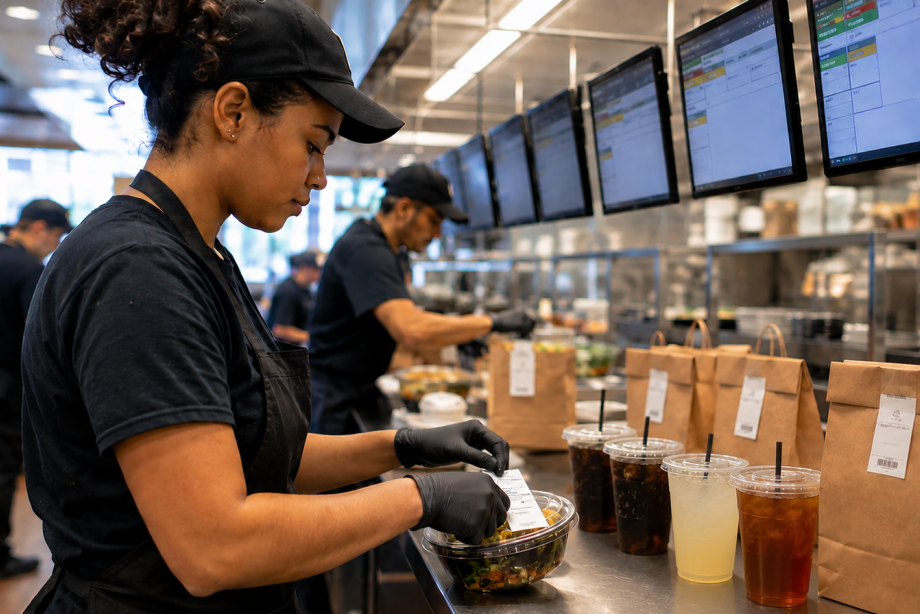
A kitchen display system (KDS) helps restaurants manage orders digitally by sending information from the point of sale (POS) system directly to food preparation stations. This gives kitchen teams real-time visibility into incoming orders, modifiers, and fulfillment priorities for dine-in, drive-thru, pickup, and delivery channels.
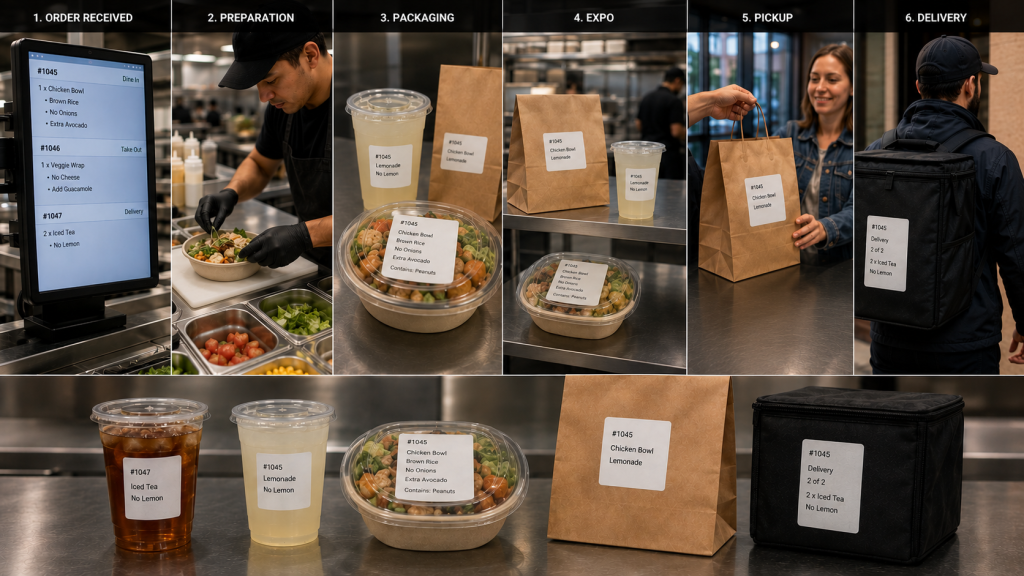
However, once food preparation begins, orders move through physical workflows. Items are prepared, packaged, staged, picked up, and delivered. Restaurant labels for KDS workflows help carry order information beyond the screen, ensuring important details remain attached to the order throughout preparation, packaging, pickup, and delivery.
From beverage labels and allergy alerts to catering labels and tamper-evident seals, the right labels help restaurants extend KDS communication throughout the operation.
Table of Contents
What Are Restaurant Labels for KDS Workflows?
A kitchen display system (KDS) manages order information digitally, but restaurant operations still depend on physical workflows. Orders move through multiple stages before reaching the customer, including:
- Food preparation
- Beverage preparation
- Packaging
- Expo
- Pickup
- Delivery
Restaurant labels for KDS workflows help carry order information beyond the screen and keep it attached to the order as it moves through these stages.
As orders move between stations, labels can communicate customer names, modifiers, allergy information, beverage customizations, pickup instructions, delivery details, and other important information. Keeping these details visible throughout preparation and fulfillment reduces reliance on verbal communication and helps teams coordinate complex dine-in, drive-thru, pickup, and delivery operations.
Types of Restaurant Labels for KDS Workflows
A KDS communicates order information digitally, but labels help carry that information through food preparation, packaging, pickup, and delivery. Different types of restaurant labels support different stages of the workflow, helping employees identify orders, manage modifications, communicate food safety information, and direct completed orders to the correct destination.
1. Drive-Thru and Takeout Labels
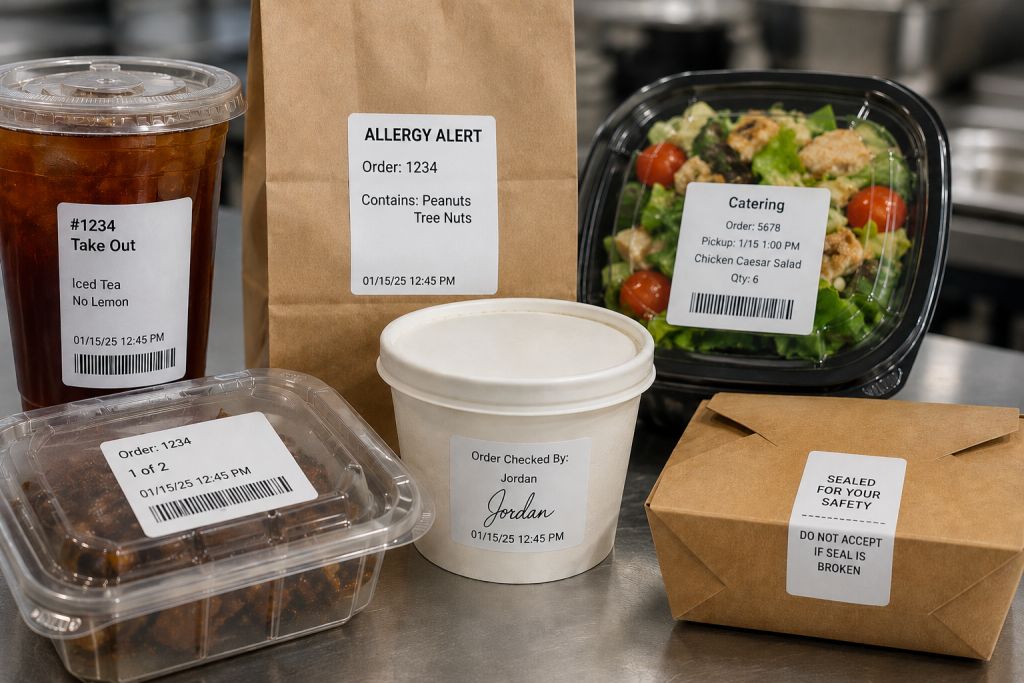
An integrated system can generate labels along with sending orders to the KDS from the drive-thru, online ordering platform, or self-ordering kiosk. Labels can be applied to trays, containers, cups, or bags so order information remains attached to the order throughout preparation and fulfillment. Labels also ensure the team directs the order to the right place, whether the front counter, the drive-thru, or order pickup.
2. Allergy and Exception Order Labels
Allergies and food sensitivities have become more common, requiring special order preparation so diners can safely enjoy their meals. Furthermore, many customers have strong food preferences and request items prepared in specific ways.
Allergy and exception order labels help ensure modifications remain visible as the order moves between preparation, packaging, and pickup stations. Exception order labels clearly inform food prep of changes to the way they typically prepare menu items. They also flag orders for the expeditor, server, or take-out counter worker that the kitchen prepared the order as the customer requested.
3. Made-to-Order Food Labels
Although a KDS has become a standard tool in quick service restaurants (QSRs), this technology offers benefits to the whole range of food service environments. When a store or café sells made-to-order (MTO) items, labels include vital information that helps customers make informed decisions and to keep the business in compliance.
MTO food labels can include product name, description, ingredients, nutrition information, and allergen or dietary restriction alerts. Businesses can also customize MTO food labels with branding elements such as their name and logo.
4. Beverage and Barista Labels
Customers have strong opinions about how they want their coffee, espresso, or tea orders, requesting various types of milk, creamer, sweetener, flavors, and other options. Beverage orders often include customizations such as milk selections, flavors, sweeteners, and preparation instructions.
Labels help baristas identify these details quickly and keep drinks matched to the correct customer throughout preparation and pickup. Labels with each detail of the order simplify order prep, and repositionable labels can follow orders from the POS system, to order prep, and then to the customer’s cup.
5. Product ID and Barcode Labels
Tracking prepared items or MTO foods can help shops manage their inventory, reduce shrinkage, and minimize waste. Barcoded labels generated during KDS workflows allow employees with scanners to capture data as items are placed into coolers or display cases, including their sell-by dates. Clear, reliable barcode labels also give shops a way to track ingredients’ sources in case of a recall and for fast price scanning at the checkout.
6. Catering Labels
If a restaurant or store offers catering, labels printed during KDS workflows can flag orders for the items they need for completeness, such as condiments, trays, or utensils. Labels can also include food safety instructions, nutrition information, allergen warnings, and serving instructions.
7. Nutrition and Calorie Labels
The FDA requires food service companies to provide nutrition facts to consumers. Although not every dine-in or take-out order has a nutrition label, restaurants must provide calorie counts and ingredient information on request. Restaurants can simplify this process with templated labels that employees print during packaging or order assembly.
8. Order Verification and QC Labels
Once an order is packaged, an expeditor or other restaurant employee cannot easily verify that every item is present by looking at the sealed bag alone. Some restaurants add a POS scale to the workflow to help verify order completeness before pickup or delivery.
A typical order verification workflow may include:
- Package the order
- Weigh the completed bag
- Compare the weight to the expected total shown on the order label
- Investigate any significant discrepancies
- Release the order for pickup or delivery
If the actual weight differs from the expected weight, employees can review the order and correct missing or incorrect items before the customer receives it. Combined with restaurant labels for KDS workflows, weight-based verification provides another checkpoint to help restaurants catch errors before orders leave the store.
9. Tamper-Evident Labels
When the kitchen team closes a package, they can add a tamper-evident label as the final step. Tamper-evident labels help indicate whether a bag or container has been opened after packaging. They are commonly used for delivery and pickup orders where food safety and package integrity are important.
How to Choose the Right Type of Restaurant Label for KDS Workflow Stages
The right restaurant label depends on both the media type and adhesive required for the workflow. Some KDS applications benefit from linerless labels for fast application, while others require die-cut labels, repositionable adhesives, or permanent tamper-evident labeling.
Linerless Labels
- No liner backing
- Fast application
- Reduced waste
- Great for:
- beverage labels
- takeout labels
- pickup labels
- food container labels
Die-Cut Labels
- Individual label shapes/sizes
- Consistent placement
- Useful for:
- nutrition labels
- product identification
- barcode labels
- made-to-order food labels
Repositionable Linerless Labels
- Diamond adhesive (light tack) or full coverage (stronger)
- Can be removed and reapplied without residue
- Useful for:
- beverage workflows
- food prep trays
- staging areas
- internal order tracking
Permanent Linerless and Tamper-Evident Labels
- Remain attached
- Show evidence of removal
- Useful for:
- delivery bag seals
- packaged foods
- barcode labels
- food safety workflows
Features to Look for in Restaurant Label Printers for KDS Workflows
Choosing the right restaurant label printer is just as important as selecting the right label media. KDS workflows often support food preparation, beverage stations, packaging, pickup, and delivery operations, so label printers should be able to support a variety of applications and deployment environments.
Multimedia Printing
Printers that support multiple media types, including linerless labels, die-cut labels, and receipts, allow restaurants to standardize hardware across stations. A multifunction printer can support different workflows without requiring separate printer models for each application.
Linerless Label Support
Linerless labels help reduce liner waste and counter clutter while supporting high-volume labeling workflows. Restaurants planning to use linerless labels should choose a printer designed specifically for linerless media.
Cloud Printing Capabilities
Cloud-connected printers can receive print jobs directly from KDS software, online ordering platforms, and cloud-based applications without relying on local print servers.
Support for Multiple Adhesive Types
Different workflows require different label adhesives. Restaurants may use repositionable labels for beverage preparation and internal workflows, while delivery and packaging applications may require permanent or tamper-evident labels.
Fast Print Speeds
High-volume kitchens depend on labels being available when needed. Fast print speeds help prevent delays during peak ordering periods and support continuous order flow.
KDS and POS Compatibility
Restaurant label printers should work with KDS software, POS systems, cloud platforms, and the operating systems used throughout the business. Compatibility can simplify deployment, support, and long-term maintenance.
User-Friendly Maintenance
Restaurant environments are busy, and printer maintenance is often handled by store-level employees. Features such as tool-free maintenance, easy media loading, user-replaceable components, and guided cleaning procedures can help reduce downtime and keep printers operating reliably.
Star Micronics Label Printers for KDS Workflows
Restaurants use a variety of labels throughout KDS workflows, including beverage labels, allergy labels, barcode labels, catering labels, order verification labels, and tamper-evident labels. Supporting these applications requires printers that match the media, adhesive, and workflow requirements of the operation.
Star Micronics offers several printer options for restaurant labels used with KDS systems, including:
mC-Label3 Multifunction Printer
The mC-Label3 supports receipts, die-cut labels, repositionable linerless labels, and permanent linerless labels from a single printer platform. This makes it a good choice for restaurants looking to standardize printing across multiple stations.

The Star Micronics mC-Label3 is a versatile multifunction printer that prints a wide range of labels and receipts, including both permanent and repositionable sticky linerless. It features cloud connectivity and innovative technologies like SteadyLAN and TetherLAN for enhanced printing convenience.
mC-Label2 Multifunction Printer
The mC-Label2 provides support for a wide range of label and receipt media in a compact design, making it suitable for food preparation, packaging, pickup, and other labeling applications.
The mC-Label2 packs powerful features into a compact, front-loading design, including 300 dpi resolution, support for linerless, die-cut, receipt, and continuous media, and connectivity options like USB-C, LAN, WLAN, Bluetooth, and Apple MFi-certified pairing (X4 models only).

TSP143IV SK Sticky Linerless Label Printer
The TSP143IV SK is designed specifically for sticky linerless label printing and is commonly used for beverage labeling, food container labeling, pickup workflows, and other applications where repositionable labels are beneficial.
The TSP143IV SK by Star Micronics sets a new standard for compact, eco-friendly thermal linerless label printing, offering advanced connectivity options like Wi-Fi and AOA, and efficient, residue-free labels for diverse business needs.

Whether a restaurant is deploying a new KDS or expanding existing workflows, selecting the right label printer helps ensure order information remains visible from preparation through pickup or delivery.
The Missing Link in KDS-Driven Restaurant Workflows
This eBook shows how labeling extends KDS accuracy into real-world workflows, helping restaurants and retailers improve fulfillment, accountability, and consistency across all ordering channels.
Contact Star Micronics to learn more about restaurant label printers for KDS workflows.
Frequently Asked Questions About Restaurant Labels for KDS Workflows
What are restaurant labels used for in KDS workflows?
Restaurant labels help carry order information through physical kitchen workflows after orders appear on a kitchen display system (KDS). They support food prep, packaging, pickup, delivery, catering, and labeling compliance workflows.
How do restaurant labels support KDS workflows?
A KDS communicates order information digitally, while labels help keep that information attached to the order itself as it moves through prep stations, expo, packaging, pickup, and delivery.
What types of restaurant labels are commonly used with KDS systems?
Restaurants commonly use:
- Drive-thru and takeout labels
- Allergy and exception order labels
- Beverage labels
- Product ID and barcode labels
- Catering labels
- Nutrition labels
- Tamper-evident labels
- Order verification and QC labels
Different labels support different stages of the workflow.
What is the difference between linerless and die-cut restaurant labels?
Linerless labels print continuously without backing paper, helping reduce waste and clutter in high-volume kitchens. Die-cut labels are individually separated and are often used for applications requiring specific label sizes or permanent adhesion.
Why are linerless labels popular in restaurant kitchens?
Linerless labels help reduce liner waste, improve workflow efficiency, and minimize clutter on prep counters and floors. They are especially useful in fast-paced restaurant and QSR environments.
What information should restaurant labels include?
Depending on the workflow, restaurant labels may include:
- Order details
- Customer names
- Allergens or dietary restrictions
- Beverage customizations
- Nutrition information
- Barcodes or QR codes
- Sell-by dates
- Pickup or delivery details
Why are allergy and exception order labels important?
Allergy and exception order labels help kitchen staff quickly identify orders that require modified preparation. These labels support safer food handling and help reduce communication breakdowns during busy service periods.
How do tamper-evident labels support delivery workflows?
Tamper-evident labels help show customers that delivery bags or food containers have not been opened after packaging. They also help restaurants maintain more secure and organized delivery workflows.
Can restaurant labels be printed automatically from a KDS?
Yes. Many KDS workflows automatically trigger label printing when orders are received, bumped to another prep stage, packaged, or prepared for pickup or delivery.
What should restaurants look for in a label printer for KDS workflows?
Important features include:
- Multimedia printing support
- Linerless compatibility
- Fast print speeds
- Compact design
- Cloud printing capabilities
- Easy KDS integration
- Support for repositionable and permanent labels
Why are multimedia label printers useful in restaurants?
Multimedia label printers can print receipts, linerless labels, and die-cut labels from a single device. This helps restaurants standardize hardware across stations and reduce the number of printer models they manage.
How do cloud-connected label printers support KDS workflows?
Cloud-connected printers can receive print jobs directly from KDS software or online ordering platforms without relying on local print servers. This simplifies deployment and supports multi-location restaurant operations more efficiently.
Leave a Reply