Tag: mC-Label Series

  • Operandio and Star Micronics Standardize Food Safety Labeling for Multi-Location Restaurants

    Operandio and Star Micronics Standardize Food Safety Labeling for Multi-Location Restaurants

    Operandio integrates with Star’s mC-Label2 and mC-Label3 multifunction label printers to help multi-location restaurants simplify and improve food safety labeling workflows.

    Somerset, NJ – July 14, 2026 – Star Micronics, a global provider of point-of-sale (POS) hardware, cloud printing, and labeling solutions, today announced its integration with Operandio, an AI-powered operations platform for franchise and multi-unit restaurant networks. By combining Operandio’s digital food safety and operations platform with Star’s mC-Label2 and mC-Label3 multifunction label printers, restaurants can generate and print food safety labels directly from digital HACCP and food preparation workflows, helping improve operational control, traceability, and compliance across every location.

    Digital Food Safety from Preparation to Compliance

    Food safety depends on consistent execution throughout the day. Yet many restaurants still rely on handwritten labels, paper checklists, and manual processes that can introduce errors and make compliance more difficult.

    Operandio helps restaurants digitize HACCP procedures, food safety programs, temperature monitoring, operational checklists, corrective actions, and employee training through a single platform. By replacing paper-based processes with real-time digital workflows, restaurant operators gain greater visibility into daily execution while helping teams maintain consistent food safety standards across locations.

    Automated Labeling Where Food Safety Happens

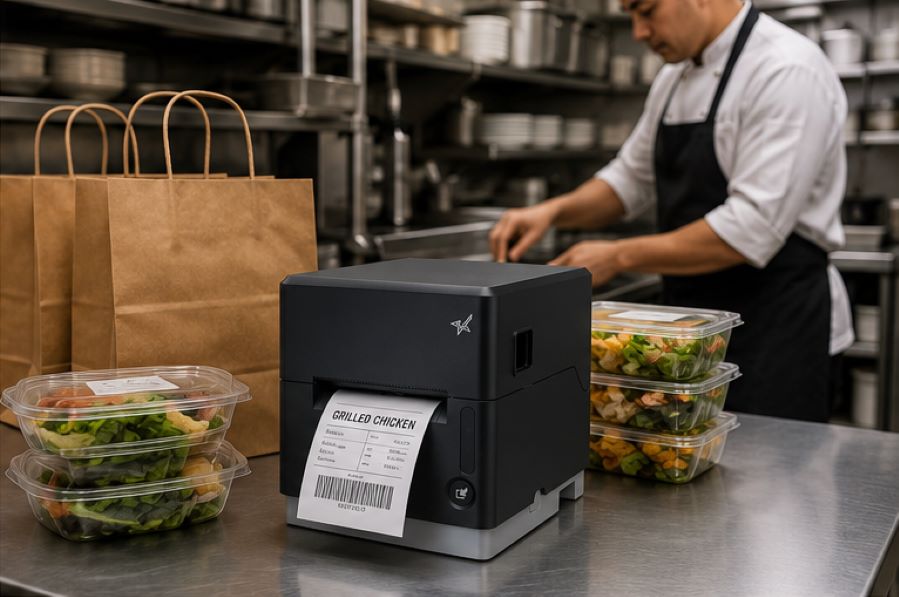
    Through its integration with Star’s mC-Label2 and mC-Label3 printers, Operandio enables kitchen staff to print labels for prep, food rotation, expiration, allergen, and product identification directly from the application at the point of preparation.

    Restaurants can:

    • Print food safety labels directly from digital workflows
    • Replace handwritten labels with clear, consistent printed output
    • Standardize food safety labeling across multiple locations
    • Support HACCP procedures with accurate, time-sensitive labeling
    • Improve product traceability and inspection readiness
    • Reduce manual labeling during food preparation

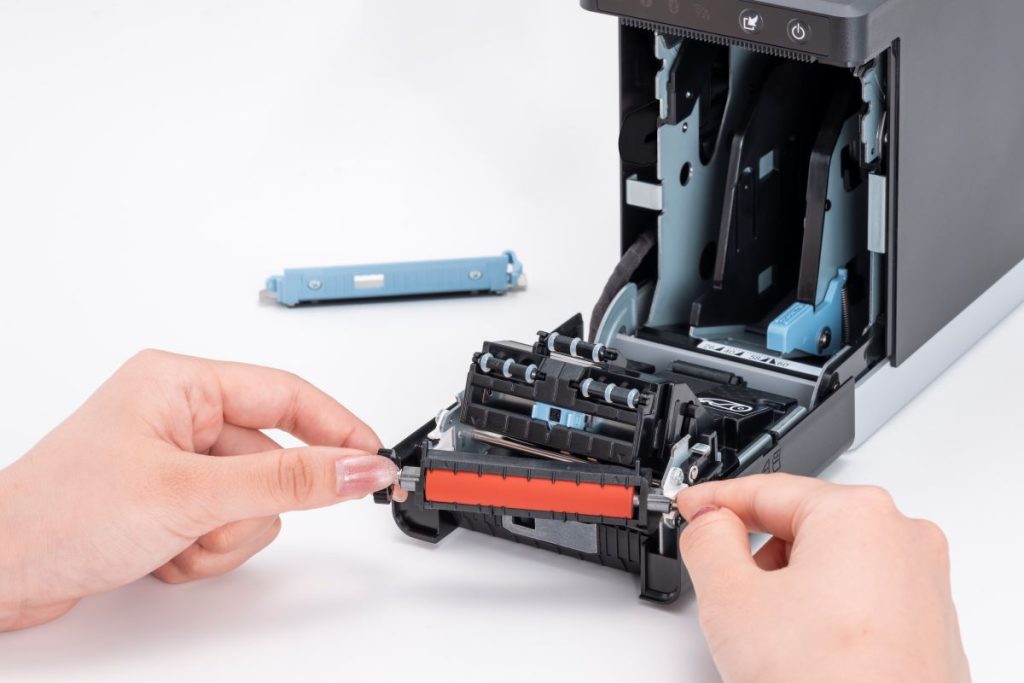
    Designed for demanding kitchen environments, the compact mC-Label2 fits easily into space-constrained prep stations with its front-loading, front-exit design, while the mC-Label3 supports label widths up to 3 inches for applications requiring larger label formats. Both printers support linerless and die-cut media, and feature tool-free maintenance to help minimize downtime in busy kitchen environments.

    “The Star mC-Label printer is an exceptionally versatile tool that brings both durability and flexible connectivity to the kitchen environment. At Operandio, we value partnering with experienced teams like Star Micronics that deliver reliable hardware to support consistent food safety and day-to-day restaurant operations.”

    “Digitizing food safety is only part of the equation. Restaurants also need a dependable way to turn those digital workflows into clear, accurate labels at the point of preparation. That’s where our mC-Label printers help complete the process.”

    Built for Multi-Unit Restaurant Operations

    Beyond food safety, Operandio provides restaurant operators with a centralized platform to recruit, onboard, train, operate, and maintain compliance across franchise and multi-location businesses. The platform digitizes standard operating procedures, inspections, equipment management, employee training, and daily tasks, giving restaurant operators greater visibility into execution across every location.

    To learn more about Star Micronics solutions, visit starmicronics.com.

    To explore Operandio, visit operandio.com.

    Can’t get enough industry news?

    Operandio Logo

    Operandio is an AI-powered operations platform built for franchise and multi-unit restaurant networks. The platform helps operators recruit, onboard, train, operate, and maintain compliance through a single system that digitizes food safety, task management, employee training, equipment management, and operational procedures. Founded in Australia with a North American headquarters in Utah, Operandio helps restaurant organizations improve consistency, accountability, and visibility across every location.
    Star Micronics logo, point-of-sale (POS) hardware and technology company.

    Star Micronics is a global provider of point-of-sale (POS) hardware, cloud printing, and labeling solutions that help businesses connect digital workflows to real-world operations. Serving retail, hospitality, healthcare, and service industries, Star delivers printing, labeling, cash management, self-service, and cloud-based technologies designed to support scalable, connected, and automated environments. Star’s solutions support Android, iOS, Windows, and web-based platforms and extend into the cloud through services such as CloudPRNT Next and StarIO.Online, Star’s fully managed cloud printing service.

    Visit starmicronics.com or follow us on Facebook, X, YouTube, or LinkedIn to learn more.

    Media Contact:

    Christin Dorner
    Star Micronics America, Inc.
    cdorner@starmicronics.com
    848-216-3318

    Media Contact:

    David Rigbye
    Operandio Pty Ltd.
    david@operandio.com
    213-863-1339

  • The Benefits of Durable, Reliable Commercial Label Printers

    The Benefits of Durable, Reliable Commercial Label Printers

    Commercial label printers play an important role in how businesses identify products, communicate workflow information, maintain regulatory compliance, and track inventory. From retail and restaurants to healthcare and fulfillment, labels help employees and customers access important information quickly and consistently.

    When a label printer fails, those workflows can slow down. Orders may be delayed, inventory may become harder to track, and important product or compliance information may not be available when needed.

    For businesses that rely on labeling throughout daily operations, choosing a durable and reliable commercial label printer can help reduce downtime, support high-volume workflows, and keep labeling processes consistent across the business.

    Table of Contents

    What Makes a Label Printer Durable and Reliable?

    The durability and reliability of a commercial label printer depend on both its physical construction and its internal components. A printer designed for daily commercial use should be built to handle frequent printing, different media types, and the environmental conditions where it will operate.

    Key factors that affect durability and reliability include:

    • Printhead lifespan: The printhead is one of the most important components in any label printer. Longer-life printheads help maintain consistent print quality and reduce replacement frequency.
    • Cutter durability: In high-volume environments, the cutter may operate thousands of times per day. Durable cutters help reduce jams and incomplete cuts.
    • Media path design: A well-designed media path helps labels feed smoothly and reduces misfeeds, jams, and wasted labels.
    • Housing materials and construction: Commercial environments may expose printers to heat, humidity, dust, or cleaning chemicals. Durable materials help the printer withstand these conditions.
    • Stable connectivity: Reliable wired, wireless, or cloud connectivity helps prevent missed print jobs and keeps workflows moving.
    • Maintenance accessibility: Printers designed for easy cleaning, media changes, and component replacement are often easier to maintain and less likely to experience preventable downtime.

    Reliable commercial label printers are typically characterized by consistent print quality, fewer jams, stable connectivity, and components designed for long-term use.

    Choosing a Label Printer for Commercial Environments

    Choosing a commercial label printer starts with understanding where and how it will be used. In addition to supporting the label types your operation requires, the printer should be built for the environment where it will operate.

    Commercial environments can expose printers to heat, humidity, dust, frequent handling, and cleaning chemicals. A printer designed for these conditions is less likely to require frequent repairs or replacement, which can help reduce long-term ownership costs.

    When evaluating a commercial label printer, consider the following:

    Printer Form Factor for Different Workspaces

    Printer design affects where and how employees use it. Front-loading and top-loading designs can make media changes easier in tight spaces, while wall-mounting options may help free up counter space in kitchens, prep stations, or healthcare environments.

    The right form factor depends on the workflow and available space.

    High-Volume Printing for Demanding Workloads

    Some environments require continuous, high-speed printing throughout the day. This may include labeling restaurant orders, retail inventory, shipping packages, patient medications, or kiosk-generated labels.

    A commercial label printer should be designed to keep up with the expected print volume without frequent jams, cutter failures, or overheating.

    The Benefits of Durable, Reliable Commercial Label Printers - Catering

    Support for Multiple Label Types

    Commercial labeling needs often vary by application. Some workflows use linerless labels, while others require die-cut labels, receipts, or permanent adhesive labels.

    A multifunction label printer can support multiple media types from a single device, allowing businesses to standardize hardware across different workflows while reducing the number of printer models they manage.

    Reliable Connectivity

    A commercial label printer should maintain stable wired, wireless, or cloud-based connections depending on how the business operates.

    For cloud-connected workflows, reliable communication between software and printers is especially important to prevent delayed or missed print jobs.

    Easy setup also matters, especially for wireless environments. Features like BLE-assisted Wi-Fi setup, available on Star’s mC-Label2 CWBi models, can help employees connect printers quickly using a smartphone or tablet without complex network configuration.

    Easy Printer Maintenance

    Routine cleaning and maintenance help prevent adhesive buildup, cutter jams, and print quality issues. Commercial label printers designed with tool-free maintenance, simple media loading, and clear cleaning instructions can make routine upkeep easier for employees and reduce preventable downtime.

    The mC-Label2 multimedia printer by Star Micronics features user-friendly, tool-free maintenance.
    The mC-Label series by Star Micronics has tool-free, super easy maintenance.

    Why Durable and Reliable Printers Matter in Daily Operations

    In many businesses, labels are part of daily workflows. When a label printer stops working, those workflows can slow down or stop entirely.

    In a QSR kitchen, a printer failure can delay order packaging or delivery handoff. In an ecommerce fulfillment center, it can interrupt shipping and inventory tracking. In healthcare, missing labels on medications, patient records, or specimens can create serious operational and compliance issues.

    Reliable commercial label printers help reduce these risks by supporting consistent print quality, stable connectivity, and dependable performance during high-volume use.

    Over time, printer durability also affects ownership costs. A printer built for its environment is less likely to require frequent repairs, component replacements, or full device replacement. This can help businesses reduce downtime, maintain labeling consistency, and extend the useful life of their equipment.

    Explore Star Micronics Commercial Label Printers

    Choosing the right commercial label printer starts with understanding your environment, print volume, media requirements, connectivity needs, and maintenance expectations. The right printer should match the demands of your workflow and the types of labels your business relies on every day.

    Star Micronics offers a range of commercial label printers designed for retail, restaurant, healthcare, fulfillment, and other high-volume environments. From multifunction label printers that support linerless, die-cut, and receipt printing to purpose-built sticky linerless label printers, Star provides options for a wide range of labeling applications.

    Explore Star’s Labeling Solutions and Receipt and Label Media to learn more, or contact Star Micronics for help choosing the right commercial label printer for your business.

    Learn More About Star Label Printers

    Frequently Asked Questions About Label Printer Durability and Reliability

    What features make label printers more durable for commercial environments?

    Durable commercial label printers are typically built with long-life printheads, durable cutters, strong housing materials, stable connectivity, and media paths designed to reduce jams and misfeeds. Easy maintenance access also helps keep the printer operating consistently over time.

    How do durable label printers reduce downtime?

    Durable printers reduce downtime by using components designed for frequent, high-volume use. Printers built for harsh environments, such as hot restaurant kitchens or healthcare settings with frequent cleaning, are less likely to fail or require frequent repair. Long-life printheads and cutters also reduce replacement frequency.

    What should businesses look for in a high-volume commercial label printer?

    Businesses should look for print speed, cutter durability, media compatibility, reliable connectivity, and maintenance accessibility. The printer should be designed for the expected daily print volume and the environment where it will operate.

    Why is label printer maintenance important for reliability?

    Routine maintenance helps prevent adhesive buildup, cutter jams, print quality issues, and media misfeeds. Cleaning the printer regularly helps ensure labels remain readable and barcodes scan correctly.

    Can durable label printers support wireless and cloud connectivity?

    Yes. Many commercial label printers support wired, wireless, and cloud-based connections. Features like BLE-assisted Wi-Fi setup can also make wireless deployment faster and easier for employees.

    How do multifunction label printers improve commercial workflows?

    Multifunction label printers can support receipts, linerless labels, die-cut labels, and other media types from a single device. This helps businesses reduce the number of printer models they manage while supporting different workflows with one platform.

    Why does media compatibility matter in commercial label printing?

    Different workflows require different label formats and adhesive types. Choosing a printer that supports the required media helps ensure consistent printing, proper label application, and reliable performance.

    How do durable label printers lower the total cost of ownership?

    Durable label printers can reduce repair costs, extend equipment lifespan, and minimize downtime. Over time, this can lower replacement frequency and reduce interruptions to daily operations.

    Are linerless label printers reliable for high-volume environments?

    Yes. Linerless label printers are commonly used in high-volume environments because they allow for faster application and fewer media roll changes. Since linerless labels do not use backing paper, they also reduce waste and help keep workspaces cleaner.

    What industries benefit most from durable commercial label printers?

    Durable commercial label printers are commonly used in retail, restaurants, ecommerce fulfillment, healthcare, pharmaceuticals, manufacturing, airports, and logistics. Any business that depends on consistent labeling can benefit from a printer designed for long-term, high-volume use.

  • 9 Restaurant Labels that Improve KDS Workflows

    9 Restaurant Labels that Improve KDS Workflows

    A kitchen display system (KDS) helps restaurants manage orders digitally by sending information from the point of sale (POS) system directly to food preparation stations. This gives kitchen teams real-time visibility into incoming orders, modifiers, and fulfillment priorities for dine-in, drive-thru, pickup, and delivery channels.

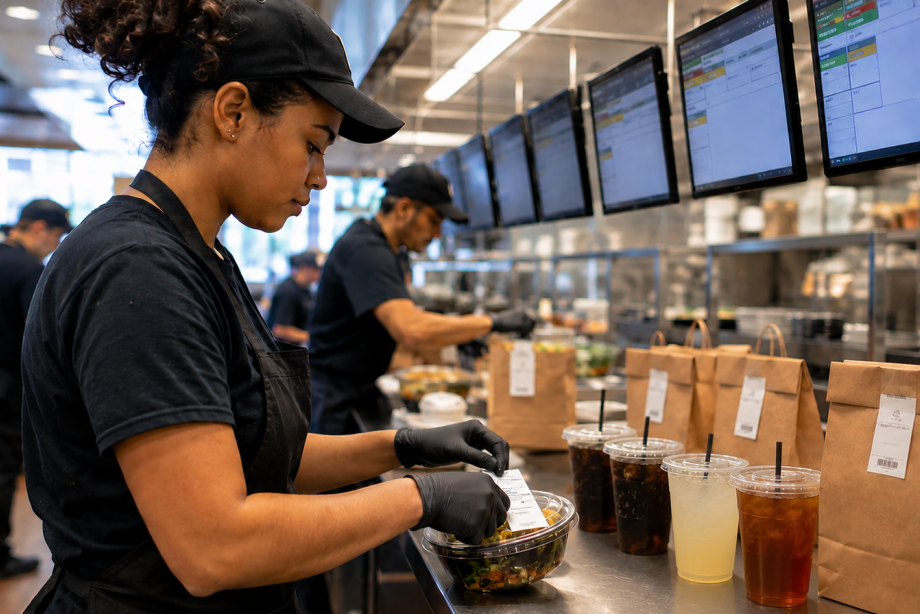
    However, once food preparation begins, orders move through physical workflows. Items are prepared, packaged, staged, picked up, and delivered. Restaurant labels for KDS workflows help carry order information beyond the screen, ensuring important details remain attached to the order throughout preparation, packaging, pickup, and delivery.

    From beverage labels and allergy alerts to catering labels and tamper-evident seals, the right labels help restaurants extend KDS communication throughout the operation.

    Table of Contents

    What Are Restaurant Labels for KDS Workflows?

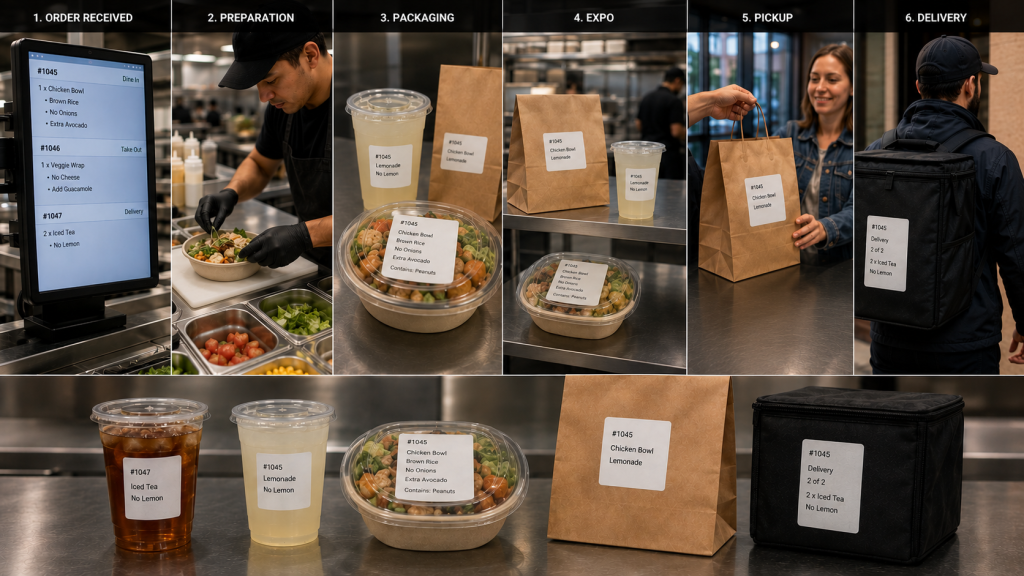
    A kitchen display system (KDS) manages order information digitally, but restaurant operations still depend on physical workflows. Orders move through multiple stages before reaching the customer, including:

    • Food preparation
    • Beverage preparation
    • Packaging
    • Expo
    • Pickup
    • Delivery

    Restaurant labels for KDS workflows help carry order information beyond the screen and keep it attached to the order as it moves through these stages.

    As orders move between stations, labels can communicate customer names, modifiers, allergy information, beverage customizations, pickup instructions, delivery details, and other important information. Keeping these details visible throughout preparation and fulfillment reduces reliance on verbal communication and helps teams coordinate complex dine-in, drive-thru, pickup, and delivery operations.

    Restaurant Label Workflow

    Types of Restaurant Labels for KDS Workflows

    A KDS communicates order information digitally, but labels help carry that information through food preparation, packaging, pickup, and delivery. Different types of restaurant labels support different stages of the workflow, helping employees identify orders, manage modifications, communicate food safety information, and direct completed orders to the correct destination.

    1. Drive-Thru and Takeout Labels

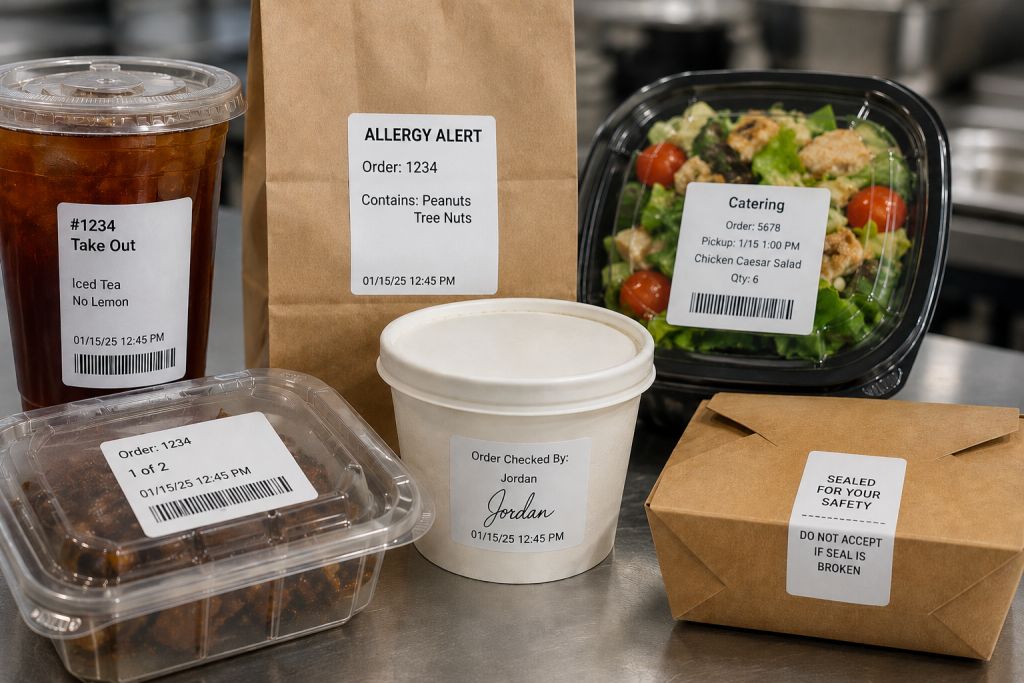
    An integrated system can generate labels along with sending orders to the KDS from the drive-thru, online ordering platform, or self-ordering kiosk. Labels can be applied to trays, containers, cups, or bags so order information remains attached to the order throughout preparation and fulfillment. Labels also ensure the team directs the order to the right place, whether the front counter, the drive-thru, or order pickup.

    2. Allergy and Exception Order Labels

    Allergies and food sensitivities have become more common, requiring special order preparation so diners can safely enjoy their meals. Furthermore, many customers have strong food preferences and request items prepared in specific ways.

    Allergy and exception order labels help ensure modifications remain visible as the order moves between preparation, packaging, and pickup stations. Exception order labels clearly inform food prep of changes to the way they typically prepare menu items. They also flag orders for the expeditor, server, or take-out counter worker that the kitchen prepared the order as the customer requested.

    3. Made-to-Order Food Labels

    Although a KDS has become a standard tool in quick service restaurants (QSRs), this technology offers benefits to the whole range of food service environments. When a store or café sells made-to-order (MTO) items, labels include vital information that helps customers make informed decisions and to keep the business in compliance.

    MTO food labels can include product name, description, ingredients, nutrition information, and allergen or dietary restriction alerts. Businesses can also customize MTO food labels with branding elements such as their name and logo.

    4. Beverage and Barista Labels

    Customers have strong opinions about how they want their coffee, espresso, or tea orders, requesting various types of milk, creamer, sweetener, flavors, and other options. Beverage orders often include customizations such as milk selections, flavors, sweeteners, and preparation instructions.

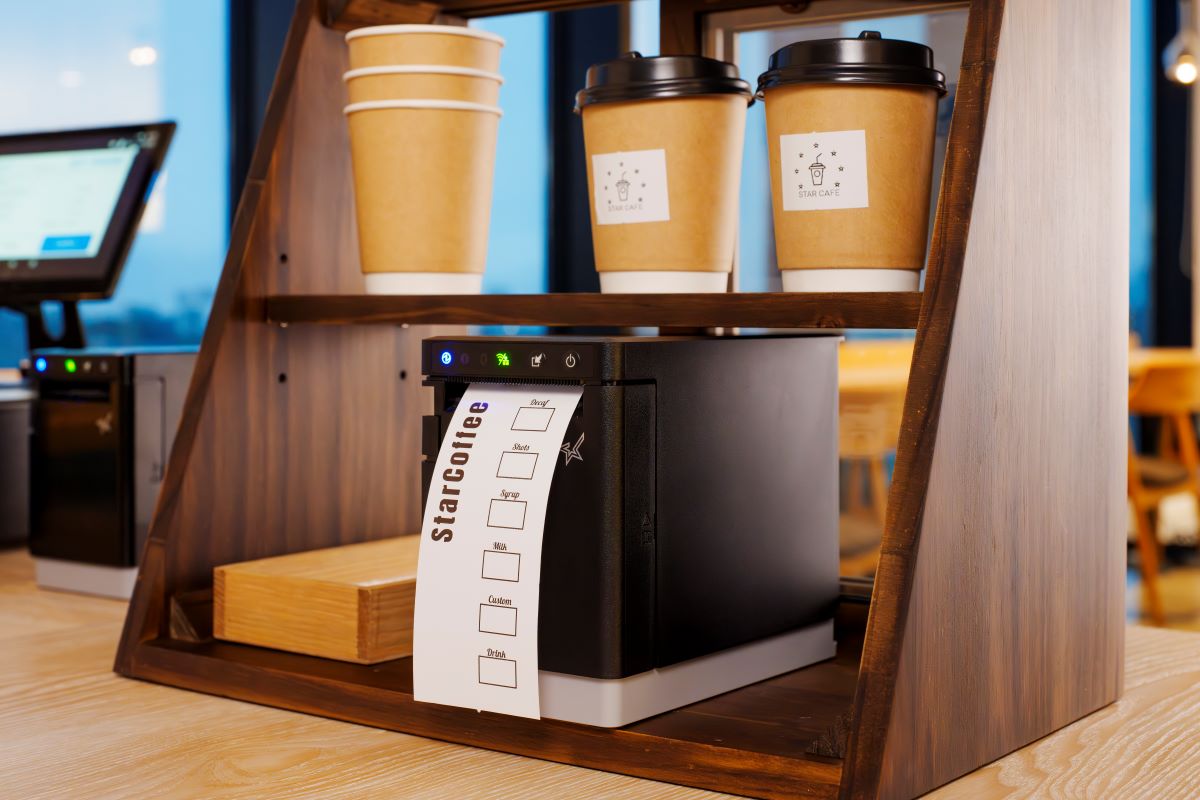
    Labels help baristas identify these details quickly and keep drinks matched to the correct customer throughout preparation and pickup. Labels with each detail of the order simplify order prep, and repositionable labels can follow orders from the POS system, to order prep, and then to the customer’s cup.

    5. Product ID and Barcode Labels

    Tracking prepared items or MTO foods can help shops manage their inventory, reduce shrinkage, and minimize waste. Barcoded labels generated during KDS workflows allow employees with scanners to capture data as items are placed into coolers or display cases, including their sell-by dates. Clear, reliable barcode labels also give shops a way to track ingredients’ sources in case of a recall and for fast price scanning at the checkout.

    6. Catering Labels

    If a restaurant or store offers catering, labels printed during KDS workflows can flag orders for the items they need for completeness, such as condiments, trays, or utensils. Labels can also include food safety instructions, nutrition information, allergen warnings, and serving instructions.

    7. Nutrition and Calorie Labels

    The FDA requires food service companies to provide nutrition facts to consumers. Although not every dine-in or take-out order has a nutrition label, restaurants must provide calorie counts and ingredient information on request. Restaurants can simplify this process with templated labels that employees print during packaging or order assembly.

    8. Order Verification and QC Labels

    Once an order is packaged, an expeditor or other restaurant employee cannot easily verify that every item is present by looking at the sealed bag alone. Some restaurants add a POS scale to the workflow to help verify order completeness before pickup or delivery.

    A typical order verification workflow may include:

    1. Package the order
    2. Weigh the completed bag
    3. Compare the weight to the expected total shown on the order label
    4. Investigate any significant discrepancies
    5. Release the order for pickup or delivery

    If the actual weight differs from the expected weight, employees can review the order and correct missing or incorrect items before the customer receives it. Combined with restaurant labels for KDS workflows, weight-based verification provides another checkpoint to help restaurants catch errors before orders leave the store.

    9. Tamper-Evident Labels

    When the kitchen team closes a package, they can add a tamper-evident label as the final step. Tamper-evident labels help indicate whether a bag or container has been opened after packaging. They are commonly used for delivery and pickup orders where food safety and package integrity are important.

    Restaurant Label Types

    How to Choose the Right Type of Restaurant Label for KDS Workflow Stages

    The right restaurant label depends on both the media type and adhesive required for the workflow. Some KDS applications benefit from linerless labels for fast application, while others require die-cut labels, repositionable adhesives, or permanent tamper-evident labeling.

    Linerless Labels

    • No liner backing
    • Fast application
    • Reduced waste
    • Great for:
      • beverage labels
      • takeout labels
      • pickup labels
      • food container labels

    Die-Cut Labels

    • Individual label shapes/sizes
    • Consistent placement
    • Useful for:
      • nutrition labels
      • product identification
      • barcode labels
      • made-to-order food labels

    Repositionable Linerless Labels

    • Diamond adhesive (light tack) or full coverage (stronger)
    • Can be removed and reapplied without residue
    • Useful for:
      • beverage workflows
      • food prep trays
      • staging areas
      • internal order tracking

    Permanent Linerless and Tamper-Evident Labels

    • Remain attached
    • Show evidence of removal
    • Useful for:
      • delivery bag seals
      • packaged foods
      • barcode labels
      • food safety workflows

    Features to Look for in Restaurant Label Printers for KDS Workflows

    Choosing the right restaurant label printer is just as important as selecting the right label media. KDS workflows often support food preparation, beverage stations, packaging, pickup, and delivery operations, so label printers should be able to support a variety of applications and deployment environments.

    Multimedia Printing

    Printers that support multiple media types, including linerless labels, die-cut labels, and receipts, allow restaurants to standardize hardware across stations. A multifunction printer can support different workflows without requiring separate printer models for each application.

    Linerless Label Support

    Linerless labels help reduce liner waste and counter clutter while supporting high-volume labeling workflows. Restaurants planning to use linerless labels should choose a printer designed specifically for linerless media.

    Cloud Printing Capabilities

    Cloud-connected printers can receive print jobs directly from KDS software, online ordering platforms, and cloud-based applications without relying on local print servers.

    Support for Multiple Adhesive Types

    Different workflows require different label adhesives. Restaurants may use repositionable labels for beverage preparation and internal workflows, while delivery and packaging applications may require permanent or tamper-evident labels.

    Fast Print Speeds

    High-volume kitchens depend on labels being available when needed. Fast print speeds help prevent delays during peak ordering periods and support continuous order flow.

    KDS and POS Compatibility

    Restaurant label printers should work with KDS software, POS systems, cloud platforms, and the operating systems used throughout the business. Compatibility can simplify deployment, support, and long-term maintenance.

    User-Friendly Maintenance

    Restaurant environments are busy, and printer maintenance is often handled by store-level employees. Features such as tool-free maintenance, easy media loading, user-replaceable components, and guided cleaning procedures can help reduce downtime and keep printers operating reliably.

    Star Micronics Label Printers for KDS Workflows

    Restaurants use a variety of labels throughout KDS workflows, including beverage labels, allergy labels, barcode labels, catering labels, order verification labels, and tamper-evident labels. Supporting these applications requires printers that match the media, adhesive, and workflow requirements of the operation.

    Star Micronics offers several printer options for restaurant labels used with KDS systems, including:

    mC-Label3 Multifunction Printer

    The mC-Label3 supports receipts, die-cut labels, repositionable linerless labels, and permanent linerless labels from a single printer platform. This makes it a good choice for restaurants looking to standardize printing across multiple stations.

    The Star Micronics mC-Label3 is a versatile multifunction printer that prints a wide range of labels and receipts, including both permanent and repositionable sticky linerless. It features cloud connectivity and innovative technologies like SteadyLAN and TetherLAN for enhanced printing convenience.

    Discover the mC-Label3 >

    mC-Label2 Multifunction Printer

    The mC-Label2 provides support for a wide range of label and receipt media in a compact design, making it suitable for food preparation, packaging, pickup, and other labeling applications.

    The mC-Label2 packs powerful features into a compact, front-loading design, including 300 dpi resolution, support for linerless, die-cut, receipt, and continuous media, and connectivity options like USB-C, LAN, WLAN, Bluetooth, and Apple MFi-certified pairing (X4 models only).

    Explore the mC-Label2 >

    TSP143IV SK Sticky Linerless Label Printer

    The TSP143IV SK is designed specifically for sticky linerless label printing and is commonly used for beverage labeling, food container labeling, pickup workflows, and other applications where repositionable labels are beneficial.

    The TSP143IV SK by Star Micronics sets a new standard for compact, eco-friendly thermal linerless label printing, offering advanced connectivity options like Wi-Fi and AOA, and efficient, residue-free labels for diverse business needs.

    Find out more >

    Whether a restaurant is deploying a new KDS or expanding existing workflows, selecting the right label printer helps ensure order information remains visible from preparation through pickup or delivery.

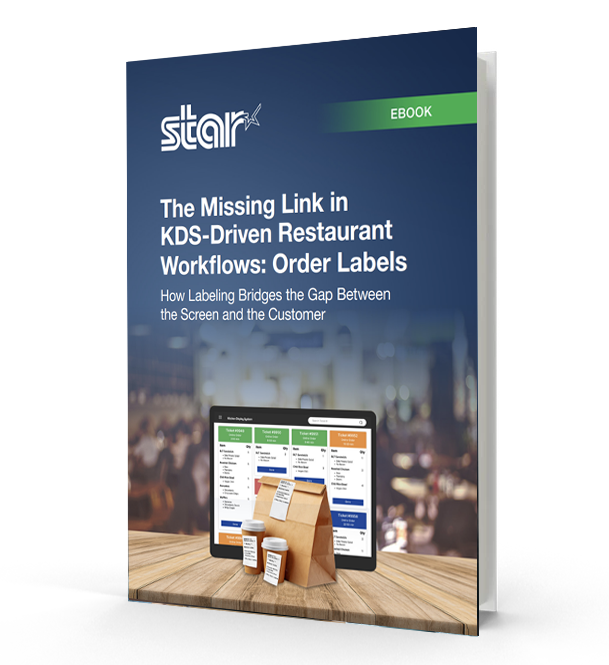
    The Missing Link in KDS-Driven Restaurant Workflows

    This eBook shows how labeling extends KDS accuracy into real-world workflows, helping restaurants and retailers improve fulfillment, accountability, and consistency across all ordering channels.

    Contact Star Micronics to learn more about restaurant label printers for KDS workflows.

    Frequently Asked Questions About Restaurant Labels for KDS Workflows

    What are restaurant labels used for in KDS workflows?

    Restaurant labels help carry order information through physical kitchen workflows after orders appear on a kitchen display system (KDS). They support food prep, packaging, pickup, delivery, catering, and labeling compliance workflows.

    How do restaurant labels support KDS workflows?

    A KDS communicates order information digitally, while labels help keep that information attached to the order itself as it moves through prep stations, expo, packaging, pickup, and delivery.

    What types of restaurant labels are commonly used with KDS systems?

    Restaurants commonly use:

    • Drive-thru and takeout labels
    • Allergy and exception order labels
    • Beverage labels
    • Product ID and barcode labels
    • Catering labels
    • Nutrition labels
    • Tamper-evident labels
    • Order verification and QC labels

    Different labels support different stages of the workflow.

    What is the difference between linerless and die-cut restaurant labels?

    Linerless labels print continuously without backing paper, helping reduce waste and clutter in high-volume kitchens. Die-cut labels are individually separated and are often used for applications requiring specific label sizes or permanent adhesion.

    Why are linerless labels popular in restaurant kitchens?

    Linerless labels help reduce liner waste, improve workflow efficiency, and minimize clutter on prep counters and floors. They are especially useful in fast-paced restaurant and QSR environments.

    What information should restaurant labels include?

    Depending on the workflow, restaurant labels may include:

    • Order details
    • Customer names
    • Allergens or dietary restrictions
    • Beverage customizations
    • Nutrition information
    • Barcodes or QR codes
    • Sell-by dates
    • Pickup or delivery details

    Why are allergy and exception order labels important?

    Allergy and exception order labels help kitchen staff quickly identify orders that require modified preparation. These labels support safer food handling and help reduce communication breakdowns during busy service periods.

    How do tamper-evident labels support delivery workflows?

    Tamper-evident labels help show customers that delivery bags or food containers have not been opened after packaging. They also help restaurants maintain more secure and organized delivery workflows.

    Can restaurant labels be printed automatically from a KDS?

    Yes. Many KDS workflows automatically trigger label printing when orders are received, bumped to another prep stage, packaged, or prepared for pickup or delivery.

    What should restaurants look for in a label printer for KDS workflows?

    Important features include:

    • Multimedia printing support
    • Linerless compatibility
    • Fast print speeds
    • Compact design
    • Cloud printing capabilities
    • Easy KDS integration
    • Support for repositionable and permanent labels

    Why are multimedia label printers useful in restaurants?

    Multimedia label printers can print receipts, linerless labels, and die-cut labels from a single device. This helps restaurants standardize hardware across stations and reduce the number of printer models they manage.

    How do cloud-connected label printers support KDS workflows?

    Cloud-connected printers can receive print jobs directly from KDS software or online ordering platforms without relying on local print servers. This simplifies deployment and supports multi-location restaurant operations more efficiently.

  • Star Micronics to Showcase Labeling, Order Accuracy, and Cloud POS Solutions at the 2026 National Restaurant Show

    Star Micronics to Showcase Labeling, Order Accuracy, and Cloud POS Solutions at the 2026 National Restaurant Show

    Star will demonstrate food safety labeling, order accuracy workflows, and cloud-connected POS solutions at Booth 6454 during the 2026 National Restaurant Show.

    Chicago, IL – May 15, 2026 – Star Micronics, a global leader in POS hardware, labeling, and cloud printing technology, will exhibit at the 2026 National Restaurant Show, taking place May 16–19 at McCormick Place in Chicago, Illinois. At Booth 6454, Star will showcase integrated solutions for food safety labeling, kitchen execution, and order accuracy in partnership with leading restaurant technology providers.

    Food Safety and Traceability Workflows

    Star will demonstrate food safety labeling solutions that replace manual processes with automated, connected workflows.

    In partnership with ConnectedFresh and Kitchen Technology, Innovations by Integrated Control Corp. (KTI/ICC) attendees can see how labeling is generated during kitchen workflows using Star’s mC-Label3 and mC-Label2 multifunction label printers.

    These demonstrations highlight how operators can:

    • Generate prep, expiration, and traceability labels at the point of food preparation
    • Replace handwritten logs with consistent, printed labeling
    • Use die-cut or linerless media depending on workflow needs

    More advanced integrations also demonstrate how real-time data can automatically trigger labeling, allowing operators to capture food safety processes without manual input.

    KDS and Order Accuracy in the Kitchen

    Star is also highlighting how kitchen display systems (KDS), labeling, and verification workflows work together to improve order accuracy in high-volume environments.

    In collaboration with Logic Controls, attendees can follow how orders move from the front of house to the kitchen via the KitchenGO KDS platform, where staff can view items on-screen and instantly trigger labels through Star’s labeling workflow tools.

    These workflows enable staff to:

    • Apply sticky linerless labels directly to orders for clear identification
    • Reduce missed or misrouted items during peak service
    • Maintain consistency across prep and handoff

    Additional demonstrations showcase scan, weigh, and print workflows using integrated hardware, including the mG-T30 POS scale, BSH-32B barcode scanner, and SK1-311 thermal kiosk printer.

    These verification workflows allow operators to:

    • Scan items to confirm order accuracy
    • Verify portioning or weight-based items
    • Generate labels or receipts as part of a single process before fulfillment

    Cloud and Omnichannel POS Integration

    Star’s booth also features cloud-connected POS workflows that support modern restaurant operations across in-store, kiosk, and online ordering environments.

    Attendees will see how cloud-based systems can:

    • Route orders across multiple stations and locations
    • Print directly from online ordering platforms without local servers
    • Support consistent workflows across dine-in, takeout, and delivery

    Using solutions such as StarIO.Online and CloudPRNT Next, Star enables reliable communication between digital ordering systems and physical kitchen hardware, helping restaurants maintain consistency across locations and service models.

    Star will also showcase the mC-Connect cash drawer controller, which allows tablet and cloud POS systems to control cash drawers directly without requiring a printer connection. Designed for modern and space-constrained POS environments, the device supports flexible cash management workflows across retail and hospitality operations.

    Partner Ecosystem on Display

    At Booth 6454, Star features integrations with a range of restaurant technology partners, demonstrating how hardware and software work together to support real-world operations.

    “Restaurants are managing more complexity than ever across ordering channels, kitchen workflows, and compliance requirements. At the National Restaurant Show, we’re focused on showing how integrated solutions, from labeling to KDS to cloud printing, can help operators bring more control, order accuracy and consistency to their day-to-day operations.”

    Free Order Accuracy and Workflow Audit

    In addition to live demonstrations, Star Micronics is offering a complimentary audit for restaurant operators looking to evaluate their current workflows.

    The audit identifies gaps in order accuracy, labeling, and kitchen communication, while providing practical recommendations to improve consistency across prep, packaging, and handoff.

    Attendees are invited to visit Booth 6454 to see the solutions in action, meet with partners, and schedule a one-on-one workflow review with the Star team.

    For more information, visit starmicronics.com.

    Can’t get enough industry news?

    Star Micronics logo, point-of-sale (POS) hardware and technology company.

    Star Micronics is a global provider of point-of-sale (POS) hardware, cloud printing, and labeling solutions that help businesses connect digital workflows to real-world operations. Serving retail, hospitality, healthcare, and service industries, Star delivers printing, labeling, cash management, self-service, and cloud-based technologies designed to support scalable, connected, and automated environments. Star’s solutions support Android, iOS, Windows, and web-based platforms and extend into the cloud through services such as CloudPRNT Next and StarIO.Online, Star’s fully managed cloud printing service.

    Visit starmicronics.com or follow us on Facebook, X, YouTube, or LinkedIn to learn more.

    Media Contact:

    Christin Dorner
    Star Micronics America, Inc.
    cdorner@starmicronics.com
    848-216-3318

  • Cleaning Printers: How to Prevent Gummed-Up Printer Cutters

    Cleaning Printers: How to Prevent Gummed-Up Printer Cutters

    In a busy kitchen or retail environment, everything runs smoothly until it doesn’t. Orders are coming in, labels should be printing, and suddenly the printer slows down. Labels tear instead of separating cleanly. The cutter jams. Staff stop what they are doing to troubleshoot, and operations stall.

    This is a common issue with many label printers. Adhesive buildup from labels accumulates over time, especially in high-volume environments or when switching between media types. As residue collects on the printer cutter, it can cause jams, miscuts, and inconsistent label output. When maintenance is delayed, performance declines and downtime increases.

    Cleaning printers is a critical part of label printer maintenance for businesses that rely on accurate, consistent labeling. Multifunction printers handle linerless labels, die-cut labels, continuous media, and receipts, but they require regular cleaning to keep cutters operating properly. 

    This guide explains how to clean printer cutters, prevent adhesive buildup, and maintain reliable label printing in high-volume operations.

    Table of Contents

    What Is a Gummed-Up Printer Cutter?

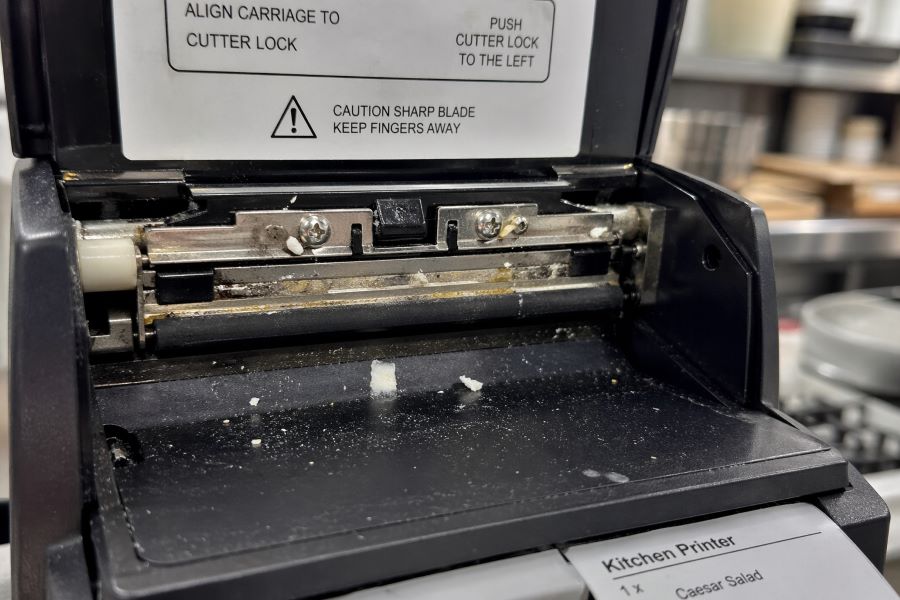
    A gummed-up printer cutter occurs when adhesive residue builds up on the cutter blade. Over time, this residue collects paper dust and label debris.

    As buildup increases, the cutter can become sticky, misaligned, or unable to cut cleanly. This leads to poor performance, inconsistent output, and eventual printer issues if left unaddressed.

    Gummed Up Printer Cutter
    A gummed-up printer cutter leads to poor performance and eventual printer issues if unaddressed.

    How Often Should You Clean a Label Printer Cutter?

    Cleaning frequency depends on print volume, media type, and overall label printer usage.

    High-volume environments and linerless label usage typically require more frequent cleaning due to increased adhesive exposure. Linerless labels, in particular, apply adhesive across the entire label surface, which makes buildup more likely.

    Rather than relying only on a fixed schedule, maintenance alerts are often a better approach. Alerts help ensure cleaning happens when it is actually needed, not too early and not too late.

    The Risks of Not Regularly Cleaning Printers

    Failing to clean printer cutters regularly can lead to a range of operational and mechanical issues:

    • Incomplete cuts, where labels tear instead of separating cleanly
    • Cutter jams that cause print queues to back up
    • Increased strain on the cutter motor, leading to long-term wear
    • Unexpected downtime that interrupts workflows and delays orders
    • Reactive maintenance that pulls staff away from their primary tasks
    • Workarounds that bypass labeling altogether, increasing the risk of errors, missing allergen information, or incorrect orders
    • Damage to brand perception when operations appear inconsistent or unreliable

    Over time, these issues compound. What starts as minor buildup can lead to more serious printer performance problems if not addressed early.

    How to Clean a Label Printer Cutter

    Keeping printer cutters clean is a simple process when done regularly. With the right approach, staff can remove adhesive buildup quickly and keep printers running without interruption.

    1. Power Off and Open the Printer

    • Turn off the printer before performing any maintenance.
    • Open the printer cover to access the cutter area.
    • Ensure the printer is stable and safe to handle before proceeding.

    2. Locate the Cutter Blade and Surrounding Area

    • Identify the cutter blade where labels or receipts are cut.
    • Check for visible adhesive buildup, dust, or debris.
    • Pay attention to edges where residue tends to collect.

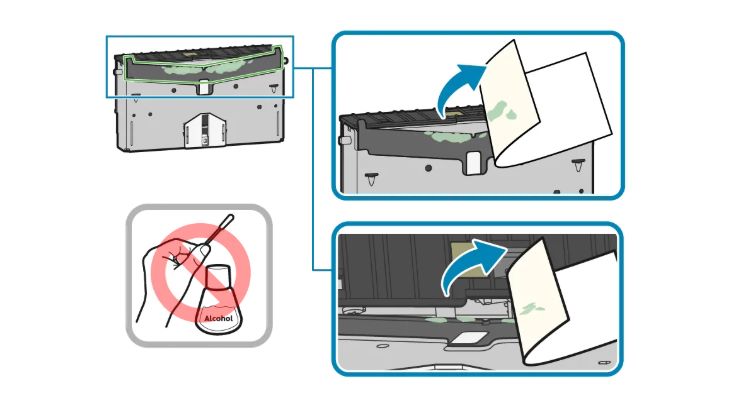
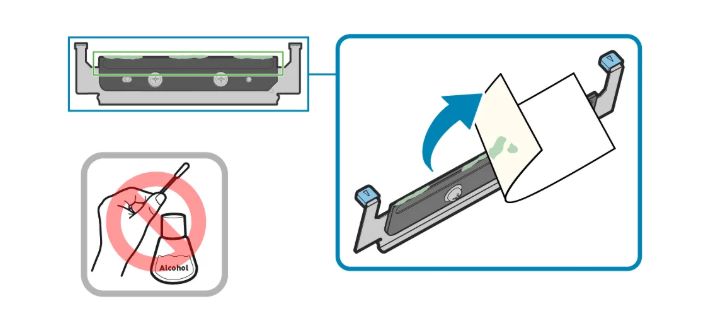
    3. Remove Adhesive Buildup

    • Use the adhesive side of an unused label to lift gum and residue.
    • Gently press and pull to remove buildup from the cutter surface.
    • Avoid using sharp objects or abrasive materials.

    Cleaning Printer Cutter Illustration

    4. Clear Loose Debris

    • Remove any remaining paper dust or label fragments.
    • Ensure the cutter area is free of obstructions.
    • Keep the cleaning process controlled and precise.

    Bottom Cutter Blade

    5. Close the Printer and Test

    • Close the printer securely after cleaning.
    • Power the printer back on.
    • Run a test print to confirm smooth, clean cuts.

    Printer Cleaning Do’s and Don’ts

    Do

    • Follow manufacturer guidelines for cleaning and maintenance
    • Clean printer cutters regularly, especially in high-volume or linerless environments
    • Use approved methods, such as the adhesive side of a label, to remove buildup
    • Perform cleaning in a controlled, well-lit area to ensure accuracy

    Don’t

    • Use sharp tools or abrasive materials that can damage the cutter
    • Apply harsh chemicals that may affect printer components
    • Attempt to clean the printer while it is powered on
    • Ignore early signs of buildup, such as uneven cuts or minor jams

    The mC-Label3 Multifunction Printer by Star Micronics great for delivery take out online ordering and QSRs.
    Keep your label printers working by following best practices for cleaning printer cutters.

    Best Practices for Cleaning Printer Cutters

    Keeping printer cutters clean comes down to a few practical maintenance habits.

    • Follow Maintenance Alerts, Not Just Schedules: Print volume can vary significantly. Built-in maintenance alerts help ensure cleaning happens at the right time, before performance issues begin.
    • Make Cleaning Instructions Easy to Access: When cleaning is required, staff need clear, immediate guidance. Printers that provide quick access to step-by-step instructions make maintenance easier and more consistent.
    • Simplify the Cleaning Process: If maintenance is complicated, it will be delayed. Tool-free access and clearly designed components allow staff to clean printers quickly without relying on IT support.
    • Replace Worn Parts Before They Fail: Even with regular cleaning, cutters and platens wear over time. Replacing these components proactively helps prevent jams and keeps printers performing reliably.

    Printer Cleaning and Maintenance Made Easy with Star Micronics

    Keeping label printers clean should not require specialized training or disrupt daily operations. In high-volume environments, printer cleaning and maintenance need to be simple, repeatable, and built into normal workflows. Star printers are designed so routine label printer maintenance can be performed by staff in minutes, without tools, service calls, or operational delays.

    The mC-Label2 and mC-Label3 multifunction label printers are built to support routine cleaning without technical expertise. Built-in maintenance alerts notify staff when attention is needed, helping prevent adhesive buildup before it impacts performance. When it’s time to clean, QR code-driven instructions provide immediate access to step-by-step guidance, so employees can act quickly and confidently.

    Cleaning the printer cutter is straightforward. In many cases, staff can use the adhesive side of an unused label to remove gum and debris from the cutter. Tool-free, color-coded components make it easy to access, clean, and reassemble parts without delays or IT support.

    With the right maintenance approach and tools, cleaning label printers becomes a quick, routine task instead of a source of downtime.

    Want to learn more about how the mC-Label series helps reduce printer downtime? Read our blog, “Reduce Label Printer Downtime with Smarter Maintenance Tools.”

    The mC-Label2 multimedia printer by Star Micronics features user-friendly, tool-free maintenance.
    The mC-Label series uses tool-free, color-coded components for easy printer maintenance.

    Contact us for a demonstration to see how easy printer cleaning and maintenance can be.

    Frequently Asked Questions About Cleaning Printers

    How often should you clean a printer cutter?

    A printer cutter should be cleaned based on print volume and media type. High-volume environments and linerless label printing require more frequent cleaning due to adhesive buildup. Maintenance alerts help ensure cleaning happens at the right time.

    What causes a label printer cutter to become gummed up?

    A label printer cutter becomes gummed up when adhesive residue builds up on the cutter blade. This residue collects paper dust and debris, causing the cutter to become sticky, misaligned, or unable to cut cleanly.

    What happens if you do not clean a printer cutter?

    A dirty printer cutter causes incomplete cuts, label tearing, and frequent jams. Over time, this increases wear on the cutter mechanism and leads to downtime that disrupts labeling workflows.

    How do you clean a label printer cutter?

    To clean a label printer cutter, use the adhesive side of an unused label to remove buildup from the cutter blade. Always follow manufacturer instructions and ensure the printer is powered off before cleaning.

    Do linerless labels require more printer maintenance?

    Yes. Linerless labels apply adhesive across the entire label surface, increasing the likelihood of buildup on the printer cutter. More frequent printer cutter cleaning is required in these environments.

    Can employees clean printer cutters without technical training?

    Yes. Printers designed with tool-free access and guided instructions allow staff to perform printer cutter cleaning without technical training or IT support.

    When should you replace a printer cutter or platen?

    Replace a printer cutter or platen when cleaning no longer resolves cutting issues, or when consistent jams and uneven cuts occur.

    How can businesses reduce printer downtime caused by cutter issues?

    Businesses can reduce printer downtime by performing regular printer cutter cleaning, following maintenance alerts, and replacing worn parts proactively. Using printers designed for easy maintenance improves consistency and reliability.

  • Star Micronics Partners with Kitchen Technology, Innovations by ICC to Deliver Automated Food Safety Labeling with i.Print3™ and mC-Label2

    Star Micronics Partners with Kitchen Technology, Innovations by ICC to Deliver Automated Food Safety Labeling with i.Print3™ and mC-Label2

    The partnership combines automated labeling technology with compact, reliable printing to help foodservice operators improve traceability, compliance, and kitchen efficiency.

    Somerset, NJ – April 14, 2026 – Star Micronics, a global leader in POS hardware, labeling, and cloud printing technology, today announced a partnership with Kitchen Technology, Innovations by ICC (KTI/ICC) to integrate the i.Print3™ automated labeling solution with Star’s mC-Label2 multifunction label printer. The combined solution helps foodservice operators automate food preparation labeling, improve traceability, and support food safety compliance across modern kitchen environments.

    Foodservice operations often rely on handwritten labels or preprinted label sheets for food preparation and grab-and-go items. These manual processes can lead to inconsistent labeling, wasted materials, and increased labor. Integrating the i.Print3 device with Star’s mC-Label multifunction printer series, including the compact mC-Label2 and mC-Label3 printers, allows operators to generate clear, accurate labels at the point of food preparation, including preparation dates, expiration times, and other key food safety information.

    Automating Food Safety Labeling in the Kitchen

    The i.Print3 device is designed to automate kitchen labeling workflows in fast-paced foodservice environments. Instead of relying on multiple tools and fragmented workflows, the solution combines hardware, software, and cloud connectivity into a single integrated labeling platform.

    Cloud-based traceability allows operators to store labeling data and maintain records that support food safety oversight and operational visibility. This capability helps organizations track food preparation information, improve accountability, and support compliance with evolving regulatory and food safety requirements.

    “The i.Print3 was developed to simplify labeling and food safety processes for foodservice operators. Partnering with Star Micronics allows us to deliver a complete labeling solution that fits right into kitchen environments while supporting accurate, automated food safety labeling.”

    Compact Hardware Designed for Busy Kitchens

    Star’s mC-Label2 printer provides the compact footprint and operational flexibility required in space-constrained kitchen environments where countertop space is limited and efficiency is critical.

    The printer’s front-loading design allows labels to be reloaded without removing the device from the counter, making it easier to maintain during busy service periods. The integrated cutter supports die-cut labels and allows operators to use multiple label sizes, providing flexibility for different food preparation and labeling workflows.

    “The mC-Label2 was an ideal fit for this solution because of its compact design, reliability, and flexible media support. These features allow the labeling system as a whole to fit naturally into real kitchen workflows without adding complexity.”

    Supporting a Wide Range of Foodservice Environments

    The combined solution is designed for a variety of foodservice and retail food preparation environments, including quick-service restaurants (QSRs), convenience stores, grocery prepared food departments, and institutional kitchens such as hospitals and cafeterias.

    By printing labels directly at the prep station, the i.Print3 and mC-Label2 turn a traditionally manual task into a fast, automated process that improves food safety visibility and keeps kitchen teams moving without interruption.

    With more than four decades of experience developing technology solutions for the foodservice industry, KTI/ICC brings deep industry knowledge to the partnership. By combining KTI/ICC’s foodservice automation expertise with Star Micronics’ reliable printing hardware, the partnership delivers a modern solution for automated food preparation labeling.

    For more information about Star Micronics solutions, visit starmicronics.com.

    To learn more about Kitchen Technology, Innovations by ICC and the i.Print3™ solution, visit onkti.com.

    Can’t get enough industry news?

    Kitchen Technology Innovations by ICC logo

    Founded in 1987, Kitchen Technology, Innovations by ICC. (ICC) and its innovation division, Kitchen Technology Innovations (KTI), develop advanced, integrated technologies for the foodservice industry. Leveraging decades of expertise and a portfolio of patented solutions, KTI/ICC delivers intelligent systems that digitize food safety, automate product management, and provide real-time operational visibility across multi-unit environments. Designed for scalability and ease of use, KTI/ICC’s platform enables operators to reduce risk, improve consistency, and optimize performance. The family-founded company supports leading global brands, including EB Group, Paradies Lagardère, and Burger King.

    Star Micronics logo, point-of-sale (POS) hardware and technology company.

    Star Micronics is a global provider of point-of-sale (POS) hardware, cloud printing, and labeling solutions that help businesses connect digital workflows to real-world operations. Serving retail, hospitality, healthcare, and service industries, Star delivers printing, labeling, cash management, self-service, and cloud-based technologies designed to support scalable, connected, and automated environments. Star’s solutions support Android, iOS, Windows, and web-based platforms and extend into the cloud through services such as CloudPRNT Next and StarIO.Online, Star’s fully managed cloud printing service.

    Visit starmicronics.com or follow us on Facebook, X, YouTube, or LinkedIn to learn more.

    Media Contact:

    Christin Dorner
    Star Micronics America, Inc.
    cdorner@starmicronics.com
    848-216-3318

    Media Contact:

    Mark Salerno
    Kitchen Technology, Innovations by ICC
    marky@goicc.com
    631-673-5100

  • Star Micronics and ConnectedFresh Automate Food Safety and Traceability Workflows with Cloud-Connected Labeling

    Star Micronics and ConnectedFresh Automate Food Safety and Traceability Workflows with Cloud-Connected Labeling

    The integration combines ConnectedFresh’s IoT monitoring and food safety platform with Star’s cloud printing technology to automate mission-critical workflows, dramatically improving documentation and reducing food waste and risk for foodservice operations.

    Somerset, NJ – April 13, 2026 – Star Micronics, a global leader in POS hardware and cloud printing technology, today announced that ConnectedFresh has integrated Star’s mC-Label3 multifunction label printer and StarIO.Online fully managed cloud printing service into its digital food safety platform. The integration enables restaurants and foodservice operators to generate accurate, traceable food labels directly from the ConnectedFresh platform, helping improve compliance, increase food safety visibility, and reduce manual labeling tasks.

    Connecting Digital Food Safety Monitoring to Physical Labeling

    ConnectedFresh uses wireless IoT sensors to give restaurant and foodservice operators real-time visibility into temperature conditions, equipment performance, and food safety compliance across their locations. Through the integration with Star Micronics, that digital food safety data can now trigger on-demand label printing via StarIO.Online, connecting digital records to printed labels that document preparation details, product information, and traceability records. Because Star manages the cloud infrastructure, labels can be generated without local servers or complex on-site IT setup.

    Supporting FSMA Traceability and Recordkeeping

    With the FDA’s Food Safety Modernization Act (FSMA) Section 204 Food Traceability Rule requiring expanded recordkeeping for certain foods, foodservice operators are strengthening their traceability processes ahead of the rule’s enforcement date in July 2028. Many operators are moving away from manual logs and handwritten labels toward digital systems that can automatically document Critical Tracking Events and maintain accurate traceability records.

    By combining ConnectedFresh’s platform with Star’s labeling and cloud printing technology, operators can automatically generate labels documenting key food safety and traceability information, including preparation dates, product details, and cooling records. For time-sensitive compliance tasks like cool-down logging, ConnectedFresh sensors can monitor the entire process and automatically trigger a printed label documenting the result, helping improve documentation accuracy while reducing labor, food waste, and risk.

    On-Demand Labeling for Real Kitchen Workflows

    Star’s mC-Label3 multifunction printer supports a wide range of labeling applications in foodservice environments, including food preparation, grab-and-go packaging, and product identification, while supporting multiple media types such as linerless and die-cut labels. Star’s mG-T30 scale is also integrated with the platform, enabling weight-based labeling and verification as an additional capability for foodservice operations.

    “ConnectedFresh is built to help operators stay on top of food safety without adding more complexity to the kitchen. Working with Star lets us connect our platform directly to reliable labeling hardware so teams can print accurate, traceable labels at the exact moment food is prepared, cooled, or packaged.”

    “Food safety and traceability are becoming more data-driven, and operators need solutions that can scale across every location. By bringing together ConnectedFresh’s sensor-driven platform and Star’s labeling and cloud technologies, this partnership helps standardize how food safety information is captured and managed across distributed operations.”

    Cloud-Connected Printing for Multi-Location Foodservice

    StarIO.Online enables cloud applications to manage and control printers remotely, allowing businesses to deploy and monitor labeling across distributed locations without maintaining on-site infrastructure. This allows ConnectedFresh users to standardize and scale labeling workflows across multiple kitchens, restaurants, and food preparation facilities using a single, versatile device that supports food safety labeling, grab-and-go labeling, and order accuracy workflows.

    For example, when ConnectedFresh sensors confirm that a food item has completed its cool-down process within the required time and temperature range, the platform can automatically generate and print a label documenting the completion time and product details, ready to apply directly to the stored product without any manual logging.

    By combining ConnectedFresh’s digital food safety platform with Star’s labeling and cloud printing technologies, the integration helps operators bridge the gap between digital compliance systems and real-world kitchen operations.

    For more information about Star Micronics solutions, visit starmicronics.com.

    To learn more about ConnectedFresh, visit connectedfresh.com.

    Can’t get enough industry news?

    ConnectedFresh Logo

    ConnectedFresh is the most comprehensive sensor-driven intelligence platform built for foodservice, helping restaurants and food operators automate food safety processes, monitor facilities and equipment in real time, and manage risk and compliance across all locations. The platform is powered by wireless IoT sensor hardware, sourced and passed through to customers at cost, delivering real-time visibility from the kitchen floor to the back office. Through integrations with partners like Star Micronics, ConnectedFresh extends that intelligence to physical labeling, connecting digital food safety records with printed documentation for improved traceability.

    To learn more about ConnectedFresh’s 25+ turnkey solutions for foodservice, visit connectedfresh.com/solutions.

    Star Micronics logo, point-of-sale (POS) hardware and technology company.

    Star Micronics is a global provider of point-of-sale (POS) hardware, cloud printing, and labeling solutions that help businesses connect digital workflows to real-world operations. Serving retail, hospitality, healthcare, and service industries, Star delivers printing, labeling, cash management, self-service, and cloud-based technologies designed to support scalable, connected, and automated environments. Star’s solutions support Android, iOS, Windows, and web-based platforms and extend into the cloud through services such as CloudPRNT Next and StarIO.Online, Star’s fully managed cloud printing service.

    Visit starmicronics.com or follow us on Facebook, X, YouTube, or LinkedIn to learn more.

    Media Contact:

    Christin Dorner
    Star Micronics America, Inc.
    cdorner@starmicronics.com
    848-216-3318

    Media Contact:

    ConnectedFresh
    media@connectedfresh.com
    888-310-2019

  • Star Micronics Becomes the First to Offer Windows on ARM Driver Support for POS Printers

    Star Micronics Becomes the First to Offer Windows on ARM Driver Support for POS Printers

    The new driver enables ISVs and solution providers to deploy Star printers on ARM-based Windows devices, expanding compatibility for modern POS environments.

    Somerset, NJ – April 7, 2026 – Star Micronics, a global provider of point-of-sale (POS) hardware, cloud printing, and labeling solutions, today announced the availability of Windows on ARM driver support for its printer portfolio. As the first POS hardware manufacturer to offer native support for Windows on ARM devices, Star is expanding compatibility with next-generation computing platforms used by ISVs, resellers, and enterprise customers.

    As adoption of ARM-based Windows devices continues to grow across tablets, laptops, and compact POS systems, software developers and solution providers are increasingly building applications for these environments. Star’s Windows on ARM driver enables native integration with Star printers, allowing ISVs to support receipt, label, and ticket printing without relying on emulation or additional workarounds.

    Expanding Compatibility for Modern POS Deployments

    Star’s Windows on ARM driver support enables ISVs to support printing natively on ARM-based Windows devices, while giving resellers confidence that Star printers will work with newer Windows hardware without requiring emulation or additional configuration. This is especially important as businesses adopt lighter, more energy-efficient ARM-based systems across retail, hospitality, and service environments.

    Supporting ISVs and Solution Providers

    For ISVs, native Windows on ARM driver support removes the need for emulation and ensures consistent printing functionality across both ARM and traditional x86 platforms, simplifying development for modern POS environments.

    Resellers and solution providers also gain greater flexibility in supporting customer environments that are adopting ARM-based Windows devices, allowing them to offer compatible solutions across a wider range of system configurations.

    “ISVs and solution providers are increasingly working with ARM-based Windows devices as part of modern POS deployments. By offering native Windows on ARM driver support, Star ensures our partners can support the latest hardware platforms without compromising compatibility or performance.”

    Availability

    Star’s Windows on ARM drivers are available on request. To learn more or request access, please contact Star Micronics at integrations@starmicronics.com.

    For more information about Star Micronics solutions, visit starmicronics.com.

    Can’t get enough industry news?

    Star Micronics logo, point-of-sale (POS) hardware and technology company.

    Star Micronics is a global provider of point-of-sale (POS) hardware, cloud printing, and labeling solutions that help businesses connect digital workflows to real-world operations. Serving retail, hospitality, healthcare, and service industries, Star delivers printing, labeling, cash management, self-service, and cloud-based technologies designed to support scalable, connected, and automated environments. Star’s solutions support Android, iOS, Windows, and web-based platforms and extend into the cloud through services such as CloudPRNT Next and StarIO.Online, Star’s fully managed cloud printing service.

    Visit starmicronics.com or follow us on Facebook, X, YouTube, or LinkedIn to learn more.

    Media Contact:

    Christin Dorner
    Star Micronics America, Inc.
    cdorner@starmicronics.com
    848-216-3318

  • Star Micronics Powers Scalable Kitchen Workflows at MURTEC 2026

    Star Micronics Powers Scalable Kitchen Workflows at MURTEC 2026

    Visit Booth 112 to experience Star’s integrated labeling, KDS, and food safety solutions designed to improve consistency across multi-unit restaurant brands.

    Las Vegas, NV – March 9-11, 2026 – Star Micronics, a global leader in point-of-sale (POS), labeling, and cloud technology, is proud to announce its participation in MURTEC 2026, taking place March 9–11 at Caesars Palace in Las Vegas. Attendees are invited to visit Booth 112 to experience Star’s latest restaurant-ready hardware and connected kitchen solutions.

    At MURTEC 2026, Star Micronics will demonstrate how restaurant operators, enterprise brands, and technology providers can improve order accuracy, strengthen food safety compliance, and streamline kitchen workflows using integrated labeling and printing solutions built for modern foodservice environments.

    Attendees can explore live demonstrations at Booth 112, including:

    Food Safety Label Technology

    • KTI Food Safety Solution featuring i.Print3™: A live demonstration showing how Star’s mC-Label2 multifunction label printer, integrated with the i.Print3 automated prep labeling system, supports accurate date labeling, expiration tracking, and cloud-based traceability. Designed for high-volume kitchens, this workflow helps multi-unit operators strengthen food safety compliance and maintain consistent standards across locations.

    KDS Solutions

    • KitchenGO KDS Order Accuracy Demo with Logic Controls: A connected workflow demonstration showing how Logic Controls’ KitchenGO KDS and Star’s mC-Label3 multifunction printer work together to reduce missed modifiers, improve fulfillment timing, and increase order accuracy across dine-in, takeout, and off-premise channels.

    Online Ordering Cloud Printing Solutions

    • mC-Label Multifunction Cloud Printer Series (mC-Label2 and mC-Label3): Multifunction printers built for restaurant environments that support linerless labels, die-cut labels, and receipt media. Ideal for prep labeling, delivery workflows, and on-demand kitchen printing, the mC-Label series delivers flexibility and cloud-ready performance in a compact footprint.

    • TSP143IV SK X4 Linerless Label Printer: A compact 3″ linerless sticky label printer designed for high-volume foodservice environments. The X4 model delivers every modern connectivity option directly on its interface, including USB, LAN, Bluetooth, Wi-Fi, Android Open Accessory (AOA), and dual-band wireless, ensuring flexible deployment across tablet, mobile, and traditional POS systems. Supports repositionable linerless labels for cleaner operations and reduced waste.

    Star will also feature linerless labeling solutions powered by media partners Iconex and StickyPOS. These repositionable linerless labels eliminate backing liners to reduce waste while maintaining strong adhesion and print clarity for prep, delivery, and compliance labeling applications.

    “At MURTEC, we’re focused on helping restaurants solve real-world operational challenges inside the kitchen. Working alongside partners like Logic Controls and KTI, we’re demonstrating how connected KDS, labeling, and printing workflows improve order accuracy, strengthen food safety compliance, and support consistent execution across every ordering channel.”

    Restaurant operators, enterprise IT leaders, and technology providers are encouraged to visit Booth 112 to see live demonstrations and schedule one-on-one meetings with the Star team.

    To book a demo or for more information, contact sales@starmicronics.com.

    Can’t get enough industry news?

    Star Micronics logo, point-of-sale (POS) hardware and technology company.

    Star Micronics is a global leader in POS hardware and transaction technology, providing printers, secure cash management, and connected peripherals for retail and hospitality environments. Known for reliability and developer-friendly integration, Star solutions work seamlessly with Android™, iOS, Windows®, and web-based POS platforms to power receipt, label, ticket, and order printing across modern commerce environments.

    Star’s cloud technologies extend printing beyond the counter. CloudPRNT Next enables scalable direct cloud printing, while StarIO.Online is Star’s fully managed cloud printing service that removes the need for server infrastructure and simplifies remote printer management across distributed locations. Star also offers a broad portfolio of POS peripherals, including barcode scanners, scales, and tablet stands, designed to work together as a complete hardware solution.

    Learn more at starmicronics.com or follow Star on LinkedIn, YouTube, Facebook, Instagram, and X.

    Media Contact:

    Christin Dorner
    Star Micronics America, Inc.
    cdorner@starmicronics.com
    848-216-3318

  • Star Micronics Introduces Easy Deployment for Cloud Printing with StarIO.Online

    Star Micronics Introduces Easy Deployment for Cloud Printing with StarIO.Online

    New serial-based onboarding dramatically simplifies CloudPRNT printer setup for ISVs and merchants using the StarIO.Online service.

    Somerset, NJ – February 3, 2026 – Star Micronics, a global leader in point-of-sale (POS) hardware and cloud printing technology, today announced a new Easy Deployment method for cloud printing using StarIO.Online, its fully managed CloudPRNT service. This new deployment approach significantly reduces setup time and complexity by eliminating traditional server configuration and manual printer settings.

    With Easy Deployment, supported Star printers can now be connected to StarIO.Online using a streamlined, serial-number-based onboarding process. Once the printer is on the network, users simply enter the printer serial number into their application, perform a brief printer operation, and the device automatically connects to Star’s cloud infrastructure. A confirmation printout verifies successful enrollment.

    This marks a major improvement over traditional self-hosted CloudPRNT deployments, which typically require logging into a printer web interface or utility application, manually enabling CloudPRNT, entering server URLs, rebooting the device, and then completing application-side configuration.

    “Easy Deployment removes unnecessary friction from cloud printing. By shifting infrastructure management to Star and simplifying onboarding to just a few steps, ISVs can deploy faster, merchants can get up and running with minimal effort, and support teams can spend less time troubleshooting setup issues.”

    Key Benefits of Easy Deployment Include:

    • Dramatically reduced setup steps compared to traditional CloudPRNT deployments
    • No server hosting or URL configuration required
    • Faster, more consistent installations across multiple locations
    • Lower risk of setup errors and misconfiguration
    • Immediate confirmation of successful connection via printer output

    Easy Deployment is designed specifically for use with StarIO.Online, Star’s fully managed cloud printing service, which handles server infrastructure, device communication, and monitoring on behalf of the customer. This approach allows ISVs to focus on core application development while Star manages the complexities of cloud printing at scale. Star offers a 90-day free trial for StarIO.Online.

    The new deployment method further reinforces Star Micronics’ commitment to simplifying POS integration and delivering future-ready solutions for modern, cloud-based retail and hospitality environments.

    For more information about StarIO.Online and Easy Deployment, contact Star’s Integration Team at integrations@starmicronics.com.

    Can’t get enough industry news?

    Star Micronics logo, point-of-sale (POS) hardware and technology company.

    Star Micronics is a global leader in POS hardware and transaction technology, providing printers, secure cash management, and connected peripherals for retail and hospitality environments. Known for reliability and developer-friendly integration, Star solutions work seamlessly with Android™, iOS, Windows®, and web-based POS platforms to power receipt, label, ticket, and order printing across modern commerce environments.

    Star’s cloud technologies extend printing beyond the counter. CloudPRNT Next enables scalable direct cloud printing, while StarIO.Online is Star’s fully managed cloud printing service that removes the need for server infrastructure and simplifies remote printer management across distributed locations. Star also offers a broad portfolio of POS peripherals, including barcode scanners, scales, and tablet stands, designed to work together as a complete hardware solution.

    Learn more at starmicronics.com or follow Star on LinkedIn, YouTube, Facebook, Instagram, and X.

    Media Contact:

    Christin Dorner
    Star Micronics America, Inc.
    cdorner@starmicronics.com
    848-216-3318