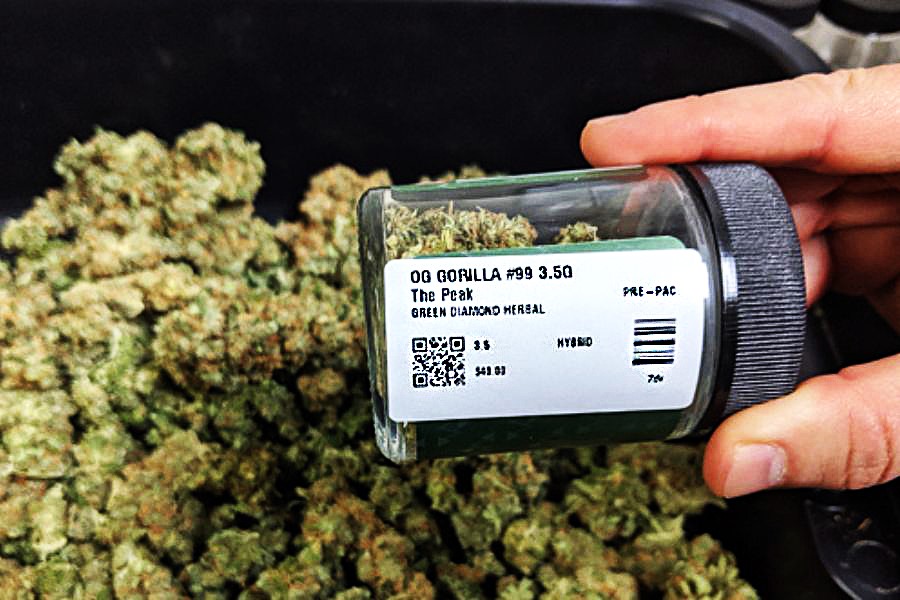
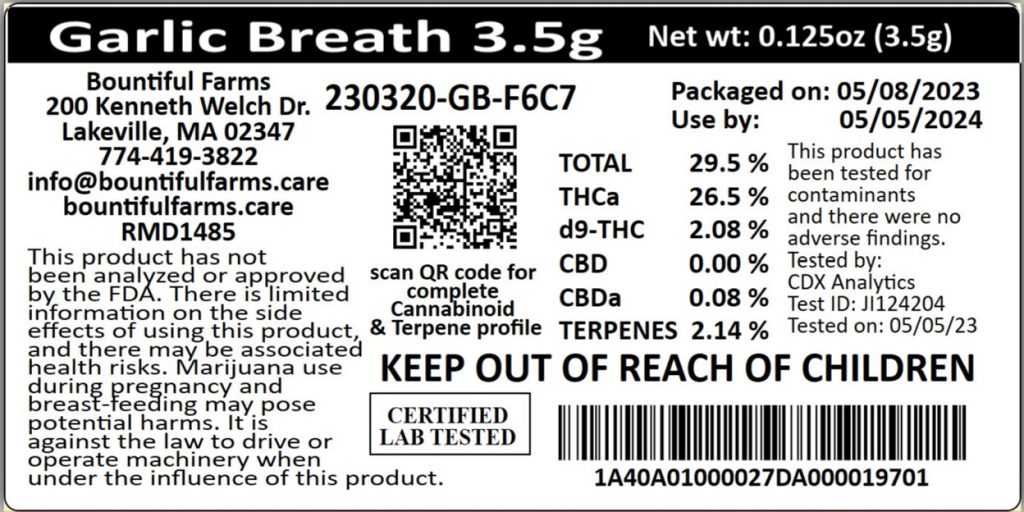
Labeling in the cannabis industry is not just a matter of branding—it’s a legal requirement. Dispensaries and cannabis retailers must ensure that every package includes detailed information such as THC and CBD content, batch numbers, manufacturer info, warning symbols, and expiration dates.
While branded packaging typically uses colorful labels for visual appeal, most operations rely on a second, white regulatory label for compliance (required information varies by state). These compliance cannabis labels are often small, and printing them clearly is critical for both legal adherence and customer trust.
5 Best Practices for Printing Small Cannabis Labels
Cannabis packaging labels can be very small, which can make printing clear, compliant labels difficult. To print small labels for cannabis products, following these best practices is a good place to start:
1. Use Simple, Readable Label Designs
Regulatory cannabis labels should prioritize legibility over aesthetics. Use clear, sans-serif fonts and maintain enough spacing between text and label edges. Even when printing on labels under 1 inch, clarity is non-negotiable. In some jurisdictions, font types and minimum sizes are specified by law.
2. Choose a High-Resolution Label Printer
To ensure every letter, number, and barcode scans cleanly, you need a printer that delivers high resolution. A label printer with a resolution of at least 300 DPI is ideal for printing small cannabis labels that require dense amounts of information. Lower-resolution printers can blur or distort critical details, potentially putting compliance at risk.
3. Select the Right Label Media
The label type impacts both durability and legibility. Choose white die-cut labels with a matte finish for optimal scan quality and text contrast. For improved workflow and less waste, consider linerless labels with permanent adhesive for tamper-evident applications. These can be applied directly over colorful branded packaging.
4. Centralize Label Design and Printing
Cannabis businesses often operate across multiple stations or locations, making consistency a challenge. With Star’s CloudPRNT Next and Label Builder, you can centrally manage and deploy approved cannabis label designs to any connected printer. Paired with a cloud-enabled printer like the mC-Label2, this setup ensures version control, prevents unauthorized edits, and delivers consistent, compliant output at every touchpoint.
5. Review and Refresh Regularly
Compliance rules change frequently. Conduct routine reviews to ensure your labels meet current state regulations and visual standards. Also, inspect print quality regularly to identify issues early, such as fading, misalignment, or worn printheads.
Why the mC-Label2 Is Ideal for Cannabis Compliance Labels
The Star Micronics mC-Label2 is a compact, front-loading 2-inch label printer that excels in tight spaces, like dispensary counters and prep stations. With ultra-sharp 300 DPI resolution, it prints small cannabis labels with exceptional clarity, perfect for overlaying compliance data on branded packaging.
It supports multiple media types, including white die-cut labels, linerless adhesive labels, receipts, and continuous rolls. The LBL models print die-cut labels and receipts only for focused use cases.
mC-Label2 Multifunction Printer
The mC-Label2 packs powerful features into a compact, front-loading design, including 300 dpi resolution, support for linerless, die-cut, receipt, and continuous media, and connectivity options like USB-C, LAN, WLAN, Bluetooth, and Apple MFi-certified pairing (X4 models only).

The printer’s One Touch Label feature allows users to store and print up to three pre-approved label designs without needing a network connection, speeding up repetitive labeling tasks. This helps budtenders or staff rapidly apply consistent labels during high-traffic hours—no need to access software or re-enter data for common label types.
Connectivity is seamless with support for USB-C, LAN, Bluetooth, and Wi-Fi. And because it integrates with CloudPRNT Next, StarIO.Online, and Star’s Label Builder, it’s easy to manage label templates and ensure accuracy across every location.
Start Printing Smarter Compliance Labels
Meeting cannabis labeling regulations doesn’t require oversized printers or complicated workflows. With the right cannabis label printer and a thoughtful process, you can create accurate, compliant, and professional labels that support your business and satisfy state requirements.
Mastering Label Compliance in the U.S.
From food and beverages to pharmaceuticals and consumer goods, this ebook provides the necessary tools to ensure your labeling meets legal standards and enhances customer engagement.
Leave a Reply