Category: Solutions & Use Cases

  • Star Micronics Introduces the New and Improved mPOP for SMB Retail

    Star Micronics Introduces the New and Improved mPOP for SMB Retail

    The new mPOP by Star Micronics offers improved functionality with easier cash management for retailers

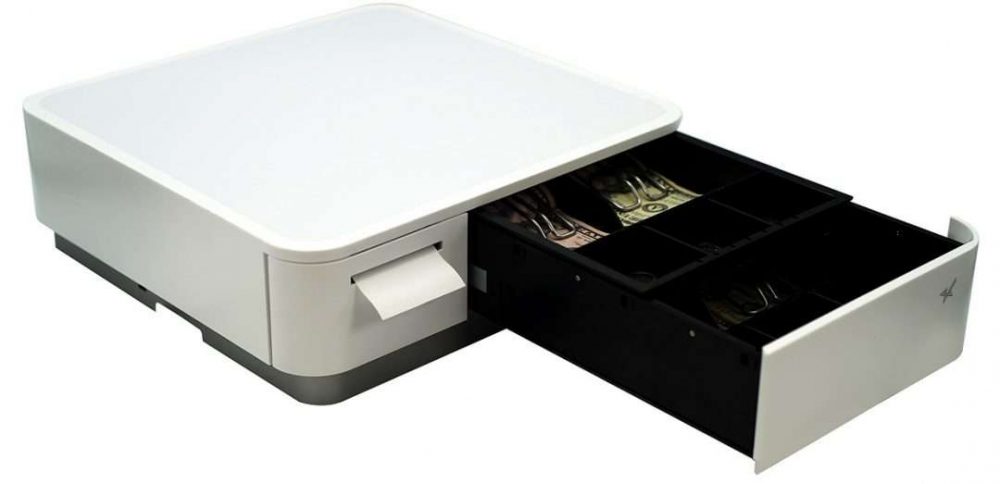
    Somerset, NJ – February 18, 2020 – Star Micronics, a leading global manufacturer of mobile, point of sale (POS), and customer engagement technologies, is proud to introduce the upgraded mPOP™ (mobile point of purchase). The Star Micronics mPOP offers a hybrid solution for tablet POS that combines a cash drawer and printer peripheral, offering an ideal hardware solution for small- to medium-sized retail businesses. Star’s most recent update to the mPOP makes it even easier for merchants to manage their cash payments with a small cash drawer footprint.

    The new mPOP with Flat Bill cash management stacks the till, providing a total of 4 slots for bills, and 4 or 6 adjustable spaces for coins. The individual tills will offer 2Bill-2Coin slots, with the top till easily sliding back to expose the bottom till section. This allows for US retailers to store and manage their cash in a more natural way and keep their cash payment organized, compared to the previous vertical-slot version of the mPOP.

    The mPOP also offers convenient Bluetooth and USB connectivity, and is compatible with any iOS, Android, or Windows device. With easy “drop-in and print” paper loading, and cable management, the mPOP offers an easy-to-use solution for any SMB retailer. The mPOP is also compatible with a number of Star peripherals including a 1D barcode scanner, 2D imager, and digital customer-facing display. Star Micronics also provides the mUnite POP solution stand for a sleek POS enclosure option.

    “Star Micronics is proud to have answered the request of many of our partners to introduce a Flat Bill solution for the mPOP,” said Michael Hanson, Executive Vice President of Star Micronics. “The new and improved Flat Bill solution keeps the small footprint of the mPOP that SMB retailers enjoyed, while integrating a more simple and familiar way to manage cash payments.”

    To learn more about the new Flat Bill mPOP, please visit https://starmicronics.com/mPOP.

  • Star Micronics and eatOS Partner to an All-In-One Restaurant Management Suite

    Star Micronics and eatOS Partner to an All-In-One Restaurant Management Suite

    eatOS and Star Micronics work to bring self-service, online ordering, and more to restaurants of all sizes

    Somerset, NJ – February 6, 2020 Star Micronics, a leading manufacturer of mobile, point of sale (POS), and customer engagement technologies, is proud to announce that eatOS has added support for Star’s restaurant printing solutions. eatOS brings a seamless experience to restaurants by offering a platform that manages point of sale, kitchen displays, self-service kiosks, pay-at-table, loyalty, and online ordering all in one application. eatOS supports the Star Micronics SP742 for back-of-house kitchen printing, and the TSP654II for point of sale receipts and self-service orders.

    The demand for self-services in restaurants is increasing rapidly. eatOS helps restaurants of any size add self-service kiosks to their workflow to reduce wait times, increase the average check size, and reduce operational costs. eatOS’s self-service kiosk is intuitive, easy-to-use, and integrates into the Point of Sale and Kitchen Display Screen seamlessly.

    Built to withstand heat and humidity, Star’s SP742 provides the ideal robust printing solution for back-of-house kitchen orders. eatOS has selected the Star TSP654II to be paired with Elo’s i-Series and Wallaby stand for their self-service kiosk solution. The TSP654II offers high print speeds and is simple to use. The self-service kiosk allows restaurant customers to skip waiting in long lines, and place their order using a touchscreen device, and pick up their order with the printed receipt.

    “We’re thrilled to be partnering with Star Micronics,” says Nicholas Brunner, COO and Co-Founder of eatOS. “Star has always been a leader in the POS space and with their highly innovative printers and Cloud technology, eatOS is continuing to bring next-generation solutions to the restaurant market.”

  • What We Learned at NRF 2020

    What We Learned at NRF 2020

    Retail’s Big Show! With 40,000 attendees, over 800 exhibitors, and 400 speakers, NRF 2020 was another one for the record books. The keynotes were entertaining and educational while the show floor was filled with tried-and-true companies as well as startups looking to grow their business.

    Of course, the largest retail expo in the world is full of lots of new ideas and technology including everything from security and inventory management to BOPIS software and self-service kiosks. The keynote address Sunday morning by Microsoft CEO Satya Nadella set the tone for what would be a show filled with hundreds of new technologies based on the data touch points and robotic technology available to retailers. This theme also stood out on the show floor, with almost all companies both large and small featuring some form of artificial intelligence (AI).

    AI Meets QSR

    Kevin Johnson, CEO of Starbucks, held a keynote session Monday morning and it seemed as though the topic was nearly identical to the previous day’s keynote. Kevin explained how Starbucks, one of the largest coffee chains in the world, is creating a cutting-edge AI technology that will allow baristas to provide a more personal experience to their customers. Normally when we think of robotics and AI, we never imagine a more personal experience, but Kevin gave a few examples of how this is possible. At the drive-thru window, baristas always seem too busy to offer high-quality customer experience, but now with Deep Brew, the barista can simply say the order and the point of sale starts collecting the order via voice recognition.

    Robots for Every Corner of Retail

    On the show floor, actual robots were on display and demonstrating the added benefits they can provide during every step of a product’s lifecycle, from the warehouse to the customer’s shopping cart. Everywhere you looked, there were robots that could help a retailer better operate their business, from a fully automated sorting robot that scans and organizes products during the shipping process to a robot that roams the store looking for spills and hazards. These new robotic innovations seem to all focus on giving employees back their valuable time and in turn, save business owners money.

    Software Advances at NRF 2020

    From a software point of view, there was a huge increase in companies that were merging the offline world with the online world. While this is really nothing new to the industry, it is becoming more and more necessary for retailers to do this in our new world of online shopping interactions. It is quite amazing that a small business can now easily offer customers BOPIS options using almost any point of sale (POS) that they choose. Whether an in-store POS software was unveiling an updated application or a young startup company was offering an integration with any POS, NRF had the technology to bring retailers into the new world of eCommerce. Any feature that can connect a store’s offline world with the online world really goes a long way in terms of helping small businesses compete with larger chain stores.

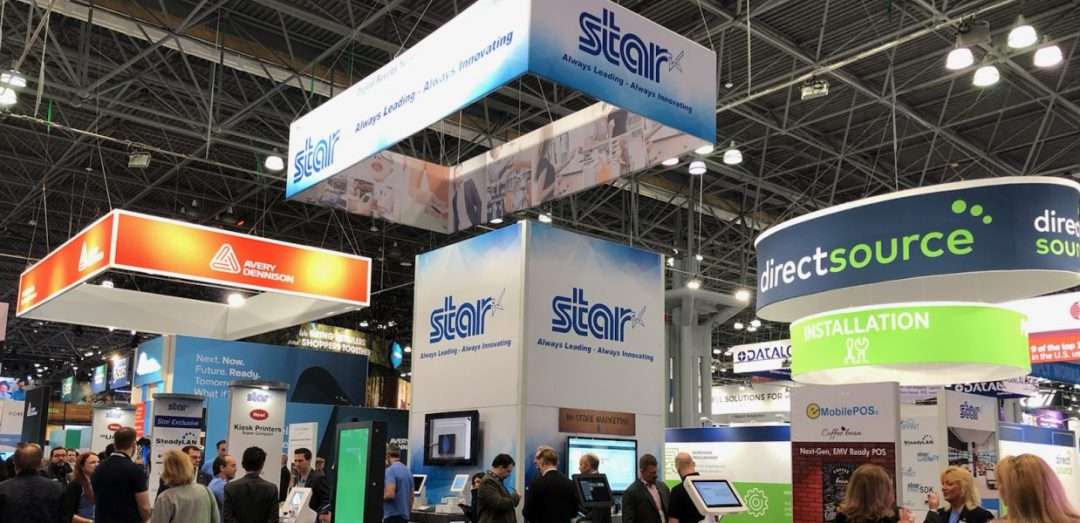
    Star at NRF 2020

    What were Star’s biggest highlights at Retail’s Big Show? We’re glad you asked. Here are the top three innovations we shared at NRF 2020:

    1. SteadyLAN

    Without a doubt, the showstopper at Star’s NRF 2020 booth was SteadyLANTM. An industry-first technology for iPad POS, SteadyLAN provides reliable power and network access through one cable connection. Learn more about how it works in this quick video:

    2. New Kiosk Printers

    Another highlight at Star’s booth is our new generation of SK1 kiosk printers, the SK1-211 and SK1-311. The SK1-211 and SK1-311 ship standard with StarPRNT emulation, which will allow software developers to take advantage of the full stack of Star Micronics technology, such as the StarPRNT SDKs and Star’s powerful line of drivers. Software developers that have already integrated Star products can now easily swap or extend their applications from a desktop printer to a kiosk printer. Learn more now in this video featuring Star’s Kiosk Product Champion, Augusto Echecopar:

    3. mUnite Stands

    Another hot topic at the Star booth was our new mUnite stands. These stands – designed for the mC-Print3, mPOPTM, and TSP143III/TSP654II – feature clean cable management, universal VESA mounting, and more. Discover more reasons why the mUnite is the industry’s best tablet stand in this video by Star’s mUnite Product Champion, Kyle Lauber:

    Last but not least, a special thanks to our in-booth partners this year:

    In Conclusion: Retail’s Big Show

    For anyone in the retail industry, NRF is the must-attend event of the year, and this year was no different. Rapidly advancing retail technology was on display at every turn you took at the show. The keynotes by Kevin Johnson and Satya Nadella had a large focus on AI and data learning. Robots on the show floor gathered crowds and demonstrated how quickly and efficiently automation is coming to the retail industry. This year we also saw the divide between big business and small business decrease. The technology that merges online business and offline business is becoming much easier to obtain, giving small business owners more tools to win a shopper’s purchase. If NRF is any indication of the trends in retail, this year will be filled with AI and automation leading the charge towards the future of retail.

  • 3 Ways to Help Your Customers Increase Restaurant Foot Traffic

    3 Ways to Help Your Customers Increase Restaurant Foot Traffic

    There are over 660,000 restaurants in the United States alone. That’s a lot of competition, and you may find your restaurant customers are facing related challenges: how do they differentiate themselves and grow sales? In a society filled with so many options for nearly every type of cuisine, and with seemingly limitless dining options available through smartphone apps, how do you help them increase foot traffic in their restaurant?

    Growing a restaurant business during this digital transformation doesn’t have to be complicated. There are a few key ways you can help your restaurant customers increase foot traffic – and lucky none of them are too complex. They do, however, require an understanding of the restaurant’s specific needs and target audience. Read on to discover how to help grow your customers’ business through leveraging online ordering, delivering a top-notch experience to diners, and growing a digital presence.

    Browse Star’s Restaurant and Kitchen Solutions

    1. Help Them Leverage Online Ordering

    In the last decade, nearly every aspect of the world has gone online – you can buy almost anything online, you can hail a cab from your smartphone, and you can do the majority of your banking from a mobile device – and the restaurant industry is no different.

    Online ordering for food is a huge market. For instance, did you know that digital ordering and delivery have grown 300% faster than dine-in traffic since 2014? Simply put, to keep up and grow restaurant foot traffic, your customers need to be active on at least one online ordering platform. Taking advantage of the millions of people using online ordering is a great way to expand your restaurant customer’s clientele from those who already know and love the restaurant, to brand new diners.

    It might sound like a complicated process but helping your restaurant customers get online can be simple. First, the restaurant should choose whether they want to be present on an online ordering app (like Grubhub, Uber Eats, DoorDash, etc.) or if they’d like to have an online ordering system integrated into their website – or both. When choosing a service, restaurants should consider the ability to customize and brand their system, the ease of integration, any associated fees and costs, and whether marketing support is offered.

    Another important component of online ordering to think about is the technology behind the solution. By choosing an online ordering service that is integrated with Star Micronics, you can rest assured you have reliable, easy-to-use, and high-quality hardware on your side. For example, CloudPRNT technology (which is available on the mC-Print2, mC-Print3, TSP654II, TSP743II, TSP847II, and SP742) allows the printer to directly communicate with the online ordering service server, meaning there is no need for an additional tablet, software, or SSL certificate at the local level. The printer simply automatically retrieves and prints online orders from any service integrated with Star’s communication protocol. CloudPRNT is compatible with receipt, label, linerless label, and kitchen printers, meaning the options for streamlined printing are endless.

    Discover how Star helped one Asian fusion restaurant group leverage online ordering and save nearly $10,000 along the way.

    Customer-Paying-at-POS-1080x7202. Give Them the Tools They Need to Deliver a Top-Notch Customer Experience

    “Have it your way.” Does that slogan ring a bell? Like one notorious QSR brand once said, to grow restaurant foot traffic, establishments should encourage customers to enjoy their dining experience on their own terms. One good reason for this is that if you aren’t offering a personalized, convenient experience, someone else most certainly is.

    So, what does a top-notch customer experience look like? Here are a few examples:

    • Convenience: We are living in the era of convenience. Diners want to order exactly what they’d like, in a quick and seamless fashion. To cater to this preference, your restaurant customers should consider implementing self-service kiosks, which not only provide a positive guest experience but also have been shown to increase profits. Another modern convenience that diners are coming to expect is mobile payment opportunities, such as paying at the table.
    • Reliability: Downtime is a bad time. If your systems go down thanks to an unstable network connection, that means lost time, lost money, and potentially lost business, which is the opposite of what your restaurant customers are looking to achieve. Avoid the stress of downtime by helping your customers choose reliable, connected restaurant point of sale (POS) hardware. For example, Star’s mC-Print2 and mC-Print3 includes SteadyLAN™ technology, which provides wired Ethernet service to an iPad connected to a networked printer via the Lightning cable. A stable connection means more money, more happy customers, and more restaurant foot traffic!

    3. Encourage Them to Grow A Digital Presence

    In addition to offering online ordering, in order to grow its foot traffic, your restaurant customer should also be sure to maintain an active website and social media accounts. A website can be useful for customers to browse a menu in advance, share the restaurant with friends and family, check business hours, and more. Social media is useful in several ways: it can give restaurants a public personality, provide diners with a “behind the scenes” look at food preparation, and promote upcoming specials. In a nutshell, the average American spends 5.4 hours a day on their smartphone. Take advantage of it! Catching a person’s attention online can certainly lead that person through a restaurant’s doors.

    Together, offering online ordering, delivering a stellar dining experience, and maintaining an active digital presence can help your restaurant customers grow their foot traffic. Contact Star Micronics now to learn more about how we can help you make your restaurant customers’ goals come to life.

    Are your customers ready for online ordering? Find out now!

  • How Back of the House Restaurant Technology is Evolving

    How Back of the House Restaurant Technology is Evolving

    There’s no doubt about it: people love to dine out. In fact, there are over 1 million restaurants in the United States alone, and it’s estimated that those restaurants produced $863 billion of sales in 2019. At the same time, the hospitality industry is undergoing the same digital transformation as nearly every other industry: for example, online ordering is growing 300% faster than in-dining spend!

    To accommodate these advancements, back of the house restaurant technology is evolving to keep up. Read on to learn more about the transformation taking place in kitchens around the world – and how it’s not as complicated as you think to keep up with modern hospitality trends if you choose the proper back of the house restaurant technology.

    Restaurants across the world are being prompted to streamline their operations to meet the demands of today’s latest hospitality trends. These new technologies include online ordering, self-service kiosks, and other updated kitchen technology. Let’s explore each trend and how your restaurant (or your customer’s restaurants) can adapt to take advantage of these opportunities.

    Online Ordering

    One of the most prevalent technological changes to the restaurant industry is online ordering. Did you know:

    • 31% of consumers say they use third-party delivery apps at least twice a week.
    • 67% of customers who have placed an order online will visit the restaurant more frequently versus those who have not.
    • Restaurants that utilizes an online-ordering system are able to grow their delivery revenue 30% more than those who do not.
    • Millennials order takeout via an app or website more than any other age group, with 79% of Millennials doing so in the last year.
    • Two-thirds of consumers say that they are more likely to visit a restaurant if they have previously ordered from them online.
    • Partnering with an online ordering service is a great way to reach new customers – one service has claimed that 92% of its orders come from entirely new customers.

    So, what does a restaurant need to do to accommodate online orders? The first step is to choose a third-party online ordering service. Some popular options include DoorDashGrubhubUber Eats, and more (Star is partnered with all three of those – and is proud to partner with nearly every other online ordering service provider, as well).

    Partnering with an online ordering service can be very straightforward. Most simply ask that the restaurant provides information about itself and uploads its menu, and then the service provider will send out the necessary equipment to get started.

    Many services allow the restaurant to either use its own drivers or leverage on-demand drivers, and some may even include special perks like professional photoshoots, marketing opportunities, website tools, and more.

    Considering back of the house restaurant technology when choosing your service provider is of utmost importance. Be sure to choose a service which provides a feature-packed printer that is:

    • Full of Connectivity Options: Star’s printers include multiple connectivity options including:
      mC-Print2-and-mC-Print3
       Star’s mC-Print2-and-mC-Print3
      • CloudPRNTCloudPRNT allows the printer to communicate directly with the online ordering service’s server, which means no need for an additional tablet, software, or SSL certificate at the local level. Enjoy all the benefits of online ordering without additional hassle and clutter!
      • SteadyLANTM: Star’s mC-Print series features SteadyLAN, which allows for direct data transfer between Apple iOS devices and the printer via the Lightning cable. For the first time ever, enjoy direct ethernet connectivity to iOS devices from the wired ethernet port of the printer.
      • USB Hub: Star’s mC-Print series also features a USB hub which allows for connectivity of up to three peripherals, like 1D and 2D scanners, cash drawers, line displays, kitchen buzzers, and more.
    • Durable: The kitchen can be a messy place. A good rule of thumb is to choose a printer that is IPX2-rated, meaning it is splash-proof and insect-proof.
    • High Performance: Choosing a high-quality and high-performance printer will serve you well in the long run. Look for a printer with a high print speed (like 250mm/s), a high print resolution (203dpi), and a simple user experience.

    Self-Service Kiosk Orders

    Arguably, the second most popular trend emerging in the hospitality market is self-service kiosks (it’s estimated that 41% of the industry is now using kiosks) – and for good reason. There are many benefits for both the customer and the restaurant when it comes to self-service kiosks:

    • More Sales: Customers spend more money when they order from a kiosk, thanks to kiosks prompting them with options such as additional toppings, which can add up over time. In fact, McDonald’s has seen a 20% increase in drink orders alone since implementing kiosks!
    • A Better Customer Experience: Implementing kiosks means shorter lines and enhanced order customization and accuracy for your customers. Additionally, your employees can spend more time giving customers a high-quality experience since they won’t have as much pressure to quickly process all of the orders.
    • Cost-Efficient: On top of making more money, you’ll avoid the time and money that is wasted when orders need to be re-made due to inaccurate manual order-taking.

    It may surprise you, but you can implement self-service kiosk technology without making big changes to your current restaurant operations! If your staff is trained on processing printed kitchen tickets, it’s possible to keep your back of the house operations the same –you can keep them by choosing a connected kitchen printer that can retrieve digital orders. Save time, money, and keep your workers happy by keeping your back-of-house processes the same.

    SK1-311 Kiosk Printer   Star’s SK1-311 Kiosk Printer[/caption]

    Star is proud to partner and integrate with many of the industry’s leading kiosk manufacturers. With a large variety of kiosk printers designed to meet different kiosk styles and requirements, there’s a good chance we have the right kiosk solution for you. Please contact our sales team to learn more, whether you’re a kiosk manufacturer searching for the right printer, a reseller or ISV looking for the right solution to offer your customers, or a restaurant on the hunt for a kiosk solution to meet your specific needs.


    Other Updated Kitchen Technology

    There are even more modern advancements happening in restaurant kitchens besides online ordering and kiosks. One example? The kitchen buzzer.

    Star mC-Sound Kitchen Buzzer
       Star’s mC-Sound Kitchen Buzzer

    Modern kitchen buzzers – like the Star mC-Sound – include many new features like:

    • High quality sound (89dB)
    • Easy-to-use, pre-recorded melodies
    • The ability to record custom user speech
    • Compatibility with Windows, iOS, and Android SDKs
    • The ability for the sound converter tool to be integrated
    • And more!

    Back of the house restaurant technology is evolving – but you may be surprised how easy it can be to update your existing technology and take advantage of today’s trends, which can add more money to your bottom line and create a better customer experience.

    Whether you want to offer online ordering, deploy self-service kiosk technology, or more, be sure your new processes are backed by high-quality hardware featuring future-proof connectivity options and integrations with your favorite service providers. Always leading, and always innovating, Star is proud to offer a portfolio of back of the house restaurant technology designed to meet today’s needs.

  • Star Micronics Launches SteadyLAN™ for iOS to Provide Reliable Network Access for iPad POS

    Star Micronics Launches SteadyLAN™ for iOS to Provide Reliable Network Access for iPad POS

    An industry-first solution to support stable store operation with one simple cable connection

    Somerset, NJ – Jan 13, 2020 – Star Micronics, a leading global manufacturer of mobile, point of sale (POS), and customer engagement technologies, is excited to announce SteadyLAN, an industry-first solution designed to provide power and network access to iPad POS through one Lightning cable connection.

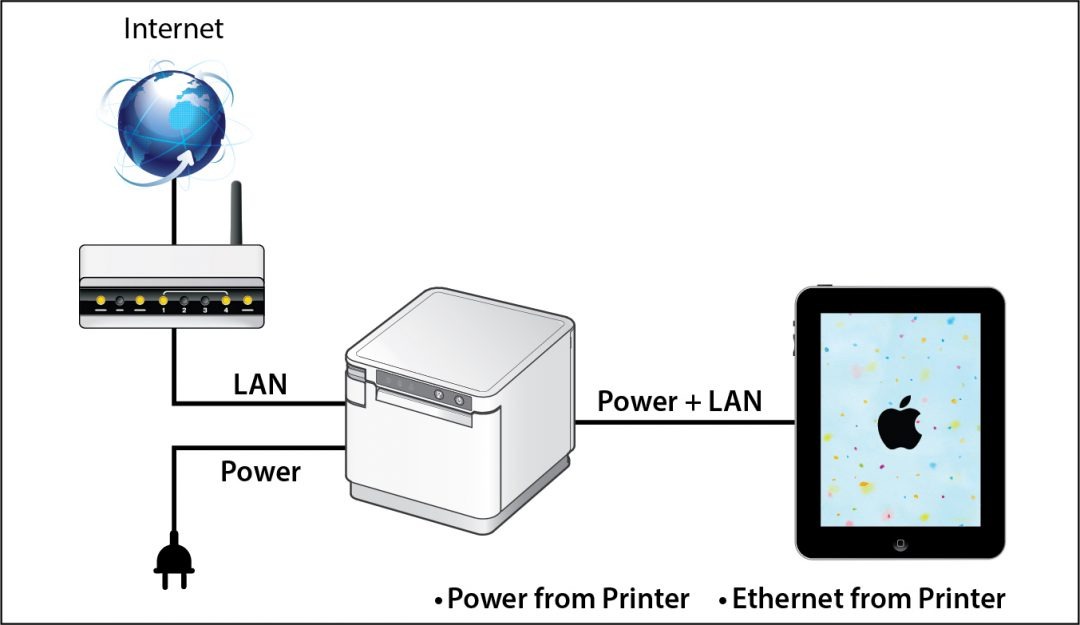
    SteadyLAN is a patent pending technology available on certain mC-Print Series printers.  It provides wired Ethernet service to an iPad connected to a networked printer via the Lightning cable (iOS10 or later required). SteadyLAN is available on the following mC-Print models: mCP21LB, mCP31L, and mCP31LB.

    Star-SteadyLAN-Technology-Final-withoutlogo-1080x625

    For locations where Wi-Fi connectivity is not possible or unreliable, this new technology is a world-first, providing the stability of a cabled LAN connection for iPad POS systems. By connecting the SteadyLAN-compatible printer to the Internet via wired LAN and connecting the printer and an iPad with a Lightning-USB cable, the iPad can use the Internet without Wi-Fi communication. At the same time, the iPad can communicate with the printer via Lightning USB and can simultaneously be charged from the printer.

    “We’re incredibly proud to announce SteadyLAN, as it will make unstable Wi-Fi signals a thing of the past,” said Jon Levin, Director of Product Management at Star Micronics. “We expect this new solution to greatly improve business operations in retail and restaurant POS settings, mobile ordering, and more.”

  • Star Micronics to Unveil New mPOS Solutions at NRF 2020

    Star Micronics to Unveil New mPOS Solutions at NRF 2020

    Additions to the mCollection, SteadyLAN, kiosks, hospitality solutions, and more to be demonstrated at booth #5419

    Somerset, NJ – Jan. 6, 2020 – Star Micronics, a leading manufacturer of mobile, point of sale (POS), and customer engagement technologies, is excited to attend NRF 2020 where it will demonstrate the latest additions to its mCollection, cutting-edge solutions for retail and hospitality, and leading self-service kiosks at booth #5419.

    Star is excited to unveil two new mCollection products at NRF 2020: a new model of mPOPTM featuring a Flat Bill cash drawer, as well as SteadyLAN, an industry-first technology for tablet POS which provides reliable power and network access through one cable connection. The mCollection also includes a variety of mPOS solutions including the mC-Print2 and mC-Print3, as well as mUnite stands, mG-Scales, and peripherals such as barcode scanners and customer displays. PromoPRNT, Star’s value-add receipt marketing tool, will be demonstrated along with these technologies.

    In addition to Star’s newest technologies, there will be three mock stores in Star’s booth: two retail shops featuring Star’s mPOP, mUnite Stands, mC-Print2/mC-Print3, cash drawers, and mobile printers; and a coffee shop featuring Star’s TSP654IIBi, mG-Scales, cash drawers, mUnite stands, and self-service kiosks.

    Several Star partners will be featured in its booth, including Elo, eMobilePOS, Erply, ImageHolders, Kiosk Group, nCLOSE, PredictSpring, Sitoo, Sophatar, SuiteRetail, and Vend. A variety of giveaways will be available in the booth, including bags of coffee, custom-designed tote bags, and gloves.

    “The Star team is looking forward to both reconnecting with current partners, and building new connections, at NRF 2020,” said Christophe Naasz, Director of Business Development at Star. “We’re excited to show the industry our latest mPOS solutions which are paving the way for retailers in the new decade.”

  • The Benefits of Leveraging Kiosks for Self-Ordering in Hospitality

    The Benefits of Leveraging Kiosks for Self-Ordering in Hospitality

    The airline industry was one of the first to revolutionize the check-in process with the implementation of self-service kiosks. The technology helped to decrease guest wait times and enabled labor to be reallocated to areas of greater need. Today, self-service kiosks have transitioned from an innovation found at the airport to an expectation held by consumers of the hospitality industry. In a recent survey by PYMNTS, it was revealed that kiosks are seeing the strongest growth, and that 41% of the industry is now using kiosk technology to serve guests.

    Self-service kiosks provide businesses the opportunity to both meet consumer expectation and demand, while at the same time growing the bottom line. Kiosks have been proven to help increase order size, improve accuracy, decrease labor costs, and more, which is why so many restaurants are adopting this solution. As this tech takes off, make sure your business is positioned to capitalize on self-ordering applications.

    Free Self-Service Kiosk Resources

    The future of many industries lies with self-service solutions. That’s why Star Micronics is offering free online ordering resources for resellers and software developers who are helping customers future-proof their businesses with self-service solutions.

    Increased Upselling Capabilities & Average Ticket Size

    In the high-tech age we live in, customers have become increasingly comfortable ordering from a screen. Kiosks allow customers to take their time and order precisely what they want, how they want it, without feeling pressure from the counter or customers next in line. According to the Kiosk Marketplace, research indicates that most customers prefer self-service devices to waiting in line or at a table for service.

    So, what’s encouraging guests to open their wallets for a bigger order at the screen? The primary driver is upselling. You may have trained your cashier to upsell, but chances are staff members aren’t asking guests to purchase additional items every time. With kiosks, an opportunity to upsell is never missed.

    Self-service kiosks can automatically prompt guests with tantalizing options that pair well with the selections they have chosen. Something as simple as additional toppings like cheese or sour cream— which may cost an additional $0.30 to $0.70—really adds up over time. When McDonald’s implemented these kiosks, they saw a 20% increase in drink orders alone.

    Don’t let the opportunity for those larger sales pass you by.

    Enhanced Order Customization

    With kiosk technology, upselling can be personalized. Kiosks can learn from the buying habits of repeat customers, making better recommendations based on what guests like. Loyalty programs are easily managed with kiosks, allowing guests to quickly see rewards points and how they can use them as they build their order. This added personalization creates a great sense of value for your customers, keeping them coming back time and time again.

    Upselling isn’t the only customization tool that self-service kiosks can provide. They also put the power directly in the hands of your guests to customize every item. They’ll be able to see every option available to them, including gluten-free or vegan options. Whether they want to add or remove toppings, swap sides, upgrade their drink, or elect a light or healthier version, they can easily make those adjustments with a few quick clicks.

    A cashier can only provide all this information when guests request it. Static menu boards only allow so much information on each item, topping, and sauce choice available. With kiosks, the customization is endless. Self-service kiosks allow businesses to meet guest expectations.
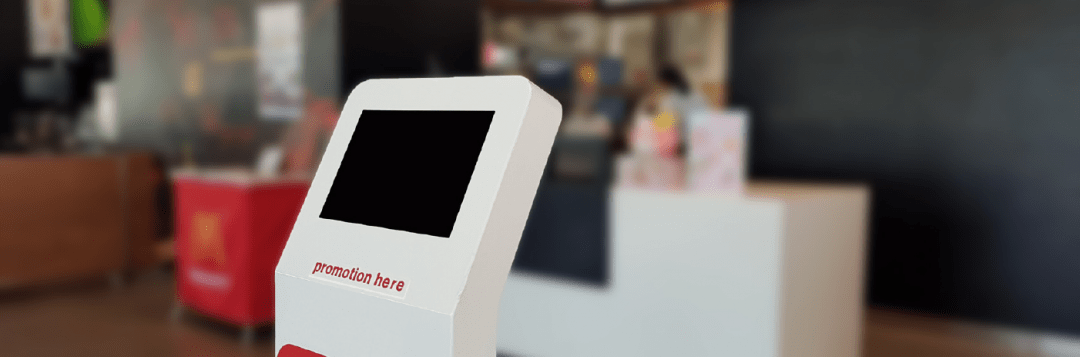
    Self-Ordering Kiosk

    Improved Order Accuracy

    As customization increases, so too increases the need for accurate order entry. Imagine you run a coffee shop, and a guest comes in and quickly rattles off, “One large iced coffee, double espresso, skim milk, light ice, mocha drizzle with extra cinnamon, no whip.” The guest might have gotten the entire order out before your cashier was able to even select the size. Your employee might require the order being repeated several times or risk entering it incorrectly—a costly mistake if it becomes a common occurrence.

    Now imagine that your guest has the ability to enter an order directly into a self-service kiosk. Every detail is entered correctly, then reviewed before checking out.

    Guests have the reassurance that their order was entered precisely how they want. Self-service kiosks deliver orders directly to the queue, which significantly increases order accuracy, saving your business time and money associated with correcting improperly made orders.

    Reduced Labor Costs

    Implementing kiosks doesn’t mean that you are eliminating cashiers and traditional cashier terminals. Some guests will still want to order from a cashier, especially if they want to pay with cash. With less pressure for cashiers to process orders quickly to meet the demands of a fast-growing line, cashiers can now take more time with customers, delivering a better customer experience. In addition, your business may now need fewer cashiers to take orders, allowing you to reallocate the labor time you save at the front counter to other areas where labor consistently falls short.

    Customer Insights

    Self-service kiosks provide business owners with valuable data. You’ll be able to get insights into popular menu items, busiest times of the day, and popular order modifications and add-on items. This data can empower you to determine what items to strategically promote on the kiosks, when additional staff might be necessary to assist guests with kiosks, and more.

    For example, if you notice that guests are often opting for a specific add-on item, this might direct you to make a price increase on that add-on item to test what that item’s ideal price point is for delivering the best profit margin. You’ll be able to track how that price change has had an impact on sales and your revenue stream. These small adjustments can have long-term impact to your bottom line.

    Additionally, you may notice that sales are slow for certain menu items during certain days or times. Changing the promotions that are displayed on the kiosk screen can bolster sales during slower times.

    Reduced Wait Times

    Guests don’t want to wait. Long lines are a major deterrent, and with the countless options available to consumers seeking quick service or fast casual establishments, wait times could make or break your guest experience—and you may never get the chance to make it up to the guest who waited too long.

    Kiosks offer a fast, easy way for guests to enter their own order, make their payment, get their (correct) order, and be on their way. This seamless process improves the guest experience and your business will reap the rewards.

    In addition, since cashiers will have to spend less time entering orders and processing payments, they can focus more on providing the best customer service possible. They’ll be available for guests to ask questions, ensure needs are met, and walk guests through any technical or user errors on the kiosks. The human element won’t be lost, simply transitioned into more of a service role, and less of a data entry one.

    Stay Competitive

    The hospitality industry is constantly evolving—always seeking the latest and greatest means to attract and retain customers. The competition is becoming more complex, as consumers have more options than ever. From high-end dining, to fast casual, home delivery services, meal kit, and grocery delivery options—the contenders aren’t backing down.

    Kiosks can help you contend with competitors in the hospitality industry, providing you with the edge you need to not only stay afloat, but also to become a successful establishment in the industry. With improved speed and accuracy, you’ll see higher customer satisfaction out of the gate. Plus, with the data it can provide, you’ll be able to fine-tune your offerings and prices, so your bottom line is always looking its best.
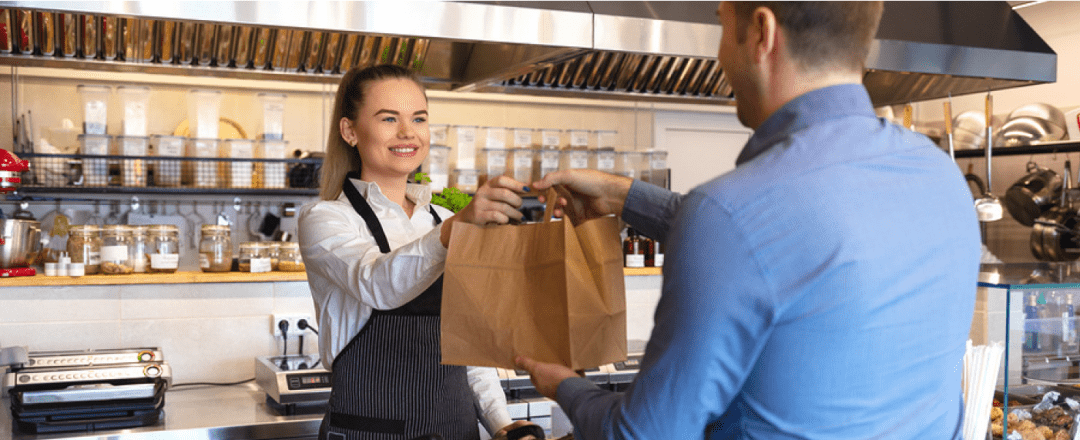
    Customer Picking up Food from Restaurant

    Make Sure Your Kiosk is Complete

    In order to process customer transactions, your kiosk needs to be outfitted with a reliable receipt printer. You’ll want to make sure that the printer is ergonomically designed to fit a wide range of kiosks. You also want to make sure the kiosk printer is fast, so lines aren’t held up from slow printing.

    A few qualities that make printers ergonomic and fast that you will want to look for are:

    • Looping presenter: This helps reduce paper jams and an output sensor detects if the customer has taken the receipt or not. The printer ejects uncollected receipts or foreign objects prior to printing the next receipt.
    • LED presenter: This helps deliver printer maintenance information to staff members and customers, such as receipt available (green light) or paper jam issue (red light).
    • Bezel: A bezel will ensure a seamless, professional aesthetic for the paper exit. It can be integrated with the LED feature for further visual appeal and maintenance functionality.
    • Paper roll holder: The paper roll holder should support different sizes of receipt paper rolls depending on the application of the kiosk printer its frequency of use.
    • PromoPRNT & Cloud-connected: A PromoPRNT, Cloud-connected kiosk printer will provide additional value-add services to your business. With PromoPRNT, you will be able to offer customers promos and coupons on printed receipts. Cloud connectivity will enable device management features and other benefits.

    Looking to learn more? Here are 8 features kiosk manufacturers should look for when choosing kiosk printing mechanisms.

    The correct kiosk printer is just a click away. Download our full eBook now to discover which kiosk printer on the market fits your needs!
  • Your Guide to Choosing Eco-Friendly Receipts

    Your Guide to Choosing Eco-Friendly Receipts

    This is the fifth and final part of “Keep the Receipt,” a five-part blog series about the various advantages paper receipts offer to businesses and consumers, and why you should elect to choose to offer – and accept – paper receipts.

    Sustainability is more than just a buzzword. It’s more important than ever to do your part to help preserve the environment. While some people’s first impression of receipts may be that they are not environmentally friendly, there are some steps you can take to ensure you are choosing eco-friendly receipts.

    Choosing receipts – and a receipt printer supplier – that practice environmentally friendly measures is an easy and important way to do your part while still providing printed receipts that many customers still prefer and business operations require.

    Discover The Value of Receipts: Printed and Digital.

    Here are three tips to help you choose eco-friendly receipts:

    Star Micronics Receipt Paper
    Star is proud to provide BPA-free, recyclable premium grade printer paper rolls. Authentic Star paper rolls are easily recognized by the Blue Core.

    1. Choose BPA-Free Receipt Paper

    Studies have shown that 90% of receipts contain the chemical BPA (Bisphenol A). While there is conflicting evidence about whether or not the level of BPA found on a receipt is dangerous to human health, why not skip the worry and choose BPA-free receipt paper?

    When you choose the right high quality, BPA-free receipt paper – like Star’s – you can also rest assured that your paper is working efficiently with your printer to extend the life of the print head, provide longer paper lengths for fewer paper changes, and prevent jams and clogs. These paper rolls also support Star’s warranty compliance and are offered in convenient pack sizes.

    2. Opt for Recyclable Receipt Paper

    Tying into the above point about choosing receipt paper that is free of BPA, it’s also important to choose receipt paper that is recyclable. There are forms of thermal receipt paper that should not be recycled, but guess what. You can recycle BPA-free receipt paper like Star’s!

    According to the American Forest & Paper Association, over 68% of paper was recycled in 2018, and the organization hopes to hit 70% in 2020. Why not contribute to that effort by choosing recyclable, eco-friendly receipts?

    3. Choose an Environmentally Friendly Supplier

    While choosing BPA-free and recyclable receipts is important, it’s just as crucial to choose a receipt printer (and paper) provider that prioritizes the environment.

    Some examples of environment friendly initiatives to look for in a receipt paper and printer manufacturer are:

    • Paper reduction tactics: Paper usage is a receipt printer’s largest negative burden on the environment. Choose a manufacturer that takes that fact into consideration and designs ways to reduce the severity of receipt paper’s ecological impact while maintaining user comfort and familiarity. Some examples of these tactics include options for reduced top margin, receipt length and width compression, digital receipts, and more.
    • Energy efficiency: Although the cost to power a receipt printer is minimal, business owners can still benefit from energy efficient solutions. Be sure to choose an ENERGY STAR-qualified manufacturer. The ENERGY STAR qualification is a highly respected achievement, and in order for a product to obtain the qualification, it must meet strict energy requirements set by the government.
    • Sustainable packaging: Every little step helps, so choose a printer manufacturer that uses recyclable packaging and provides electronic manuals.
    • Environmentally friendly manufacturing: Look for a supplier that monitors and conforms to international laws and standards, obtains certifications, and investigates new ways to make products safe for people and the environment. Some examples of these environmental initiatives include:

      Star is proud to offer all of these eco-friendly features – and more! Click here to read more about our environmentally friendly practices.

    Ready to make the switch to an eco-friendly printer manufacturer?

  • Do You Really Need a Receipt?

    Do You Really Need a Receipt?

    This is the fourth part of “Keep the Receipt,” a five-part blog series about the various advantages paper receipts offer to businesses and consumers, and why you should elect to choose to offer – and accept – paper receipts.

    The world has become digital – very quickly. In 1990, only 0.25% of the world population had a cell phone, and as of February 2019, it was estimated that more than 5 billion people have them. In today’s technologically advanced society, you might wonder if you still need a receipt. And guess what. You do!

    In today’s blog post, we’re going to explore why you still need a receipt, whether it’s for a traditional reason like confirming a tip amount, or if it’s part of an omnichannel retail experience, like to be used with cashback apps. Without further ado, let’s explore why shoppers do indeed need a receipt.

    While receipts are important, Star Micronics provides retailers with much more than just receipt printers – explore our full suite of Retail POS Solutions.

    In the hospitality business? Check out our Restaurant and Kitchen Solutions and QSR Solutions!

    7 Reasons Why You Need a Receipt

    1. Immediate Itemized Information

    Simply put, receipts are great at providing information. Many times, digital receipts provide basic transaction information, like a grand total, transaction date, and payment method. But with paper receipts, it’s a given that you’ll receive full itemized, line-by-line details – within seconds of payment.

    Besides basic transparency into what you paid for, this line item information can be useful to confirm you received the correct discount/promotion, and can even come in handy if you accidentally set off the alarm at the store and need to quickly provide proof of purchase for a specific item (we’ve all been there).

    2. Tip Amount Confirmation

    It’s not unheard of to be charged the wrong amount for the tip you leave on the bill at a restaurant, bar, or other establishment. While most of the time the information was simply entered incorrectly by mistake and it is easy enough to correct the issue directly with the business, that’s a hassle that not many people have time for. By keeping your paper receipt and filling out the tip amount on your personal copy, it becomes easy to double-check the amount on your credit card statement and correct any issues that may arise.

    3. Warranty/Return/Exchange Policies

    When you want to check if your product is still under warranty or able to be returned/exchanged, you want that information to be easily (and quickly) accessible. A surefire way to promise that is by keeping a paper receipt for the purchase in question. While some systems allow for that information to be stored automatically, that process is tied to the credit card used for the original transaction. This can present problems if you no longer have the card, lost the card, or didn’t use a card for the original purchase. Keep reimbursement, return/exchange, and warranty issues simple by keeping the paper receipt for those important items!

    4. Cashback Apps

    Who doesn’t want a little extra cash? Luckily, there are a variety of easy-to-use cashback apps on the market today, like Ibotta, Fetch Rewards, Shopkick, and more. How do these apps work? It’s easy: you simply make purchases normally, and then scan your receipt to receive rewards. It’s a pretty great reason to keep the receipt, if you ask us.

    And speaking of savings, if a business prints on-receipt promotions, those can be a great way to save money on future purchases and can be easily kept in your wallet so you don’t forget them during your next shopping trip.

    5. Instant Account Information

    You might see a pattern emerging: paper receipts are simply the best at providing fully detailed transaction information – instantly. That pattern also applies to providing account information instantly.

    Take, for example, a bank ATM. You need to take some cash out, and you want to check your account balance. An easy and private way to do that is to retrieve a receipt from the kiosk printer, which lists your current account information. When you do that, there’s no need to engage in a second step (like opening an app or logging on to a website) to get that account information, and it’s easy to quickly look back on that information at any time.

    6. Recordkeeping

    Paper receipts are simply the best for recordkeeping! First, and arguably most crucial, it’s important to keep proper records for tax purposes. According to Investopedia, it’s important to hold on to receipts, “so you have a record of even the smallest expenses you incur for business, charity and your health. As those expenses add up, they can start to lower your tax bill.” On a business owner-level, the IRS has further details regarding what kind of records you should keep.

    Receipts come in handy for other kinds of recordkeeping, too, like expense tracking for business trips, and personal budgeting. It’s also important to get a paper copy of gift receipts to make returns and exchanges easier/possible for your friends and family.

    7. Private and Personal

    The information provided on a receipt is personal, and in an ideal world, it is private. However, in a world filled with cybersecurity concerns (there is a hacker attack every 39 seconds!), it comes as no surprise that some consumers may feel hesitant about that information being stored in their email inbox.

    A paper receipt stays right where it should – in your wallet! With a hard copy receipt, there’s no need to worry about your sensitive information getting into the wrong hands.

    So – what do you think? When do you need a receipt? What other ways can they be useful? Let us know in the comments!

    Be sure to tune into our fifth Keep the Receipt blogs, which will take a deep dive into the sustainable features of Star receipts.