Category: Solutions & Use Cases

  • POS Industry Updates and Trends of 2016

    POS Industry Updates and Trends of 2016

    We are now in the middle of the POS industry redefinition. 2016 and 2017 will be very interesting years where we will see major players rising and others disappearing in the industry.

    In the last few years, mPOS solutions have proven that tablet devices are a reliable hardware solution for many retailers, and that the cloud is a reliable solution to provide instant information on not only one, but multiple retail locations. The POS of the 21st century was born, and is continuing to grow quickly.

    What we see now is a strong demand for small, and easy to deploy POS solutions. Since most of the POS solutions now provide a cloud solution, the need for heavy store hardware has decreased significantly, and many POS providers are rethinking their hardware offering.

    For many restaurants and retail stores, a simple tablet, cash drawer, and receipt printer is all that is needed . And don’t forget your payment device!   The payment device has actually become one of the most important devices at the POS.  It is the device that has the capability to enable Apple Pay, Android Pay, Samsung Pay, and most importantly, EMV enabled payment.

    The October EMV deadline came and passed. It did not motivate many SMB retailers to change their POS. The way we, as consumers want to purchase a product is what will make the retailers want to upgrade their point of sale system.

    Retailers and restaurateurs alike are looking to increase their revenue by offering purchase options both in-store and online. While online shopping has been around for quite some time, restaurants and food service are also beginning to adopt the idea of online ordering by allowing customers to order pick-up or delivery right from their smart phones.

    Leading the transition to this new world, Star Micronics’s hardware and software solutions represent new opportunities for technology providers. Adopting Star Micronics peripheral suite of mobile or desktop printers with Star Micronics cash drawers,  or just embracing the world of all-in-one with the mPOP™, (cash drawer, printer, scanner and tablet stand in one, easy to ship package) helps to answer the requirement for smaller POS solution.

    Technology like CloudPRNT allows restaurateurs to receive orders from online ordering services without the need to have the printer connected to any other device or service inside the store. CloudPRNT will work with the online service to store jobs, create jobs, and communicate with the printer directly through the cloud.
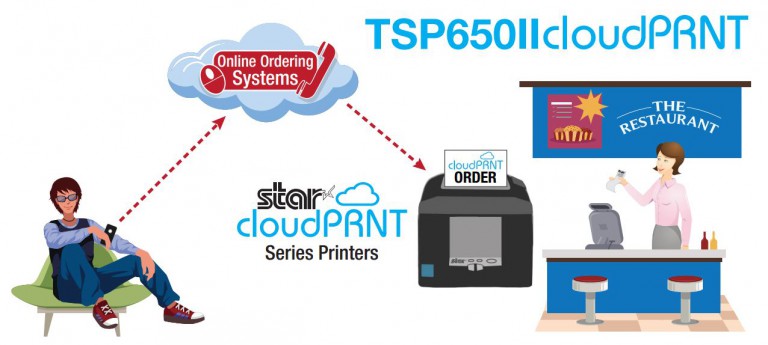
    cloudprnt

    In addition to leading the way to a better shopping or eating experience, Star is improving the way we manage our purchase receipts. Last year Star released the first true digital receipt solution, AllReceipts™, where shoppers can now decide for themselves if they want to keep their paper receipt or save and store them on their mobile device. Now, Star is offering retailers the capability to communicate electronically with their customers to promote their latest products.

    The face of retail will continue to change rapidly and Star will always be there to lead and innovate for you and keep your business successful.
  • Cash, Card, or Phone?

    Cash, Card, or Phone?

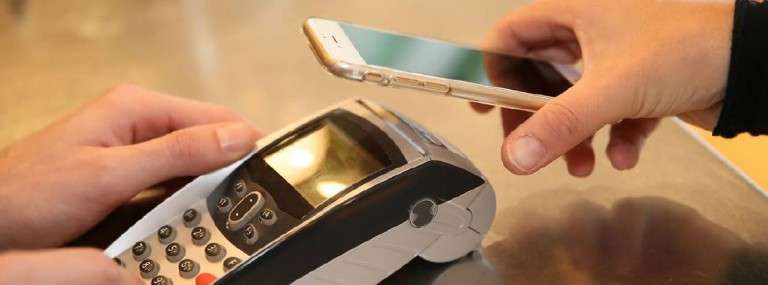
    Our phones have already replaced our cameras, our iPods (or MP3s), and our computers. Now, they are beginning to replace our wallets. We are seeing more and more consumers reaching for their mobile phone at the point of sale instead of their wallet. It’s no surprise that this recent adoption of mobile payments is going to majorly change the way people shop.

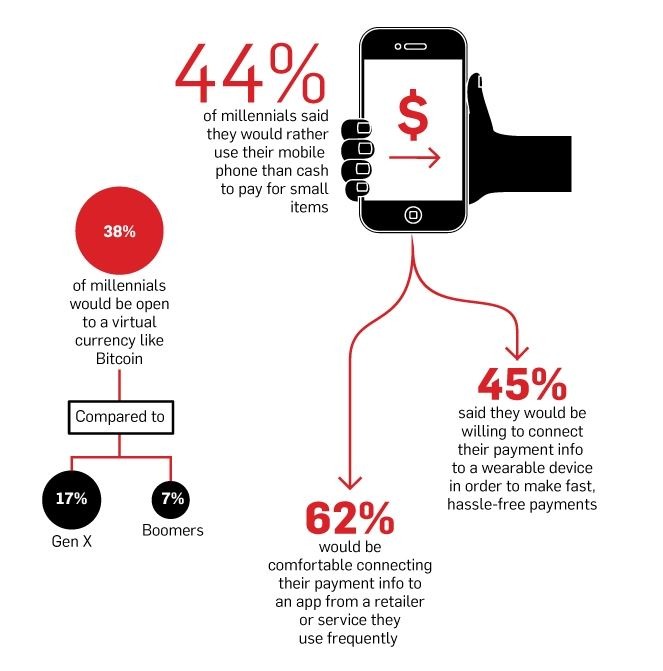
    The number one thing driving consumers toward mobile pay options and mobile wallets is simply the convenience of the payment. 45% of millennials said that they would be willing to connect their payment info to a wearable device in order to make fast, hassle-free payments, according to Adweek. If there is one thing that consumers today love, it’s for their shopping experience to be as quick and painless as possible. We know this because consumers, especially the millennial generation, prefers their shopping experience to be online. Seriously, what’s better than doing all your shopping from the comfort of your own living room? But, we are finding that brick and mortar stores are making a comeback.

    mobilepay-millenial-stats

    According to TimeTrade research, 85% of consumers say they prefer to shop in physical stores. However, there is still a convenience in the shopping experience that consumers are looking for. This comes at the point of sale.

    Giving customers the option of their preferred payment method is important, because it can make or break the entire shopping experience. How many times have you had your credit card out and ready to pay only to hear “sorry, cash only”? According to Business Insider, about 45% of millennials (ages 18-34) have made an NFC payment, and 35% of adults 35 or older have done so. When a retailer cannot accept the customer’s preferred payment method, the entire shopping experience becomes frustrating and inconvenient for the shopper. We must accept that we are now moving toward an age where shoppers will be standing at the point of sale with their mobile device out and ready to pay.

    It’s now the responsibility of the point of sale industry to make these mobile payments possible and easy to implement for SMB retailers.

    From a point of sale standpoint, we already see ISVs (Independent Software Vendors) working to make their POS applications compatible with mobile payments. Some, such as Square, have even developed their own customized payment terminals to accept any type of mobile payment along with chip-enabled credit cards. By moving toward mobile payments as the norm, we are left wondering what that means for the future of point of sale.

    This could easily lead to a greater move toward digital receipts. When retailers are implementing mobile payment options, it is important for them to keep in mind the idea of the mobile wallet not just for payment, but for the digital receipt as well. While many mobile payment platforms offer digital receipt options, if retailers want to use those digital receipts as an opportunity to engage with their customers, going with an outside digital receipt provider might be the best option.

    The bottom line is that cash and card payments will never fully disappear. As the adoption of mobile payments continues to grow, we will find a growing demand for more brick and mortar retailers to accept these type of payments.

    Learn more about Star Cloud Services digital receipt solutions at www.starcloudservices.com.

  • How Digital Receipts Can Boost Omnichannel Retail

    How Digital Receipts Can Boost Omnichannel Retail

    In the world of small to medium businesses (SMBs) in retail, we hear the word “omnichannel” being used quite often. Retailers are working to improve and grow their omnichannel strategy in order to better satisfy and engage with their customers. Today, there are so many channels for purchasing, it is important for SMB retail stores, especially brick and mortar, to utilize these channels to increase their engagement with customers and customer loyalty.

    First, what does omnichannel mean?

    Omnichannel is a multi-channel approach to sales that seeks to provide the customer with a seamless shopping experience whether the customer is shopping online from a desktop or mobile device, by telephone or in a brick and mortar store.

    Now the question is  – what does this mean for SMB retailers?

    The answer seems very obvious – expand business by creating buying opportunities for customers through multiple channels. In order to do that and see an actual ROI from creating purchasing options from all channels, retailers will need to also develop a strategy for using these channels to increase customer loyalty and omnichannel marketing opportunities. Luckily, the two go hand-in-hand.

    One important thing to consider about omnichannel retail is that you are not only giving your customers the option to choose which channel to purchase from, but you are giving them the flexibility of seamlessly moving between channels during their purchasing. For example, your customer finds the perfect dress for her friend’s wedding, but you do not have her size in stock. You will be receiving another shipment at the end of the week with her size included, but she is afraid that she may not make it back to the store in time. By offering the option to purchase through multiple channels, the customer can simply go online and pre-order the dress right from her smartphone, making it a win-win for both parties involved.

    The tricky part here becomes marketing through the different channels in which customers are purchasing. Should you be investing in more digital advertisement to target your online buyers, or do in-store shoppers still make up the bulk of your total customers?

    An easy way to bridge the gap between the digital channel and your brick and mortar store is to offer the option of digital receipts to customers. By offering the AllReceipts™ digital receipt application to in-store shoppers, you are automatically gaining access into their digital world, making the customer more likely to make future purchases through an alternative channel such as an online desktop or mobile device.

    Since Star Cloud Services offers AllReceipts™ in-app marketing tools like Engage NOW and Flip, retailers can increase their omnichannel marketing strategies without any additional cost, and by targeting customers through all channels.

    Star Cloud Services’ digital receipt solutions works to connect the retailer to the customer through IoT technology and uses the smartphone application, AllReceipts™, to help retailers engage with their customers through all purchasing channels, whether in-store or online.

    With the growing adoption of mobile payments and mobile wallets, digital receipts are going to continue to grow in the retail space. By offering multi-channel purchasing options and using omnichannel marketing strategies, such as digital receipt applications, to engage with customers, you are opening your retail business to endless possibilities.

    To learn more about Star Cloud Services and AllReceipts™, please visit www.starcloudservices.com.


  • Bar POS: 4 Things to Help You Be Successful

    Bar POS: 4 Things to Help You Be Successful

    Owning and managing a bar is not all fun and games, but takes a lot of time and hard work. With drink specials, pricing, food menus, and of course, money to worry about, it leaves little time to consider how you will manage the point of sale system of your bar. For bars and restaurants in particular, the point of sale and cash management is extremely important. In a fast-paced environment with a high cash flow, you will want a point of sale that is easy to use for employees and will help you connect with your customers. Here are a few things to consider when choosing a POS for your bar or restaurant.

    Easy-to-Use Software

    Bars, nightclubs, and restaurants tend to be very hectic and fast-paced working environments for bartenders and servers. This means you will want a point-of-sale system that is easy to navigate for both management and employees. Being a bartender in a busy bar often means having to take multiple drink orders at one time and remembering the separate tabs for each. A point of sale system that allows your employees to easily manage tabs, split items, and enter happy hour and other other drink specials will cut down on the amount of time spent entering orders, and will increase the time spent preparing drinks and communicating with customers.

    You will also want a system that allows employees to print customer tabs and receipts, or send food orders directly to a kitchen printer.

    Cash Management

    When managing a bar, you will typically have a higher amount of cash coming in compared to your standard restaurant. For this, you will want to ensure that your point of sale system has the capabilities to handle large amounts of cash. You may also want to consider a proximity-based solution for your cash drawer to ensure that your cash drawer is always safe while bartenders are restocking liquor or grabbing food orders from the kitchen.

    Ambiance

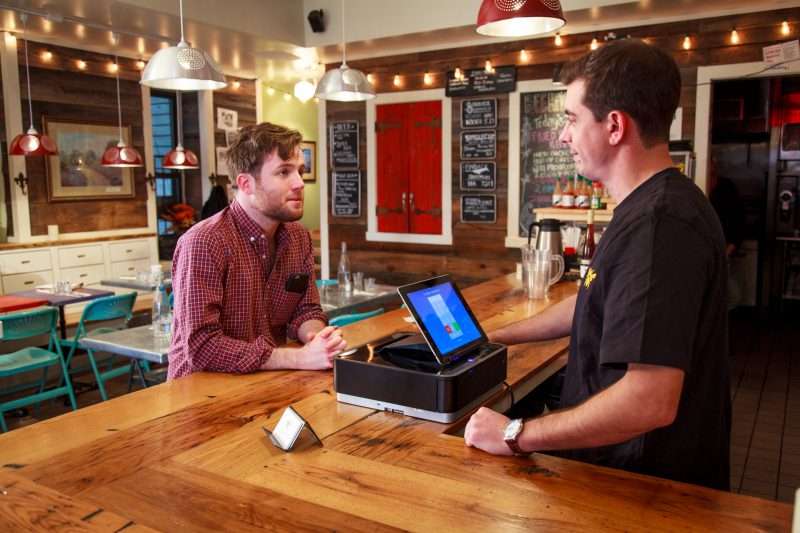
    In a bar, ambiance is extremely important! People decide to go out to a bar to relax after a long day of work, or to have fun with a group of friends. You want to make sure that your bar makes guests feel welcome and comfortable no matter their reason for being there. With that, be sure to consider the look and feel of your point of sale. When sitting at the bar, customers will see your bartender running tabs, printing receipts, and interacting with the point of sale. Invest in a POS that will display a smooth transaction between the employees and the POS system, and one that jibes with the ambiance of your bar. If you’re the type of bar to have wooden stool seats and dart boards lining the walls, then a standard cash drawer and printer with a tablet should do the job. If your bar radiates a more modern and trendy look, you may want to go for a sleek, all-in-one POS system, such as the Star mPOP™.

    Customer Engagement

    As a bartender, engaging with customers is important for two reasons: you get better tips, and customers end up spending more money on drinks. When customers feel comfortable talking to and engaging with their bartender, they are more likely to stay longer and purchase more drinks while they cat. But what about after the customer leaves? It’s just as important to engage with customers after their visit as it is to during their visit in order to ensure they continue coming back. There are a number of customer engagement options offered by POS providers with just one being digital receipts.

    Offering a digital receipt option to your customer customers can easily allow you to track how often a customer frequents your bar and their go-to drink order. This then allows you to offer your customer coupons or inform them of promotions using those digital receipts. Star’s AllReceipts™ digital receipt solution offers engagement tools, such as Engage NOW and Flip, providing customers with coupons and discounts using the back of the digital receipts, or can direct them straight to your website. AllReceipts™ also offers device management options and data facilitation tools to make sure you get to most out of your digital receipt solution.

    In your bar, a POS can be so much more than just a place to manage cash and input orders, but it can help you grow your business!

  • A Beginner’s Guide to POS Software and Systems

    A Beginner’s Guide to POS Software and Systems

    Investing in a point of sale (POS) system is one of the best things you can do for your business, but with so many options on the market, how do you determine which POS hardware and software best suit your business needs and your budget?

    This guide can help you get on the right path to finding the perfect POS system for your business.

    Step 1: Define Business Needs

    No one wants to waste time and money on a POS solution that lacks needed capabilities, or has unnecessary features that increase the price. To avoid purchasing a system that isn’t right for your business, you need to identify the specific challenges that you will need your new POS system to address.

    Start by asking yourself:

    • Is business suffering because customers must often wait in long lines at the POS?
    • Do shoppers frequently leave your establishment empty-handed because you don’t have the merchandise they want?
    • Are you spending too much time managing employees or trying to find out why your sales volume often doesn’t jibe with your inventory levels?
    • Do you want to attract new customers?

    Once you have clearly identified your business needs, research which POS functions address them. The list of functions you need your new system to provide will help narrow the field of choices when you shop for a new POS system.

    Step 2: Set a Budget

    Decide how much your business can afford to spend on a POS system. By most accounts, the average industry investment in POS systems total 2 to 3 percent of retailers’ annual volume, and 1 to 1.5 percent of restaurant operators’ annual volume. Consider ongoing costs, such as software maintenance/updates, hardware maintenance, and technical support.

    Step 3: Shop for Software

    As you consider your options, you will find that not every software solution is compatible with all POS hardware. Selecting your software first will prevent you from being limited in functionality.

    There are different types of software you can choose from:

    • Native: Native POS software is installed on your POS hardware. It is easier to customize then cloud-based software.
    • Cloud-based software (Software-as-as-Service, or SaaS): In a SaaS model, software is delivered via the cloud, and you pay for it on a monthly subscription basis. Also, cloud-based software can be accessed from anywhere there is an Internet connection, giving you enhanced visibility into, and control over your operation. Customizing this type of software may be difficult.
    • Hybrid software: This software can be run online in the cloud or offline.

    Step 4: Find Compatible Hardware

    The POS software you choose will dictate the POS hardware that you can use. In many cases, however, there will still be a number of options to choose from. Some of the choices you must make are related to how your employees will use the system. For example:

    • What is the preferred input method? Some operators favor keyboards or a scanner interface for POS data input, while others prefer a touchscreen interface that facilitates faster data input and easier training for new employees.
    • Will you use mobile POS? POS functionality on a tablet or other mobile device can give you line-busting, in aisle assist, and pay-at-the-table capabilities that can greatly enhance customer experiences. Your options include adding mobile POS to a traditional, stationary system, or using mobile POS alone.
    • Which peripherals are needed? You need to consider printers, cash drawers, PIN pads, payment card readers, and barcode scanners, and select the model that best suits your needs.
    • Will you accept all forms of payment? Make sure your new system gives your customers the ability to pay by their preferred method. Now that the U.S. is migrating toward EMV payments, all new POS systems should have the ability to accept chip card payments. Failure to do so can result in bearing liability for fraudulent payment card changes. Also consider trends that indicate emerging payment types. Mobile wallet use, for example, is gaining ground. To accept payments of this type, you’ll need POS solutions that include near field communications (NFC) technology.
    • Which terminal design do you prefer? A traditional POS terminal design may work well for your business. If space at the checkout counter is limited, however, you may want to consider a more ergonomic solution with a smaller footprint, such as an all-in-one configuration that incorporates basic peripherals (e.g., printers, cash drawers, credit card readers, PIN pads, and customer displays) or a tablet POS system. You will also find options that are aesthetically pleasing and don’t detract from a store’s dècor or restaurant’s ambiance.
  • Finding the Right mPOS for Your Food Truck

    Finding the Right mPOS for Your Food Truck

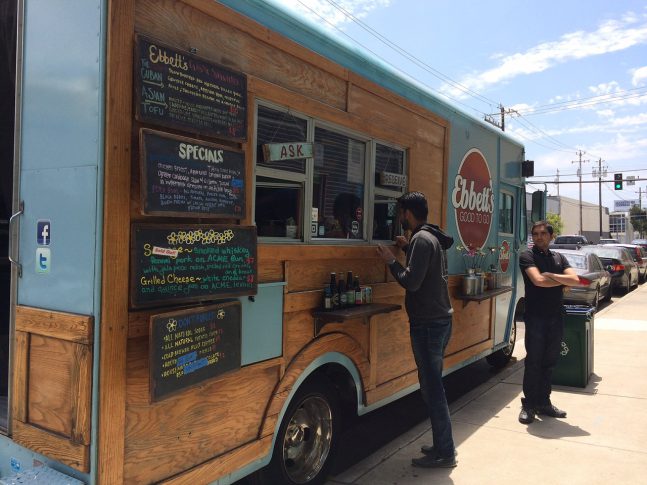
    It’s food truck season, folks! The warmer seasons are the best time to grab an outdoor bite from your local food truck or food stand. We see them popping up more and more as the weather gets warmer, and people flooding them to snag some quick and tasty street food. This often times results in crowded trucks with long lines, making business very hectic for cooks and cashiers. Luckily, Star Micronics has the perfect mobile point of sale technology for these businesses, making their job all the more easy, while also keeping customers happy and satisfied with their service.

    When thinking about finding the right mPOS system for your seasonal food truck or food stand, there are a few key considerations. Are you looking to solve the issue of line busting? Are you trying to create a more efficient workflow for your employees? Do you want to save space in your compact location by switching to a more mobile printer peripheral?

    If you answered yes to any of these questions, Star has the solution for you!

    Kitchen Printers

    If you’ve ever ordered from a busy food truck in the middle of the summer, you can see that it can be a hot and hectic environment for cooks. The “old-school” process of writing down orders and passing them off the cook becomes inefficient when handwriting is hard to read, the cooks are very busy, or when the order gets lost or damaged in the transition between order-taker and cook.

    Using a POS system to input orders and send them to an impact kitchen printer makes for an easier workflow because the order is being taken and entered into the POS in real-time. The order can then be sent directly to the impact printer, eliminating miscommunication between the “front of truck” and “back of truck” staff. Impact printers are also often times noisy, making it easier for the cook to know when a new order is coming through, and the paper remains durable in hot environments.

    Receipt Printers

    Just because your customer is ordering food on-the-go, doesn’t mean they don’t need their receipt. A thermal POS printer is necessary for food trucks for the obvious – to provide a proof of transaction, but the key for food trucks is to keep the printer mobile.

    A Bluetooth thermal desktop printer or a portable printer is the best solution for food trucks. When working in such a small location, things can get tight. With a Bluetooth enabled thermal printer, you can move your printer daily throughout the truck to wherever space allows. Portable printers are also a viable option for receipt printing because it not only allows you to move throughout the truck, but to move outside of the truck for a line-busting POS solution.

    Multi-Function Printers

    Again, when trying to navigate a food truck on a busy summer afternoon, space can be limited. For those who are looking to really save counter-space, a multi-function peripheral might be the best option for you. Star Micronics’ latest mPOP™, all-in-one mobile point of purchase combines a cash drawer with a two-inch receipt printer, and a 1D barcode scanner to create the perfect mPOS solution for small spaces. Using Bluetooth connection, the mPOP can also be repositioned in the food truck or food stand in order to maximize counter space, and can be operated on-the-go using a tablet or mobile device.

    To find the right mPOS solution for your food truck, visit www.starmicronics.com.