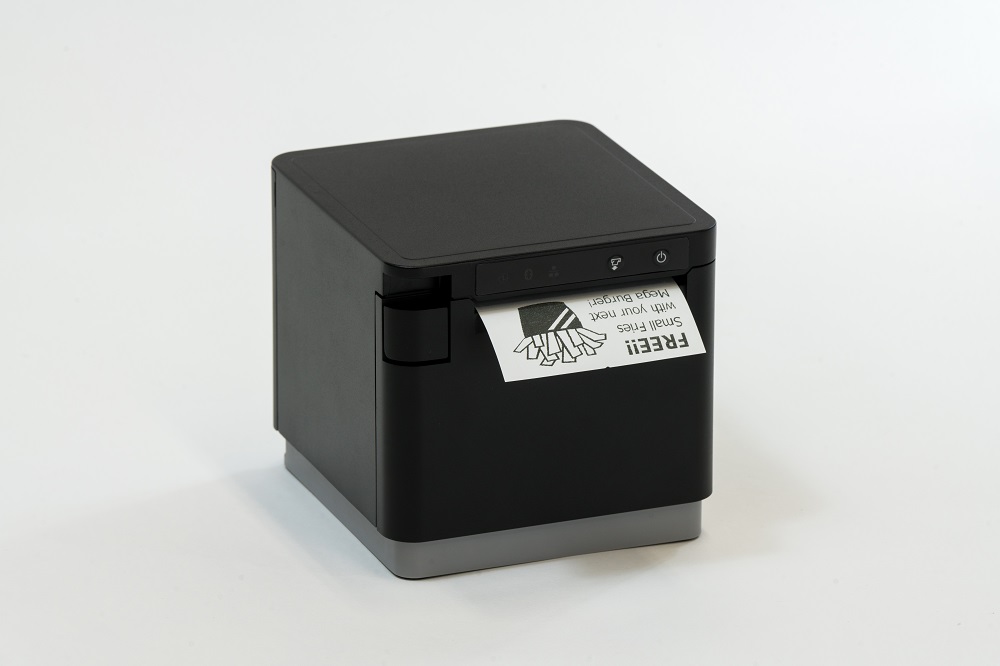
Star Micronics is proud to release the TSP143IVUE: a modern, ultra-connected thermal receipt printer in the TSP100 POS printing solution series.
Somerset, NJ – February 22, 2022 – Continuing its “Always Leading – Always Innovating” philosophy, Star Micronics presents the TSP143IVUE, a modern and ultra-connected POS printing solution.
Already a leading player in the mPOS market, the new Star Micronics TSP143IVUE offers multiple ways to connect, with a modern USB-C connector for communication and an additional USB-A connector for android mobile device powering and peripheral communication. It offers a USB/LAN Dual Interface and cloud printing capabilities for traditional and mobile POS solutions.
Built with all the capabilities you have come to expect from its predecessor, the TSP143IVUE provides a more compact and sleek design, with added features like AOA (Android Open Accessories) and CloudPRNT. Its innovative design boasts a 20% smaller footprint, a protected internal power supply, and “drop-in and print” paper loading.
Offered with AOA and Dual USB/LAN interface connectivity (the first in the series to do so), this printer has effortless installation, making it simple to incorporate into your existing point-of-sale system.
AOA technology gives the printer full communication with your Android device while keeping it powered. The Star TSP143IVUE is CloudReady which means it can connect to any cloud application supporting Star’s CloudPRNT technology.
The TSP143IVUE is high-speed and can print up to 250 millimeters per second. This printer is part of the new generation of devices that can connect to the Star Micronics Cloud Services platform, where users can customize and enhance their receipts by adding graphics and logos and triggering coupons for better customer experiences.
Star Micronics, one of the world’s largest POS providers, has designated a portfolio of printing, secure cash management, and customer engagement solutions for any retail or hospitality establishment in POS and mPOS environments. Embracing the mobility wave, Star’s complementary SDKs allow users to utilize Star printers in tandem with Android™, iOS iPad®, and iPhone® devices to generate receipts for all of its printers. In addition, Star Micronics is always leading and innovating, enabling web-based printing solutions, including remote cloud printing, wireless cash drawer solutions, proximity-based printing, and secure cash management. For more information, visit www.starmicronics.com or follow us on Facebook, Twitter, YouTube, or LinkedIn.
Welcome to the Star Software Update, the regular series of blog updates where Star’s Integration Team informs you about the latest important Star Micronics software updates.
What’s New:
Star Micronics has released the futurePRNT v7.5.1 to address issues related to a Windows 10 update issue.
About the Issue
Windows 10 updates released on June 8, 2021 have been reported to cause printing problems with USB printers, and may also cause some cash drawers to not close properly.
More information on the issue can be found here: https://starmicronics.com/help-center/knowledge-base/resolving-usb-printer-queue-issues-related-to-june-2021-windows-update/
The Solution
In addressing the printer/cash drawer malfunctions related to recent Windows 10 Updates, Star Micronics developed a driver update to resolve this matter. Please use the following links to download the driver and access the installation guide.
C&H Hawaiian Grill was a long-time passion project, founded by Hensan and Cora Timo. They have been in business for 16 years, starting in Killeen, TX, serving hearty island BBQ. The Timo family wanted to share the “Aloha” spirit with their community combining the essence of vibrant Hawaiian experiences with a laid-back atmosphere. They recently opened their Austin, TX location and plan to open in San Antonio, TX in May, 2021.
Like many other independent restaurants, C&H Hawaiian Grill felt the impact of the COVID-19 pandemic and were forced to shift their business model. Prior to the pandemic, C&H used third-party delivery services such as Uber Eats and DoorDash, and hired someone full-time to handle delivery and pickup orders via phone. When the global pandemic hit, the amount of delivery and pickup orders coming in via phone quickly became too much to handle manually.
The Solution
Since their current third-party ordering services did not have a solution for curbside pickup, and many of their orders were still call-ins, C&H knew they needed another solution. That’s where UBMe and Star Micronics come in.
UBMe offers a social, mobile technology that is built to help local businesses connect with their customers. UBMe’s seamless technology allowed C&H customers to search and order food directly through the app for curbside pick up. Even more, the app allowed C&H to communicate with these customers when they arrived to pick up their orders with specific safety instructions and procedures.
C&H started by installing the UBMe platform without the Star printer, but quickly realized it was too difficult to track the orders coming to their tablet or phone. Once they installed Star’s mC-Print3 with CloudPRNT technology, online ordering became a breeze. Orders placed through the UBMe app would print directly to the kitchen so they could begin food prep right away.
“UBMe and Star helped solve an issue that we never expected to arise,” says Hensan Timo, Owner of C&H Hawaiian Grill. “Curbside pickup seemed to grow overnight, and many of the existing online ordering apps did not have an easy solution for this transition. With UBMe and Star, online ordering has never been easier.”
After seeing success with UBMe and Star in their Killeen location, they installed the solution in their Austin location as well.
The Results
From the time that C&H installed the UBMe and Star solution, they nearly doubled their profits from online orders. C&H has printed hundreds of curbside pickup orders at their Killeen location. The system has been easy to use for both employees and customers, and the customers love being able to communicate directly with the restaurant through the UBMe app.
With UBMe’s 5% flat commission per order, the solution is maintainable and affordable for C&H Hawaiian Grill.
Star Micronics, a leading manufacturer of mobile, point of sale (POS), and customer engagement technologies, is proud to announce that Crunch has added support for Star’s new mC-Print3. With the Crunch Manager and Star Micronics, receiving and printing online orders has never been easier.
Crunch is an app built to seamless receive and accept online food orders. Restaurateurs are able to confirm the order, review important order details, provide status updates to hungry customers, and more through Crunch. Crunch also provides its customers with a custom-designed self-ordering kiosk and mobile ordering apps built specifically for their business. With food images, nutritional information, varied menu options, and more, Crunch allows restaurants to stand out from their competition and other online ordering platforms.
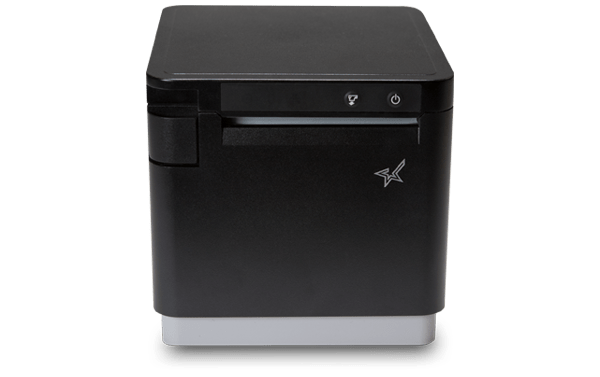
Star Micronics’ new mC-Print3 is compact and sleek with exceptional functionality. With front paper loading, and a splash- and insect-proof design, the mC-Print3 is perfect for restaurant environments. The new printer comes with multiple connectivity options and hub functionality to power up to three peripherals, such as a kitchen buzzer, scanner, or line display.
“We are pleased to continue our partnership with Star Micronics,” says Shmuly Preizler, CEO of Crunch. “Together we are able to offer an amazing product for restaurants across the country and help them with the Crunch Self-Ordering Kiosks and online ordering platform to be more efficient and successful.”
About Crunch Systems
Crunch is a point-of-sale and restaurant management platform built exclusively for food service businesses on an affordable cloud-based platform. Crunch offers advanced functionality including self-ordering kiosks, quick menu modifications, real-time enterprise reporting, online ordering, mobile ordering on an easy-to-use interface, and more!
Crunch gives restaurant owners the ability to have their customers order online using their website directly from any device. Crunch offers a feature rich and user-friendly ordering solutions, including online web ordering, mobile app and self-ordering kiosks. Crunch also offers a full back office portal and integrates to over 35 POS systems. For more information, visit https://www.gocrunch.com or follow us on Facebook, Twitter, YouTube and LinkedIn.
Restaurant technology is evolving extremely quickly. Gone are the days of taking orders by hand on a paper tablet and punching entries into a legacy point of sale (POS) system. Clunky POS terminals have been replaced by sleek tablet-based POS systems, complete with integrated sales, menu, and loyalty information.
As the hospitality industry leverages all of the benefits that mobile point of sale (mPOS) has to offer, one thing is more important than ever: connectivity. In today’s blog post, we will explore how a tethered Ethernet connection between a restaurant POS tablet and a receipt printer can benefit restaurants in three major ways.
1. Steady Network Connection
A tethered connection – or a direct connection from the POS tablet to a restaurant’s Ethernet network – is very important because it means one thing: reliable connectivity!
A steady network connection is an absolute gamechanger when it comes to any restaurant and retail business, as Wi-Fi signals tend be weak and unstable in physical brick-and-mortar locations. Why is this? According to Infovista,
“Wi-Fi signals are notoriously sensitive to the surrounding environment… Construction materials, nearby sources of interference, even the products on the shelves can attenuate Wi-Fi signals.”
When you choose a POS system that includes a dependable tethered connection that runs from the receipt printer through to the POS tablet, you eliminate the need to worry about Wi-Fi signals all together. Using this setup can also provide an added bonus: By selecting a receipt printer that provides both Ethernet connection and power to the tablet, restaurants can experience a true “two-birds-one-stone” situation in terms of streamlining their POS and boosting its reliability and functionality.
2. Prevent Downtime
When it comes to any business, and especially restaurants, time is money. Processing transactions and turning tables quickly means more profit for the business and happier customers who are more likely to return to the restaurant. When running a business smoothly is a top priority, one thing can be very dangerous: downtime.
If a restaurant relies on an unstable Wi-Fi network to process transactions and close tabs, downtime can unfortunately become a regular occurrence. Choosing a POS system with a receipt printer that provides both wired Ethernet access and power to the tablet means that restaurants can mitigate the risk of network downtime and keep business flowing smoothly because they are avoiding network disconnection, as well as the possibility of the tablet running out of charge.
Two of the most important things to patrons are a restaurant’s food and its service. Ensure you are providing smooth, timely, and high quality service by implementing tethered connections at the POS.
3. Space and Cost Savings
Just like avoiding downtime is critical to a restaurant’s operations, reducing expenses and creating a clean, cohesive aesthetic is also important. A tethered connection between the receipt printer and the POS tablet can help you do both of those things.
With a tethered connection between the receipt printer and the tablet, Ethernet connection and power are routed through one cable, so you have fewer cables and adapters to purchase and manage. This not only saves money but also provides a tidier, clutter-free look at the POS which is a place where you have the opportunity to make a positive impression on many customers, especially those that are simply popping in to quickly pick up their online ordering order.
Looking to modernize your restaurant and take advantage of online ordering?
Download our free eBook, “Is Your Restaurant Ready for the Growing Online Ordering Trend?” now!
SteadyLAN® for Tethered Connections in Restaurant POS
If you are interested in the benefits that a tethered connection between the receipt printer and restaurant POS tablet can offer, look no further than Star Micronics’ SteadyLAN®!
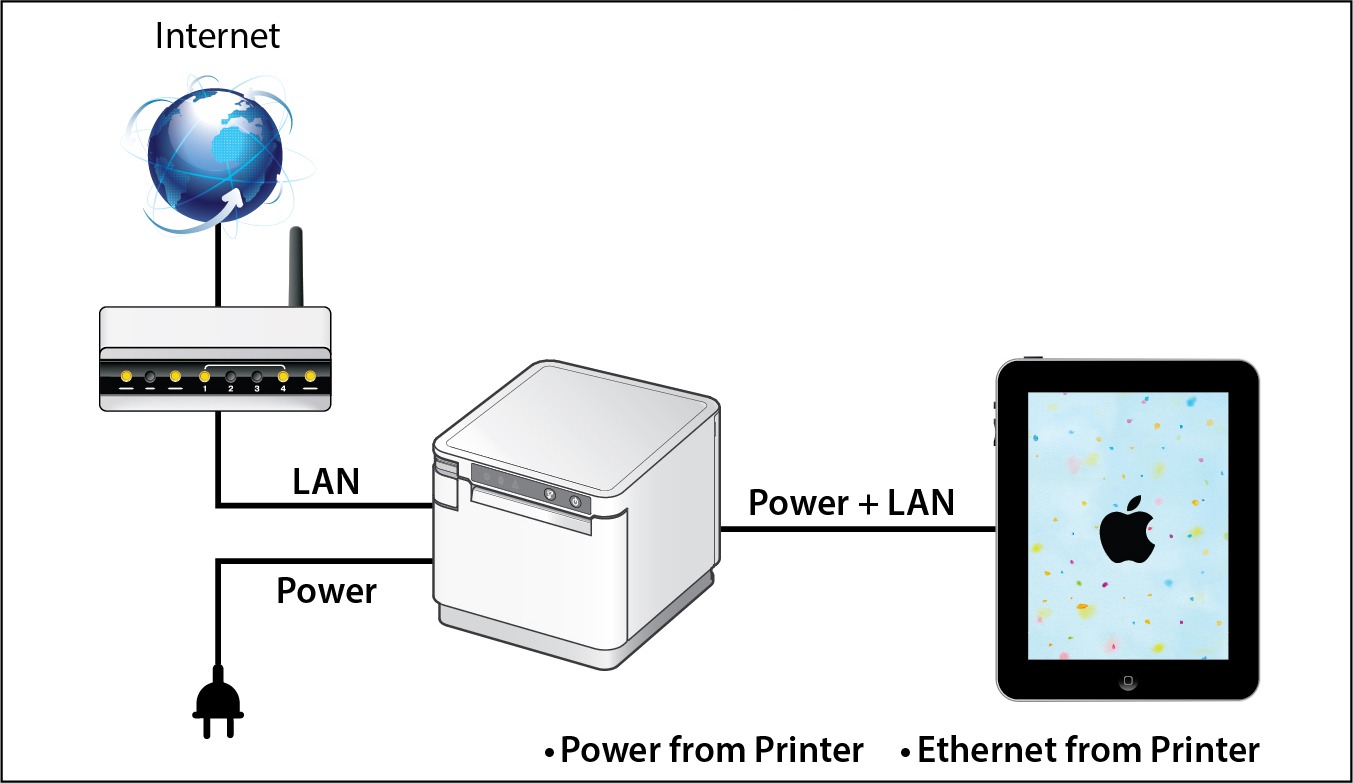
Star’s unique SteadyLAN® technology (patent pending) makes unstable Wi-Fi signals a thing of the past! SteadyLAN, available on certain mC-Print models and designed for iOS, Android, and Windows devices provides direct cabled control of the printer and attached peripherals, as well as Ethernet provision to the tablet, from the wired Ethernet port of the printer.
For locations where Wi-Fi connectivity is not possible or unreliable, this new technology is a world-first, providing the stability of a cabled LAN connection for tablet POS systems. By connecting the SteadyLAN-compatible printer to the Internet via wired LAN and connecting the printer and a tablet with a Lightning-USB or USB-C® cable, the device can use the Internet without Wi-Fi communication. At the same time, the tablet can communicate with the printer via USB or LAN and can be charged from the printer.
To more about SteadyLAN, click here or watch the below video:
Which Printers Include SteadyLAN?
SteadyLAN is available on certain models of both the mC-Print2 and the mC-Print3.
mC-Print2
2” thermal receipt printer Easy setup Guillotine auto-cutter Bluetooth, USB, Lightning, LAN, CloudPRNT Cloud ready SteadyLAN™technology available on model: mCP21LB
3” thermal receipt printer Simple user experience Easy to integrate through common SDK Bluetooth, USB, Lightning, LAN, CloudPRNT IPX2 splash-proof design SteadyLAN™ technology available on models: mCP31L and mCP31LB
The COVID-19 pandemic has drastically changed the way people shop, forcing retailers to reevaluate their processes and their technology. While there are uncertainties, we know stores just aren’t going to reopen and go back to normal.What will retailers do differently? What will shoppers expect? What new technology do retailers need?
Across the country, consumers are choosing to shop with retailers that offer cleaner stores, shorter checkout lines, curbside pickup, “Buy Online, Pickup In Store” (BOPIS), touchless payments, and more. As consumers adapt, they will become accustomed to these new conveniences, and eventually expect it. Retailers that start using newer technology to adapt and offer all these options will succeed.
Whether they want to or not, retailers have to change – not to just get through the pandemic, but to be successful in the new world of retail. There have been important lessons learned from COVID-19 for retailers, all of which should be taken into consideration moving forward.
10 Retail Technology Solutions for Today’s New World
Whether you are an essential retailer, or reopening your brick-and-mortar, here are 10 technology solutions to help retail businesses reopen and adopt to the new world of retail:
1. Online Shopping
If there’s one thing we’ve learned over the past few months, having an online storefront is vital. If you have a physical store, offer BOPIS and add curbside pickup as a delivery option on your site. Consider selling on third-party sites such as Amazon, Walmart, eBay, and Facebook to expand your market reach and increase online sales.
2. Curbside Pickup
While many retailers offer curbside delivery, it’s not always easy to manage, especially with lots of orders and/or limited staff. Develop a well-thought-out process to manage your orders and use text messages/emails to communicate the status of each order with customers.
3. Mobile Point of Sale
With current restrictions, it’s important to keep traffic flowing. With a mobile POS solution, you can process payments anywhere in your store to keep lines as short as possible (line-busting), as well as outside your store for curbside pickup.
4. Touchless Payments
As more brick-and-mortar businesses reopen and consumers return to shopping in stores, touchless solutions become more and more important. Consider offering Smart Wallet payment processing solutions, such as Google Pay and Apple Pay. This allows customers to pay for their orders without having to reach into their wallet or touch your credit card device.
5. Sneeze Guards
All stores should have a shield for virus protection. Some sneeze guards are designed for specific point of sale monitors, so check with your technology provider before buying a custom solution. They should be easy to install and relocate in case your store setup changes.
6. Security Labels
If you offer home delivery or curbside pickup, you can secure packages with tamper-proof labels (or seals). These labels provide visual evidence if a package has been tampered with. Your customers will appreciate it!
7. Email Marketing Automation
With fewer customers visiting brick-and-mortar stores, retailers need a way of communicating with customers and getting promotions out. If you aren’t already, use an email marketing solution. If your system allows it, personalize and automate your campaigns/promotions to drive up clicks and sales.
8. Self-Service Kiosks
If your store gets busy, add a few kiosks so customers can shop your store’s live inventory without having to walking around. Add kiosks outside your store if shoppers have to wait in a line to enter your store.
For retailers willing to experiment, scan-and-go looks like a promising technology for mainstream retail, especially in the post-Coronavirus world. Similar to Amazon Go, customers simply grab items off the shelf and walk out, eliminating checkout lines altogether.
Tips for Purchasing New Technology
Before purchasing new retail technology, prepare a list of all the hardware and software you own, and what you think you may need. Even if it’s just a short list, it will help you plan a budget and compare solutions. When making your list, consider all mobile point of sale devices, credit card devices, receipt printers, cash drawers, scanners, servers, internet service, retail software, eCommerce technology, and more.
5 ways to save on new technology purchases:
Tax deductions: Save all receipts and ask your staff to save receipts too. Technology purchases for your business can be deducted on taxes.
Trade-ins: Before disposing of your unneeded hardware (which can cost money), ask your technology provider if they accept trade-ins, or sell/donate it to a store that needs it.
Financial assistance: Research grants and financial assistance offered by organizations to retail businesses impacted by the COVID-19 pandemic.
Volume discounts: While you shouldn’t base new technology purchasing decisions solely on price, ask your technology provider if they offer volume discounts and/or have any current promotions.
Defer payments: Many technology providers are currently assisting retailers and helping them adopt new technology solutions by offering either deferred payments or even buy now, pay later models. For example, at Celerant, we are currently offering your first 3 months free for any new SaaS product to help retailers get started with new technology now, while not having to pay until later.
Are you Ready for New Retail Technology?
Celerant Technology is the #1 provider of innovative retail software.
To help retailers during this challenging time, Celerant is offering up to 3 months free on new SaaS retail software contracts; from now through June 30th.
Receipt printers play an integral part in the customer experience. Every transaction at the point of sale (POS) generates a receipt; these paper (or digital) takeaways are proofs of purchase and potentially so much more. A good receipt printer enables store owners and managers to print coupons, raise brand awareness, and issue customer surveys. As receipt printer technology progresses, you can expect even more functionality, higher quality printing, and faster connections.
What does the future hold for receipt printers? These six features will become even more important as businesses evolve.
1. Front-Loading Paper Design
Front-loading printers are designed for easy loading and low maintenance. It’s inevitable that cashiers will need to change the printer paper at least once while there’s a line waiting. Quick access for a paper swap can shave time off the wait, which keeps the line moving.
2. Multiple Connectivity Options
Consumers expect always-on connectivity for uninterrupted service, so don’t limit yourself. Purchasing a printer that has multiple connectivity choices, including Ethernet, Wi-Fi, traditional USB, lightning USB, Bluetooth, and CloudPRNT, allows for versatile, reliable use throughout retail locations. Mobile checkouts are mainstays in busy retail operations, so multiple connectivity choices will ensure your receipt printer is always up and running.
3. Easy Software Integration
The days of downloading multiple drivers, clicking around to integrate printers and software, getting frustrated and finally calling tech support is over. No one has time to sit on the phone to troubleshoot problems, so expect to see plug and play setups, with everything you need right in one box and online.
4. Hardy and Compact, but Still High-End and Stylish
Bigger isn’t better, and in the future, you’ll be hard-pressed to find a receipt printer that takes up a lot of real estate on a checkout counter. Instead, expect stylish, compact designs, even for printers that are tough enough to work in any modern environment.
5. Thermal Printing
A thermal receipt printer is quiet and uses a printhead to apply heat that transfers characters and images to receipt paper and labels. Thermal receipt printers have a higher resolution than impact printers, so they print crisp, clear images. For merchants that want a nicer looking receipt, or print coupons and marketing information, thermal printers may be the right choice.
6. Value-Added Services Included
You want more control from your POS system over services that were previously managed through third-party companies, such as surveys, promotions, coupons, and even digital signage. Star Cloud Services was created to bring next-generation customer engagement solutions to retailers by transforming their receipt printers into cloud-connected devices. This gives business owners total control over the what and how of communicating with their customer base.
Star Cloud Services include:
AllReceipts: a free cloud-based, digital receipt application that allows customers to store and manage receipts on their mobile devices
PromoPRNT/scheduler: schedule the duration of a coupon campaign by selecting a time, date, and printer for each coupon/promotion
Customer surveys: a direct line of communication with customers, printed on the receipt, to get their feedback on how your business and products are performing
Business owners shopping for a new receipt printer shouldn’t choose one that’s obsolete before it’s even out of the box. Look for a printer that is a front-loading device for fast paper changes, and one with myriad connectivity options for mobility and flexibility. Don’t let your receipt printer limit you — choose one that includes value-added services that gives you control over how and when you communicate with customers.
A restaurant’s “back-of-house” generally refers to three parts: kitchen (the largest component), offices, and staff break room/rest area. A restaurant with a well-run back-of-house operation increases customer satisfaction, empowers staff to provide a higher level of customer service, and prepares the consistent, quality meals your customers expect at every visit.
Essential restaurant back-of-house technologies like a kitchen display system, durable receipt printers, and an all-in-one point of sale system help your kitchen run more smoothly so the front-of-house doesn’t suffer from long waits for a table, poorly timed service or incorrect orders.
Here are three restaurant back-of-house technologies that your eatery should implement right now:
Kitchen display system (KDS)
A kitchen display system streamlines food preparation. This critical restaurant back-of-house technology helps manage customer expectations by preventing kitchen backups, monitoring prep times and alerting staff when things start to go awry. The KDS also lists out cooking directions/ingredients to ensure that diners have the same delicious experience every time they visit your restaurant.
A kitchen display system connects to the point of sale terminal and consists of software, a monitor that can resist moisture and heat, controller, and a bump bar to scroll through the orders. When the customer is finished ordering, data is sent through the kitchen controller to the appropriate location, either to a single screen or multiple ones at different food prep stations.
Selections are time stamped, labeled with the customer’s name and sent to the appropriate prep area at different times to ensure everything will be finished and served to the proper person simultaneously. This means diners will never have to wait for their friends to be served while their meal gets cold or receive their appetizer with their dinner being served immediately after.
Fast, tough receipt printer for orders
Receipt printers are an integral part of your restaurant back-of-house technologies. However, an immaculately well-run kitchen is full of hazards for electronic components. Overuse, heat, spills, particles and steam can harm a restaurant kitchen printer, causing expensive work slowdowns, bottlenecks, and mistakes.
Restaurant owners looking for a quality printer for their kitchen should consider a durable receipt printer that can withstand this harsh environment. To guarantee a healthy ROI, the receipt printer chosen should be spill-proof and insect-proof. Additionally, consider a compact model that won’t take up much valuable back-of-the-house counter space. Ensure that the printer you choose is flexible and able to connect with future hardware by selecting one with a multi-interface. For example, the mC-Print3 fills all of these requirements, plus grants access to a suite of free value-added Star Cloud Services.
All-in-one point of sale systems
All-in-one point of sale (POS) systems are exactly what the name implies: POS systems that include all the important components in space-saving configurations. The best all-in-one POS systems will give end-users the ability to add peripherals, upgrades, and new options as they come to market.
All-in-ones typically include a touchscreen, printer, cash drawer, and magnetic stripe reader, with the option of adding other peripherals such as a scale, bar code scanner, additional security options, and displays. In addition to the mC printers, Star’s mCollection includes 1D scanners, 2D imagers, customer display, and three NTEP-certified scales.
All-in-one POS systems can save a business money, time, and counter space. These systems have a much smaller footprint then a stationary terminal which frees up space for taking orders and impulse purchases. Purchasing an all in one POS means the components are equally rugged and designed for the environment you’re working in. This will also eliminate any headaches and runaround from different vendors when it’s time to make repairs to the system.
Take a Wholistic View of Your Operation
Restaurant back-of-house technologies can be just as important to profitability and customer service as solutions your restaurant uses in the front of the house. Evaluate your entire operation for areas that can operate more efficiently and find solutions that can address those issues, helping you save time and money.
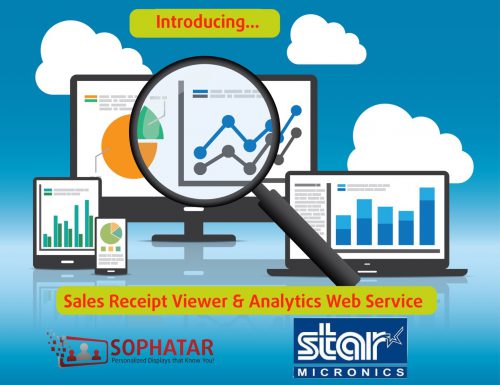
Download sales receipt images and obtain sales insights, with a brand new sale receipt viewer service from Sophatar for retailers using Star printers!
Are you a retailer looking for an easy web-based sales receipt re-print solution?
Or find out at which time of day, or day of the week you consistently generate more sales so you can plan employee shifts effectively?
Or find out when your first and last sales of the day happen?
And be able to do this from anywhere, not just while at your store, without extra software to install or change your POS?
Then we have THE solution for you!
Sophatar is improving the sales IQ of retail locations with a Sales Receipt Viewer and Analytics dashboard that is targeted to customers of Star Micronics.
No software to install. No need to change your point-of-sale software.
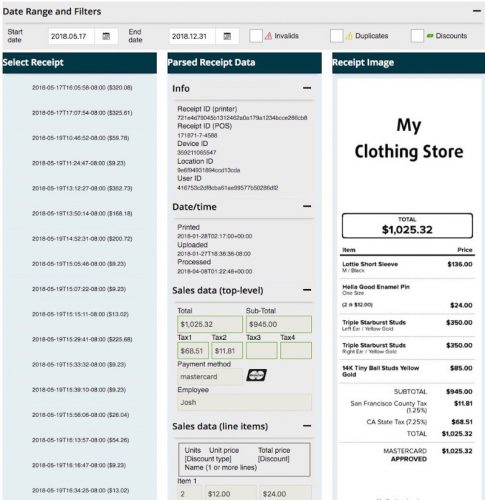
It is a web-based service with downloadable images of your sales receipts showing in a browser and downloadable for re-print or email.
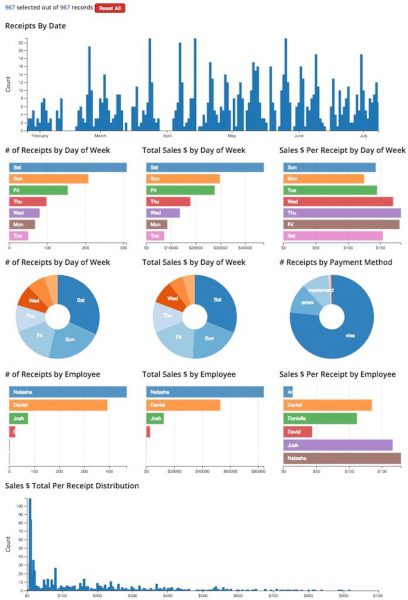
The service also includes extracting the data from your sales receipt images and turning that into actionable information via an interactive graphical sales analytics tool so you can explore sales trends.
It only costs $20 USD per month after an initial free 3-month period. No credit card is required during the trial period. This extended-time trial period is only offered for a limited time, during the introduction of this brand new service.
What Do I Need for This to Work?
Most Star Micronics printer installations have the unique capability that they can upload receipt images from your printer to the Star Micronics Cloud Dashboard each time a receipt prints. Check with your Star sales rep to find out if your install can. Once your image is uploaded and you sign up for this service, your receipt images will automatically be parsed in the cloud, and both the receipt images and parsed data is made available to you via a web dashboard and an interactive sales exploration graphics tool.
Multi-Dimensional Sales Analytics in the Cloud
Explore your sales receipts to uncover trends and actionable insights in a variety of ways. Simply click on the interactive graph in the browser and select one or more dimensions to turn your sales data into insights. Graphs update automatically to filter and analyze your data:
by calendar date range
by day of week
by time of day
by payment method
by employee
by sales receipt total $
etc.
Furthermore, you can filter to only see those receipts with discounts applied, or detect duplicate receipts. Use this to uncover ‘sweat-hearting’ by employees (discounts given to friends) or print receipt fraud (multiple prints of same receipt given to different customers from a single transaction on the POS, mostly seen in environments with a limited number of SKUs, such as QSR).
As retail stores must compete in today’s world with e-commerce and online shopping, physical retailers are increasingly in need of more data and analytics. Sophatar’s partnership with Star Micronics means receipt data at the POS can deliver new insights for retailers to improve their marketing strategy to boost sales at key times.
Besides this receipt viewer and analytics tool, Sophatar also offers other services based on sales receipt data from Star printers, such as its POS-transaction driven digital signage.
How Do I Sign Up?
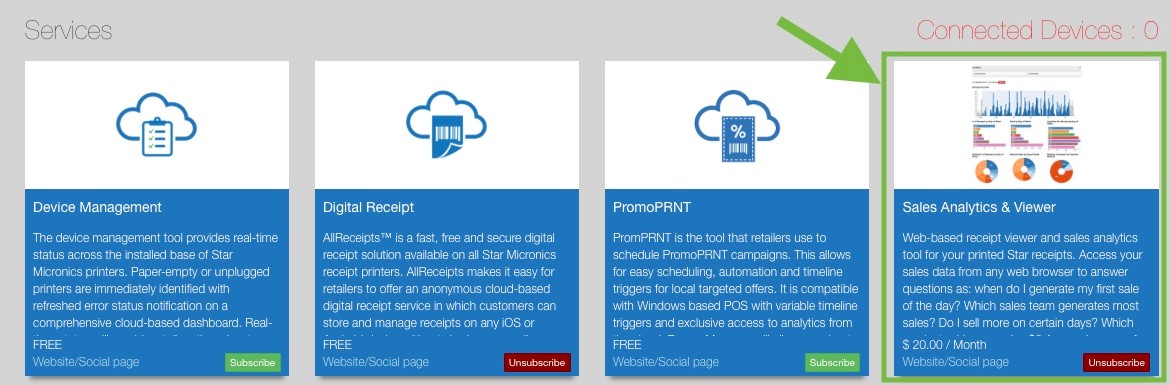
The service is offered by Sophatar but fully integrated with Star Micronics. Star customers can login to their account at https://starmicronicscloud.com/ and subscribe to the ‘sales receipt analytics & viewer service’ in the Star Marketplace. We will then reach out to you to complete setup and activate your subscription.
Now any retailer can keep an eye on their business, even from a remote location.
Check out our 2-minute video demo and sign up today to take advantage of this no-risk limited-time no credit-card required introductory offer of $0 for the first 3 months!
Effortlessly create promotions right on paper receipts!
Somerset, NJ – August 3, 2018 – Star Micronics, a leading global manufacturer of mobile, point of sale (POS) and customer engagement technologies, is proud to announce PromoPRNT, a brand-new service added to the famous Star Micronics Cloud Service platform.
PromoPRNT will allow retailers to automatically create printed promotions in addition to receipts. These incentives and bonuses will be delivered directly to shoppers’ hands, boosting customer retention and notifying customers of new deals and promotions.
PromoPRNT is provided through two services on the Star Micronics Cloud Services dashboard: Promotion Builder and Promotion Scheduler. Promotion Builder is a seamless and simple way to create and design the promotions that will appear on the receipts from templates available in the Promotion Builder library. Promotion Builder makes it simple to add logos, text, and icons.
Promotion Scheduler will empower retailers to schedule the duration of a coupon campaign by selecting a time, date, and printer for each coupon/promotion. With Promotion Scheduler, retailers will also have access to analytics that provides insight into each promotional campaign.



 The Situation