Tag: Mobile POS (mPOS)

  • Star Spotlight with iVend Retail

    Star Spotlight with iVend Retail

    Star_mPOP_iVend

    What does iVend Retail do?

    CitiXSys develops technology and omnichannel retail solutions with the iVend Retail suite. The solution consists of about seven modules that has the terminal POS, mobile POS, e-commerice, loyalty, and more, all in one solution that works right out of the box. iVend Retail is designed to address the challenges faced by omnichannel retailers today.

    How is iVend Retail working with Star Micronics?

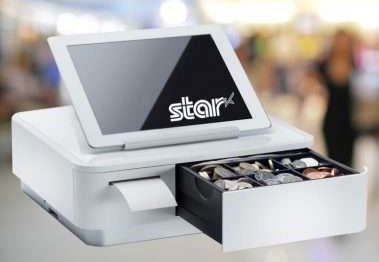
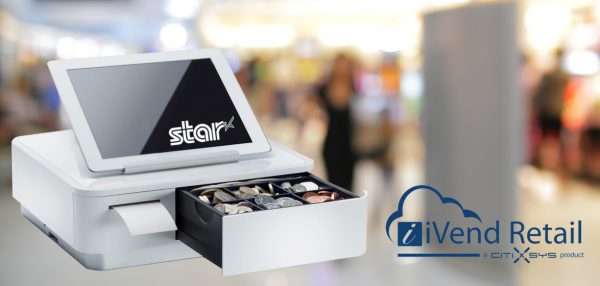
    iVend Retail certified Star Micronics’ mPOP™, combination cash drawer and receipt printer peripheral, in order to provide their retailers with a compact, sleek, and attractive contemporary offering. Star’s mPOP has been integrated with iVend Retail’s terminal POS and mPOS solution to deliver their customers an all-in-one, out of the box offering with a hardware component. The mPOP and iVend Retail solution has been hugely popular within the footwear and apparel retail industry due to the mPOP’s sleek look, and it’s ability to compliment the retailer’s image and brand.

    [youtube https://www.youtube.com/watch?v=SJ_En9FH4Wg]

    What key benefits and features is the mPOP bringing to iVend Retail customers?

    CitiXSys has recent released iVend 6.5 with the new POS designer. This solution allows the retailer to take advantage of the slick, mPOP device and tailer the point of sale screen to match. The mPOP and iVend solution also offers a highly functional and reliable solution for the retailer that requires no technical knowledge to operate.

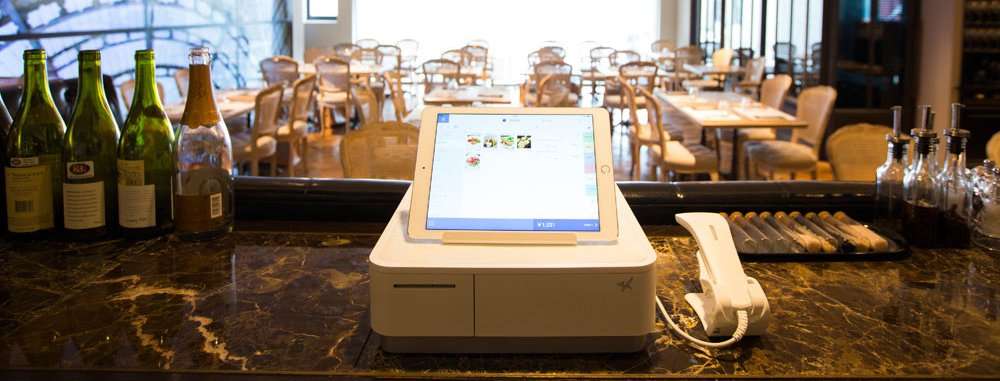
    “The main attraction of the mPOP to our customers is that it gives a sleek, compact look in the store,” says Paula DiSilva, VP of Sales for Asia Pacific for CitiXSys. “They’re looking for a larger footprint in brick and mortar stores and need something that will blend in nicely with their brand.”


  • 5 Reasons Retailers Want Ergonomic mPOS Solutions in 2017

    5 Reasons Retailers Want Ergonomic mPOS Solutions in 2017

    mpop_press_main

    Mobile point of sale (mPOS) solutions have ranked on retailers’ list of “nice to have” technologies since their introduction several years ago. However, for most merchants, mPOS solutions are “must-haves” for 2017. Here’s why.

    1. Convenience. Customers are no longer willing to stand in long lines to complete sales transactions. They want options that allow them to pay for their items quickly, and that allow them to pay from locations other than the stationary checkout lane. With mPOS solutions, retailers can accept payments in store aisles, at temporary checkout stations on the sales floor and, in the case of sidewalk sales, in front of the store itself. Additionally, retailers that sell merchandise in other environments, such as craft shows or farmer’s markets, can securely process credit card payments when mPOS solutions are in their technology toolbox.

    2. Access to Information. Increasingly, consumers are using their smartphone while shopping at brick-and-mortar stores. According to a recent survey by mobile loyalty firm SessionM, 90 percent of respondents said they research products on their smartphones; 54 percent search for price comparisons; 48 percent search for product information; and 42 percent check reviews online. Equipping sales associates with mPOS devices allows store employees to access the same product information as shoppers, and it allows them to engage shoppers at the point of decision.

    3. Endless aisle capability. Today’s consumers want what they want, when they want it – and if it’s not available at your store, shoppers will turn to your competitors to get it. mPOS solutions can prevent this from happening by providing endless aisle capability. Endless aisle capability allows customers to access an establishment’s e-commerce store, find the item that is out of stock in the current brick-and-mortar location and order immediately. Customers can shop endless aisles and arrange for the item to be delivered or picked up at the store, thanks to mPOS.

    4. Space saving. Traditional POS technology occupies a lot of room on retail counters; the bulkier the equipment, the more difficult it is for store employees to operate in tight spaces. Bulky tech equipment is also less aesthetically pleasing. By contrast, ergonomic mPOS solutions have a small footprint and a sleek appearance, as well as require only minimal counter space. This paves the way for a more attractive store, with more room on the counters to display merchandise.

    5. Support for a top-notch customer experience. Retail in 2017 is all about providing customers with the first-class customer experience they have come to expect and demand. mPOS solutions contribute heavily to that experience by allowing retailers to offer efficient customer service, payment flexibility, access to the widest possible range of merchandise, and a higher level of customer engagement.

    mPOP your way 3When you plan for a new mPOS, a complete retail solution is more than a tablet. Easy-to-integrate peripheral components, such as a 1D or 2D barcode scanner, receipt printers, scales, customer displays, and cash drawers, are vital to the retailer’s mPOS success. Star Micronics’ mPOP™, Mobile Point of Purchase, is the first “hybrid for tablet” POS and is an ideal solution for tablet and mobile device-based POS. It affords the above-mentioned benefits and so much more. To learn about mPOP™ and other POS options from Star Micronics, visit www.starmicronics.com.


    Download the our eBook: 5 Ways Ergonomic mPOS Solutions for Large Retailers Increase Sales and Boost Customer Satisfaction

  • What to Expect at NRF 2017

    What to Expect at NRF 2017

    Everyone in the point of sale industry knows that NRF is the biggest trade show of the year! As always, Star will be there exhibiting with our entire team of Star Sales, Integrations, and Marketing professionals at booth #3731. In 2016, Star released a number of new products including our TSP100III series and TSP650IIWLAN printers, our new CD3 Cash Drawers, and our PassPRNT, cloudPRNT, and StarPRNT SDK technologies. We’ve also built a number of great partnerships with point of sale software and retail technology providers.

    Here’s a sneak peak of what you’ll see at the Star booth at NRF 2017:

    mPOP™ Your Way!

    While mPOP™ has been around for a couple of years now, Star is continuously making updates and improvements to our all-in-one peripheral to make it the best ergonomic mPOS solution on the market. This year, we are going to be showcasing the mPOP as a point of sale hub with optional accessories including a 1D or 2D barcode scanner, customer display, scale, or a DK port to connect an external cash drawer to the mPOP.

    CloudPRNT

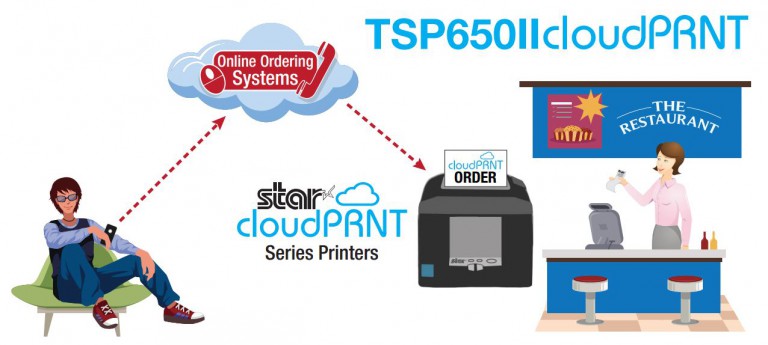
    CloudPRNT is Star’s latest advance in point of sale technology, allowing users to print to Star printers directly through a cloud service. With CloudPRNT, retailers and restaurateurs can easily accept and print online orders with no need for an extra tablet to communicate with the printer. See a live demo at our booth!

    Star Micronics Cloud Services Introduces the Micro Receipt™!

    Star Micronics Cloud Services is making huge strides in the digital receipt market! With new features in 2016, including Receipt Flip and Data Facilitation, retailers are now offered more services for the same cost – NOTHING! SMCS is free to retailers using Star receipt printers and allows them to better engage with their customers and offer digital receipts through Star’s AllReceipts™ app (which is also free to download in the App Store and Google Play).

    This year, SMCS is proudmicro-receipt to introduce the Micro Receipt™. We all know that receipts are a necessary, yet sometimes annoying piece of paper that often goes missing or gets thrown away. That is why SMCS has created the Micro Receipt!
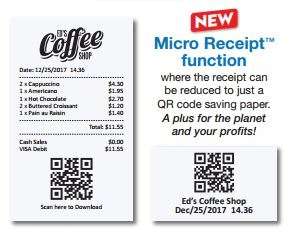
    The Micro Receipt contains all of the same information as a full-length receipt, but allows the retailer to save paper by only printing their store name or logo, time stamp, and an AllReceipts™ scannable QR code. Customers can then scan the QR code on their smartphone using the AllReceipts™ app and gain access to all of their purchase information along with coupons or promotions on the digital copy. SMCS will be showing demos of the Micro Receipts, AllReceipts app, and all of their additional free services at the Star booth.

    Now, let’s meet our Star partners who will be at NRF 2017:

    Itemizeitemize-color-logo-1 and Star Micronics have partnered to revolutionize the digital expense receipt market. Itemize is an app that allows users to capture data from their receipts for expense purposes. They have now integrated AllReceipts™ QR capability for a more clean and legible digital receipt, ensuring more accurate data capture.


    dorDôr and Star Cloud Services have partnered to help retailers know their business inside and out. With Dôr, retailers can see how many customers are visiting their store, compared to how many customers are making a purchase. Retailers can now optimize staffing, improve marketing spending, and be everywhere with Dôr and SCS.

    thirdshelf-logoThirdshelf, another new partner of Star Cloud Services helps retailers to build and nurture customer relationships. Combined with Engage NOW from Star Cloud Services, retailers can create branded loyalty programs to start marketing like a pro. With Thirdshelf and SCS, retailers can make every sale the start of their next.

    nclose-3d-logo_09252012-300x227nClose, a long time partner of Star Micronics, will be exhibiting in Star’s booth, showcasing their protective tablet enclosures and mobile credit card readers for POS. With stands and enclosures for Apple iPad®, Samsung, and Windows tablets, nClose designs pair perfectly with any of Star’s mPOS peripherals.

    largecolinlogo-300x75MoZONE offers a unique omnichannel and proximity marketing solution for all smartphones with no apps required. Using Star’s TSP100ECO printers, MoZONE allows customers to order and pay from any smartphone, tablet, or computer, while notifying customers of deals and promotions based on the customer’s location.

    emobileposStar and eMobilePOS will be showcasing their point of sale solutions for retail and hospitality with Star’s mPOP™, and SM-T300i and SM-S220i mobile printers. In addition, eMobilePOS and Star will be showcasing our latest solutions with Elo’s iSeries. Visit the eMobilePOS partner counter in the Star booth for a live demo!

    Visit our mPOP™ table!

    The mPOP is Star’s first hybrid for tablet POS that combines a cash drawer and printer peripheral. Over the past few years, the mPOP has redefined the mPOS market, and many software providers have partnered to support the mPOP with their point of sale software solutions. Make sure to stop by our mPOP table in NRF booth to see a full display of software and stand options for the mPOP.
    mpop-table

    We look forward to seeing you there!
  • Star Spotlight with Hike POS

    Star Spotlight with Hike POS

    What does Hike POS do?

    Hike POS is an award-winning omnichannel retail point of sale solution designed for small businesses around the world. With Hike POS, retailers can sell in-store, online, and on-the-go. Hike believes that point of sale should be modern, flexible, and user-friendly, which is why they have made their solution available for PC, Mac, and iOS users. With a wide application suite including inventory management, gift cards, customer loyalty, and more, Hike POS makes it easier than ever to start & grow your business.

    How are you working with Star Micronics?

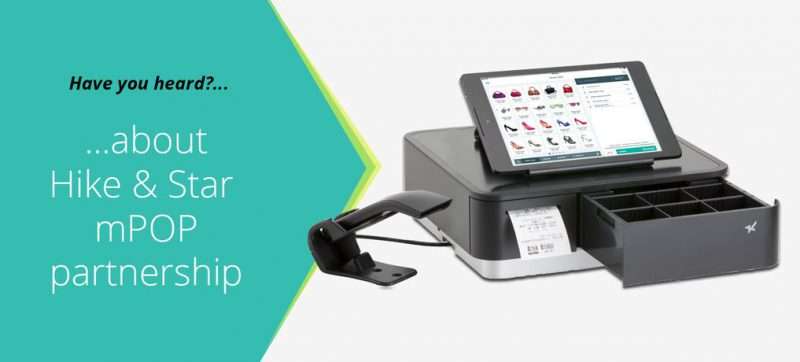
    Star was the first choice of point of sale printers for Hike POS. Hike POS promotes Star printers with their cloud-based feature which was recently introduced. Hike POS software combined with Star’s mPOP combination cash drawer, receipt printer, and barcode scanner, allows retailers to get a true, all-in-one mPOS solution that is easy to use and helps grow business.

    Hike POS has also been one of the first Star Certified Software Partners to fully integrate Star Cloud Services’ digital receipt and customer engagement tools. Using Star Cloud Services, Hike POS retailers can now offer their customers the option of digital receipts through Star’s AllReceipts™ digital receipts app.

    What are the biggest benefits of AllReceipts™ for retailers and for Hike POS?

    Retailers love the idea of offering their customer digital receipts, but struggle to get their customers to give up their email address. Hike POS wanted to provide a solution for this problem that their customers where experiencing, so they turned to AllReceipts™. Allowing their retailers to still offer digital receipts without needing any personal information from the customer was a huge win for Hike POS customers.

    [youtube https://www.youtube.com/watch?v=qUkSXZ_oW1Y]

    Hike POS vendors were also able to take advantage of other Star Cloud Services features including the instant customer feedback survey, Engage NOW, and Receipt Flip.

    “Star is a leader in technology and manufactures fully integrated printers that are easy for our customers to use, including their USB and Ethernet printers, along with the all-in-one mPOP. Star is truly the printer provider of choice for Hike POS” – Jay Sutaria, Business Development Director for Hike POS.

  • POS Industry Updates and Trends of 2016

    POS Industry Updates and Trends of 2016

    We are now in the middle of the POS industry redefinition. 2016 and 2017 will be very interesting years where we will see major players rising and others disappearing in the industry.

    In the last few years, mPOS solutions have proven that tablet devices are a reliable hardware solution for many retailers, and that the cloud is a reliable solution to provide instant information on not only one, but multiple retail locations. The POS of the 21st century was born, and is continuing to grow quickly.

    What we see now is a strong demand for small, and easy to deploy POS solutions. Since most of the POS solutions now provide a cloud solution, the need for heavy store hardware has decreased significantly, and many POS providers are rethinking their hardware offering.

    For many restaurants and retail stores, a simple tablet, cash drawer, and receipt printer is all that is needed . And don’t forget your payment device!   The payment device has actually become one of the most important devices at the POS.  It is the device that has the capability to enable Apple Pay, Android Pay, Samsung Pay, and most importantly, EMV enabled payment.

    The October EMV deadline came and passed. It did not motivate many SMB retailers to change their POS. The way we, as consumers want to purchase a product is what will make the retailers want to upgrade their point of sale system.

    Retailers and restaurateurs alike are looking to increase their revenue by offering purchase options both in-store and online. While online shopping has been around for quite some time, restaurants and food service are also beginning to adopt the idea of online ordering by allowing customers to order pick-up or delivery right from their smart phones.

    Leading the transition to this new world, Star Micronics’s hardware and software solutions represent new opportunities for technology providers. Adopting Star Micronics peripheral suite of mobile or desktop printers with Star Micronics cash drawers,  or just embracing the world of all-in-one with the mPOP™, (cash drawer, printer, scanner and tablet stand in one, easy to ship package) helps to answer the requirement for smaller POS solution.

    Technology like CloudPRNT allows restaurateurs to receive orders from online ordering services without the need to have the printer connected to any other device or service inside the store. CloudPRNT will work with the online service to store jobs, create jobs, and communicate with the printer directly through the cloud.

    cloudprnt

    In addition to leading the way to a better shopping or eating experience, Star is improving the way we manage our purchase receipts. Last year Star released the first true digital receipt solution, AllReceipts™, where shoppers can now decide for themselves if they want to keep their paper receipt or save and store them on their mobile device. Now, Star is offering retailers the capability to communicate electronically with their customers to promote their latest products.

    The face of retail will continue to change rapidly and Star will always be there to lead and innovate for you and keep your business successful.

  • 10 Ways mPOS Can Benefit Your Business

    10 Ways mPOS Can Benefit Your Business

    As a business owner, the last thing you should need to stress over is your point-of-sale system. POS  systems are designed to make your daily workflow smoother and easier for business owners and employees alike. If you’re considering a mobile POS solution, be sure to look at ergonomic mobile solutions.

    These solutions recognize that some businesses need peripherals beyond the basic tablet POS, such as a combination cash drawer/receipt printer. Here’s what ergonomic mobile solutions offer:

    1. Convenience. With an ergonomic tablet POS plus cash drawer/receipt printer, you can accept all payments anywhere, anytime. This is a big improvement over common mPOS, which traditionally only handles electronic payments.

    2. Space saver. Ergonomic solutions reduce your POS footprint significantly. With their small size and sleek profile, these platforms are attractive and unobtrusive in your retail or restaurant environment, freeing up space in which you can add tables or expand merchandise displays.

    3. Assist mPOS solutions. Because these ergonomic mobile solutions rely on Bluetooth technology for connectivity, they’re fully mobile when needed and rid you of tangled wires and a jumble of dongles.

    4. Full functionality. Ergonomic mobile solutions offer robust features and functionality for a wide range of applications.

    5. Receipt printer. Small and compact, a built-in printer lets you quickly and quietly print a receipt as soon as the transaction closes. Additionally, sometimes single accessories are needed without a full system. In this case, you should check to see if your system can support additional printers for your bar, kitchen, and other areas.

    6. Barcode scanner. If your tablet or mobile device lacks a barcode scanner, your ergonomic mobile solution easily accommodates an optional plug-and-play scanner for reading merchandise.

    7. Cash Drawer. A secure cash drawer stores currency, checks, receipts and other important items. The size of the cash drawer you choose will depend on the number of cash transactions you process a day.

    8. Software application. To get the greatest value of your ergonomic mobile solution, pick a software application that supports the latest payment options such as NFC and EMV. This will help you to avoid another technology upgrade in the near future.

    9. Tablet/device. When evaluating tablet and mobile device options on the market, be sure to select hardware that’s designed to process NFC and EMV payments, preferable without requiring add-ons or peripherals to do so. Choose a device that’s compatible with your preferred software application. Most software applications have a preferred operating system, however if you need a software application to be cross compatible, make sure to do your research and find a web-based solution.

    10. Digital receipt. More and more retailers want to deliver an in-store experience that provides digital support. There are innovative, downloadable apps on the market today that are supported by many POS systems. These apps allow your customers to receive a digital copy of their receipt on their smatphones. Some of these apps even allow functionality for customer satisfaction surveys, so retailers can always get a gauge on how they are perceived by their customers.

    For more information on mPOS solutions, download our eBook: mPOS: How it’s Revolutionizing Payments

  • 4 Solutions to Overcome Mobile Printing Challenges

    4 Solutions to Overcome Mobile Printing Challenges

    Point of sale (POS) is no longer limited to the traditional, fixed model. Merchants have tried and proven the benefits of mobility. They can complete payment transactions in-aisle of tableside, and set up additional checkouts for line busting.

    Here are four common challenges merchants face with mobile printing and the solutions that will help you overcome them.

    Challenge 1: Printing from an iOS, Android, or Windows Native App

    With most legacy applications, many POS printers and printer brands could be used by just installing the right Windows driver. Since iOS and Android operating systems do not have a print engine to support drivers, the printer functions need to be integrated inside the POS software, thus limiting the choice. Fortunately, these companies have usually integrated the best of breed printers which make for an easy choice.

    Solution: SDK Integration

    A software development kit (SDK) helps software engineers or developers to speed up the process to support special features (like printing) in software applications. The printing SDKs needed to create applications are usually available for developers to download from the printer hardware manufacturer. For example, iOS applications traditionally use Objective-C or Swift programming language, while Android uses Java.

    An advantage to SDK integration is that the application your software engineer or developer creates can give you more complete control of printing, such as adjusting print formatting, controlling the cash drawer, or checking the status of the printer. It also enables additional, innovative features to be added to the print application such as digital receipts and other cloud services.

    Challenge 2: Printing from a Web Browser Application

    Advanced Web standards, such as HTML5, give developers the ability to build Web-based applications with nearly the same level of features as native (local) applications. Web applications have the added advantage of allowing live, automatic updating so that customers always have the most up-to-date version of the software since the application lives in the cloud.

    If the POS software is Web-based, the issue isn’t which mobile device the application is running on. Most Web-based solutions are device agnostic: if the device can connect to the Internet, it can usually use the application. In this case, it’s necessary for the printer to receive data directly from the Web-based application.

    Solution: WebPRNT

    Star’s JavaScript-based WebPRNT technology allows complete control of any Star WebPRNT Ethernet interface printer. Developers can use Star’s JavaScript library and Builder API to integrate a Web-based application with a WebPRNT printer. In addition, this functionality can be extended to Bluetooth printers by using the WebPRNT Browser with little to no changes.

    Challenge 3: Printing from a FileMaker™ Project

    FileMaker Go is a free app that runs FileMaker applications, such as those for POS and retail management solutions on iPad®, iPhone®, and iPod Touch®. Traditionally, it has not been possible to print from applications such as FileMaker Go to point of sale and mobile printers.

    Solution: PassPRNT

    Star’s PassPRNT application solves the problem of printing from FileMaker applications. Any FileMaker Go project, native iOS or Androud application, or Web application can send the receipt in an HTML format to the PassPRNT application using a URL Scheme. The PassPRNT native application then formats the receipt for the printer and sends it to any Star Bluetooth printer paired with the iOS device. The operating system can automatically switch from the FileMaker application to the PassPRNT application and back, making seamless, “one-tap” printing possible.

    Challenge 4: Continuing to use a Legacy Windows Application with Newer Mobile Hardware

    In some instances, a merchant may want to update its hardware to be more mPOS compatible, but also wants to continue to use their legacy system running an OS such as Windows or Linux. Examples may include a PC upgraded to a Microsoft Surface, or a desktop serial or parallel printer upgraded to a network or Bluetooth POS printer.

    Solutions: Update Hardware and Drivers

    Most legacy applications can be used on the latest Windows 8.1 or 10 tablets. But like any new installation, the new hardware needs to be set up, meaning new drivers, and new configuration. Network printers (either LAN or WLAN) are usually recommended for mPOS system, however new Bluetooth printers are often as powerful and easier to set up. In this configuration, the old cash drawer can be connected to the new printer. However, if the decision is made to use a mobile printer, more modifications are needed. Since 90% of all cash drawers are usually driven by a POS printer, if a portable printer is now used, you will need to update your cash drawer to a wireless one, or integrate DK-AirCash to bring the old drawer to an Ethernet or wireless configuration.

    To learn more, download our eBook: How Printer Software Technology is Evolving to Accommodate mPOS

  • Desi Burrito Teams Up with Star Micronics and NirvanaXP to Deliver All Natural Indian Food ASAP

    Desi Burrito Teams Up with Star Micronics and NirvanaXP to Deliver All Natural Indian Food ASAP

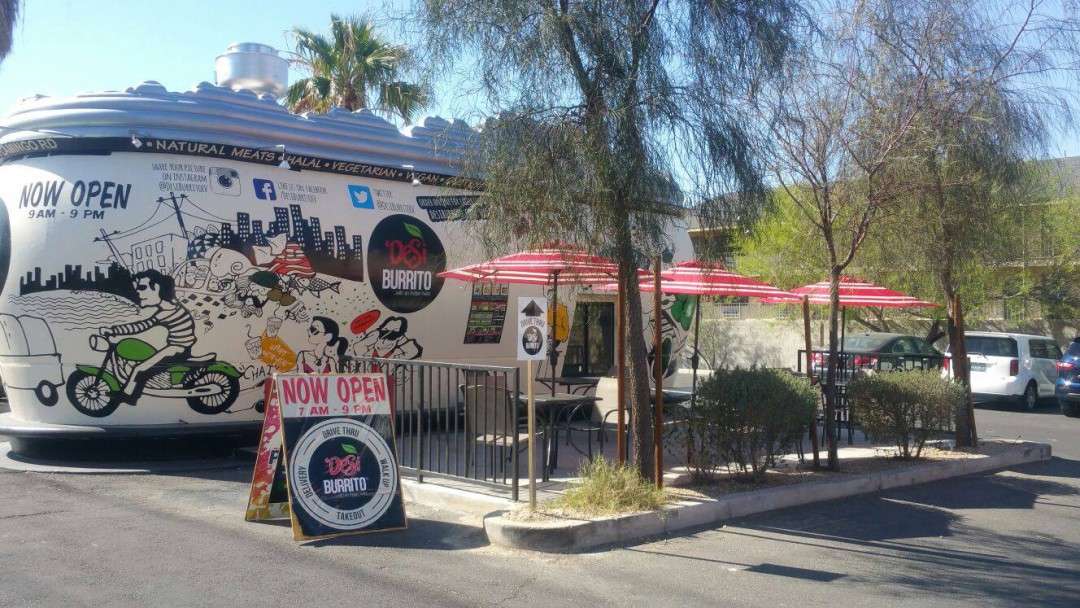
    Desi Burrito is the first Indian drive-through restaurant, providing fresh and flavorful fast-food with many healthy options for people who want to grab a quick, but healthy bite. As a brand new concept, Desi Burrito was looking for a POS system that they could get up and running quickly and would coincide with their innovative business idea. Star Micronics’ mPOP™, combination receipt printer and cash drawer with NirvanaXP’s POS system was the perfect fit to get Desi Burrito up and running in record time.

    Desi Burrito, being the first of its kind as an all natural, Indian drive-through, did not want to waste any time in getting their business off the ground. Desi Burrito sought out a quick and seamless POS solution from NirvanaXP, due to their all-in-one POS business model and compatibility with iOS mobile devices such as an iPad® or iPhone®. In search of a solution that was easy to install and attractive to customers, NirvanaXP suggested Star Micronics mPOP™ to Desi Burrito as a wireless all-in-one mPOS system.

    NirvanaXP - black

    “Smal businesses are often looking for a POS solution that is easy to set-up, and takes up as little space as possible. The mPOP’s compact size was the main consideration, but the fact that it doesn’t need a separate printer is huge! Its accessibility and seamless set-up won over Desi Burrito right away.

    – Kris Parikh, CEO & Founder of NirvanaXP

    Desi Burrito

    “Star Micronics’ mPOP was the perfect solution for Desi Burrito. The mPOP with NirvanaXP allowed us to have our business up and running in no time. It’s compact design and Bluetooth set-up made the mPOP the ideal POS solution for our restaurant.”

    – Sujal Mehta from Desi Burrito

    Download the full success story here: Star_Desi-Burrito_Case-Study

  • Finding the Right mPOS for Your Food Truck

    Finding the Right mPOS for Your Food Truck

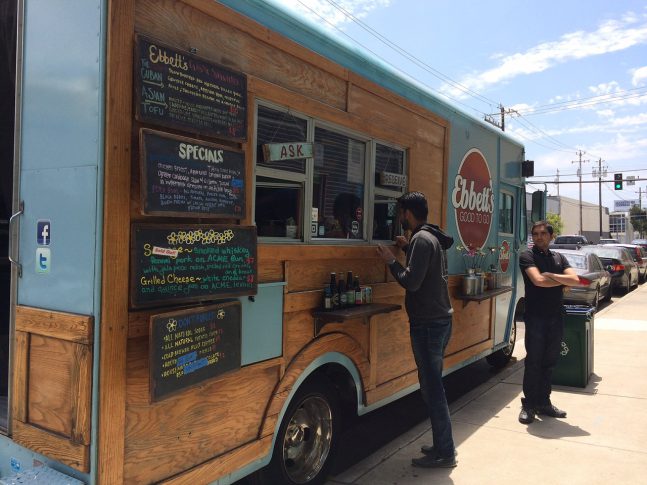
    It’s food truck season, folks! The warmer seasons are the best time to grab an outdoor bite from your local food truck or food stand. We see them popping up more and more as the weather gets warmer, and people flooding them to snag some quick and tasty street food. This often times results in crowded trucks with long lines, making business very hectic for cooks and cashiers. Luckily, Star Micronics has the perfect mobile point of sale technology for these businesses, making their job all the more easy, while also keeping customers happy and satisfied with their service.

    When thinking about finding the right mPOS system for your seasonal food truck or food stand, there are a few key considerations. Are you looking to solve the issue of line busting? Are you trying to create a more efficient workflow for your employees? Do you want to save space in your compact location by switching to a more mobile printer peripheral?

    If you answered yes to any of these questions, Star has the solution for you!

    Kitchen Printers

    If you’ve ever ordered from a busy food truck in the middle of the summer, you can see that it can be a hot and hectic environment for cooks. The “old-school” process of writing down orders and passing them off the cook becomes inefficient when handwriting is hard to read, the cooks are very busy, or when the order gets lost or damaged in the transition between order-taker and cook.

    Using a POS system to input orders and send them to an impact kitchen printer makes for an easier workflow because the order is being taken and entered into the POS in real-time. The order can then be sent directly to the impact printer, eliminating miscommunication between the “front of truck” and “back of truck” staff. Impact printers are also often times noisy, making it easier for the cook to know when a new order is coming through, and the paper remains durable in hot environments.

    Receipt Printers

    Just because your customer is ordering food on-the-go, doesn’t mean they don’t need their receipt. A thermal POS printer is necessary for food trucks for the obvious – to provide a proof of transaction, but the key for food trucks is to keep the printer mobile.

    A Bluetooth thermal desktop printer or a portable printer is the best solution for food trucks. When working in such a small location, things can get tight. With a Bluetooth enabled thermal printer, you can move your printer daily throughout the truck to wherever space allows. Portable printers are also a viable option for receipt printing because it not only allows you to move throughout the truck, but to move outside of the truck for a line-busting POS solution.

    Multi-Function Printers

    Again, when trying to navigate a food truck on a busy summer afternoon, space can be limited. For those who are looking to really save counter-space, a multi-function peripheral might be the best option for you. Star Micronics’ latest mPOP™, all-in-one mobile point of purchase combines a cash drawer with a two-inch receipt printer, and a 1D barcode scanner to create the perfect mPOS solution for small spaces. Using Bluetooth connection, the mPOP can also be repositioned in the food truck or food stand in order to maximize counter space, and can be operated on-the-go using a tablet or mobile device.

    To find the right mPOS solution for your food truck, visit www.starmicronics.com.

  • The Benefits of EMV

    The Benefits of EMV

    Following the October 1, 2015 deadline created by U.S. credit card issuers MasterCard, Visa, Discover, and American Express, the liability of EMV compliant payment processing systems has shifted in the U.S. Prior to this shift, one of two parties would be held responsible in the case of fraudulent credit card transactions – the payment processor or the issuing bank. Now, whichever party is the least EMV compliant in a fraudulent credit card transaction  – the merchant or the card issuing bank – will be liable for the consumer losses.

    While business owners and shoppers tend to see the shift as a negative, it turns out that there are many overlooked benefits to the EMV shift for both businesses and consumers.

    As mentioned, the Oct. 1, 2015 deadline is strongly encouraging businesses to switch to EMV compliant payment processing systems in order to avoid being held liable for fraudulent credit card transactions. While switching to a new EMV compliant POS system may be expensive, it can potentially save businesses from losing hundreds to thousands of dollars in credit card fraud. What’s more, this switch gives business owners the opportunity to not only become EMV compliant but to consider switching to a more modern and mobile POS system.

    Tablet-based POS is becoming more prevalent in businesses, especially small businesses. The reason being is that tablet-based POS is usually inexpensive and can scale or expand your business. Tablet POS is also a sleek and attractive option for small business owners, allowing them to keep a modern check-out and save precious counter space at the point of transaction. The benefit of upgrading your traditional cash register or POS to a mobile or tablet POS system, is that most mPOS systems are already EMV compliant, making the shift to EMV as smooth and inexpensive as possible.

    Now, let’s talk about some of the benefits of EMV for shoppers.

    Since the shift to EMV compliant payment processing, there has been an obvious push-back from shoppers all over the U.S. This is mostly due to the fact that dipping the EMV chip of your credit card takes significantly longer than the simple swipe of a magnetic stripe reader. While this can be a nuisance, the EMV chip is a major benefit for consumer shoppers as well.

    The reason you have to wait an extra 5 to 10 seconds for the chip reader to process your payment is because each transaction with your EMV card is a unique one. When dipping your card into the chip reader, the terminal performs many stages of complex processing to create a unique transaction each time your EMV card is used for payments. This requires dozens of pieces of data to be read in order to create this unique transaction, resulting in a slightly longer wait time. But the benefit is, that if the card information gets copied and attempted to be used for another transaction, the information would not be usable, and the card would just be denied.

    To learn more about the EMV shift and mobile payment solutions, check out Star Micronics eBook – mPOS: How its Revolutionizing Payments.