Category: Product Updates

  • Choosing the Appropriate Kiosk Printer: A Comprehensive Guide

    Choosing the Appropriate Kiosk Printer: A Comprehensive Guide

    Self-service technology, including kiosks with kiosk printers, continues to increase in popularity in a wide range of vertical markets. Retailers of all types, as well as quick-service restaurants, gas stations, parking lots, casinos, telecommunications companies, banks, transportation providers, and other organizations are implementing these solutions. According to a recent study by Technavio, the self-service market is estimated to reach $18 billion by 2020.

    What’s more, consumer demand for access to kiosks is growing. For instance, a survey by InRetail revealed that 69% of shoppers are more likely to make purchases from stores with kiosks, than from stores that do not have them.

    However, capitalizing on the self-service trend and consumers’ affinity for kiosks in any application — retail or otherwise — necessitates strategic kiosk printer selection. Choosing the right kiosk printer is a matter of understanding the business, the business environment, and customers. It involves careful assessment of the range of feature options. This guide presents a roadmap for selecting the kiosk printer that best suits the needs of an operation and its clientele.

    Discover all of Star Micronics’ Self-Service Kiosk Solutions.

    Free Self-Service Kiosk Resources

    The future of many industries lies with self-service solutions. That’s why Star Micronics is offering free online ordering resources for resellers and software developers who are helping customers future-proof their businesses with self-service solutions.

    Top 3 Key Considerations

    The road to finding the right kiosk printer starts with a few key considerations. Here at the top three; find out the rest by downloading the full free guide now!

    Size

    In most applications, space for the kiosk — and the kiosk printer — is at a premium. For example, in a typical retail or hospitality environment, the area in which the kiosk is installed is not sufficiently large enough to accommodate a unit with a bulky peripheral. Therefore, you will want to look for printer options configured as “open frame” printing mechanisms. There should be no unnecessary casings that increase the unit’s size and occupy space that may be needed for other components to make the kiosk more user friendly.

    Use Case

    One of the most common mistakes in selecting a kiosk printer is designing the actual kiosk before the printer and other accessories have been chosen. To ensure that the kiosk printer really satisfies the requirements of your business, think first about the use case and its parameters. For instance, if the kiosk will be installed in an environment where transaction volume is high, and thousands of receipts will be printed daily, you may need a kiosk printer that accommodates very large rolls of paper. However, many kiosk printers have a slender design and cannot support these large rolls, or necessitate the purchase of a special attachment at an additional cost.

    Customer Experience

    A kiosk allows businesses to interact directly with customers, and provide high-caliber customer service, all while decreasing wait times. To kick things up a notch, you can select a kiosk printer that can support graphical printing at a high speed. This allows you to offer coupons, special promotion options, product information, and other materials that customers can print out on the spot, increasing their engagement level with your establishment, and cultivating repeat business.

    Must-Have Kiosk Technologies

    Here are the top three kiosk printer technologies and accessories that you will find essential, depending on the application (get the full list in our guide):

    Presenter

    A presenter increases security and supports customer privacy by ensuring that receipts are delivered only to the right person; if forgotten, they remain inside the kiosk where unauthorized parties cannot access them.

    The presenter also offers other benefits that make it worthwhile. Perhaps most importantly, the presenter prevents paper jams from occurring if receipts are inadvertently left in the printer. This, in turn, decreases the incidence of operating interruptions that cause customer service delays, and have a negative impact on the customer experience.

    What’s more, with a presenter, there is no opportunity for receipts or other collateral to fall to the floor if it is not delivered to the intended recipient. The end result is reduction in litter, and a cleaner-looking store, restaurant, or other business environment.

    Bezel

    The bezel is an alternative to the presenter. Typically positioned between the kiosk slot and the printer, it acts as a guide
    to push paper out of the kiosk. If the best kiosk printer for your application is not designed to accommodate a presenter, or there is another reason why a presenter would not work with a particular kiosk printer model (e.g., space constraints), a bezel is a viable solution.

    Paper Status Alerts

    Kiosks are typically left unattended for extended periods of time. However, you’ll need to know immediately when a kiosk printer requires more paper. Select a kiosk printer that displays alerts when it is low or entirely out of paper.

    Looking for more tips on key considerations and must-have technologies, and information on how to source your kiosk printer?

  • Star Software Update: Peripheral Usage for mC-Print (WebPRNT) and Scale Data Output Utility

    Star Software Update: Peripheral Usage for mC-Print (WebPRNT) and Scale Data Output Utility

    Welcome to the Star Software Update, the regular series of blog updates where Star’s Integration Team informs you about the latest important Star Micronics software updates.

    In this edition:

    • Peripheral Usage for mC-Print2 and mC-Print3 (WebPRNT)
    • Scale Data Output Utility

    Read on to learn what each update entails.

    Peripheral Usage for mC-Print2 and mC-Print3 (WebPRNT)

    Release Date:

    This update was released on October 2, 2019.

    What’s Included?

    WebPRNT Browser has been updated to support the mC-Print2 and mC-Print3 when using a USB connection. Now you can use Bluetooth or USB!

    In addition, both printers can now use their peripherals with WebPRNT and WebPRNT Browser. Now customers have the flexibility to choose a wired or a wireless connection when using the mC-Print Series with WebPRNT. Peripheral support includes Star’s 1D and 2D barcode scanners, as well as the customer line display.

    Scanners are often used in point of sale (POS), while line displays are more commonly used in grocery, as well as self-service. A good example of this is a frozen yogurt shop displaying the price and weight for the customer at checkout.

    Next Steps

    Customers wanting to use the mC-Print Series with a USB connection should update the WebPRNT Browser app through the Google Play Store.

    To use the peripherals, please update the printer’s firmware to V2.1. Firmware can be updated through Stars mC-Print Utility, also available on the Google Play Store.

    Scale Data Output UtilityScale-Data-Output-Utility

    Release Date:

    The tool was released on September 30, 2019.

    What’s Included?

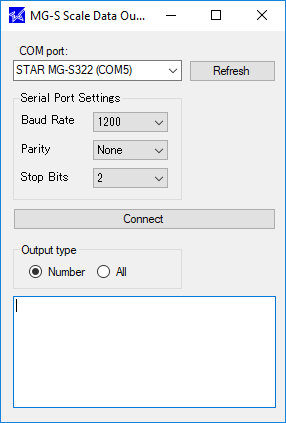
    The scale data output utility is a tool for Windows customers and developers alike to easily read scale input without complicated software. This is the first release, so the version number is 1.0.

    For software that do not directly integrate with a scale, this tool can be used to read the weight and copy it directly into a text box into the POS software.

    Potential industries that can take advantage of this update include cannabis, frozen yogurt, jewelry, deli, candy shop, bulk fruits/nuts in a grocery store, and more.

    Next Steps

    No firmware update is needed. To download the tool, please visit the Star Global Support Site.

  • POS Scales: What You Need to Know

    POS Scales: What You Need to Know

    Thinking of adding or replacing a POS scale in your store (or product offering line)? Scales are used in a variety of businesses, including: cannabis (production and dispensaries), grocery/deli, jewelry, yogurt shops, spice shops, pharmacies, candy/chocolate stores, coffee shops that sell beans by the pound, and more. They’re important for shoppers and business owners alike, ensuring the correct amount of goods is being sold – no more, no less – at the correct price.

    There are a couple important things to keep in mind when it comes to POS scales. First, all scales are not created equal – to get the most out of your investment, you need to carefully align your scale to your business use case. And second, you need to have your scale(s) certified, and calibrated and maintained by a certified service company.

    Does that sound daunting? Don’t worry – below we’ll teach you how to choose a POS scale, as well become informed on scale regulations in your state.

    Download Now: Scale Buyer’s Guide

    How to Choose a POS Scale

    Accuracy

    First and foremost, it’s important to choose a scale that aligns with the product that will be measured. The below scales offer an option for nearly any business:

    • The mG-S322: This scale is accurate down to the hundredth of a gram, and is used in highly sensitive realms, like pharmacy and cannabis. Included with the scale is a windshield for even the most demanding scientific environments. It is legal to use in all states where cannabis is legal.
    • The mG-S1501: This scale is really the jack of all trades. It’s a versatile scale which measures down to the tenth of a gram, and also has four other units of measure. If you’re not sure which unit you will be measuring, this scale can adapt. Also, it is legal in some states for cannabis but it can only measure in certain amounts of weight.
    • The mG-S8200: In the market for grocery, deli, or frozen yogurt? This is your scale! The mG-S8200 is a conventional scale that can weigh goods up to 18 pounds, but can also measure down to the gram.
    The Star mG POS Scales Series
    The Star mG-Scales Series

    Connectivity

    Next thing to consider? Connectivity options. Look for a scale that comes with multiple interfaces, like serial, USB-B, and Bluetooth BLE (all three of Star’s scales come with all of these options). For legacy POS, make sure a serial interface is also present (again, Star’s scales have that).

    Having a variety of connectivity options all on the same scale is important because you know you won’t need to replace the scale anytime soon, and you can maximize your return on investment (ROI). Running a legacy POS but want to move toward a more modern POS? Having a serial interface can help you easily swap your old scale out without purchasing any other hardware. Plan on moving to a tablet-based Bluetooth connection in the future? Your scale is ready whenever you are, and BLE can provide you with a low-energy portable option.

    Software Support 

    Next on your checklist is software support. A good rule of thumb is to make sure your scale supports Windows, iOS, and Android. Having this support helps you prepare for the future of retail, where everyone uses a tablet instead of a PC. And you guessed it: all three of Star’s scales support all three software.

    Power Options

    When it comes to power, you need to ask yourself, “Where will my scale be used?” A traditional power supply is great for traditional brick-and-mortar stores, with standard POS.

    However, it’s a good idea to choose a scale that also comes with a battery option, like Star’s. A battery-operated scale is a great choice for farmer’s markets, food trucks, and more, because while typically businesses need to bring a generator to power their POS, with a battery-operated scale they no longer need to. Some extra benefits that a battery-operated scale can offer is a clean, wire-free footprint, and the ability for software to still work even in the case of a power outage.

    Important POS Scale Regulations

    State-Specific Regulations

    Now on to the fun important stuff. It’s extremely important to remember that nearly every state requires a State Certified Technician do scale installation, calibration, and registration.

    So how do you get started? First thing’s first: contact your local Weights and Measures office to get information and first steps on how to get your scale ready for use legally.

    State requirements can range from only getting the scale inspected after installation, to requiring you to file a request to have a certified installer come to your store to calibrate and lock your scale, followed by a Weights and Measures employee coming to examine the scale and issue a one-year seal (if it passes the examination). In those cases, if the scale fails the examination, a technician must return, redo the process, and then the scale must be re-examined. Long story short, do not try this yourself – be sure to choose a trusted technician! Our Scales Support webpage can help you find a nationwide partner.

    Registration

    In most states, registration with the Weights and Measures office needs to be done by a certified company. This registration usually expires each year, and gives the Weights and Measures office permission to come and test the scale without notice. If the scale fails the test the store can be fined, so be sure to use a certified company for all of your scale registration, calibration, and maintenance needs.

    Calibration

    Again, in the vast majority of cases, calibration should be completed by a certified company. Not only will choosing a certified company give you peace of mind, it can also save you serious money. To legally calibrate the scale, extremely precise weights, called F1 Class weights, must be used. These weights can cost nearly $5,000 and need to be kept in a special box with records of usage, maintenance, and more. Why go through the hassle of owning the weights yourself when a service company already has them?

    Maintenance

    For proper maintenance, a service company should be used once a year to ensure that the scale is still properly calibrated. Hiring a service company for maintenance gives store owners ease of mind that everything is working properly.

    Star’s NTEP Certification

    Star is proud to offer NTEP-certified scales – which means all three of our scales are legal for trade. In fact, when the scales were first released, Star was the first company to meet the new 2019 NTEP certification! Again, be sure that whatever scale you choose is NTEP-certified, or else it is not legal for trade.

    How to Start Planning Your POS Scale Project

    Ready to jump into your scale project? It’s best to start planning as soon as possible, so you know what process lies ahead. As a quick summary:

    • Choose a scale with the accuracy you need,
    • Choose a scale with future-proof connectivity options,
    • Choose a scale with flexible power options,
    • And be sure to stay compliant with your state’s requirements by working with a certified service company to register, calibrate, and maintain your scale.

    Visit Star’s Scales Support webpage to browse certified nationwide partners, as well as state-specific requirements.

  • 3 Reasons Why Star Cash Drawers are the Perfect MMF VAL-u Line Replacement

    3 Reasons Why Star Cash Drawers are the Perfect MMF VAL-u Line Replacement

    If you’re looking for MMF VAL-u Line® replacement cash drawers, you’ve come to the right place. Star Micronics is so much more than a printer company, and cash drawers are an integral part of our product line.

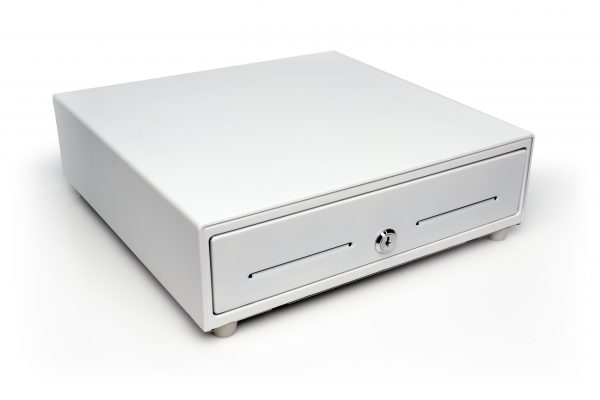
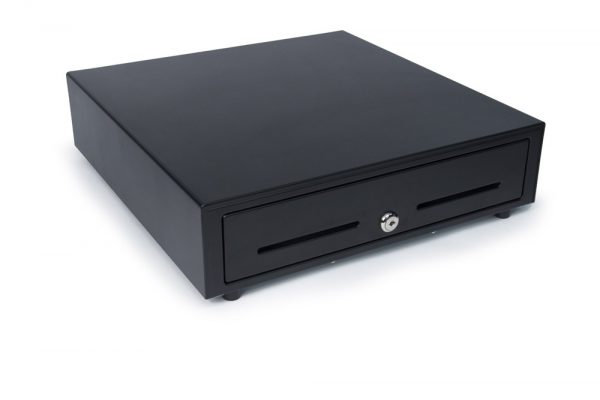
    Our Value Series cash drawers, including the CD3-1313 and CD3-1616, are the ideal replacement for MMF VAL-u Line cash drawers for a variety of reasons: they are an exact replacement for the VAL-u Line drawers, they work with both Star and Epson printers, and they’re feature-packed and ready to pair with your point of sale (POS).

    Here are the 3 reasons Star’s Value Series cash drawers are the ideal MMF VAL-u Line replacement:

    1. Exact Replacement for VAL-u Line Cash Drawers

    Simply put, the Star CD3 Value Series cash drawers are the perfect replace for the VAL-u Line because they are the exact replacement for the VAL-u Line! That’s right: our CD3-1313 and CD3-1616 have exactly the same features and looks as the VAL-u Line. You won’t be able to notice any difference! Can’t get a better replacement than that, can you?

    2. Works with Both Star and Epson Printers

    Although Star manufacturers printers, we understand that not everyone who is looking for a cash drawer necessarily uses a Star printer, as well. For that reason, our CD3 Value Series cash drawers work with both Star and Epson printers.

    3. Feature-Packed and Ready to Pair with Your POS

    On top of all of the VAL-u Line features you know and love – which our Value Series has to a T – Star cash drawers also offers the below features:

    • Available in black or white coated finish to match your existing POS (white finish includes drawer front, as well)
    • Bottom exit cables included
    • Ideal for either standard amount of cash capacity, or high-volume cash capacity

    Meet Your New Cash Drawer

    CD3-1313

    HiRez-IMG_9969-e1574806067107

    • 13 x 13 standard size
    • Cost-effective
    • Exact replacement of MMF VAL-u Line
    • Durable steel construction and black or white coated finish
    • Printer driven interface with bottom exit cable (cable included) – works with Star and Epson clone printers
    • Dual media slots

    Learn More About the CD3-1313

    CD3-1616

    IMG_8024-e1574806085931

    • 16 x 16 robust size
    • Robust storage, high volume
    • Exact replacement of MMF VAL-u Line
    • Durable steel construction and black or white coated finish
    • Printer driven interface with bottom exit cable (cable included) – works with Star and Epson clone printers
    • Dual media slots

    Learn More About the CD3-1616

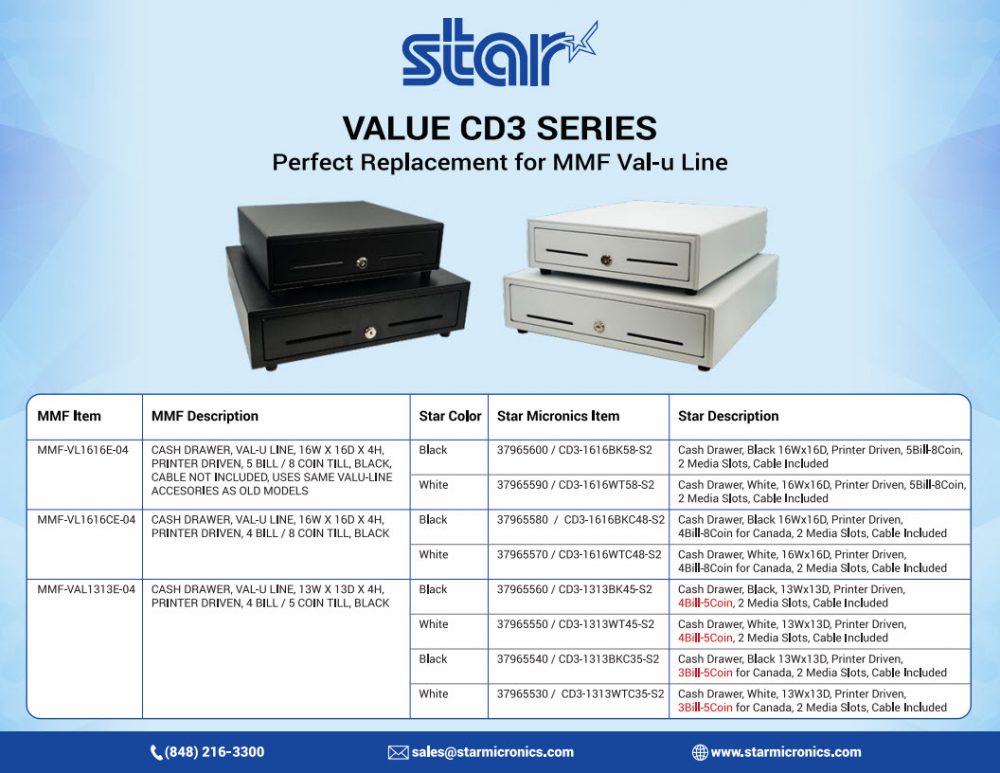
    Star / MMF Comparison ChartCash-Drawer-Matrix-e1574806106742

    Star also proudly offers the Choice Series and Max Series cash drawer lines. Click here to browse all Star cash drawers.

  • WebPRNT vs. CloudPRNT: What’s the Difference?

    WebPRNT vs. CloudPRNT: What’s the Difference?

    When designing a software product, whether it be a point of sale (POS), online ordering, or reservation system (or more), deciding which printing mechanism technologies to use is very important. Star is happy to help, and offers solutions for both web-based POS and cloud-based POS (WebPRNT and CloudPRNT, respectively). While both technologies enable printing from a server (local or cloud-based), there are many differences between the two, and specific use cases for each.

    Below, we explore the basic differences between the two technologies, when to use each, and which Star products feature these technologies. If you have any further questions, please contact us and a member of our team will assist you.

    Important Note: All current CloudPRNT-capable printers also support WebPRNT.

    Click here to download a full comparison document.

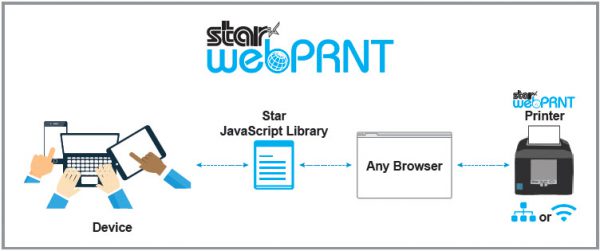
    All About WebPRNTWebPRNT-General-Diagram-e1574805991783


    To support customers building web-based POS applications, Star developed WebPRNT, which provides a multi-platform solution to print directly from various devices including PCs and tablets via a web browser.

    To use, simply embed JavaScript samples from Star’s SDK package into your HTML file, and you can control your Star printer. WebPRNT is the perfect solution for web developers.

    Pros

    • WebPRNT SDK is JavaScript-based and is very familiar to web developers
    • Supports a wide variety of printers including Bluetooth printers by using WebPRNT Browser
    • Once initially coded, WebPRNT can run anywhere with a browser

    Cons

    • Users must know the printer’s IP address
    • Need to set up an SSL certificate

    WebPRNT is available on Star’s mC-Print3, mC-Print2, TSP654II, TSP743II, TSP847II, and SP742. Click here to learn more.


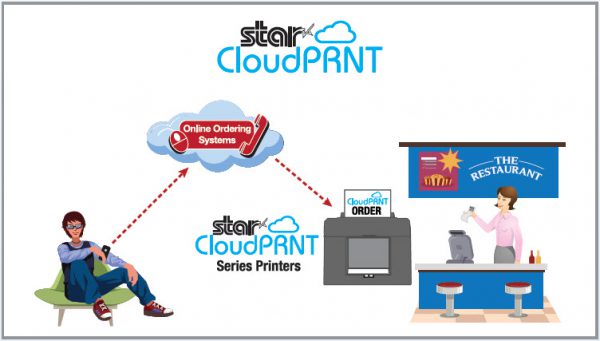
    Exploring CloudPRNTCloudPRNT-General-Diagram-1-e1574806010723

    CloudPRNT is a technology that enables printing directly from a server, usually in the cloud. This device-agnostic method of printing separates the printing technology from the device triggering the print job, making it perfect for web-based software solutions where there is no device on the same network as the printer (and many other scenarios).

    Here’s an example of how CloudPRNT works: By integrating CloudPRNT, a web-based POS solution could generate print jobs seamlessly and without a print dialog from any browser, on any device, running any operating system since the print job is coming straight from the cloud. Online ordering and bring your own device (BYOD) solutions are also a perfect match for CloudPRNT since the device triggering the print job doesn’t have to be on the same network or connected directly to the printer.

    Another benefit of CloudPRNT is that it simplifies print job queue management since it allows management to occur centrally on the server instead of on each individual device. This makes for a robust print management solution in environments with multiple printers such as restaurants.

    Last but not least, CloudPRNT printers periodically poll the server with its status looking for new print jobs rather than pushing the print job from the cloud to the printer. This means that the user doesn’t have to worry about the IP address of the printer, making for easier hardware management and support. The user also does not need to manage SSL certificates on the printer as is required with WebPRNT when printing from secure sites.

    Pros

    • CloudPRNT protocol is platform- and programming language-agnostic
    • The printer and the person initiating printing can be in different physical locations (remote printing)
    • REST-based architecture
    • No need to set up SSL certificates
    • All communication is done through one unified URL

    Cons

    • Requires a reliable internet connection
    • Cannot print when network/internet is down

    CloudPRNT is available on Star’s mC-Print3mC-Print2TSP654IISP742TSP743II, and TSP847IIClick here to learn more.


  • 6 Compelling Reasons Developers Should Choose the StarPRNT SDK

    6 Compelling Reasons Developers Should Choose the StarPRNT SDK

    Constantly evolving technology requirements and the need to stay competitive is enough to keep any programming and development staff busy 24/7. But instead of forcing you to write pages of new code to integrate your products or systems with Star Micronics printers, we’ve created StarPRNT SDK, a software developer kit that eliminates additional complexity in a way that is unmatched by competitors’ solutions. StarPRNT SDK reduces development time, costs and eliminates the need to study different programming manuals and write pages of code for full-feature support.

    The StarPRNT SDK was developed to facilitate the integration of any Star product by making the process as seamless as possible. StarPRNT SDK gives developers all the tools they need at their fingertips to integrate Star’s printer lineup with your application  without the heavy workload. In short: Every Star Micronics printer, One software development kit.

    Learn more about the SDK now in our free eBook.

    There are six specific advantages the StarPRNT SDK has over software development kits that are offered by competitors:

    1. Support every Star Micronics product
    2. Built to be developer-friendly
    3. No need to worry about printer commands
    4. Additional support for Star Micronics’ peripherals
    5. Provides flexibility with programming language
    6. Star Micronics provides development support with the SDK through the Software Partner Program

    Developer-e1574805830803

    Work with a Company that Supports Your Business

    Designed with the needs of software developers in mind, the Star Micronics’ StarPRNT SDK gives you all of the tools you need to integrate your software with Star’s line of printers and peripherals — moreover, we give you the tools to help the process run more smoothly and cost-effectively so you can improve the bottom line.

    Star provides you with a line of industry-leading products including printers and POS peripherals and an SDK that makes it easy to develop software that enables your customers to use our products in ways that are most beneficial to them.

    And Star adds the value of support from our development and marketing teams to ensure your partnership with us is profitable.

  • How to Celebrate Earth Day Every Day with Star Micronics

    How to Celebrate Earth Day Every Day with Star Micronics

    Earth Day is upon us! Established in 1970, the holiday aims to educate people around the globe about environmental issues. This year Earth Day falls on Monday, April 22, but did you know you can give back to the environment every day using your Star Micronics technology? Read on to learn about the many ways we strive to preserve the earth while supplying top notch point of sale (POS) solutions.

    Star Printer Environmental Profiles

    Star puts forth great consideration into manufacturing safe and environmentally friendly products. Each printer model has an Environmental Profile featuring information on its usage safety, hazardous chemical substances, ecology considerations, and more.

    Paper Reduction

    Paper usage is a receipt printer’s largest negative burden on the environment. Taking this fact into consideration, Star designed ways to reduce the severity of receipt paper’s ecological impact while maintaining user comfort and familiarity. Here are some examples of how:

    • Reduced Top Margin: The top margin is the white space starting from the paper’s top edge down to the first line of printed text. In the past, typical receipt printers had top margins ranging from 11 to 15 mm, resulting in lots of unnecessary waste over time. Realizing this, Star defined the default top margin size of the TSP143III to 3 mm and made the feature available on other printer models in our lineup. The result? Conserving between 8 to 12 mm per receipt without any effort or adjustment from the retail shop or restaurant owner!
    • Receipt Length and Width Compression: Many Star printers enable retailers to reduce the size of their receipts without requiring any modification to existing POS software. Store owners have the ability to compress receipts horizontally, vertically, or both ways, for maximum paper conservation. Reduction of both vertical and horizontal space can reduce receipt size by a total of 75% without compromising image quality.
    • On-Demand Printing: Each day, cashiers provide receipts for small purchases, most of which are immediately discarded. The TSP143III addresses this wasteful situation by offering an intuitive option to print the receipt – or not – with no modification to existing POS software. Should the customer wish to not have the receipt printed, the cashier can simply hit the “No” button to skip the print job. The transaction data can then be automatically saved into a journal which allows the store or restaurant owner to browse past transactions, reprint receipts, and more. (Please note some countries ban transaction reprinting or logging, so this feature may not be available in your country should such a law exist).
    • Digital Receipts: What better way to reduce paper waste than with digital receipts? With Star Micronics Cloud Services, end users may provide digitized receipts in a fast, free, and secure way using any Star receipt printer.

    Energy Efficiency

    Although the cost to power a receipt printer is quite small, business owners can still benefit from Star’s energy efficient solutions. By using a Star receipt printer, businesses can save on electricity and add to their green efforts without making a large investment or changing company operations.

    Star is proud to be ENERGY STAR-qualified! An international standard for the promotion of energy efficiency, the ENERGY STAR qualification is a highly respected achievement for any product. In order for a product to obtain the qualification mark, it must meet strict energy requirements set by the government.

    Sustainable Packaging

    To further reduce negative impact on the environment, Star has adopted environmentally friendly packaging techniques, including:

    • Recyclable Packaging: Every Star printer ships in a recyclable cardboard box which can be easily dismantled and folded. The TSP143III took this initiative a step further by featuring the removal of polystyrene and Styrofoam packaging. These components were replaced by the same recyclable cardboard (which protects products from damage just as well).
    • Electronic Manuals: Star provides an electronic user manual on the installation CD included with most printer models. The manual, along with other documentation including setup sheets, installation guides, and FAQs, are available online for download.

    Environmentally Friendly Manufacturing

    Star continually monitors and conforms to international laws and standards, obtains certifications, and investigates new ways to make our products safe for people and the environment. Some environmental initiatives Star has taken include:

    • ISO 14001 Conformity: Star’s main printer manufacturing locations conform to the ISO 14001 international standard.
    • RoHS Compliance: All Star printers are RoHS (Restriction of use of Hazardous Substances) compliant. RoHS restricts the inclusion of certain hazardous substances in electronics manufacturing.
    • WEEE Compliance: All Star printers have earned the WEEE (Waste from Electrical and Electronic Equipment) marking. WEEE mandates the proper disposal and recycling processes of electronics equipment.
    • Environmental Activity Reporting: A yearly Environmental Report is published and posted on Star’s corporate website.
    • Green Procurement Guide and Survey Issuance: Star created a Green Procurement Guide, which is distributed to all suppliers and enables Star to mandate and monitor the exclusion of particular materials during manufacturing processes.
    • BPAFree Paper Rolls: Star is proud to provide BPA-free, premium grade printer paper rolls. Authentic Star paper rolls are easily recognized by the Blue Core.

    Recycling Practices

    Star strives to be eco-friendly every step of the way and encourages its customers to follow local standards for recycling electronics. Please note the disposal process for desktop printers, portable printers and batteries varies from country to country. Please refer to the appropriate measures mandating the disposal method of the country in which your printer is used.

    Encourage Others to Go Green

    Last but not least, one of the best ways to “do your part” when it comes to improving the environment is to encourage others to do the same! Business owners can use PromoPRNT, a value-add tool that prints custom promotions on receipts, to encourage its customers to use reusable bags, recycling product packaging, and more.

    Looking to learn more about Star Micronics’ environmentally friendly technology? Click here to browse Star’s hardware products.

  • Star Micronics Scales: For More Than Just Cannabis

    Star Micronics Scales: For More Than Just Cannabis

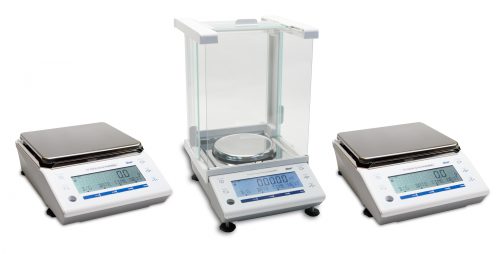
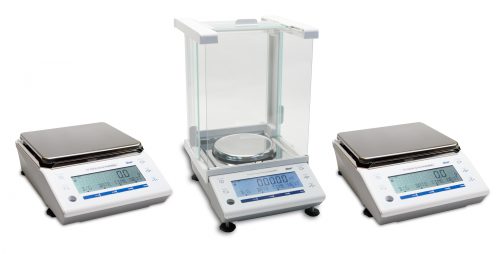
    When you think of Star Micronics scales, you might think of cannabis retail use cases. To be fair, our mG-Scales series – including the mG-S322, the mG-S1501, and the mG-S8200 – is authorized to sell cannabis in Washington, Alaska, and California. But did you know that Star Micronics scale uses extend way beyond cannabis? Star’s mG-Scales boast the the following features:

    • NTEP certification, which is required for all U.S. retail sales
    • Included water- and dust-proof cover
    • Software support for Windows, iOS, and Android
    • Bluetooth BLE, USB, and Serial interfaces
    • Can be powered through an outlet or by battery, enabling portable use

    3-Scales-e1574802743805

    Download the Free Scale Buyer’s Guide.

    Star Micronics scales are great for cannabis retailers – but check out six other industries that are also a perfect match for our scales:

    1. Delis

    As every grocery shopper knows, deli items like meats and cheeses are almost always sold by weight. Many large-scale delis, such as those in grocery stores, use specialty scales that are high-performing and large in size, but come with a hefty price tag. On the contrast, smaller delis don’t need such a big footprint, and most importantly, they need a more affordable integrated scale option. Star Micronics scales fit that bill perfectly, with their compact design, affordable price, and protective and easy-to-clean cover.

    2. Candy Stores

    Because many candies are sold in bulk and high-end candies, such as truffles, are sometimes sold by weight, scales are a must for candy retailers. With their bright and modern design, candy stores are also a perfect environment for sleek, tablet-based point of sale solutions – but there aren’t a lot of scales on the market that can integrate with tablet point of sale. That’s where Star Micronics scales come in to play: our scales’ Bluetooth connectivity – combined with iOS and Android software development kits (SDKs) – enables them to work easily with modern tablet-based solutions. How sweet!

    3. Spice Shops

    Like candy, spices are also generally sold by weight and with certain spices like saffron costing up to $10,000 per pound, it’s extremely important to accurately weigh them. Star Micronics scales combine high accuracy with a small footprint – perfect for a spice shop! Our scales also have the ability to be battery operated, meaning that items like spices can be sold at a farmer’s market with no power – without sacrificing accurate measurement.

    4. Jewelry Stores

    Speaking of expensive items, Star Micronics scales are a great match for jewelry stores. Jewelry is another high cost-per-weight industry, and precious metals and gems must be measured extremely accurately. Star’s most sensitive scale, the mG-S322, can measure to 0.01g accuracy and the units can be switched to carats for measuring materials like diamonds. And thanks to the scale’s included glass enclosure, air movement doesn’t move the jewelry or affect measurements.

    5. Frozen Yogurt Shops

    Taking a step back to modern, sugary industries, frozen yogurt is another business category where tablet-based point of sale is becoming very popular, making it critical to have an iOS/Android-compatible scale, like Star’s. Additionally, frozen yogurt shop counterspace is at a premium, making Star scales’ small footprint a must. In terms of actual measurements, Star Micronics scales can measure in ounces, the industry’s most popular unit of measurement, and with lots of potential for messiness in the shop, the scales’ protective and easy-to-clean covers certainly come in handy.

    TSP800IIRx-e1574802760636
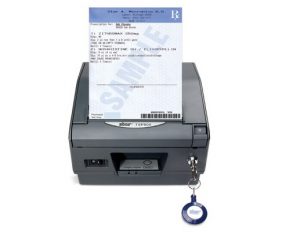
    Star’s TSP800IIRx Thermal Printer is also perfect for pharmacies

    6. Pharmacies

    Candy is delicious and jewelry is beautiful, but in the pharmacy industry, accurately measuring items can be a matter of life and death. In fact, there’s no industry where it’s more important to reliably measure to a high degree of accuracy. Connectivity to software is also important, as measurements are often validated by software to reduce errors. Star Micronics scales have all of that and more – they also include a counting function that’s useful for counting pills. And with an accompanying pharmacy thermal printer, Star is truly one of the most functional, reliable, accurate options on the market for pharmacies.

    Looking to up your retail scale game? Learn more about Star Micronics scales now!

  • NRF 2019 Recap: The Point of Sale of the Future

    NRF 2019 Recap: The Point of Sale of the Future

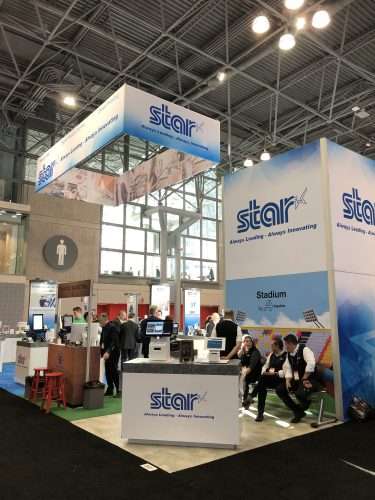
    Last week, we had the pleasure of attending and exhibiting at NRF 2019 at the Jacob K. Javits Convention Center in New York City. The Star family was set up at booth #3601, and also took some time to explore the show floor and learn even more about the latest trends in retail. Here’s a look back at what we demonstrated in our booth, as well as some of the key trends we noticed around the show.

    The Star Booth

    Our booth this year was one of our best yet! We chose to create a mock shopping mall, complete with a candy store, apparel boutique, and even a sports stadium. In our “mall,” we demonstrated:

    The mCollection:

    One highlight of our NRF booth this year was our latest line of mPOS products, the mCollection. Built with the latest technology, the mCollection features sleek and modern printers, scales, and peripherals to offer the full hardware solution, for a variety of industries. The mCollection now also features its very own stand that unifies all of the peripherals and even hides all clunky cables. The lineup’s clean, sophisticated look (and high-end scales) lends itself perfectly to cannabis and confectionery markets, so that’s what we demonstrated this year at NRF!

    PromoPRNT:

    In-store marketing and customer retention are always hot topics that retail brands want to improve upon. To assist, Star created PromoPRNT, a value-added tool that allows retailers to engage and reengage customers where it matters the most – in the store! By offering printed promotions and information, you can encourage loyalty among customers, with the printer you already use. To educate NRF visitors on PromoPRNT, we set up an “In-Store Marketing” booth, and it was a hit.

    PP03-e1574802510776
    The pioneer of PromoPRNT, David Salisbury.
    Our Partners:

    We were very happy to host some of our best partners in our booth this year. On the software/point of sale side, we demonstrated with Appetize, Apptizer, Evoke, Mad Mobile, SuiteRetail, Vend, and Veras Retail. And when it comes to hardware, we proudly displayed ArmorActive, BOX IT, Elo, Heckler Design, Innovative, Mimo Monitors, nClose, and SpacePole.

    IMG_3671-e1574802546974
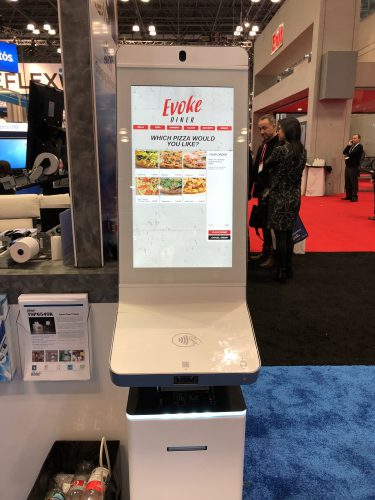
    A kiosk example from our partner, Evoke.

    Trends from Around the Show

    Self-Service Kiosks:

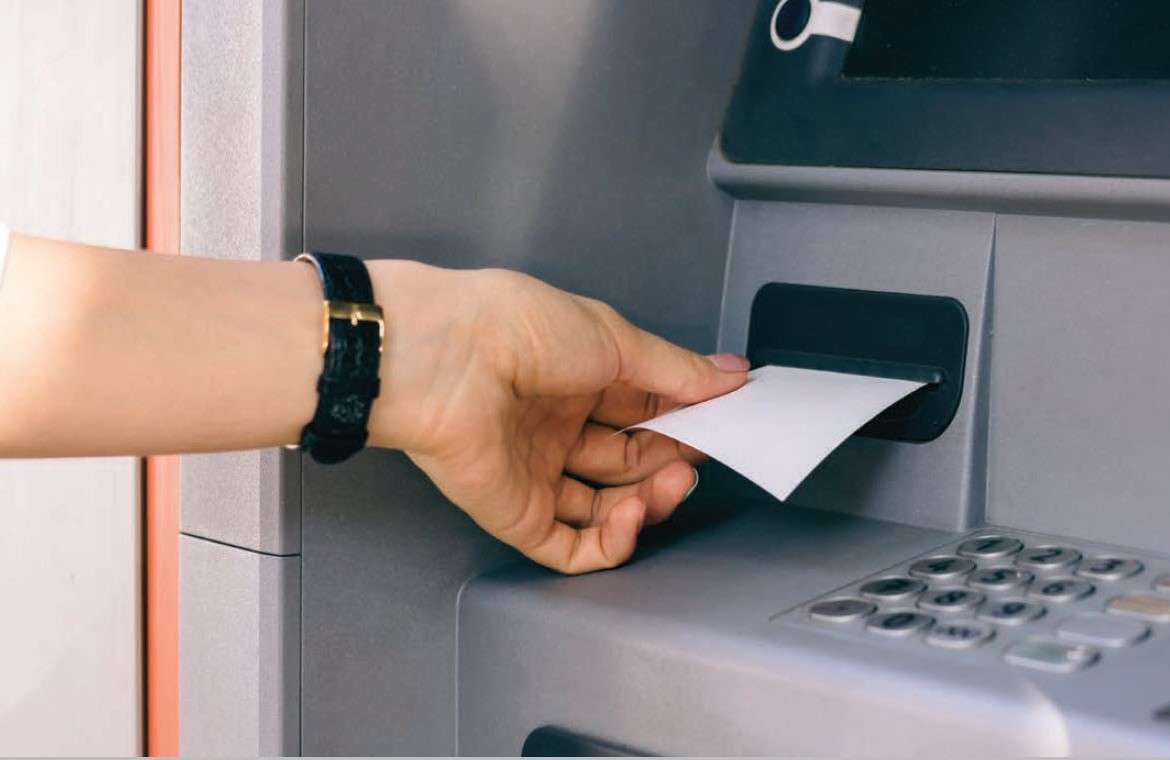
    Self-service kiosk technology was everywhere at NRF! The need for kiosk printers is quickly expanding as consumers prefer a more fast-paced experience. Star offers printing solutions to fit any kiosk – whether it be for ATMs, lottery, self-ordering, or retail.

    Smart Displays:

    Smart displays that incorporate dynamic data were another trend we spotted at NRF. An interesting example of this was a demo featuring electronic grocery shelf labels that displayed featured recipes, country of origin, competitors’ prices, and more.

    Experiential Retail:

    From a bar demo where you created your own drink, to a session focused on architecting an immersive customer environment, experiential retail was a hot NRF topic. Today’s consumers are looking for an authentic, hands-on shopping experience, and that trend was very clear this year at the show.

    We had a blast at NRF 2019 and can’t wait for NRF 2020!

  • Dale Carnegie Training Recap: Our Top 3 Takeaways

    Dale Carnegie Training Recap: Our Top 3 Takeaways

    Star Micronics family.
    A part of the Star family who visited Arizona.

    Last month, we had the pleasure of visiting sunny Scottsdale, Arizona to attend a Dale Carnegie training that taught us some of the best tips and tricks to sell mPOS in today’s market. As we all know, technologies are always changing, and it’s a good idea to refresh your skillset in order to do your best and offer your best to your customers. Although we manufacture POS solutions, there were three key takeaways we received from the Dale Carnegie training that are also relevant for ISVs, resellers, and SMBs alike. Read on to get some good business tips, no matter what industry you’re in.

    1. Don’t Just Hear – Listen

    Our first takeaway sounds easy, but is often overlooked. When engaging with colleagues and customers (and friends and loved ones, too) don’t just hear what they’re saying – truly listen. Paying attention and really listening to what the other person is saying will not only improve your relationship, but also help you remember the conversation more fully.

    The beautiful landscaping at the JW Marriott Scottsdale Camelback Inn Resort and Spa.
    The beautiful landscaping at the JW Marriott Scottsdale Camelback Inn Resort & Spa.

    2. Mix It Up

    It’s easy to get overwhelmed when you have a lot on your plate. To avoid things slipping through the cracks, mix up your tasks! Categorize your to-do list by things that already happened that you need to work on (responding to older emails), items that pop up in the present (a report that is due today), and things you need to deliver on in the future (writing a draft that’s due next week). Then, choose a task to begin with, and work one-by-one and alternate the type of task as you go. This will help you keep a variety of tasks in the foreground of your mind.

    Dale Carnegie training.
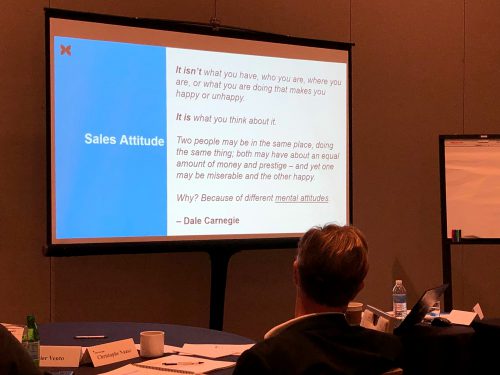
    Learning about the importance of mental attitudes.

    3. Choose the Right Attitude

    Last but not least, is a good lesson in developing a healthy, productive perspective. Per Dale Carnegie:

    “It isn’t what you have, who you are, where you are, or what you are doing that makes you happy or unhappy. It is what you think about it. Two people may be in the same place, doing the same thing; both may have about an equal amount of money and prestige – and yet one may be miserable and the other happy. Why? Because of different mental attitudes.”

    Thanks again, Dale Carnegie of Arizona, for having us and teaching us your ways!