Category: Product Updates

  • What to Expect at NRF 2017

    What to Expect at NRF 2017

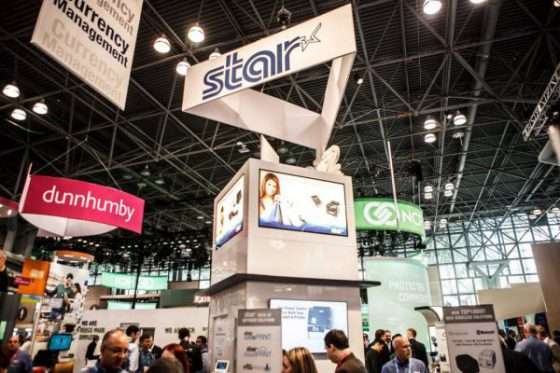
    Everyone in the point of sale industry knows that NRF is the biggest trade show of the year! As always, Star will be there exhibiting with our entire team of Star Sales, Integrations, and Marketing professionals at booth #3731. In 2016, Star released a number of new products including our TSP100III series and TSP650IIWLAN printers, our new CD3 Cash Drawers, and our PassPRNT, cloudPRNT, and StarPRNT SDK technologies. We’ve also built a number of great partnerships with point of sale software and retail technology providers.

    Here’s a sneak peak of what you’ll see at the Star booth at NRF 2017:

    mPOP™ Your Way!

    While mPOP™ has been around for a couple of years now, Star is continuously making updates and improvements to our all-in-one peripheral to make it the best ergonomic mPOS solution on the market. This year, we are going to be showcasing the mPOP as a point of sale hub with optional accessories including a 1D or 2D barcode scanner, customer display, scale, or a DK port to connect an external cash drawer to the mPOP.

    CloudPRNT

    CloudPRNT is Star’s latest advance in point of sale technology, allowing users to print to Star printers directly through a cloud service. With CloudPRNT, retailers and restaurateurs can easily accept and print online orders with no need for an extra tablet to communicate with the printer. See a live demo at our booth!

    Star Micronics Cloud Services Introduces the Micro Receipt™!

    Star Micronics Cloud Services is making huge strides in the digital receipt market! With new features in 2016, including Receipt Flip and Data Facilitation, retailers are now offered more services for the same cost – NOTHING! SMCS is free to retailers using Star receipt printers and allows them to better engage with their customers and offer digital receipts through Star’s AllReceipts™ app (which is also free to download in the App Store and Google Play).

    This year, SMCS is proudmicro-receipt to introduce the Micro Receipt™. We all know that receipts are a necessary, yet sometimes annoying piece of paper that often goes missing or gets thrown away. That is why SMCS has created the Micro Receipt!
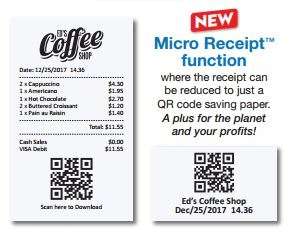
    The Micro Receipt contains all of the same information as a full-length receipt, but allows the retailer to save paper by only printing their store name or logo, time stamp, and an AllReceipts™ scannable QR code. Customers can then scan the QR code on their smartphone using the AllReceipts™ app and gain access to all of their purchase information along with coupons or promotions on the digital copy. SMCS will be showing demos of the Micro Receipts, AllReceipts app, and all of their additional free services at the Star booth.

    Now, let’s meet our Star partners who will be at NRF 2017:

    Itemizeitemize-color-logo-1 and Star Micronics have partnered to revolutionize the digital expense receipt market. Itemize is an app that allows users to capture data from their receipts for expense purposes. They have now integrated AllReceipts™ QR capability for a more clean and legible digital receipt, ensuring more accurate data capture.


    dorDôr and Star Cloud Services have partnered to help retailers know their business inside and out. With Dôr, retailers can see how many customers are visiting their store, compared to how many customers are making a purchase. Retailers can now optimize staffing, improve marketing spending, and be everywhere with Dôr and SCS.

    thirdshelf-logoThirdshelf, another new partner of Star Cloud Services helps retailers to build and nurture customer relationships. Combined with Engage NOW from Star Cloud Services, retailers can create branded loyalty programs to start marketing like a pro. With Thirdshelf and SCS, retailers can make every sale the start of their next.

    nclose-3d-logo_09252012-300x227nClose, a long time partner of Star Micronics, will be exhibiting in Star’s booth, showcasing their protective tablet enclosures and mobile credit card readers for POS. With stands and enclosures for Apple iPad®, Samsung, and Windows tablets, nClose designs pair perfectly with any of Star’s mPOS peripherals.

    largecolinlogo-300x75MoZONE offers a unique omnichannel and proximity marketing solution for all smartphones with no apps required. Using Star’s TSP100ECO printers, MoZONE allows customers to order and pay from any smartphone, tablet, or computer, while notifying customers of deals and promotions based on the customer’s location.

    emobileposStar and eMobilePOS will be showcasing their point of sale solutions for retail and hospitality with Star’s mPOP™, and SM-T300i and SM-S220i mobile printers. In addition, eMobilePOS and Star will be showcasing our latest solutions with Elo’s iSeries. Visit the eMobilePOS partner counter in the Star booth for a live demo!

    Visit our mPOP™ table!

    The mPOP is Star’s first hybrid for tablet POS that combines a cash drawer and printer peripheral. Over the past few years, the mPOP has redefined the mPOS market, and many software providers have partnered to support the mPOP with their point of sale software solutions. Make sure to stop by our mPOP table in NRF booth to see a full display of software and stand options for the mPOP.
    mpop-table

    We look forward to seeing you there!

  • Star Spotlight with Quetzal

    Star Spotlight with Quetzal

    quetzal-banner

    What does Quetzal do?

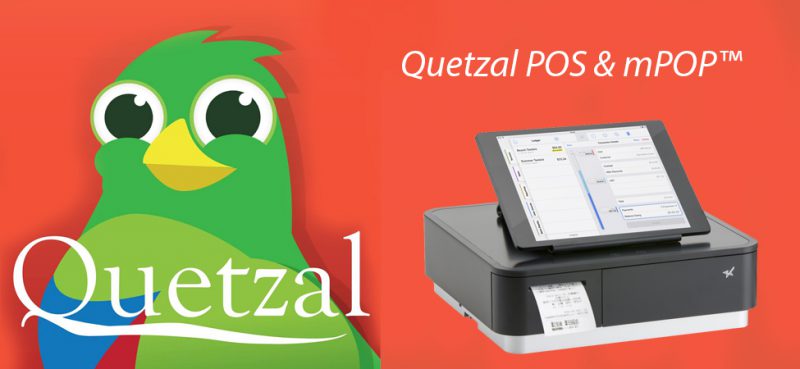
    Quetzal is designed from the ground up for one specific group of customers: forward-thinking and stylish clothing and shoe retailers who have one or two locations with ambitions to open a few more. Quetzal POS is a cloud-based point of sale software that can be ran on Apple iPad® devices, with the ability to connect up to ten locations. The fully integrated point of sale allows users to do everything from the iPad from importing, to sales, to customer management, to visual retail-time reporting.

    How is Quetzal working with Star Micronics?

    Quetzal has integrated Star’s mPOP™, Mobile Point of Purchase, peripheral for a sleek, all-in-one solution for their specialty retailers. In addition to the mPOP, Quetzal has also certified support for Star’s TSP100 printers and the AllReceipts™ digital receipt app. Retailers can use both the mPOP and TSP100 peripherals to offer their customers digital receipts through the AllReceipts app, and engage with customers and manage their devices with Star Cloud Services.

    [youtube https://www.youtube.com/watch?v=aUzXnTB8z2s]

    What key benefits do Star peripherals bring the the specialty retail market?

    Star’s mPOP and printer peripherals offer an easy solution for retailers to set up their point of sale using and iPad device. With no need for additional development or integration, retailers can get the entire point of sale up and running in no time. In addition to the easy set-up, Star’s mPOP offers an attractive, yet reliable cash drawer and receipt printer for the retailer, with the option of digital receipts being an added bonus.

    “Our customers are able to get set up with any of the Star products literally in moments of opening it out of the box. It’s a very simple solution for our retailers to set up and we can complete the implementation in less than five minutes with no technical skills required.” – Joshua Stanphill, VP of Sales and Marketing for Quetzal.

  • Star Spotlight with Hike POS

    Star Spotlight with Hike POS

    What does Hike POS do?

    Hike POS is an award-winning omnichannel retail point of sale solution designed for small businesses around the world. With Hike POS, retailers can sell in-store, online, and on-the-go. Hike believes that point of sale should be modern, flexible, and user-friendly, which is why they have made their solution available for PC, Mac, and iOS users. With a wide application suite including inventory management, gift cards, customer loyalty, and more, Hike POS makes it easier than ever to start & grow your business.

    How are you working with Star Micronics?

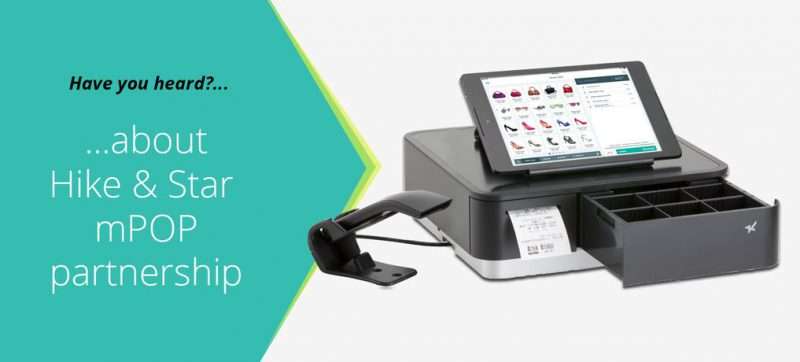
    Star was the first choice of point of sale printers for Hike POS. Hike POS promotes Star printers with their cloud-based feature which was recently introduced. Hike POS software combined with Star’s mPOP combination cash drawer, receipt printer, and barcode scanner, allows retailers to get a true, all-in-one mPOS solution that is easy to use and helps grow business.

    Hike POS has also been one of the first Star Certified Software Partners to fully integrate Star Cloud Services’ digital receipt and customer engagement tools. Using Star Cloud Services, Hike POS retailers can now offer their customers the option of digital receipts through Star’s AllReceipts™ digital receipts app.

    What are the biggest benefits of AllReceipts™ for retailers and for Hike POS?

    Retailers love the idea of offering their customer digital receipts, but struggle to get their customers to give up their email address. Hike POS wanted to provide a solution for this problem that their customers where experiencing, so they turned to AllReceipts™. Allowing their retailers to still offer digital receipts without needing any personal information from the customer was a huge win for Hike POS customers.

    [youtube https://www.youtube.com/watch?v=qUkSXZ_oW1Y]

    Hike POS vendors were also able to take advantage of other Star Cloud Services features including the instant customer feedback survey, Engage NOW, and Receipt Flip.

    “Star is a leader in technology and manufactures fully integrated printers that are easy for our customers to use, including their USB and Ethernet printers, along with the all-in-one mPOP. Star is truly the printer provider of choice for Hike POS” – Jay Sutaria, Business Development Director for Hike POS.

  • The Benefits of Free POS for Bakery Shops

    The Benefits of Free POS for Bakery Shops

    With technology moving forward and over 9,000 bakeries in the U.S., a recent study found that over 70% of those businesses still use an analog cash register. It could be because they are already used to them, or it could be because they feel the cost is prohibitive. However, there are good free POS systems which help to optimize operations and service.

    These systems are able to remedy the problems bakeries deal with on a regular basis. Though it may seem like a giant pipe dream to have a full POS system in a small business at no expense, it’s very possible. The features and benefits offered promote efficiency in the bakery, and ensures customers get the time and service they need.

    Generally, a lot of bakers think that a few lost customers here and there is acceptable. This is not the case, as they typically do not return. Lee Resources found that 91% of unhappy customers will not return for repeat business. One bad experience is enough to cost many dollars in profit from the lost chance of repeat business.

    Loyal customers are like gold to small businesses. A study by Constant Contact found that eighty-two percent of small business owners say that loyal customers were their primary sources of profit and success.

    Let’s go over the features that can help a bakery help them roll in the dough.

    ehopper-pos

    It All Starts In the Kitchen, But Ends with A Happy Customer

    The heart and soul of any bakery is where the bread is made, which makes the kitchen in the back even more important than the counter in the front. Making sure that cooks and other kitchen staff have the tools they need to fulfill orders quickly and correctly is what keeps a bakery operating at maximum efficiency.

    A point of sale system comes with core features that are built to make the entire process of baking goods and selling them to customers must faster, easier, and less prone to mistakes which cause customer issues and loss of profit. Bakery profits need to rise as much as the dough in the oven will.

    Order Management

    Bakeries do much more than sell individual loafs to people who walk in to make a purchase. Restaurants, stores, and other businesses often make large orders on a daily and sometimes even hourly basis. A pen and paper “system” is prone to error, and busy periods will lead to incorrect orders and misplaced tickets. Order management allows counter staff to provide accurate, digital order lists to the kitchen staff that have been taken down as they were on the phone. This ensures accuracy when the order is being baked and prepared.

    Order Tracking

    When effort is put into ensuring that customer orders are completed and received by a grinning customer, each step to completion must be tracked. With order tracking, managers can keep track of walk-ins, deliveries, dine-ins and even drive-thru orders. By tracking each step, it cuts down on errors because they can be corrected in real-time. Accurate orders always make for happy customers, especially in an industry where order mix-ups are the norm.

    Customer Management

    Bakeries are busy for a reason; customers and businesses alike purchase from them regularly. No matter who the customer is, everyone could use a slice of bread. This is why they are better off using a bakery POS instead of quickly scratching out words on a pad of paper. It’s a given that these will get lost in the shuffle out. This is proven with a study by Acxiom which reported that half of businesses today cannot name their most loyal customers. Having a record of frequently ordered items from a customer will make their ordering process more convenient for both the buyer and seller.

    Inventory Management

    No one runs a successful bakery by selling items on the fly. Taking an order and not having the baked goods to complete it will leave a customer looking for another bakery. With inventory management features, managers can actively add to the counts with a few button presses, and the POS will simply manage the inventory as items are sold, instead of dealing with the pressure and panic of managing a constantly changing inventory, the point of sale system does all the tough stuff for you.

    Business Reporting

    After a hectic day of running around, tending to the ovens and making sure customers aren’t left hungry, the bakery manager just wants to know how much profit was made from today’s haul. Instead of sitting down to do the time-consuming math, POS systems take care of all the calculating in real-time as the staff does business and makes customers happy. All information will be stored on a cloud server and can be accessed at any time. It is constantly updated as sales are performed. Even better, the closing manager only has to simply close the register at the end of the day.

    As demonstrated, a POS system has a lot to offer to any small bakery. If bakeries wish to see their customer satisfaction rise, it’s time to check out one of these systems and see the benefits and solutions they provide from the moment they are booted up at the start of each day.

    Many of our customers who own and manage small bakeries provide us with a lot of vital feedback, which we put together for this piece, as useful information is always good to share in today’s business market. If more tips are needed, reach out to us at any time, or download eHopper POS for free and discover the benefits.

    To find even more great posts such as these, visit eHopper’s blog for new ones each week.

    Ronald Morris

    Marketing Manager for eHopper Services, LLC

  • 4 Solutions to Overcome Mobile Printing Challenges

    4 Solutions to Overcome Mobile Printing Challenges

    Point of sale (POS) is no longer limited to the traditional, fixed model. Merchants have tried and proven the benefits of mobility. They can complete payment transactions in-aisle of tableside, and set up additional checkouts for line busting.

    Here are four common challenges merchants face with mobile printing and the solutions that will help you overcome them.

    Challenge 1: Printing from an iOS, Android, or Windows Native App

    With most legacy applications, many POS printers and printer brands could be used by just installing the right Windows driver. Since iOS and Android operating systems do not have a print engine to support drivers, the printer functions need to be integrated inside the POS software, thus limiting the choice. Fortunately, these companies have usually integrated the best of breed printers which make for an easy choice.

    Solution: SDK Integration

    A software development kit (SDK) helps software engineers or developers to speed up the process to support special features (like printing) in software applications. The printing SDKs needed to create applications are usually available for developers to download from the printer hardware manufacturer. For example, iOS applications traditionally use Objective-C or Swift programming language, while Android uses Java.

    An advantage to SDK integration is that the application your software engineer or developer creates can give you more complete control of printing, such as adjusting print formatting, controlling the cash drawer, or checking the status of the printer. It also enables additional, innovative features to be added to the print application such as digital receipts and other cloud services.

    Challenge 2: Printing from a Web Browser Application

    Advanced Web standards, such as HTML5, give developers the ability to build Web-based applications with nearly the same level of features as native (local) applications. Web applications have the added advantage of allowing live, automatic updating so that customers always have the most up-to-date version of the software since the application lives in the cloud.

    If the POS software is Web-based, the issue isn’t which mobile device the application is running on. Most Web-based solutions are device agnostic: if the device can connect to the Internet, it can usually use the application. In this case, it’s necessary for the printer to receive data directly from the Web-based application.

    Solution: WebPRNT

    Star’s JavaScript-based WebPRNT technology allows complete control of any Star WebPRNT Ethernet interface printer. Developers can use Star’s JavaScript library and Builder API to integrate a Web-based application with a WebPRNT printer. In addition, this functionality can be extended to Bluetooth printers by using the WebPRNT Browser with little to no changes.

    Challenge 3: Printing from a FileMaker™ Project

    FileMaker Go is a free app that runs FileMaker applications, such as those for POS and retail management solutions on iPad®, iPhone®, and iPod Touch®. Traditionally, it has not been possible to print from applications such as FileMaker Go to point of sale and mobile printers.

    Solution: PassPRNT

    Star’s PassPRNT application solves the problem of printing from FileMaker applications. Any FileMaker Go project, native iOS or Androud application, or Web application can send the receipt in an HTML format to the PassPRNT application using a URL Scheme. The PassPRNT native application then formats the receipt for the printer and sends it to any Star Bluetooth printer paired with the iOS device. The operating system can automatically switch from the FileMaker application to the PassPRNT application and back, making seamless, “one-tap” printing possible.

    Challenge 4: Continuing to use a Legacy Windows Application with Newer Mobile Hardware

    In some instances, a merchant may want to update its hardware to be more mPOS compatible, but also wants to continue to use their legacy system running an OS such as Windows or Linux. Examples may include a PC upgraded to a Microsoft Surface, or a desktop serial or parallel printer upgraded to a network or Bluetooth POS printer.

    Solutions: Update Hardware and Drivers

    Most legacy applications can be used on the latest Windows 8.1 or 10 tablets. But like any new installation, the new hardware needs to be set up, meaning new drivers, and new configuration. Network printers (either LAN or WLAN) are usually recommended for mPOS system, however new Bluetooth printers are often as powerful and easier to set up. In this configuration, the old cash drawer can be connected to the new printer. However, if the decision is made to use a mobile printer, more modifications are needed. Since 90% of all cash drawers are usually driven by a POS printer, if a portable printer is now used, you will need to update your cash drawer to a wireless one, or integrate DK-AirCash to bring the old drawer to an Ethernet or wireless configuration.

    To learn more, download our eBook: How Printer Software Technology is Evolving to Accommodate mPOS

  • The Benefits of EMV

    The Benefits of EMV

    Following the October 1, 2015 deadline created by U.S. credit card issuers MasterCard, Visa, Discover, and American Express, the liability of EMV compliant payment processing systems has shifted in the U.S. Prior to this shift, one of two parties would be held responsible in the case of fraudulent credit card transactions – the payment processor or the issuing bank. Now, whichever party is the least EMV compliant in a fraudulent credit card transaction  – the merchant or the card issuing bank – will be liable for the consumer losses.

    While business owners and shoppers tend to see the shift as a negative, it turns out that there are many overlooked benefits to the EMV shift for both businesses and consumers.

    As mentioned, the Oct. 1, 2015 deadline is strongly encouraging businesses to switch to EMV compliant payment processing systems in order to avoid being held liable for fraudulent credit card transactions. While switching to a new EMV compliant POS system may be expensive, it can potentially save businesses from losing hundreds to thousands of dollars in credit card fraud. What’s more, this switch gives business owners the opportunity to not only become EMV compliant but to consider switching to a more modern and mobile POS system.

    Tablet-based POS is becoming more prevalent in businesses, especially small businesses. The reason being is that tablet-based POS is usually inexpensive and can scale or expand your business. Tablet POS is also a sleek and attractive option for small business owners, allowing them to keep a modern check-out and save precious counter space at the point of transaction. The benefit of upgrading your traditional cash register or POS to a mobile or tablet POS system, is that most mPOS systems are already EMV compliant, making the shift to EMV as smooth and inexpensive as possible.

    Now, let’s talk about some of the benefits of EMV for shoppers.

    Since the shift to EMV compliant payment processing, there has been an obvious push-back from shoppers all over the U.S. This is mostly due to the fact that dipping the EMV chip of your credit card takes significantly longer than the simple swipe of a magnetic stripe reader. While this can be a nuisance, the EMV chip is a major benefit for consumer shoppers as well.

    The reason you have to wait an extra 5 to 10 seconds for the chip reader to process your payment is because each transaction with your EMV card is a unique one. When dipping your card into the chip reader, the terminal performs many stages of complex processing to create a unique transaction each time your EMV card is used for payments. This requires dozens of pieces of data to be read in order to create this unique transaction, resulting in a slightly longer wait time. But the benefit is, that if the card information gets copied and attempted to be used for another transaction, the information would not be usable, and the card would just be denied.

    To learn more about the EMV shift and mobile payment solutions, check out Star Micronics eBook – mPOS: How its Revolutionizing Payments.


  • NRF 2016 Recap

    NRF 2016 Recap

    Star Micronics would like to thank all of those who visited us at NRF Big Show 2016! We had an amazing time interacting with our customers and partners, building new relationships, and sharing information on our newest products and technology. We’d like to share some of the highlights from the show for anyone who might have missed it.

    For Star, trade shows are a way to connect with our customers and partners on a more personal level. We were fortunate enough to have not only a number of partners featuring Star products in our booth, but all over the show floor. With both traditional POS and new mPOS technology and solutions being displayed, Star was able to reach a wider audience and show off both our classic, and our most innovative solutions for the POS and mPOS technology industry.

    mPOP™
    mPOP microsoft interview

    Our new all-in-one POS solution, the mPOP, was the star of our show this year! The mPOP, Mobile Point of Purchase, is Star’s first hybrid for tablet POS that combines a cash drawer and printer peripheral. Along with the number of mPOPs showcased in our own booth with our partners’ software and tablet mounting cases, we found them across the entire show being featured at Intel, Microsoft, MagTek, Celerant, Armor Active, and more!

    TSP143IIITSP100III NRF video

    For the first time, Star Micronics showcased our newest POS thermal receipt printer, the TSP143III, at NRF 2016! Star anticipates the TSP143III to be one of our hit products of 2016. The POS thermal receipt printer is perfect for retail and hospitality with simple “Push ‘n’ Connect” WPS set-up, WLAN connection, USB power source for tablet or mobile device charging, high-speed printing, and tons of other great features.

    AllReceipts

    AllReceipts NRF

    Star Micronics is also expecting big things for AllReceipts in 2016! From Star Micronics Cloud Services, AllReceipts is a free digital receipt solution available on all Star Micronics printer models. With complete demos and free giveaways, people flooded the AllReceipts stand to learn more about how to digitally manage their receipts.

    Star Micronics also had the pleasure of welcoming our Latin America team to the show. It was a great opportunity for us not only to connect with our own team, but to meet the many partners and customers that they have been working closely with as well.

    Overall, it was the wonderful combination of our customers, partners, and our own Star Micronics team that helped to make NRF 2016 a successful show. Thank you again to everyone who attended and we look forward to seeing you all next year!