Author: Star Micronics

  • 3 Ways to Set Up a Successful Kiosk Implementation in 2020

    3 Ways to Set Up a Successful Kiosk Implementation in 2020

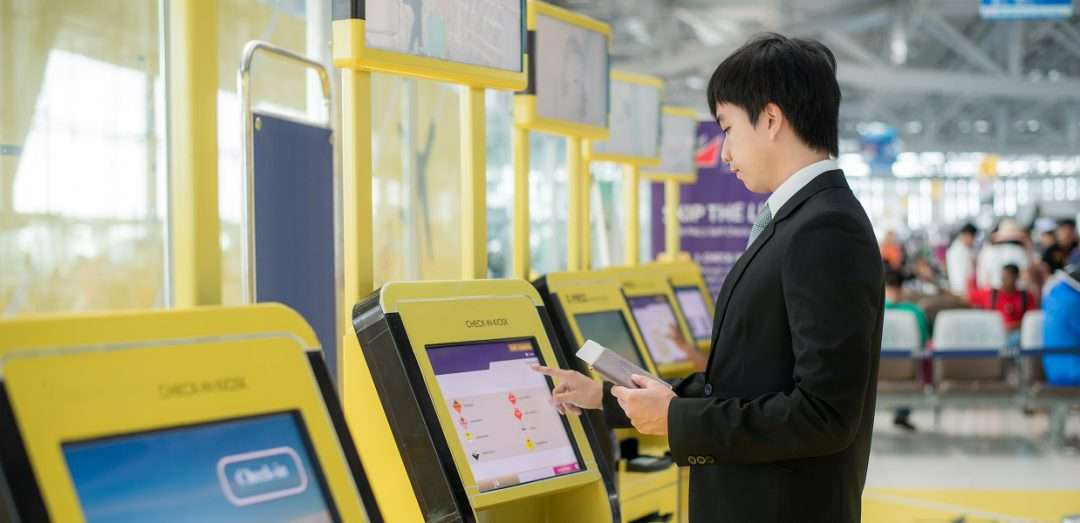
    So, you’re looking to take advantage of self-service kiosk technology. You know that self-service solutions can boost profits, increase order accuracy, and improve the customer experience. But how do you ensure a successful kiosk implementation?First and foremost, it’s important to remember that understanding the environment in which the self-service kiosk will operate is crucial to its success. If the kiosk will remain unattended for the most part of its operational cycle and if attending it for any reason (being it technical or merely operational) is costly due to distances or any other logistic aspect, then focusing on the kiosk’s autonomy is key.

    Explore Star’s self-service kiosk solutions.

    Your best chance for an autonomous kiosk boils down to three important factors:

    • A powerful and effective set of components,
    • A strategic location, and
    • A high-quality supplier.

    Read on to learn more about each factor.

    Kiosk Implementation Rule #1: A Kiosk is as Powerful and Effective as the Sum of its Components

    For any kiosk integrator, selecting the proper components when putting together a kiosk solution is one of the most important aspects of their kiosk design. Three things to look for when selecting kiosk components are ruggedness, a large paper roll holder, and user-proof features.

    • Ruggedness: A good rule of thumb is to make sure the kiosk printer that you select is durable and includes components that are long-lasting. In terms of a kiosk printer, that includes consumables such as the print head, automatic cutter, and more.
    • Large Paper Roll Holder: One easy way to instantly cut down on maintenance time (and associated fees) is by selecting a large paper roll holder for your kiosk. Considering a larger paper roll diameter (length) allows the kiosk to operate for a longer period of time without attention since it can accommodate many more printed receipts without any additional paper roll changes.
    • UserProof Features: Designing a kiosk to be user-proof is very important. What exactly does user-proof mean? It means creating a self-service solution which process is inherently straightforward and easy-to-adopt for end-users. One way to do that is by considering the use of an optional presenter to allow all the printing and cutting to happen inside the kiosk unit prior to making it available to the user. With a presenter, there’s no question about whether or not the receipt is ready.

    Choosing the right technology in your self-service solution allows your kiosk to be remotely monitored, so that operators can more effectively and efficiently plan maintenance visits regarding paper replenishing, technical service, replacement of consumable components, etc. At the end of the day, this efficiency means less downtime, more profit, and happier customers!

    Kiosk Implementation Rule #2: Location, Location, Location

    You know what they say: location is key! That same rule applies to self-service kiosks.

    Selecting the right place for your self-service kiosk solution not only can increase sales, but may also affect its reliability, durability, and customers’ perceptions of quality of service provided.

    A couple of tips for choosing a location include:

    • Consider an easy-to-access, well-illuminated, and high-traffic area to give your kiosk the greatest chance for success in terms of adoption and sales.
    • Make sure that when you select the kiosk’s location, you are considering how the location will benefit or affect both the end-user and the kiosk’s success. For example, if your kiosk is serving as a parking self-service payment station, it should be placed in a natural path towards the parking garage to allow end-users to access it without having to go to a different area or being unsure of where to pay.

    Kiosk Implementation Rule #3: Your Supplier Matters

    Last but not least, your supplier matters … a lot. In order to choose a supplier that will be able to assist you in the long run no matter what your use case, be sure to go with one that acts as a trusted adviser, offers a wide range of kiosk printers, and provides top-notch support.

    • A Trusted Adviser: Choosing a supplier that doesn’t just sell, but consults, is just as important as selecting your kiosk’s components and location. To do this, look for a manufacturer with a healthy amount of industry experience who can act as a trusted adviser. Working with companies specialized in the vertical being attended, in this case the self-service kiosk vertical, is critical. Absorbing decades of experience and having access to the most innovative technologies and options will benefit your final solution, and in some cases will open the door to create solutions previously inconceivable.
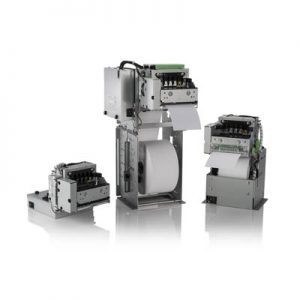
    • A Wide Range of Kiosk Printers: Kiosks are not “one size fits all.” Choose a supplier that offers a range of kiosk printers, including open-frame and closed-frame, with a variety of possible positions, connectivity options, and accessories.
    • Superb Support: Your self-service journey doesn’t end when the kiosk implementation is complete. Your long-term success depends on choosing a supplier that offers a robust level of support, such as easy-to-find drivers, manuals, warranty information, and FAQs/troubleshooting, as well as on-site technical support staff.

    We hope that these kiosk implementation tips were helpful, and will guide you as you select kiosk components, locations and use cases, and suppliers.

    Free Self-Service Kiosk Resources

    The future of many industries lies with self-service solutions. That’s why Star Micronics is offering free online ordering resources for resellers and software developers who are helping customers future-proof their businesses with self-service solutions.


    Get to Know Star’s Kiosk Printers

    Explore all printers.

    Looking for more kiosk help? Download our free Guide to Selecting the Right Kiosk Printer.

  • Star Software Update: mC-Print Firmware Update (v2.4)

    Star Software Update: mC-Print Firmware Update (v2.4)

    Welcome to the Star Software Update, the regular series of blog updates where Star’s Integration Team informs you about the latest important Star Micronics software updates.

    In this edition:

    Read on to learn what this month’s update entails.

    Release Date:

    This firmware update was released on January 31, 2020.

    What is Included in the Update?

    Simply put, this new firmware update allows you to more reliably share a printer between an online ordering service using CloudPRNT and a POS using Star’s SDK/driver.

    In today’s restaurant and retail environments it is becoming less and less common to have all services through one provider and much more common to have many different vendors providing different services such as point of sale, online ordering, etc. This firmware update makes sharing a printer between different services using different Star print technologies more reliable, resulting in fewer errors and missed print jobs.

    Next Steps

    You can update your firmware in the mC-Print Utility, under the “Firmware Update” function.

  • The Best New Star Technology in 2020

    The Best New Star Technology in 2020

    It’s 2020 and it should come as no surprise that point of sale (POS) technology is advancing rapidly. But which POS trends are predicted to be hot this year?


    • Cloud POS: According to Finances Online, the cloud POS market penetration rate is expected to hit 44% this year, up from 35% in 2018 and 39% in 2019.
    • Self-Service: In 2019, the self-service market was valued at $28 billion USD, and by 2025 it’s expected to reach $68 billion USD. Needless to say, self-service kiosks will be popping up left and right this year.
    • Mobile Payments: It’s estimated that by the end of 2020, nearly 1 in every 2 dollars spent online will come from purchase made using mobile devices. That’s a lot of mobile payments!

    Download Free eBook: MPOS: How it’s Revolutionizing Payments

    So, what’s Star doing to keep up with these emerging trends? Read on to discover the best new Star technology this year.

    SteadyLAN®

    The foundation of each of the above POS trends is a stable connection. For cloud POS to reliably operate, a strong network connection must be present. A self-service kiosk that’s out of order is a nuisance to customers and a waste of money to business owners. Mobile payments don’t exist without a solid connection.

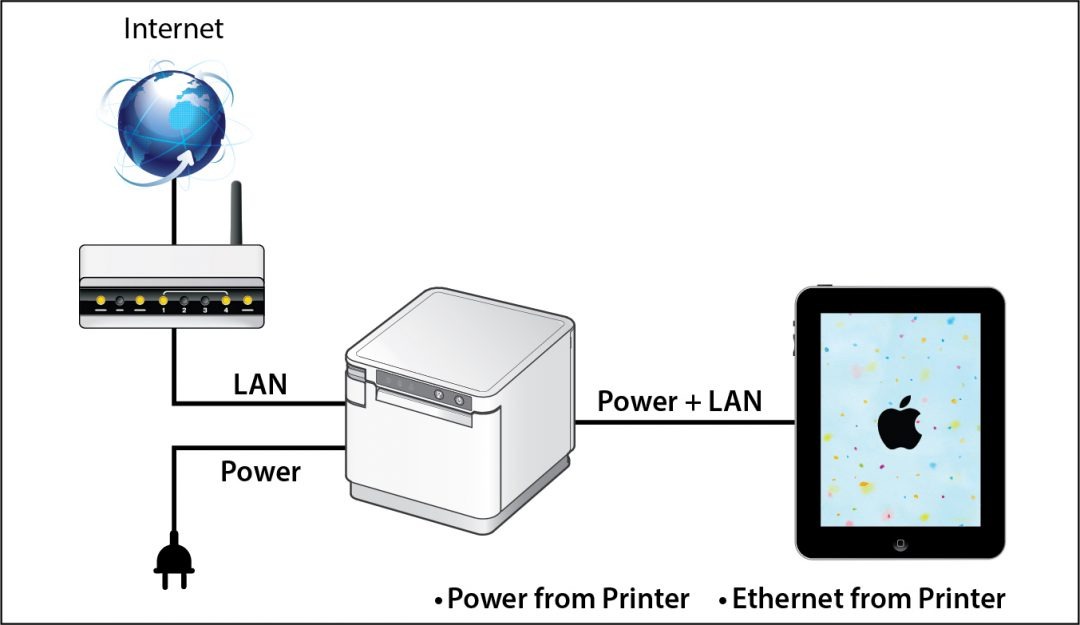
    To greatly strengthen network connection in iPad POS, Star is proud to introduce SteadyLAN®. This unique, patent-pending new Star technology makes unstable Wi-Fi signals a thing of the past. Available on certain mC-Print models and designed for iOS, Android, and Windows devices provides direct cabled control of the printer and attached peripherals, as well as Ethernet provision to the tablet, from the wired Ethernet port of the printer.

    Star-SteadyLAN-Technology-Final-withoutlogo-1080x625

    For locations where Wi-Fi connectivity is not possible or unreliable, this new technology is a world-first, providing the stability of a cabled LAN connection for tablet POS systems. By connecting the SteadyLAN-compatible printer to the Internet via wired LAN and connecting the printer and a tablet with a Lightning-USB or USB-C® cable, the device can use the Internet without Wi-Fi communication. At the same time, the tablet can communicate with the printer via USB or LAN and can be charged from the printer.

    Click here to learn more about SteadyLAN

    A Full Kiosk Lineup

    Kiosk printers aren’t a new edition to Star in 2020 – we have been offering a robust lineup of self-service printing options for quite some time – but what is new and hot this year are our second generation of compact SK1 kiosk printers.

    The new kiosk printers, the SK1-211 and the SK1-311,  ship standard with StarPRNT emulation, which will allow software developers to take advantage of the full stack of Star Micronics technology, such as the StarPRNT SDKs and Star’s powerful line of drivers. Software developers that have already integrated Star products can now easily swap or extend their applications from a desktop printer to a kiosk printer.

    When used with Windows drivers, StarPRNT emulation also enables developers to take advantage of PromoPRNT, Star Micronics’ cloud-based marketing tool which allows for custom-designed promotions to print on the bottom of receipts.

    These new kiosk printers are exciting for a few reasons: Not only are these new products faster and more reliable, the addition of the modern StarPRNT emulation will allow easy integration of kiosk solutions into any environment already featuring Star printers.

    Star offers even more kiosk printers than the SK1 series. Click here to browse all available kiosk printers, including open-frame printers, housed printers, wide-format printers, and more.

    mPOP™ Flat Bill

    mPOP-Flat-Bill-1080x523
    You may already recognize our sleek, all-in-one mobile point of purchase, the mPOP. But did you know that this year we have released a new and improved mPOP for SMB retail, the mPOP Flat Bill?

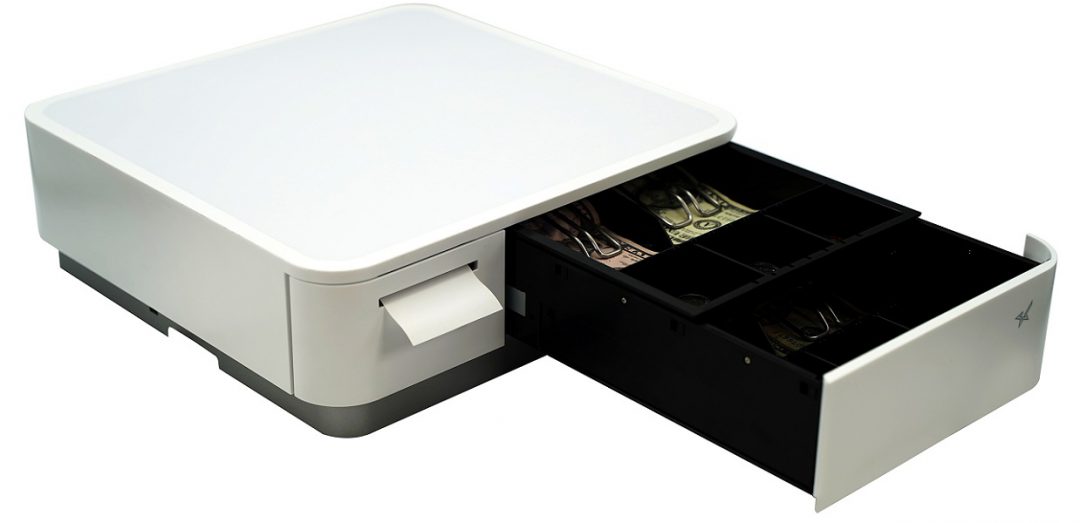
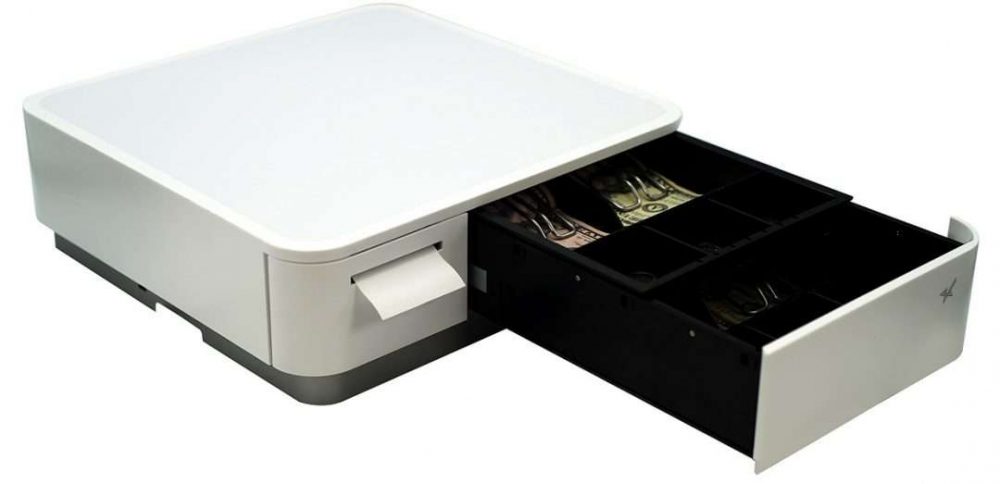
    The new mPOP with Flat Bill cash management stacks the till, providing a total of 4 slots for bills, and 4 or 6 adjustable spaces for coins.The individual tills offer 2Bill-2Coin slots, with the top till easily sliding back to expose the bottom till section.

    Just like the original mPOP, the mPOP Flat Bill also features:

    • Bluetooth and USB connectivity
    • Compatibility with any iOS, Android, or Windows device
    • Easy “drop-in and print” paper loading and cable management
    • Compatibility with Star peripherals ( 1D barcode scanner, 2D imager, digital customer-facing display)
    • Optional mUnite POP solution stand

    Click here to learn more about mPOP

    mUnite

    A new decade calls for business owners of all kinds to make the switch to a sleek, modern POS, and our mUnite stands make that easier than ever.

    Designed to accompany the mC-Print3, mPOP, and TSP143/TSP654II, the mUnite tablet POS stands are the perfect solution for businesses on the hunt for a clean POS which frees up valuable counterspace.

    With clean cable management and a sleek, unified design, mUnite stands bundles all devices together into one visually cohesive solution, and are:

    • Built of durable steel
    • Compatible with any tablet manufacturer (universal VESA mounting)
    • Easy to set up
    • Available in black or white to match existing POS systems
    • And more!

    Click here to learn more about mUnite

    The new Star technology featured in this blog post is just a portion of Star’s many offerings. To learn more about our full product lineup and see how our various technologies can be bundled into one cohesive, streamlined solution, explore our Product Catalog.

  • Star Micronics Introduces the New and Improved mPOP for SMB Retail

    Star Micronics Introduces the New and Improved mPOP for SMB Retail

    The new mPOP by Star Micronics offers improved functionality with easier cash management for retailers

    Somerset, NJ – February 18, 2020 – Star Micronics, a leading global manufacturer of mobile, point of sale (POS), and customer engagement technologies, is proud to introduce the upgraded mPOP™ (mobile point of purchase). The Star Micronics mPOP offers a hybrid solution for tablet POS that combines a cash drawer and printer peripheral, offering an ideal hardware solution for small- to medium-sized retail businesses. Star’s most recent update to the mPOP makes it even easier for merchants to manage their cash payments with a small cash drawer footprint.

    The new mPOP with Flat Bill cash management stacks the till, providing a total of 4 slots for bills, and 4 or 6 adjustable spaces for coins. The individual tills will offer 2Bill-2Coin slots, with the top till easily sliding back to expose the bottom till section. This allows for US retailers to store and manage their cash in a more natural way and keep their cash payment organized, compared to the previous vertical-slot version of the mPOP.

    The mPOP also offers convenient Bluetooth and USB connectivity, and is compatible with any iOS, Android, or Windows device. With easy “drop-in and print” paper loading, and cable management, the mPOP offers an easy-to-use solution for any SMB retailer. The mPOP is also compatible with a number of Star peripherals including a 1D barcode scanner, 2D imager, and digital customer-facing display. Star Micronics also provides the mUnite POP solution stand for a sleek POS enclosure option.

    “Star Micronics is proud to have answered the request of many of our partners to introduce a Flat Bill solution for the mPOP,” said Michael Hanson, Executive Vice President of Star Micronics. “The new and improved Flat Bill solution keeps the small footprint of the mPOP that SMB retailers enjoyed, while integrating a more simple and familiar way to manage cash payments.”

    To learn more about the new Flat Bill mPOP, please visit https://starmicronics.com/mPOP.

  • Star Spotlight – NRF 2020 Edition: Appetize

    Star Spotlight – NRF 2020 Edition: Appetize

    NRF is a wonderful show for multiple reasons – it’s where over 40,000 retail industry professionals gather to share ideas, build partnerships, and experience the year’s latest technology. Speaking of partnerships, one of Star’s favorite reasons for being at Retail’s Big Show is the dedicated time we give to catching up with our many retail software partners.

    In today’s blog post, we will explore what one our valued partners, Appetize, is up to in 2020, and how they are working with Star. Learn more about our partnership in the below video interview filmed at NRF 2020 and stay tuned for even more partnership interviews in our upcoming Star Spotlight NRF 2020 Edition blog posts.


    What Does Appetize Do?

    Since being founded in 2011, Appetize has quickly become the leading enterprise cloud point of sale (POS) and management platform trusted by the world’s highest volume businesses.

    Our mission is to enhance the guest ordering experience while making operations more efficient and productive. We provide all the benefits and flexibility of the cloud including easy deployment, scale-up, reconfiguration and upgrade capabilities, with our enterprise capabilities such as centralized management and real-time reporting.

    As the technology hub for commerce, we’ve connected our ordering technologies which include POS terminals, handheld devices, self-service kiosks, mobile and online ordering, with best-in-class application and technology integrations. We’ve simplified the transaction process in order to drive financial performance, improve guest experience, and future-proof operations.

    Today, Appetize powers many well-known Fortune 500 companies and enterprises to process billions of dollars annually across multi-unit restaurants, sports and entertainment properties, education campuses, convention centers, theme parks, travel and leisure sites, and more. Headquartered in Los Angeles, California with offices across the United States, our team of experts help Appetize users modernize and scale their business.

    Source: https://appetize.com/

    What are Some of Appetize’s Key Products?

    Appetize’s portfolio of offerings is broken down into three categories: Software, Hardware, and Solutions.

    • Software: Appetize’s software solutions “transform the way your staff and guests interact with robust front and back of house software products that solve operational and ordering challenges.” These offerings include: point of sale, self-service kiosks, mobile and online ordering, and back of house management.
    • Hardware: Designed to increase revenue and customer satisfaction, Appetize’s hardware products (including Star) are reliable and industry-leading, and include self-service kiosks, terminals, handheld devices, and more.
    • Solutions: Appetize specializes in offering solutions to quick-service restaurants, traditional restaurants, and retail. These cloud-based solutions help businesses streamline operations and increase profits.

    What’s New with Appetize in 2020?

    Appetize has been the leader in the enterprise stadium and arena technology market for years. This looks like the technology supporting the ability to feed 20,000 fans a meal within a 20-minute span of time. Now, in 2020, Appetize is taking that experience and extending its enterprise solutions to the multi-unit retail and QSR marketplace.

    “We’ve really grown our footprint to have great partners like Star to help enable us and provide us a rock of steady, reliable technology that still innovates and drives forward with the new footprint and the new sleek look and feel, but still the same core reliability. It’s great to be aligned, we love our partnership with Star.” – Brian Whitney, Vice President, Sales, Appetize

    Which Star Products Does Appetize Integrate?

    Appetize currently integrates the Star Micronics TSP654II, TSP654IISK, TSP143III, SM-S230i, and TUP500.

    TSP654II

    TSP654II

    High reliability and performance
    High-speed printing (300mm/s)
    Swappable interfaces: serial, parallel, USB, LAN
    Bluetooth and AirPrint connectivity available

    TSP654IISK

    TSP654II

    Repositionable, linter-free thermal label solution
    Improves order accuracy up to 99%
    Liner-free yields 60% more labels per roll than diecut
    80mm and 58mm paper support

    TSP143III

    TSP143III

    High-speed printing (250mm/s)
    Easy setup across all models
    Lightning connection for simultaneous charging and data transfer
    Compatible with Star Micronics Cloud Services

    SM-S230i

    SM-S230i

    2-inch portable printer with compact, lightweight design
    Bluetooth 2.1 + EDR / USB 2.0 full speed
    Barcode/graphics printing supported
    Magnetic stripe reader

    TUP500

    TUP500

    Kiosk printer with modular design for easy integration
    220mm/s print speed
    Adjustable print width (42mm – 82.5mm)
    Optional bezel, presenter, large paper roll holder, and more

    Stay tuned for our upcoming NRF 2020 Star Spotlights, coming soon. In the meantime, learn more about how Star and our partners have teamed up to provide solutions by browsing our Success Stories.

  • The Evolution of Printer Software Technology to Cater to mPOS

    The Evolution of Printer Software Technology to Cater to mPOS

    Point of sale (POS) is no longer limited to the traditional, fixed model. Merchants have tried and proven the benefits of mobility. They can complete payment transactions in-aisle or tableside, and set up additional checkouts for line busting. In addition, they can enhance the customer experience at their establishments by providing sales associates and wait staff with information on products and menu items, promotions and sales, and even the customer’s purchase history or loyalty program activity.

    While POS has gone mobile, so have label and receipt printers, as well as the point of sale systems they operate with. Mobile printers or mobile point of sale systems can help reduce labor time and costs of in-aisle and shelf labeling. Mobile point of sale also provides mobile receipt printing both in-store and beyond, at pop-up shops, and other outdoor sales and dining venues.

    Today’s mPOS solutions can be both lightweight and easy-to-use, are capable of printing receipts and labels with a variety of media, and can even assist businesses with their marketing strategy. Mobile POS peripherals can connect with mobile devices such as tablets or mobile phones using cabled, Bluetooth, or wireless network connection. They can also receive print jobs directly from the merchant’s network, or third-party online ordering and scheduling applications.

    From a printer software perspective, however, mPOS has created new challenges. With merchants using a variety of devices for POS functions, printing is no longer as simple as plugging in a printer that’s designed to work with the POS terminal to print receipts and other materials such as labels, tags, forms, or coupons.

    As your mobility initiative grows, you may encounter challenges to printing what you need, when and where you need it. Here are three common challenges merchants face with mobile printing and the solutions that will help you overcome them.

    Download the Full eBook: “How Printer Software Technology is Evolving to Accommodate mPOS”

    Illustration of Software

    Challenge 1: Printing from an iOS, Android, or Windows Native App

    With most legacy applications, many POS printers and printer brands could be used by just installing the right Windows driver. Since iOS and Android operating systems do not have a print engine to support drivers, the printer functions need to be integrated inside the POS software, thus limiting the choice. Fortunately, these companies have usually integrated the best of breed printers which make for an easy choice.

    Solution: SDK Integration

    A software development kit (SDK) helps software engineers or developers to speed up the process to support special features (like printing) in software applications. The printing SDKs needed to create applications are usually available for developers to download from the printer hardware manufacturer. For example, iOS applications traditionally use Objective-C or the Swift programming language, while Android uses Java.

    An advantage to SDK integration is that the application your software engineer or developer creates can give you more complete control of printing, such as adjusting print formatting, controlling the cash drawer, or checking the status of the printer. It also enables additional, innovative features to be added to the print application such as digital receipts and other cloud services.

    Another huge advantage is that an SDK provides a foundation for developers to build on. Without it, each developer would have to build the basics themselves, which can be especially complicated when working with multiple printers.

    The modern SDKs provided by printer manufacturers are designed to be powerful while also being simple to integrate – adding printing capabilities may only require a few lines of code.

    Solution: AirPrint®

    Star Micronics’ AirPrint technology allows retailers to continue to use the simple print method that they are used to. Apple has certified Star Micronics’ TSP654II AirPrint as the first and only AirPrint receipt printer, and has also certified the Star Micronics TSP847II AirPrint, which can print labels, tickets, forms, barcodes, and graphics. Modern and flexible, this new technology is beneficial to integrators as well.

    For ISVs, using Star Micronics’ AirPrint technology is the easiest and fastest way to integrate a printer with Apple software. The TSP654II AirPrint and TSP847II AirPrint work immediately after setup and are the perfect fit for the occasional print job. With Star Micronics’ Apple-certified printers, Mac and iOS developers now have another option in addition to the StarPRNT SDK, giving them more flexible printer control.

    Learn More About Star Micronics StarPRNT SDK

    Challenge 2: Managing Online Ordering and Scheduling

    Online ordering and scheduling have made a huge splash in the global marketplace. In particular, the hospitality, salon/spa, medical, and service industries have been highly effected. Customers choose to order food and schedule appointments online primarily for convenience. Online ordering and scheduling help to simplify the process, ensure accuracy, keep costs transparent, reduce human error, and more.

    This new wave of Cloud-based orders and requests presents a new set of challenges to those in effected industries – and all of those challenges revolve around having a reliable, functional mPOS and chit printer. Businesses need a printer that can promptly receive and alert staff to online orders and requests, and that is compatible with today’s modern, ever-changing online applications.

    Solution: CloudPRNT

    Star’s CloudPRNT technology is the answer to online ordering and scheduling pain points. A remote printing technology specially designed for Web-based POS printing, CloudPRNT is scalable, quick to integrate, easy to deploy, and even allows Cloud-connected control of peripherals.

    Platform-independent, CloudPRNT is compatible with the industry’s top online ordering and scheduling applications. CloudPRNT, which automatically detects and pulls Web-based orders and requests, requires no SSL certificate, has no exposed network ports or special firewall settings, and is compatible with any programming language or operating system.

    Star Micronics CloudPRNT

    Challenge 3: Printing from a Web Browser Application

    Advanced Web standards, such as HTML5, give developers the ability to build Web-based applications with nearly the same level of features as native (local) applications. Web applications have the added advantage of allowing live, automatic updating so that customers always have the most up-to-date version of the software since the application lives in the cloud.

    If the POS software is Web-based, the issue isn’t which mobile device the application is running on. Most Web-based solutions are device agnostic: if the device can connect to the Internet, it can usually use the application. In this case, it’s necessary for the printer to receive data directly from the Web-based application.

    Solution: WebPRNT

    Star’s JavaScript-based WebPRNT technology allows complete control of any Star WebPRNT Ethernet interface printer. Developers can use Star’s JavaScript library and Builder API to integrate a Web-based application with a WebPRNT printer. In addition, this functionality can be extended to Bluetooth printers by using the WebPRNT Browser with little to no changes.

    Learn More About WebPRNT

    Want to learn about the last 3 challenges? Discover how to successfully market to target audiences, continue to use legacy applications with newer hardware, and more in our free eBook.

  • Star Micronics and eatOS Partner to an All-In-One Restaurant Management Suite

    Star Micronics and eatOS Partner to an All-In-One Restaurant Management Suite

    eatOS and Star Micronics work to bring self-service, online ordering, and more to restaurants of all sizes

    Somerset, NJ – February 6, 2020 Star Micronics, a leading manufacturer of mobile, point of sale (POS), and customer engagement technologies, is proud to announce that eatOS has added support for Star’s restaurant printing solutions. eatOS brings a seamless experience to restaurants by offering a platform that manages point of sale, kitchen displays, self-service kiosks, pay-at-table, loyalty, and online ordering all in one application. eatOS supports the Star Micronics SP742 for back-of-house kitchen printing, and the TSP654II for point of sale receipts and self-service orders.

    The demand for self-services in restaurants is increasing rapidly. eatOS helps restaurants of any size add self-service kiosks to their workflow to reduce wait times, increase the average check size, and reduce operational costs. eatOS’s self-service kiosk is intuitive, easy-to-use, and integrates into the Point of Sale and Kitchen Display Screen seamlessly.

    Built to withstand heat and humidity, Star’s SP742 provides the ideal robust printing solution for back-of-house kitchen orders. eatOS has selected the Star TSP654II to be paired with Elo’s i-Series and Wallaby stand for their self-service kiosk solution. The TSP654II offers high print speeds and is simple to use. The self-service kiosk allows restaurant customers to skip waiting in long lines, and place their order using a touchscreen device, and pick up their order with the printed receipt.

    “We’re thrilled to be partnering with Star Micronics,” says Nicholas Brunner, COO and Co-Founder of eatOS. “Star has always been a leader in the POS space and with their highly innovative printers and Cloud technology, eatOS is continuing to bring next-generation solutions to the restaurant market.”

  • What We Learned at NRF 2020

    What We Learned at NRF 2020

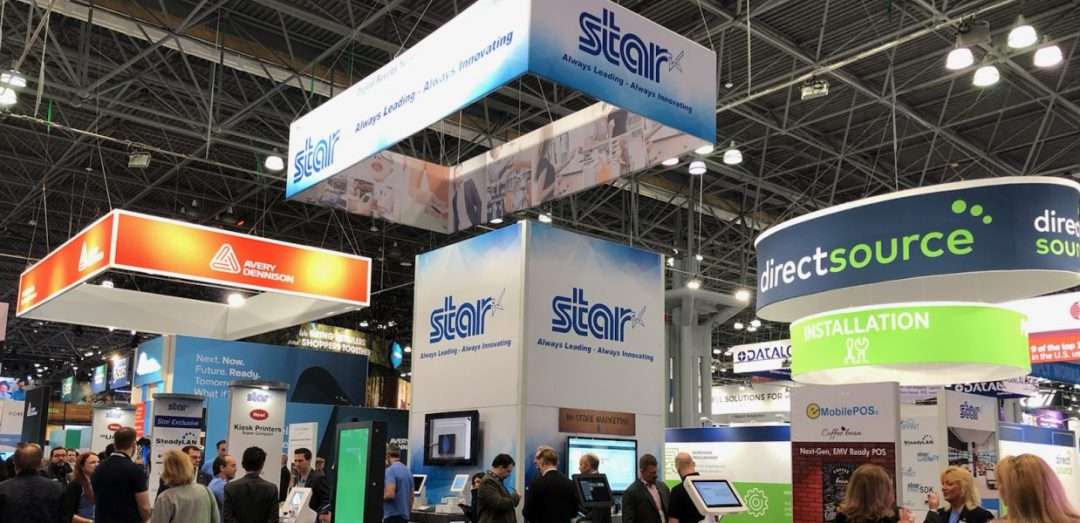
    Retail’s Big Show! With 40,000 attendees, over 800 exhibitors, and 400 speakers, NRF 2020 was another one for the record books. The keynotes were entertaining and educational while the show floor was filled with tried-and-true companies as well as startups looking to grow their business.

    Of course, the largest retail expo in the world is full of lots of new ideas and technology including everything from security and inventory management to BOPIS software and self-service kiosks. The keynote address Sunday morning by Microsoft CEO Satya Nadella set the tone for what would be a show filled with hundreds of new technologies based on the data touch points and robotic technology available to retailers. This theme also stood out on the show floor, with almost all companies both large and small featuring some form of artificial intelligence (AI).

    AI Meets QSR

    Kevin Johnson, CEO of Starbucks, held a keynote session Monday morning and it seemed as though the topic was nearly identical to the previous day’s keynote. Kevin explained how Starbucks, one of the largest coffee chains in the world, is creating a cutting-edge AI technology that will allow baristas to provide a more personal experience to their customers. Normally when we think of robotics and AI, we never imagine a more personal experience, but Kevin gave a few examples of how this is possible. At the drive-thru window, baristas always seem too busy to offer high-quality customer experience, but now with Deep Brew, the barista can simply say the order and the point of sale starts collecting the order via voice recognition.

    Robots for Every Corner of Retail

    On the show floor, actual robots were on display and demonstrating the added benefits they can provide during every step of a product’s lifecycle, from the warehouse to the customer’s shopping cart. Everywhere you looked, there were robots that could help a retailer better operate their business, from a fully automated sorting robot that scans and organizes products during the shipping process to a robot that roams the store looking for spills and hazards. These new robotic innovations seem to all focus on giving employees back their valuable time and in turn, save business owners money.

    Software Advances at NRF 2020

    From a software point of view, there was a huge increase in companies that were merging the offline world with the online world. While this is really nothing new to the industry, it is becoming more and more necessary for retailers to do this in our new world of online shopping interactions. It is quite amazing that a small business can now easily offer customers BOPIS options using almost any point of sale (POS) that they choose. Whether an in-store POS software was unveiling an updated application or a young startup company was offering an integration with any POS, NRF had the technology to bring retailers into the new world of eCommerce. Any feature that can connect a store’s offline world with the online world really goes a long way in terms of helping small businesses compete with larger chain stores.

    Star at NRF 2020

    What were Star’s biggest highlights at Retail’s Big Show? We’re glad you asked. Here are the top three innovations we shared at NRF 2020:

    1. SteadyLAN

    Without a doubt, the showstopper at Star’s NRF 2020 booth was SteadyLANTM. An industry-first technology for iPad POS, SteadyLAN provides reliable power and network access through one cable connection. Learn more about how it works in this quick video:

    2. New Kiosk Printers

    Another highlight at Star’s booth is our new generation of SK1 kiosk printers, the SK1-211 and SK1-311. The SK1-211 and SK1-311 ship standard with StarPRNT emulation, which will allow software developers to take advantage of the full stack of Star Micronics technology, such as the StarPRNT SDKs and Star’s powerful line of drivers. Software developers that have already integrated Star products can now easily swap or extend their applications from a desktop printer to a kiosk printer. Learn more now in this video featuring Star’s Kiosk Product Champion, Augusto Echecopar:

    3. mUnite Stands

    Another hot topic at the Star booth was our new mUnite stands. These stands – designed for the mC-Print3, mPOPTM, and TSP143III/TSP654II – feature clean cable management, universal VESA mounting, and more. Discover more reasons why the mUnite is the industry’s best tablet stand in this video by Star’s mUnite Product Champion, Kyle Lauber:

    Last but not least, a special thanks to our in-booth partners this year:

    In Conclusion: Retail’s Big Show

    For anyone in the retail industry, NRF is the must-attend event of the year, and this year was no different. Rapidly advancing retail technology was on display at every turn you took at the show. The keynotes by Kevin Johnson and Satya Nadella had a large focus on AI and data learning. Robots on the show floor gathered crowds and demonstrated how quickly and efficiently automation is coming to the retail industry. This year we also saw the divide between big business and small business decrease. The technology that merges online business and offline business is becoming much easier to obtain, giving small business owners more tools to win a shopper’s purchase. If NRF is any indication of the trends in retail, this year will be filled with AI and automation leading the charge towards the future of retail.

  • 3 Ways to Help Your Customers Increase Restaurant Foot Traffic

    3 Ways to Help Your Customers Increase Restaurant Foot Traffic

    There are over 660,000 restaurants in the United States alone. That’s a lot of competition, and you may find your restaurant customers are facing related challenges: how do they differentiate themselves and grow sales? In a society filled with so many options for nearly every type of cuisine, and with seemingly limitless dining options available through smartphone apps, how do you help them increase foot traffic in their restaurant?

    Growing a restaurant business during this digital transformation doesn’t have to be complicated. There are a few key ways you can help your restaurant customers increase foot traffic – and lucky none of them are too complex. They do, however, require an understanding of the restaurant’s specific needs and target audience. Read on to discover how to help grow your customers’ business through leveraging online ordering, delivering a top-notch experience to diners, and growing a digital presence.

    Browse Star’s Restaurant and Kitchen Solutions

    1. Help Them Leverage Online Ordering

    In the last decade, nearly every aspect of the world has gone online – you can buy almost anything online, you can hail a cab from your smartphone, and you can do the majority of your banking from a mobile device – and the restaurant industry is no different.

    Online ordering for food is a huge market. For instance, did you know that digital ordering and delivery have grown 300% faster than dine-in traffic since 2014? Simply put, to keep up and grow restaurant foot traffic, your customers need to be active on at least one online ordering platform. Taking advantage of the millions of people using online ordering is a great way to expand your restaurant customer’s clientele from those who already know and love the restaurant, to brand new diners.

    It might sound like a complicated process but helping your restaurant customers get online can be simple. First, the restaurant should choose whether they want to be present on an online ordering app (like Grubhub, Uber Eats, DoorDash, etc.) or if they’d like to have an online ordering system integrated into their website – or both. When choosing a service, restaurants should consider the ability to customize and brand their system, the ease of integration, any associated fees and costs, and whether marketing support is offered.

    Another important component of online ordering to think about is the technology behind the solution. By choosing an online ordering service that is integrated with Star Micronics, you can rest assured you have reliable, easy-to-use, and high-quality hardware on your side. For example, CloudPRNT technology (which is available on the mC-Print2, mC-Print3, TSP654II, TSP743II, TSP847II, and SP742) allows the printer to directly communicate with the online ordering service server, meaning there is no need for an additional tablet, software, or SSL certificate at the local level. The printer simply automatically retrieves and prints online orders from any service integrated with Star’s communication protocol. CloudPRNT is compatible with receipt, label, linerless label, and kitchen printers, meaning the options for streamlined printing are endless.

    Discover how Star helped one Asian fusion restaurant group leverage online ordering and save nearly $10,000 along the way.

    Customer-Paying-at-POS-1080x7202. Give Them the Tools They Need to Deliver a Top-Notch Customer Experience
    “Have it your way.” Does that slogan ring a bell? Like one notorious QSR brand once said, to grow restaurant foot traffic, establishments should encourage customers to enjoy their dining experience on their own terms. One good reason for this is that if you aren’t offering a personalized, convenient experience, someone else most certainly is.

    So, what does a top-notch customer experience look like? Here are a few examples:

    • Convenience: We are living in the era of convenience. Diners want to order exactly what they’d like, in a quick and seamless fashion. To cater to this preference, your restaurant customers should consider implementing self-service kiosks, which not only provide a positive guest experience but also have been shown to increase profits. Another modern convenience that diners are coming to expect is mobile payment opportunities, such as paying at the table.
    • Reliability: Downtime is a bad time. If your systems go down thanks to an unstable network connection, that means lost time, lost money, and potentially lost business, which is the opposite of what your restaurant customers are looking to achieve. Avoid the stress of downtime by helping your customers choose reliable, connected restaurant point of sale (POS) hardware. For example, Star’s mC-Print2 and mC-Print3 includes SteadyLAN™ technology, which provides wired Ethernet service to an iPad connected to a networked printer via the Lightning cable. A stable connection means more money, more happy customers, and more restaurant foot traffic!

    3. Encourage Them to Grow A Digital Presence

    In addition to offering online ordering, in order to grow its foot traffic, your restaurant customer should also be sure to maintain an active website and social media accounts. A website can be useful for customers to browse a menu in advance, share the restaurant with friends and family, check business hours, and more. Social media is useful in several ways: it can give restaurants a public personality, provide diners with a “behind the scenes” look at food preparation, and promote upcoming specials. In a nutshell, the average American spends 5.4 hours a day on their smartphone. Take advantage of it! Catching a person’s attention online can certainly lead that person through a restaurant’s doors.

    Together, offering online ordering, delivering a stellar dining experience, and maintaining an active digital presence can help your restaurant customers grow their foot traffic. Contact Star Micronics now to learn more about how we can help you make your restaurant customers’ goals come to life.

    Are your customers ready for online ordering? Find out now!

  • Star Software Update: Introducing SteadyLAN®

    Star Software Update: Introducing SteadyLAN®

    Welcome to the Star Software Update, the regular series of blog updates where Star’s Integration Team informs you about the latest important Star Micronics software updates.

    In this edition:

    • Introducing SteadyLAN®! An industry-first solution for iPad POS

    Read on to learn what this month’s update entails.

    SteadyLAN-R-1080x527

    Release Date:

    SteadyLAN was released to the public on January 13, 2020.

    What is SteadyLAN?

    SteadyLAN is a patent-pending technology available on certain mC-Print Series printers. It provides wired Ethernet service to iOS, Android, and Windows devices connected to a networked printer via the Lightning or USB-C® cable..

    Star’s unique SteadyLAN technology makes unstable Wi-Fi signals a thing of the past! SteadyLAN, available on certain mC-Print models and designed for iOS, Android, and Windows devices provides direct cabled control of the printer and attached peripherals, as well as Ethernet provision to the tablet, from the wired Ethernet port of the printer.

    For locations where Wi-Fi connectivity is not possible or unreliable, this new technology is a world-first, providing the stability of a cabled LAN connection for tablet POS systems. By connecting the SteadyLAN-compatible printer to the Internet via wired LAN and connecting the printer and a tablet with a Lightning-USB or USB-C® cable, the device can use the Internet without Wi-Fi communication. At the same time, the tablet can communicate with the printer via USB or LAN and can be charged from the printer.


    Which Printer Models Include SteadyLAN?

    SteadyLAN is available on the following mC-Print models: mCP21LB, mCP31L, and mCP31LB.

    Star-SteadyLAN-Technology-Final-withoutlogo-1080x625

    Next Steps

    If you already own an applicable mC-Print model, all you need to do to enjoy SteadyLAN is update your firmware through the mC-Print Utility app.