Tag: Restaurant & Hospitality

  • 3 Benefits of a Tethered Connection Between a Restaurant POS Tablet and Receipt Printer

    3 Benefits of a Tethered Connection Between a Restaurant POS Tablet and Receipt Printer

    Restaurant technology is evolving extremely quickly. Gone are the days of taking orders by hand on a paper tablet and punching entries into a legacy point of sale (POS) system. Clunky POS terminals have been replaced by sleek tablet-based POS systems, complete with integrated sales, menu, and loyalty information.

    As the hospitality industry leverages all of the benefits that mobile point of sale (mPOS) has to offer, one thing is more important than ever: connectivity. In today’s blog post, we will explore how a tethered Ethernet connection between a restaurant POS tablet and a receipt printer can benefit restaurants in three major ways.

    1. Steady Network Connection

    A tethered connection – or a direct connection from the POS tablet to a restaurant’s Ethernet network – is very important because it means one thing: reliable connectivity!

    A steady network connection is an absolute gamechanger when it comes to any restaurant and retail business, as Wi-Fi signals tend be weak and unstable in physical brick-and-mortar locations. Why is this? According to Infovista,

    “Wi-Fi signals are notoriously sensitive to the surrounding environment… Construction materials, nearby sources of interference, even the products on the shelves can attenuate Wi-Fi signals.”

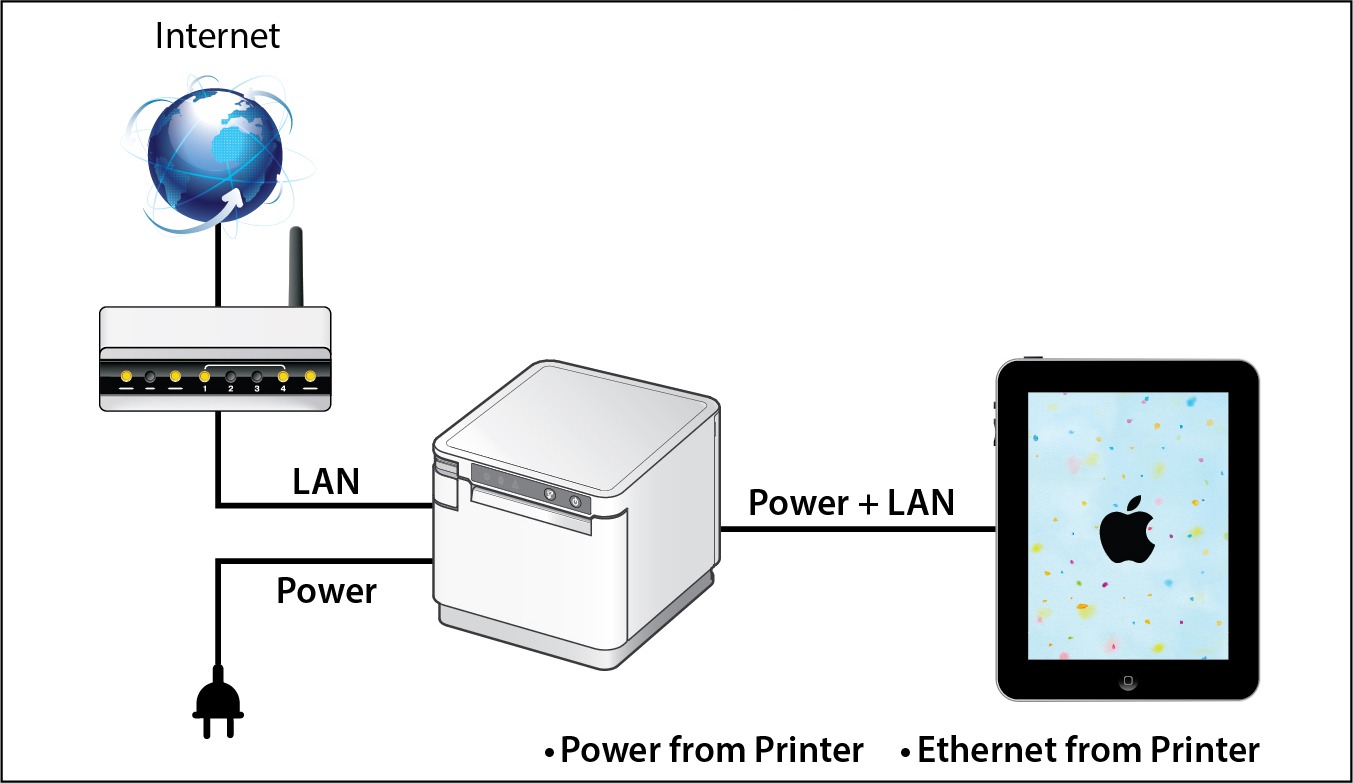
    When you choose a POS system that includes a dependable tethered connection that runs from the receipt printer through to the POS tablet, you eliminate the need to worry about Wi-Fi signals all together. Using this setup can also provide an added bonus: By selecting a receipt printer that provides both Ethernet connection and power to the tablet, restaurants can experience a true “two-birds-one-stone” situation in terms of streamlining their POS and boosting its reliability and functionality.

    2. Prevent Downtime

    When it comes to any business, and especially restaurants, time is money. Processing transactions and turning tables quickly means more profit for the business and happier customers who are more likely to return to the restaurant. When running a business smoothly is a top priority, one thing can be very dangerous: downtime.

    If a restaurant relies on an unstable Wi-Fi network to process transactions and close tabs, downtime can unfortunately become a regular occurrence. Choosing a POS system with a receipt printer that provides both wired Ethernet access and power to the tablet means that restaurants can mitigate the risk of network downtime and keep business flowing smoothly because they are avoiding network disconnection, as well as the possibility of the tablet running out of charge.

    Two of the most important things to patrons are a restaurant’s food and its service. Ensure you are providing smooth, timely, and high quality service by implementing tethered connections at the POS.

    3. Space and Cost Savings

    Just like avoiding downtime is critical to a restaurant’s operations, reducing expenses and creating a clean, cohesive aesthetic is also important. A tethered connection between the receipt printer and the POS tablet can help you do both of those things.

    With a tethered connection between the receipt printer and the tablet, Ethernet connection and power are routed through one cable, so you have fewer cables and adapters to purchase and manage. This not only saves money but also provides a tidier, clutter-free look at the POS which is a place where you have the opportunity to make a positive impression on many customers, especially those that are simply popping in to quickly pick up their online ordering order.

    Looking to modernize your restaurant and take advantage of online ordering?

    Download our free eBook, “Is Your Restaurant Ready for the Growing Online Ordering Trend?” now!

    Download eBook

    SteadyLAN® for Tethered Connections in Restaurant POS
    Star-SteadyLAN-Technology-Final-withoutlogo

    If you are interested in the benefits that a tethered connection between the receipt printer and restaurant POS tablet can offer, look no further than Star Micronics’ SteadyLAN®!

    Star’s unique SteadyLAN® technology (patent pending) makes unstable Wi-Fi signals a thing of the past! SteadyLAN, available on certain mC-Print models and designed for iOS, Android, and Windows devices provides direct cabled control of the printer and attached peripherals, as well as Ethernet provision to the tablet, from the wired Ethernet port of the printer.

    For locations where Wi-Fi connectivity is not possible or unreliable, this new technology is a world-first, providing the stability of a cabled LAN connection for tablet POS systems. By connecting the SteadyLAN-compatible printer to the Internet via wired LAN and connecting the printer and a tablet with a Lightning-USB or USB-C® cable, the device can use the Internet without Wi-Fi communication. At the same time, the tablet can communicate with the printer via USB or LAN and can be charged from the printer.

    To more about SteadyLAN, click here or watch the below video:

    Which Printers Include SteadyLAN?

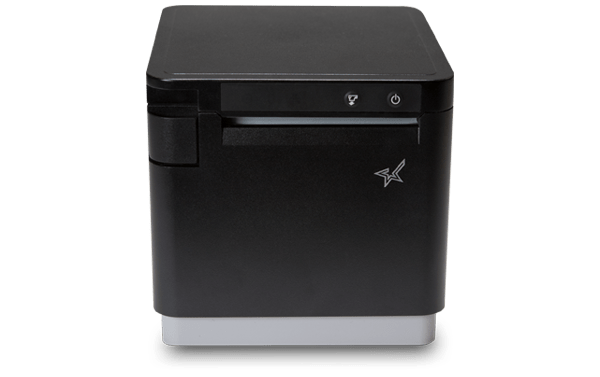
    SteadyLAN is available on certain models of both the mC-Print2 and the mC-Print3.

    mC-Print2
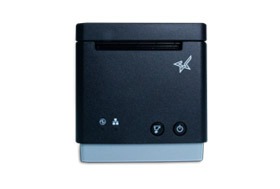
    mC-Print2

    2” thermal receipt printer
    Easy setup
    Guillotine auto-cutter
    Bluetooth, USB, Lightning, LAN, CloudPRNT
    Cloud ready
    SteadyLAN™technology available on model: mCP21LB

    Learn more about mC-Print2

    mC-Print3

    mC-Print3

    3” thermal receipt printer
    Simple user experience
    Easy to integrate through common SDK
    Bluetooth, USB, Lightning, LAN, CloudPRNT
    IPX2 splash-proof design
    SteadyLAN™ technology available on models: mCP31L and mCP31LB

    Learn more about mC-Print3

    Star Micronics is proud to offer a full range of restaurant POS solutions for tablet POS, online ordering, back-of-house, and more.

    Download Restaurant Brochure

  • What to Consider When Purchasing a Cash Drawer

    What to Consider When Purchasing a Cash Drawer

    To some, a cash drawer might just look like, well, a cash drawer. But when it comes to choosing a cash drawer as a business owner, cash drawers become a bit more complex. How will it fit in your space? Is it big enough to accommodate your day-to-day transactions? What kind of till do you need? The list of considerations goes on and on.

    Star is here to make the cash drawer selection process a bit more transparent and easier for you. Let’s explore the five key things to consider when purchasing a cash drawer:

    1. Connectivity

    First, let’s discuss connectivity options when it comes to cash drawers.

    The most common type of connectivity for cash drawers is a printer driven interface, which means the cash drawer is controlled through the printer’s DK port. The DK port, which stands for Drawer Kick, sends a 24V DC signal to open the cash drawer and is used in the majority of cash drawers.

    Another way to open a cash drawer is quite obvious: manually with a key. Most cash drawers have both DK port connectivity, and manual key access.

    Lastly, there are also wireless cash functions controlled by Wi-Fi and Bluetooth. These cash drawers are not as common, and tend to be more expensive.

    2. Size and Style

    The next topic to consider is one of the most important: how big of a cash drawer do you need, and what kind of cash drawer should you choose to match the look and feel of your counterspace and other POS components?

    On the market, there are normally two different sizes for cash drawers: a smaller option (typical 13” x 13”) and a larger option (typically 16” x 16” and larger). When choosing a cash drawer size, be sure to keep in mind considerations such as if you have items (like a keyboard) that needs to fit on top of the drawer, or if the drawer needs to be a specific height to fit under a counter.

    You may also choose a cash drawer color to match the other parts of your POS. For example, if you have a white receipt printer and white tablet-based POS/stand, choosing a white cash drawer will help provide a sleek look to your counter.

    How Star Can Help Even though each store is unique, balancing cash drawers is one thing every store has in common. Star Micronics offers the tools you need to make balancing your cash drawer as simple and painless as possible. For more information on the solutions we offer, contact Star Micronics today! Star’s Cash Drawer Solutions

    3. Cash Flow

    Next on your list of considerations is cash flow. What kind of currency do you accept? Do you accept a lot of physical coupons? What about checks?

    Cash drawer tills (the part of the cash drawer that holds the money) come in several different sizes and bill/coin layouts. Some tils have room for the US standard (five bill and four coins). Other tills come with room for more coins or more bills depending on if larger, higher value bills, such as $50 and $100, are accepted. There are also available tills for Canadian and Latin American currencies.

    Handle a lot of coupons, checks, and higher value bills? Be sure to choose a cash drawer with media slots, or slots on the front that feed into a hidden space underneath the till, to securely store these items.

    4. Durability

    Next on the list of considerations (and something that is very important) is durability.

    What type of material is the drawer made of? Is it made of steel, or a different material? Cash drawers like Star’s, which are made of steel, are highly durable which not only makes your investment more worthwhile, but is also a security feature.

    Another thing to consider is how many cash drawer opens is included in the product’s warranty? Be sure to choose a warranty that includes at least 1 million opens.

    5. Security

    Last but certainly not least on your list of considerations should be security. There are a few different security options to look for:

    • An additional lock that secures the drawer itself to the counter.
    • A locking till cover, so when you need to take the till to the back office at closing time, cash can’t be stolen during transport.
    • A universal key, so that cash drawers are easier to open in a rush and during an emergency there is no need to look through a huge key ring for the correct key.
    • A manual release options, so you can open the cash drawer no matter what. Manual release is quicker than waiting for a Bluetooth signal and even faster than some DK port signals.

    Meet Star’s Cash Drawers

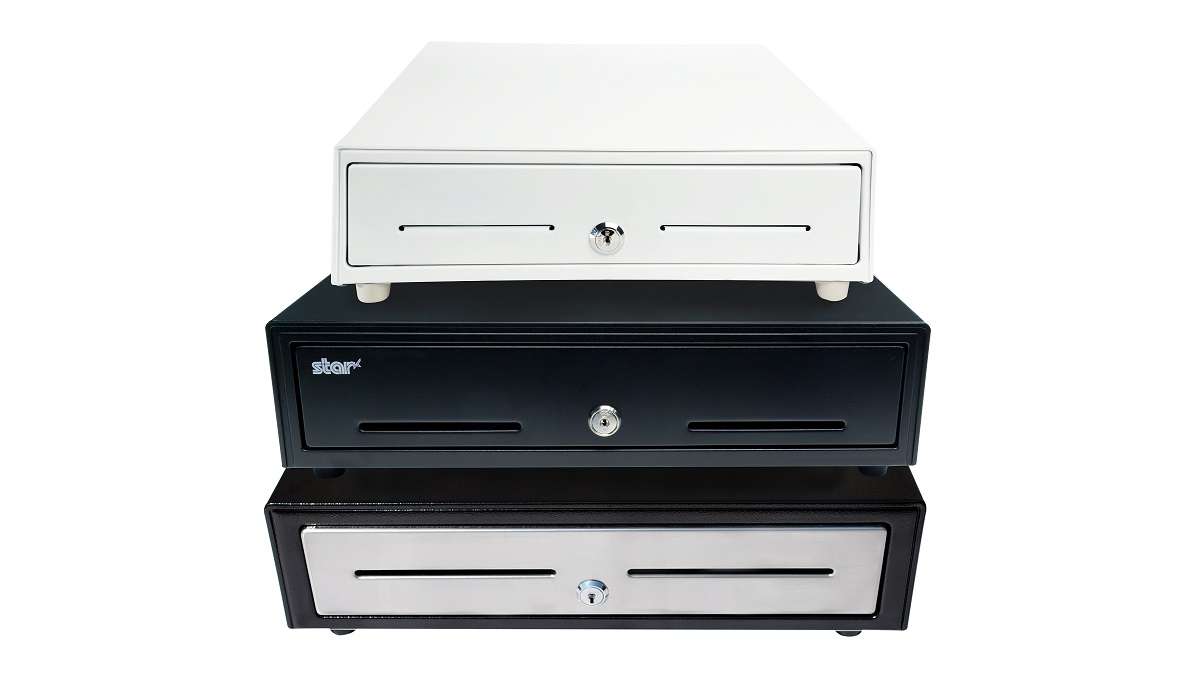
    Cash-Drawers-Stacked-TW

    With three lines of cash drawers with a variety of features and price points, Star Micronics is proud to offer cash drawers for any budget or application. Learn more about each series below:

    • Value Series: The Value Series includes cost-effective cash drawers that integrate seamlessly into any retail or hospitality environment with a standard printer communication interface and bottom exit cable, hidden from the customer’s view. The cash drawers also feature four lock functions: locked, closed, online (opens electronically), manual open, and locked open.
    • Choice Series: Choice Series cash drawers include features businesses already know and love, but with added features such as extra strength to support touch tablets and POS terminals, a secure dual-drawer cable to enable the Choice Series to work as either cash drawer 1 or cash drawer 2, a foldable hinged key which minimizes the possibility of breaking off in the lock, and over 10 different lock set options for added security.
    • Max Series: Max Series cash drawers are the premier choice for retailers. Featuring durable, high quality drawers with Kensington lock compatibility and sleek Star branding, the cash drawers are designed to securely manage cash while delivering professional looks. The cash drawers also feature four lock functions: locked, closed, online (opens electronically), manual open, and locked open.

    Explore all of the cash drawers now.

    Cash Drawers

  • Star Micronics and Flash Order Partner to Provide a Self-Ordering Kiosk Solution for Restaurants

    Star Micronics and Flash Order Partner to Provide a Self-Ordering Kiosk Solution for Restaurants

    Flash Order and Star Micronics offer a complete system for order taking with a kiosk, menu wizard, and full-featured Kitchen Display System (KDS)

    SOMERSET, NJ – APRIL 10, 2019 – Star Micronics, a leading manufacturer of mobile, point of sale (POS), and customer engagement technologies, is proud to announce that Flash Order has added support for Star’s TSP143III, SP742 printers, and CD3 Value Series Cash Drawers, and plan to add support for the mPOP. Flash Order, paired with Star Micronics’ printing peripherals, delivers a DIY (do-it-yourself) kiosk solution to restaurants as a fast and easy way to implement digital ordering.

    Flash Order is seamlessly integrated with Square and brings the cost saving and operational efficiency of digital ordering to the Square POS. Using the menu wizard, restaurants can easily import their menu from Square or build it from scratch. Flash Order allows users to manage their orders through the Flash Order KDS or with integrated Star Printing. The KDS allows restaurant owners and managers to set targets for order prep times, expedite orders, and filter and streamline orders between the grill, cold, prep, or any other station.

    Star’s TSP143III receipt printer offers easy-to-use LAN connectivity, along with high-speed printing, and “print-flat” technology. It is ideal for offering customers printed copies of their self-ordering receipt that contains important information such as order number, wait time, etc. and can also be used to deliver printer promotions with Star’s PromoPRNT technology. The SP742 is Star’s ultimate kitchen printing solution, built to withstand environments where high temperatures can erode the type on the kitchen order.

    “Flash Order self-order kiosks are perfect for restaurants of any size from Food Trucks to multi-unit chains,” said Flash Order co-founder Weston Hafen. “Kiosks can eliminate long lines, increase revenue, and with our DIY approach a location can be set up and ready to take customer orders in minutes.”

    The benefits of implementing the Flash Order kiosk system attracted The Wash, a late-night desserts and drinks shop. Sean Kang owner of The Wash said, “We love the Flash Order system. We have transitioned to run all of our transactions through the self-order kiosks.  It has transformed our business and our customers love it.”

  • Millennials’ Eating Habits: How They’re Changing the Food Industry

    Millennials’ Eating Habits: How They’re Changing the Food Industry

    If there’s one generation that makes headlines, it’s millennials. According to the 2015 U.S. Census, there are 75.4 million millennials living in the country, officially making them the largest generation in the States. If you operate a restaurant, it’s worth paying attention to what millennials do and want – especially when you consider that they spend more dining out than they save for retirement. Here are the top four things millennials are seeking when it comes to dining out – and how these changes are affecting the food industry.

    They Want Convenience

    The first meal kit service started in 2007 – and now, 12 years later, it’s a booming industry estimated to hit $10 billion in revenue by 2020. Who’s to thank for that? Millennials, of course – they’re considerably more likely to subscribe to these services than non-millennials.

    That’s just one example of the importance convenience has to millennials. Other popular (and booming) examples are grocery delivery services, food trucks, heat-and-eat options available at grocery stores, and online ordering (millennials are the most likely to get home delivery from restaurants). In fact, according to the 2017 Food and Health Survey by the International Food Information Council, 55% of millennials say convenience is a top driver when buying food.

    They Want Transparency (And Responsibility)

    Don’t be mistaken: just because millennials value convenience doesn’t mean they don’t also take healthiness and sustainability seriously. The trend is just the opposite, actually.

    First and foremost, millennials are redefining what it means for a food to be considered “healthy” – instead of low-fat being a top priority, they now put natural, organic, locally sourced, and sustainable foods at the top of their list. Did you know that millennials eat 52% more vegetables than baby boomers and 52% of organic consumers are millennials?

    This generation also wants to know where their food is made – a whopping 80% of them want to know more about where their food is grown – and they value how it’s made (you may have noticed the terms “locally sourced” and “farm-to-table” popping up on menus in recent years).

    appetizer-avocado-basil-1824353-e1574802805597
    Avocado toast, a trendy meal popular among millennials. Source: pexels.com

    They Want Trendiness

    Gone are the days of steak and potatoes – instead, unique, customizable items are making a splash with millennials. “Build-your-own” quick service restaurants (like Chipotle) are growing steadily, and for a good reason: 72% of consumers expect customization! Some examples of recent unique trends are food bowls, food mashups/hybrids (hello, cronuts), and avocado toast.

    So, are unique meals actually popular with millennials, or do they just make headlines? The former is true: 40% of millennials report they like to order different things every time they eat in the same restaurant, and they don’t shy away from vegan and cultural cuisines. They’re also described as open-minded and curious. Besides adopting a creative menu, it’s a good idea to also create a unique, modern vibe in your restaurant – from your light fixtures to your point of sale.

    They Want an Experience

    If you have a social media account, you know that photos from users experiencing a satisfying meal are popular. In fact, 75% of millennials report they value the experience of eating food more than the nourishment. And social media is a huge part of the dining experience: 41% of millennials log in to Facebook every day, 29% use Instagram regularly, and 25% use Snapchat on a daily basis. To top it off, 20% of millennials say that they receive food news from peers on Facebook.

    To help make your restaurant “Instagram-worthy,” consider adopting a modern and aesthetically pleasing menu design, ambiance, and décor – and don’t forget to create social media accounts for your restaurant if you haven’t already!

    Looking to modernize your restaurant for today’s largest demographic? Discover how Star Micronics helped a restaurant operate efficiently, provide excellent service, and incorporate online ordering.

  • Why Guest Wi-Fi is an Important Asset for Small Businesses

    Why Guest Wi-Fi is an Important Asset for Small Businesses

    If one thing is true about today’s consumers, it’s that they are constantly (or nearly constantly) connected. With the rising trend of omnichannel retail experiences, it’s more important than ever to provide an easy, free way for your customers to connect to the internet. Implementing a guest Wi-Fi network does more than connect your shoppers to their favorite apps and websites, though – it can also improve your business in many ways! Here’s how:

    Enhance Marketing

    Speaking of omnichannel marketing, having a guest Wi-Fi network is an excellent way to expand your omnichannel strategy. One way to do so is to engage in Wi-Fi marketing, a method where you use your network as a channel to communicate with your shoppers. Using Wi-Fi marketing, you can promote campaigns of your choice, which can serve as a part of your in-store marketing strategy.

    When guests log on to your Wi-Fi network, their phones will redirect to a splash page where they’ll view a branded message, as well as details about the network and its terms of use. On the page, users will enter credentials such as their email address, which can help you build customer profiles and gather leads. With this additional insight into shoppers’ demographics, you can further tailor your marketing tactics to better suit them, and that can help create more sales. For example, a Deviscape survey found that half of businesses report that customers spend more money now that they have a Wi-Fi network!

    Safeguard Internet of Things (IoT) Devices

    Better marketing and more sales are nice, but did you know that implementing a guest Wi-Fi network has security benefits, as well? If you incorporate IoT-connected devices into your store, such as automated checkouts and smart shelves, you probably already know that they’re more vulnerable than traditional devices. If you connect those smart devices to your main network, the chance that hackers can access your other devices – like your main server or physical security system – is increased.  By connecting your smart devices to a guest network instead, you create an additional layer of protection against attacks; Even if a cybercriminal hacks into one of your devices, they won’t be able to penetrate your main network, where your most valuable information lies.

    Improve Customer Experience

    Last but not least – and this probably goes without saying – guest Wi-Fi networks greatly improve the customer experience. Depending on your store location and your customers’ cellular provider, providing shoppers a guest network saves them data and gives them a potentially faster network. And there are stats to back it up – nearly 62% of businesses with free Wi-Fi report their customers stay in the store longer, which likely means they’re having a better shopping experience, spending more money, and are more likely to return.

    From boosting sales to securing your sensitive data, there are many reasons to utilize a guest Wi-Fi network!

  • Seatninja and Star Micronics Empower Full Service Restaurants to Deliver VIP Diner Experience

    Seatninja and Star Micronics Empower Full Service Restaurants to Deliver VIP Diner Experience

    PHOTO CREDIT: OLYMPUS DIGITAL CAMERA

    With the increase in popularity of fast casual and fast-fine dining establishments, full service restaurants are under increasing pressure to provide top-notch dining experiences. Each diner’s experience begins the moment they step through restaurant doors and approach the host stand.

    Seatninja Host is a low-cost solution that allows full-service restaurants to connect with guests and consistently provide a VIP Diner Experience. The digital seating system was created to emulate the paper tools that 90% of restaurants still use for managing walk-ins, waitlist parties, and reservations. Seatninja Host is a complete front-of-house system that will enable your staff to interact with guests via SMS or mobile application, gain visibility into where all seated guests are in the dining cycle, identify tables with VIPs and special occasions, quote accurate wait times by party size, manage and follow server rotations, quickly look up guest’s dining history, and more.

    THE SITUATION

    As a result of the growth in fast casual and fast-fine dining establishments, guests are becoming more and more intolerant of mistakes in lost reservations, long wait lists, and misquoted wait times. Guests are also starting to expect automated and seamless reservation and waitlist procedures at the front-of-house within a modern and up-to-date full-service restaurant. To appease unhappy and impatient customers, restaurants lose hundreds of dollars in revenue each month to guest comps or freebies to avoid bad press and poor Yelp reviews.

    THE SOLUTION

    Seatninja Host organizes and automates most of the host stand functions, such as taking and managing reservations and waitlists, managing seating, wait time estimates, and server rotation. The solution automatically suggests tables for guests, accurately estimates wait times, and organizes the guests into a seating line. The solution uses a two-way texting system to communicate with guests to let them know their table is ready and allows guests to disperse to other nearby areas and thus removing the pressure from small, over-crowded lobbies. In this way, it never loses a reservation or waitlist party, maximizing restaurant seating, without overbooking.

    For easy server reference, the integrated Star Micronics TSP100III printer prints out a reservation or waitlist “chit” that includes each guest’s visit details including, name, number in party, visit history, permanent guest notes, current visit reservations notes, table number and any party flags assigned, i.e. birthday, anniversary, high chair required, etc. For additional server management, each server’s schedule can be printed from the system as well. The schedule includes the name of the server, the tables assigned to each server and his or her’s scheduled time in. This further ensures that each guest receives a VIP customer experience delivered not only from the front-of-the-house stand, but also their server as well.

    THE RESULTS

    The Seatninja and Star Micronics solution deliver an immediate ROI on the monthly subscription. Setup takes, on average, less than an hour. The solution is paired with an iPad tablet upon deployment. Training is quick and easy, completed in an hour or less and staff typically and staff typically reaches proficiency with the solution within two shifts or less.

    Full service restaurants who deploy the solution may see some or all of the following results:

    • fewer table checks ($75 per month in savings)
    • additional table turns ($400 per month in additional revenue)
    • decrease in reservation no shows ($400 per month in savings)
    • decrease in walk outs on waitlists ($400 per month in savings)
    • no lost or damaged paper replacements ($100 per month in savings)
    • reservations can be taken automatically during off hours ($1500 per month in additional revenue)
    • reduced comps for mistakes ($100 per month in savings)
    • automatic table assignments for reservations ($124 per month in savings)
  • 3 Must-Have Restaurant Back-of-House Technologies

    3 Must-Have Restaurant Back-of-House Technologies

    A restaurant’s “back-of-house” generally refers to three parts: kitchen (the largest component), offices, and staff break room/rest area. A restaurant with a well-run back-of-house operation increases customer satisfaction, empowers staff to provide a higher level of customer service, and prepares the consistent, quality meals your customers expect at every visit.

    Essential restaurant back-of-house technologies like a kitchen display system, durable receipt printers, and an all-in-one point of sale system help your kitchen run more smoothly so the front-of-house doesn’t suffer from long waits for a table, poorly timed service or incorrect orders.

    Here are three restaurant back-of-house technologies that your eatery should implement right now:

    1. Kitchen display system (KDS)

    A kitchen display system streamlines food preparation. This critical restaurant back-of-house technology helps manage customer expectations by preventing kitchen backups, monitoring prep times and alerting staff when things start to go awry. The KDS also lists out cooking directions/ingredients to ensure that diners have the same delicious experience every time they visit your restaurant.

    A kitchen display system connects to the point of sale terminal and consists of software, a monitor that can resist moisture and heat, controller, and a bump bar to scroll through the orders. When the customer is finished ordering, data is sent through the kitchen controller to the appropriate location, either to a single screen or multiple ones at different food prep stations.

    Selections are time stamped, labeled with the customer’s name and sent to the appropriate prep area at different times to ensure everything will be finished and served to the proper person simultaneously. This means diners will never have to wait for their friends to be served while their meal gets cold or receive their appetizer with their dinner being served immediately after.

    1. Fast, tough receipt printer for orders

    Receipt printers are an integral part of your restaurant back-of-house technologies. However, an immaculately well-run kitchen is full of hazards for electronic components. Overuse, heat, spills, particles and steam can harm a restaurant kitchen printer, causing expensive work slowdowns, bottlenecks, and mistakes.

    Restaurant owners looking for a quality printer for their kitchen should consider a durable receipt printer that can withstand this harsh environment. To guarantee a healthy ROI, the receipt printer chosen should be spill-proof and insect-proof. Additionally, consider a compact model that won’t take up much valuable back-of-the-house counter space. Ensure that the printer you choose is flexible and able to connect with future hardware by selecting one with a multi-interface. For example, the mC-Print3 fills all of these requirements, plus grants access to a suite of free value-added Star Cloud Services.

    1. All-in-one point of sale systems

    All-in-one point of sale (POS) systems are exactly what the name implies: POS systems that include all the important components in space-saving configurations. The best all-in-one POS systems will give end-users the ability to add peripherals, upgrades, and new options as they come to market.

    All-in-ones typically include a touchscreen, printer, cash drawer, and magnetic stripe reader, with the option of adding other peripherals such as a scale, bar code scanner, additional security options, and displays. In addition to the mC printers, Star’s mCollection includes 1D scanners, 2D imagers, customer display, and three NTEP-certified scales.

    All-in-one POS systems can save a business money, time, and counter space. These systems have a much smaller footprint then a stationary terminal which frees up space for taking orders and impulse purchases. Purchasing an all in one POS means the components are equally rugged and designed for the environment you’re working in. This will also eliminate any headaches and runaround from different vendors when it’s time to make repairs to the system.

    Take a Wholistic View of Your Operation

    Restaurant back-of-house technologies can be just as important to profitability and customer service as solutions your restaurant uses in the front of the house. Evaluate your entire operation for areas that can operate more efficiently and find solutions that can address those issues, helping you save time and money.

  • 3 Reasons Why Restaurants Should Allow Customers to Order Online

    3 Reasons Why Restaurants Should Allow Customers to Order Online

    Online ordering and delivery are so convenient that more and more people are going online and, in a few clicks, having meals delivered to their door. According to banking analysts Cowen, delivery will grow to a $76 billion industry by 2022. CNBC reports that online orders comprise half of all deliveries, with millennials and the 35-44 age group leading the pack among diners who are taking advantage of online ordering apps and services.

    Online Ordering Makes Sense for Your Restaurant

    Although most restaurants take phone orders, it’s a good idea to have an alternate ordering method so people won’t get a busy signal or wait on hold for too long. Online ordering also means the phone won’t be ringing as often, taking staff away from other tasks and making the atmosphere more pleasant for dine-in customers.

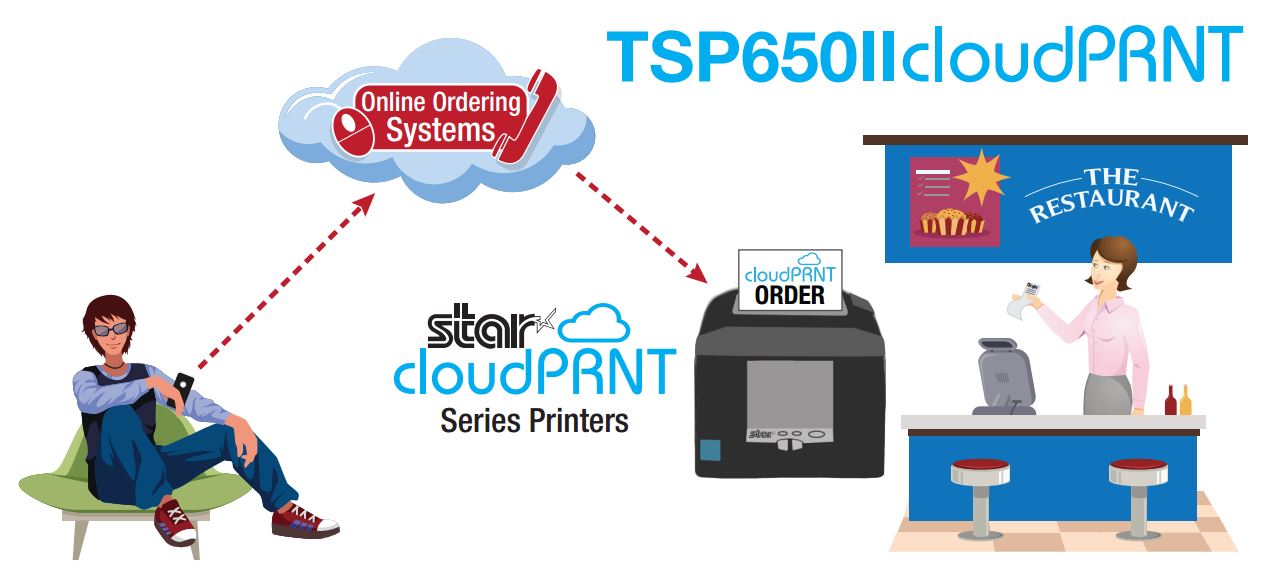
    Online ordering allows diners to enter their orders online through the restaurant’s website or app and designate whether it’s for pickup, delivery, or dine-in. Online ordering solutions also enable the customer to pay with a credit card before the order is prepared, and it streamlines workflows by sending orders directly to the kitchen. Implementing an online ordering system means a better customer service experience for patrons and allows you to gather their contact information for future marketing efforts.

    Online ordering is a great way to boost revenue and attract new customers. The addition of Amazon Eats and Seamless are making it easier than ever for restaurants to introduce online ordering. If you haven’t already, here are three reasons why your customers should be able to point, click, and eat:

    1. Increased sales and larger orders

    Restaurants that introduce online ordering increase their takeout revenue, on average, by 30%. For small restaurants or ones with limited hours, adding online ordering and delivery generates an additional revenue stream without impacting your dine-in customers.

    Online ordering encourages larger orders by giving customers extra time to look through the menu and discover new items they would like to try. Diners are in control of the ordering process and they can take their time reading the menu without feeling rushed, securely process their payments, and never get a busy signal.

    2. Improved order accuracy

    Taking phone orders means an employee must be able to clearly hear the customer on the phone, accurately and legibly write down an order, and then input it into the point of sale (POS) system. Sometimes the employee may not hear the order correctly or make mistakes while entering it into the POS terminal. Removing these steps means less opportunity for errors and a reduction in the amount of time and resources wasted remaking orders prepared incorrectly.

    3. Expand your customer base

    More of your customers will seek out restaurants with online ordering, so it’s important to have every option available—phone, online and ordering app. According to a survey by the National Restaurant Association, 61% of people said they consider delivery and takeout options important for table service restaurants.  The experts at QSR Web reported that online ordering is outpacing dine-in patrons by 300%. If reservations at your restaurant are hard to get, or there are only a few tables, online ordering makes it easy for people to satisfy their craving or try it for the first time quickly and easily.

    Restaurants are preparing more meals for take-out than they are serving to on-premises customers, so make sure they can place their orders using the technology they want. Online ordering is the key to drawing in new customers and increasing revenue.

    CloudPRNT

  • How to Choose the Right POS Scale for Your Application and Industry

    How to Choose the Right POS Scale for Your Application and Industry

    If you’re in the market for a new POS scale, consider these points to help you make a smart choice for your business.

    POS scales are used in different types of businesses that charge for items by weight, including supermarkets, self-service restaurants and buffets, butcher shops, candy stores, health food markets with bulk bins, cannabis dispensaries, and more. From a pound of cold cuts to a cup of frozen yogurt, scales measure the weight of a customer’s purchase and calculate the price accurately.

    Scales ensure you are not over- or under-charging customers and assist with inventory tracking at your store or restaurant. Running a business that charges based on weight is impossible without a properly calibrated scale, so make sure you choose the one that best takes care of your needs.

    If you’re in the market for a new point of sale (POS) scale, consider these points to help you make a smart choice for your business.

    • Application: Why do you need the scale? Before you purchase POS scales, identify how they’re going to be used and what you need to weigh. Is it fresh produce in a supermarket, bulk candy, and meat or items like mail and packages? Are most of your products heavy or light? Large or small? Identify the types of items you need to weigh and use that as a starting point.
    • Accuracy: How accurate do you need the measurements to be? Scale accuracy is important because it tells the customer they are receiving the exact amount of product they’re paying for. An accurate scale also ensures that the retailer is receiving the correct payment. Across the U.S., every state has its own agencies and departments that regulate scales and inspect them for accuracy. Some states may require a yearly inspection, while others are inspected less frequently. Make sure the scales you purchase will meet requirements for accuracy.
    • Capacity: What is the largest possible load you need the scales to handle? If you own a candy store or a supermarket, would anyone ever purchase 500 pounds of candy? It seems unlikely, so if you’re a purveyor of sweet treats, the scale’s capacity can be lower. For a butcher weighing large pieces of meat, or a UPS shipping store, however, a scale with a higher capacity would be in order.
    • Environment: Where will this scale be used? Choose a scale that’s durable enough for your business. If it is meant for high-volume use weighing food products, choose a hygienic scale designed for easy cleaning. Also, consider where the POS scales will be used. Are there extreme temperature variations? Are there disruptive vibrations, interference from other electronics, or even air currents that could affect the scale’s accuracy? Choose the type of scale with the right features for the environment.
    • Installation and calibration: Choose the location for your POS scales carefully, because you shouldn’t move them around once they’ve been installed. Connect the scale to your POS system so it can be set up and calibrated properly. Scales that are used daily will need frequent calibration to maintain accuracy and stay in compliance with local weights and measures laws.

    Business owners who sell items by weight need an accurate scale to protect their customers and their business. If you’re looking for a new scale for your store or restaurant, be honest about your needs, how accurate it needs to be, where it will be set up and how often it should be calibrated. Taking time to understand your business’ requirements for POS scales and the options available to you will result in a greater ability to provide excellent customer service and to manage inventory down to the ounce—or less.

    Available for Free: Scale Buyer’s Guide

    POS Scales

  • How Cloud-Based Software is Changing the POS Game

    How Cloud-Based Software is Changing the POS Game

    SCS-certified-e1574795386768

    Cloud-based point of sale (POS) packages are comprehensive solutions that are easy on your wallet. These affordable, powerful platforms reduce downtime and increase mobility, provide in-depth reports and securely store your important data. “Software as a Service” (SaaS) solutions are easy to install and update automatically, so you are always running the most recent version of the software. But how can a cloud-based POS solution help your restaurant up its game?

    1. Reduced downtime

    Today’s cloud-based POS solutions keep functioning, even in the event of an internet outage. Solutions are available that secure your data in the cloud but that store data locally on restaurant hardware. When connectivity returns, data is synced to the cloud automatically. This allows your restaurant to operate without disruption.

    A cloud-based solution also provides the benefit of keeping your data secure in the event of a power outage, theft or accident, so you are assured of business continuity and nothing is at risk for permanent loss.

    2. Cost-effective

    Cloud-based software providers charge a budget-friendly monthly fee for software and data storage. This service is perfect for businesses that don’t have thousands of dollars in upfront fees to make an outright software purchase. There are no upgrade costs or unexpected charges — the monthly fee includes everything you need.

    Using cloud-based software, there is also less of a burden on your IT staff. Updating POS terminals can be done quickly and easily. You are no longer required to update each terminal individually and restart the computer several times. Instead, owners of multiple restaurants or small chains can manage all their locations from one computer or mobile device saving you time and resources.

    3. Mobility

    Cloud-based software makes it easy to add more terminals, mobile POS or additional checkouts — you just configure new sites and equipment for the software, sync them and you’re good to go. They automatically run the same solution, with the same data accessibility, as the other terminals in your restaurant. And once your network is established, you can manage every location from one computer or mobile device, whether it’s an on-site terminal in a back office or your home computer.

    4. Remote data access

    With cloud-based POS, you can login in from any location at any time to view sales and inventory information, allowing you to keep track of your business throughout the day. Cloud-based POS systems include a variety of reporting options that give you an in-depth look into every shift, hour, day, week, month or year. Running sales reports also help restaurant owners and managers identify the most popular menu items so they can make sure top-selling selections are always available, maximizing profitability and increasing customer satisfaction.

    If you are considering upgrading a legacy POS system for your restaurant, learn more about the features of cloud-based software and how these solutions could benefit your business. With their business continuity, mobility, and scalability features — as well as anytime, anywhere access to your POS system and data — cloud-based software can be a smart choice for your next POS system.