The integration combines ComplianceMate’s food safety monitoring platform with Star Micronics’ on-demand labeling technology to help restaurants improve food safety documentation, traceability, and kitchen execution.
Somerset, NJ – September 9, 2026 – Star Micronics, a global provider of point-of-sale (POS) hardware, cloud printing, and labeling solutions, today announced that Ladle’s ComplianceMate® food safety platform has integrated with Star’s mC-Label2 and mC-Label3 multifunction label printers. The integration lets restaurants and foodservice operators generate food safety and traceability labels directly from ComplianceMate, reducing manual work while improving labeling consistency and documentation accuracy.
ComplianceMate is Ladle’s food safety and operational compliance platform designed to help restaurants monitor temperatures, manage digital checklists, maintain HACCP processes, and improve operational visibility across single and multi-location operations. By connecting ComplianceMate workflows to Star’s real-time label printing technology, operators can generate prep, discard, allergen, and traceability labels directly at the point of food preparation.
Connecting Food Safety Monitoring to On-Demand Labeling
Restaurants continue to move away from handwritten logs and manually written labels toward digital workflows that improve consistency and reduce human error.
Through integration with Star Micronics printers, ComplianceMate lets kitchen staff generate labels tied directly to operational and food safety workflows, helping standardize labeling across locations while reducing manual entry.
Operators can use the integrated solution to:
Print prep-date and discard-date labels
Generate allergen and ingredient identification labels
Support grab-and-go and batch-prep labeling workflows
Produce labels tied to food safety monitoring and temperature verification processes
Because labels are generated directly from ComplianceMate data, operators can maintain more consistent labeling formats and reduce handwriting errors that often occur during busy kitchen periods.
Designed for Modern Kitchen Environments
Star’s mC-Label2 and mC-Label3 multifunction printers are designed for foodservice operations that require compact hardware, fast output, and flexible media support at prep stations and kitchen work areas.
The integration supports workflows that require:
On-demand labeling directly at prep stations
Consistent label formatting across multiple locations
Fast label generation during peak kitchen periods
Support for multiple media types, including linerless and die-cut labels
By combining ComplianceMate’s digital monitoring capabilities with Star’s labeling hardware, operators can connect food safety processes to physical labeling workflows without relying on handwritten documentation.
Supporting Food Safety Compliance Across Locations
As restaurants manage increasing food safety documentation requirements, operators need systems that can maintain consistency across multiple stores while remaining practical for day-to-day kitchen use.
The integration between ComplianceMate and Star’s labeling platform helps restaurants standardize food rotation and traceability workflows while improving visibility into compliance processes.
“Food safety processes only work if teams can execute them consistently during busy service. By integrating ComplianceMate with Star’s labeling technology, operators can move faster while maintaining clearer documentation and more consistent food safety practices across locations.”
Jennifer Shelgren, Chief Marketing Officer at Ladle
“Restaurants are looking for ways to reduce manual processes while maintaining accurate food safety documentation. Together, ComplianceMate and Star’s automated prep and traceability labeling solution helps operators connect digital food safety workflows directly to kitchen execution.”
Christophe Naasz, Global Director of Business Development at Star Micronics
For more information about Star Micronics solutions, visit starmicronics.com.
Ladle helps restaurants and foodservice operators improve food safety, compliance, and operational consistency through its ComplianceMate® platform. Designed for single and multi-location operations, ComplianceMate enables operators to digitize food safety workflows, monitor temperatures, manage HACCP processes, and maintain real-time visibility into critical kitchen and compliance tasks.
In addition to ComplianceMate, Ladle’s portfolio includes MeazureUp® for operational assessments and Storewise® for pricing and retail operations management.
Star Micronics is a global provider of point-of-sale (POS) hardware, cloud printing, and labeling solutions that help businesses connect digital workflows to real-world operations. Serving retail, hospitality, healthcare, and service industries, Star delivers printing, labeling, cash management, self-service, and cloud-based technologies designed to support scalable, connected, and automated environments. Star’s solutions support Android, iOS, Windows, and web-based platforms and extend into the cloud through services such as CloudPRNT Next and StarIO.Online, Star’s fully managed cloud printing service.
A wrong restaurant order rarely costs only the price of the missing burger, forgotten side, or incorrect modifier.
Restaurant order errors can mean a remake. A refund. Wasted food and labor. Sometimes a chargeback. Then there is the cost that is harder to measure: a frustrated customer who decides not to order from you again.
For restaurants handling takeout, delivery, drive-thru, curbside pickup, and catering, that risk grows with every order that leaves the building. Once the customer walks away or the delivery driver pulls out of the parking lot, correcting a mistake gets much harder.
That is why order accuracy is more than a kitchen metric. It is tied directly to profitability, customer loyalty, and trust.
How Much Are Restaurant Order Errors Really Costing You?
Start with the obvious costs. An inaccurate order can result in:
A refund or chargeback
Food that must be remade
Additional labor
Wasted ingredients and packaging
Customer service time spent resolving the complaint
But that is only the first layer.
When a customer receives the wrong meal at home, the restaurant has fewer opportunities to fix the problem than it would inside the dining room. A server cannot immediately replace the dish. A manager may never have the chance to speak with the customer.
Instead, the experience may end with a refund request, a poor review, or the decision to order somewhere else next time.
That makes off-premise order accuracy especially important. Once an order leaves the restaurant, there are fewer chances to catch a missing item, wrong modifier, or switched meal before the customer does.
One Preventable Chargeback Can Add Up Fast
The financial impact becomes more significant as location count increases.
Imagine eliminating just one preventable chargeback per day.
At one restaurant, that can add up over the course of a year.
Now multiply the same improvement across 25 locations.
The point is not just to put a dollar amount on restaurant order errors. It is to see how much one preventable mistake, repeated across locations and throughout the year, could be costing the business.
Where Do Off-Premise Order Errors Happen?
The order can be entered correctly into the POS and displayed correctly on the Kitchen Display System, yet the customer can still receive the wrong food.
Why?
Because a digital order eventually becomes a physical one.
Someone has to prepare each item, apply the correct modifiers, assemble the order, match drinks and sides, place everything into the right bag, and hand it to the correct customer or delivery driver.
That creates several opportunities for an otherwise accurate digital order to break down.
A sandwich is prepared correctly but placed in the wrong bag.
A modifier is missed during assembly.
Two similar drinks are switched.
An order is complete except for one side sitting on another prep station.
A catering order has dozens of individually prepared items, but staff cannot quickly tell which meal belongs to which guest.
These are not necessarily POS problems or KDS problems. They are often identification and handoff problems.
That is where labeling can help by keeping critical order information attached to the physical item as it moves through preparation, assembly, and handoff.
How Better Labeling Can Help Reduce Chargebacks in Restaurants
Labels give restaurant teams a visible connection between the digital order and the physical item in front of them.
Instead of relying on memory, handwritten notes, or a receipt stapled to the outside of a bag, teams can put relevant information directly where it is needed.
Depending on the restaurant or QSR workflow, that may include:
Order confirmation labels: Clearly identify the order number, customer name, pickup information, or delivery details.
Item labels: Identify individual meals, drinks, sides, or other components of a larger order.
Modifier information: Make special requests more visible, including substitutions, additions, removals, or preparation instructions.
Customer names: Make individual meals and drinks easier to match with the right person, especially when several similar items are being prepared at once.
Bag seals and delivery labels: Help identify completed orders and keep order information visible through staging and handoff.
The goal is not to add another task to the kitchen. It is to make important order information easier to see at the points where mistakes are most likely to occur.
For restaurants trying to reduce chargebacks, that gives employees another chance to catch a wrong item, missed modifier, or mismatched order before it leaves the restaurant.
Catering Makes Order Accuracy Even More Important
A single takeout order may contain three or four meals.
A catering order could contain dozens.
That changes the margin for error dramatically.
Catering teams may need to coordinate individual guest meals, dietary requests, modifiers, beverages, sides, serving instructions, and pickup or delivery information within one order.
Clear labeling can help keep those details attached to the right meal, tray, or package throughout preparation and handoff.
A guest name can be printed directly on an individual meal. Allergen information can travel with the item. Trays can be identified before they are staged. Pickup details can remain visible throughout preparation and handoff.
That gives staff a way to verify what they are looking at instead of trying to remember where each item belongs.
For the customer placing a large catering order, those details are easy to notice when they are wrong.
Getting 30 meals right can earn trust for the next event. Getting several of them wrong can do the opposite.
Order Accuracy Is a Customer Loyalty Strategy
Restaurants put significant effort into earning repeat business.
Loyalty programs, promotions, mobile apps, limited-time offers, and personalized marketing can all help bring customers back.
But none of them can compensate for consistently inaccurate orders.
Customers expect the basics first: the food they ordered, prepared the way they requested it, with everything they paid for.
That is why order accuracy matters so much to repeat business.
A clear label may seem like a small operational detail, but it can help make important order information visible through preparation and handoff. The customer name is correct. The modification was acknowledged. Allergen information is attached to the right item. Every part of the order is accounted for.
Those details help reduce the kinds of mistakes customers remember for the wrong reasons.
Accuracy is not simply about preventing a refund. It’s about giving customers a reason to trust the next order, too.
The Same Labeling Workflow Can Support Food Safety and Traceability
For multi-location restaurant brands, standardized labels can also replace inconsistent handwritten systems with the same information and format from one location to the next.
The principle is the same as order accuracy: put the information employees need directly on the item they are handling.
Some restaurants can add a final checkpoint by verifying order weight before handoff.
When a brand establishes expected weight ranges for completed orders or specific items, a connected scale can help flag an order that may be missing something before it leaves the restaurant.
Labeling identifies what should be there.
Weight provides another signal that something may be missing.
For high-volume takeout and delivery operations, that extra check can help teams catch mistakes while the order is still in the restaurant, not after the customer opens the bag.
Improving order accuracy does not require replacing the restaurant’s entire technology stack.
POS platforms and KDS solutions already manage critical parts of ordering and kitchen production. The opportunity is to carry that digital information into the physical workflow, where items are prepared, labeled, verified, packed, and handed off.
Star Micronics works with restaurant software providers to connect printing and verification hardware to the applications restaurants already use.
That can include label printers for order identification, modifiers, food safety, and handoff, along with connected scales that provide an additional verification point before an order leaves the restaurant.
Star’s integration team works with software providers and restaurant technology teams to help connect those devices to existing workflows.
The goal is simple: keep the information from the POS and KDS with the order all the way through handoff, and catch mistakes before the customer does.
Reduce Chargebacks by Preventing the Error First
Refunds and chargebacks happen after something has already gone wrong.
The bigger opportunity is preventing the mistake that causes them.
Better item identification. Clearer modifiers. Organized catering orders. Visible customer names. Consistent food safety information. A final verification step before handoff.
Each improvement may seem small on its own. Across hundreds or thousands of off-premise orders, they can help reduce the restaurant order errors that lead to remakes, refunds, chargebacks, and lost trust.
For a multi-location brand, even eliminating one preventable chargeback per location per day can add up quickly.
Want to see what that could mean for your restaurants?
Use Star’s chargeback calculator to estimate your potential exposure, then connect with our team to review the results and identify where stronger order accuracy could have the greatest impact.
Frequently Asked Questions About Restaurant Order Errors
What causes restaurant order errors?
Restaurant order errors can happen at several points between order entry and handoff. Even when an order is entered correctly into the POS and displayed correctly on the KDS, mistakes can occur during preparation, assembly, packaging, staging, or handoff.
Common examples include missed modifiers, switched drinks, missing sides, incorrectly packed meals, and orders handed to the wrong customer or delivery driver.
How much can restaurant order errors cost?
The cost of a restaurant order error can extend beyond the price of the food itself. It may include a remake, refund or chargeback, additional labor, wasted ingredients and packaging, customer service time, and potentially lost repeat business.
For multi-location restaurant brands, even a small number of preventable errors repeated across many stores can add up throughout the year.
Why are off-premise restaurant order errors especially costly?
Takeout, delivery, drive-thru, curbside, and catering orders are harder to correct once they leave the restaurant.
A dine-in mistake may be caught and fixed immediately. With an off-premise order, the customer may not discover a missing item or incorrect modifier until they are already home or the delivery driver has left. At that point, the restaurant may be dealing with a refund, remake, complaint, or chargeback instead of correcting the order before handoff.
How can restaurants reduce order errors?
Restaurants can reduce order errors by making order information easier to verify throughout preparation and handoff.
That may include clear item and order labels, visible modifier information, customer names, organized catering labels, bag identification, and a final verification step before the order leaves the restaurant.
The goal is to give employees opportunities to catch a mistake while it can still be corrected.
Can labeling help reduce restaurant chargebacks?
Labeling can help address some of the identification and handoff mistakes that lead to refunds and chargebacks.
Labels can keep information such as customer names, order numbers, modifiers, item details, and pickup or delivery information attached to the physical item or package. That gives employees another way to verify that the right food is going into the right order before handoff.
Labeling cannot prevent every chargeback, but it can support workflows designed to catch preventable order errors earlier.
How can weight verification improve restaurant order accuracy?
When a restaurant establishes expected weight ranges for completed orders or specific items, a connected scale can provide an additional checkpoint before handoff.
An unexpected weight can signal that something may be missing or incorrect, giving employees a reason to review the order before it leaves the restaurant.
Labeling helps identify what should be there, while weight verification can provide another indication that the order may need a second look.
How can restaurants estimate the cost of preventable chargebacks?
Star Micronics’ chargeback calculator helps restaurant operators estimate what eliminating one preventable chargeback per day, per location could mean across their business.
Operators can enter information about their restaurant operation to estimate their potential exposure and see how the impact changes as the number of locations increases.
Operandio integrates with Star’s mC-Label2 and mC-Label3 multifunction label printers to help multi-location restaurants simplify and improve food safety labeling workflows.
Somerset, NJ – July 14, 2026 – Star Micronics, a global provider of point-of-sale (POS) hardware, cloud printing, and labeling solutions, today announced its integration with Operandio, an AI-powered operations platform for franchise and multi-unit restaurant networks. By combining Operandio’s digital food safety and operations platform with Star’s mC-Label2 and mC-Label3 multifunction label printers, restaurants can generate and print food safety labels directly from digital HACCP and food preparation workflows, helping improve operational control, traceability, and compliance across every location.
Digital Food Safety from Preparation to Compliance
Food safety depends on consistent execution throughout the day. Yet many restaurants still rely on handwritten labels, paper checklists, and manual processes that can introduce errors and make compliance more difficult.
Operandio helps restaurants digitize HACCP procedures, food safety programs, temperature monitoring, operational checklists, corrective actions, and employee training through a single platform. By replacing paper-based processes with real-time digital workflows, restaurant operators gain greater visibility into daily execution while helping teams maintain consistent food safety standards across locations.
Print food safety labels directly from digital workflows
Replace handwritten labels with clear, consistent printed output
Standardize food safety labeling across multiple locations
Support HACCP procedures with accurate, time-sensitive labeling
Improve product traceability and inspection readiness
Reduce manual labeling during food preparation
Designed for demanding kitchen environments, the compact mC-Label2 fits easily into space-constrained prep stations with its front-loading, front-exit design, while the mC-Label3 supports label widths up to 3 inches for applications requiring larger label formats. Both printers support linerless and die-cut media, and feature tool-free maintenance to help minimize downtime in busy kitchen environments.
“The Star mC-Label printer is an exceptionally versatile tool that brings both durability and flexible connectivity to the kitchen environment. At Operandio, we value partnering with experienced teams like Star Micronics that deliver reliable hardware to support consistent food safety and day-to-day restaurant operations.”
David Rigbye, Managing Director of Operandio
“Digitizing food safety is only part of the equation. Restaurants also need a dependable way to turn those digital workflows into clear, accurate labels at the point of preparation. That’s where our mC-Label printers help complete the process.”
Christophe Naasz, Global Director of Business Development at Star Micronics
Built for Multi-Unit Restaurant Operations
Beyond food safety, Operandio provides restaurant operators with a centralized platform to recruit, onboard, train, operate, and maintain compliance across franchise and multi-location businesses. The platform digitizes standard operating procedures, inspections, equipment management, employee training, and daily tasks, giving restaurant operators greater visibility into execution across every location.
To learn more about Star Micronics solutions, visit starmicronics.com.
Operandio is an AI-powered operations platform built for franchise and multi-unit restaurant networks. The platform helps operators recruit, onboard, train, operate, and maintain compliance through a single system that digitizes food safety, task management, employee training, equipment management, and operational procedures. Founded in Australia with a North American headquarters in Utah, Operandio helps restaurant organizations improve consistency, accountability, and visibility across every location.
Star Micronics is a global provider of point-of-sale (POS) hardware, cloud printing, and labeling solutions that help businesses connect digital workflows to real-world operations. Serving retail, hospitality, healthcare, and service industries, Star delivers printing, labeling, cash management, self-service, and cloud-based technologies designed to support scalable, connected, and automated environments. Star’s solutions support Android, iOS, Windows, and web-based platforms and extend into the cloud through services such as CloudPRNT Next and StarIO.Online, Star’s fully managed cloud printing service.
CaterZen Catering Software integrates with Star’s TSP143IV SK printer to help restaurants organize, identify, and fulfill catering orders with greater accuracy from the kitchen to the customer.
Somerset, NJ – July 10, 2026 – Star Micronics, a global provider of point-of-sale (POS) hardware, cloud printing, and labeling solutions, today announced its integration with CaterZen Catering Software, a catering management platform built specifically for restaurants. Through the integration, CaterZen’s Catering Kitchen Display System (KDS) generates linerless labels on Star’s TSP143IV SK sticky linerless label printer as orders are prepared, helping restaurants keep complex catering orders organized from the kitchen to the customer.
Extending the Catering Kitchen Workflow
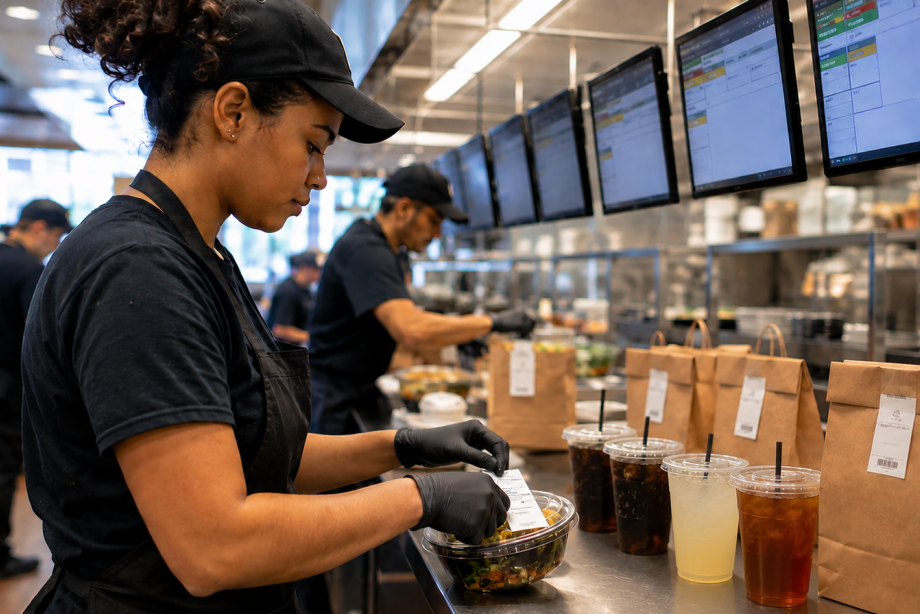
Catering orders are often larger, more customized, and more time-sensitive than traditional restaurant orders. Multiple trays, individually packaged meals, dietary restrictions, delivery locations, and scheduled pickup times all require clear labeling and organization throughout preparation and fulfillment.
CaterZen helps restaurants manage every stage of the catering process, from customer inquiries and proposals to order management, production, online ordering, delivery coordination, marketing, and repeat business. In 2017, CaterZen introduced its Catering Kitchen Display System (KDS) to help restaurants manage catering production more efficiently. As customers looked to extend those digital workflows with printed labels, integrating the Star TSP143IV SK became a natural next step, allowing restaurants to generate clear, professional linerless labels directly from the KDS as orders are prepared.
“We built CaterZen specifically for restaurant operators because catering requires workflows that fit the way restaurants actually work. Integrating Star’s TSP143IV SK gives our customers a dependable way to organize and identify every catering order while maintaining the professional presentation that keeps customers coming back.”
Michael Attias, Founder and CEO of CaterZen Catering Software
The integration helps restaurants:
Print catering labels directly from CaterZen order workflows
Clearly identify trays, containers, bags, and individually packaged meals
Include customer names, delivery destinations, and special instructions
Organize complex catering orders during preparation and packing
Reduce packing and handoff errors before pickup or delivery
Built for High-Volume Catering Workflows
The Star TSP143IV SK is a single, compact linerless sticky label printer that gives restaurants the flexibility to handle everyday transactions and catering fulfillment with one printer. Repositionable linerless labels can be applied, removed, and repositioned without leaving adhesive residue, making them well-suited for catering containers, delivery bags, and order packaging. The printer also helps reduce liner waste while providing more labels per roll than traditional label media.
“Large catering orders leave very little room for error. The last step before an order leaves the kitchen is often the one customers notice most. Clear, accurate labeling helps ensure every catering order arrives organized, identifiable, and ready to serve.”
Christophe Naasz, Global Director of Business Development at Star Micronics
Supporting Restaurants That Cater
As catering continues to grow as an important revenue channel for restaurants, operators need systems that simplify execution without adding unnecessary complexity. Together, CaterZen and Star provide a connected solution that helps restaurants manage catering orders, improve fulfillment accuracy, strengthen food presentation, and support a consistent customer experience for every event, meeting, and large-order delivery.
For more information about Star Micronics solutions, visit starmicronics.com.
To learn more about CaterZen Catering Software, visit caterzen.com.
CaterZen Catering Software is a catering management platform built specifically for restaurant operators. Designed by restaurateur Michael Attias, the platform helps restaurants manage customer inquiries, proposals, catering orders, online ordering, production, delivery coordination, customer communications, marketing, and repeat business through a single system. Built around real restaurant operations, CaterZen enables operators to grow catering revenue while maintaining organized, repeatable workflows.
Star Micronics is a global provider of point-of-sale (POS) hardware, cloud printing, and labeling solutions that help businesses connect digital workflows to real-world operations. Serving retail, hospitality, healthcare, and service industries, Star delivers printing, labeling, cash management, self-service, and cloud-based technologies designed to support scalable, connected, and automated environments. Star’s solutions support Android, iOS, Windows, and web-based platforms and extend into the cloud through services such as CloudPRNT Next and StarIO.Online, Star’s fully managed cloud printing service.
A kitchen display system (KDS) helps restaurants manage orders digitally by sending information from the point of sale (POS) system directly to food preparation stations. This gives kitchen teams real-time visibility into incoming orders, modifiers, and fulfillment priorities for dine-in, drive-thru, pickup, and delivery channels.
However, once food preparation begins, orders move through physical workflows. Items are prepared, packaged, staged, picked up, and delivered. Restaurant labels for KDS workflows help carry order information beyond the screen, ensuring important details remain attached to the order throughout preparation, packaging, pickup, and delivery.
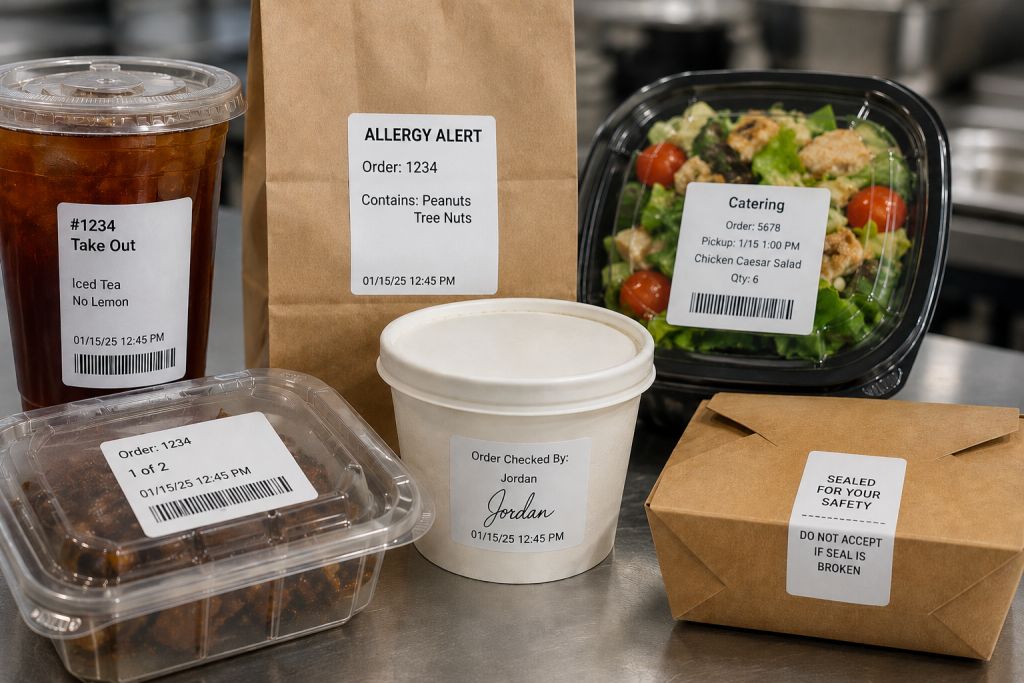
From beverage labels and allergy alerts to catering labels and tamper-evident seals, the right labels help restaurants extend KDS communication throughout the operation.
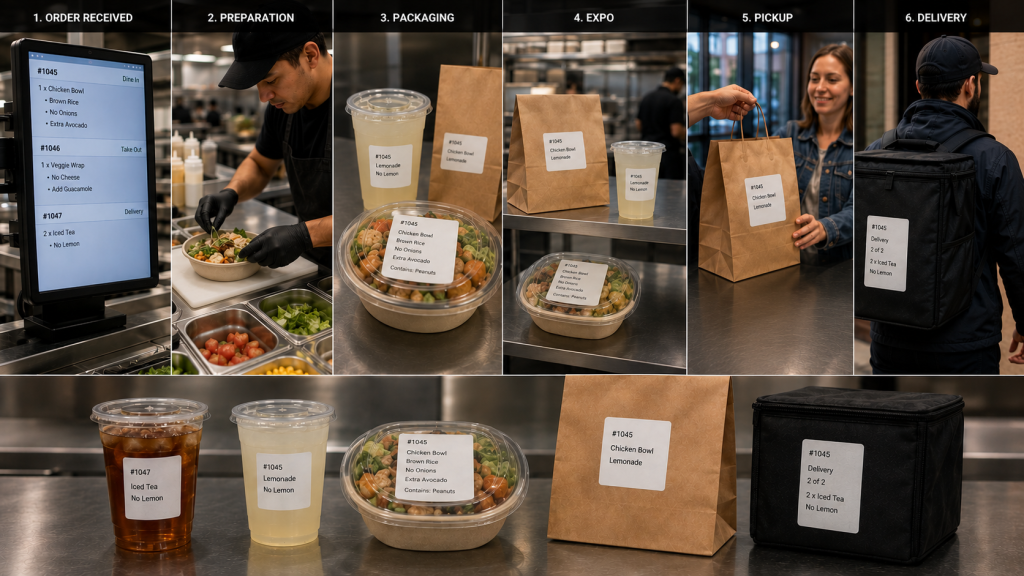
A kitchen display system (KDS) manages order information digitally, but restaurant operations still depend on physical workflows. Orders move through multiple stages before reaching the customer, including:
Food preparation
Beverage preparation
Packaging
Expo
Pickup
Delivery
Restaurant labels for KDS workflows help carry order information beyond the screen and keep it attached to the order as it moves through these stages.
As orders move between stations, labels can communicate customer names, modifiers, allergy information, beverage customizations, pickup instructions, delivery details, and other important information. Keeping these details visible throughout preparation and fulfillment reduces reliance on verbal communication and helps teams coordinate complex dine-in, drive-thru, pickup, and delivery operations.
Types of Restaurant Labels for KDS Workflows
A KDS communicates order information digitally, but labels help carry that information through food preparation, packaging, pickup, and delivery. Different types of restaurant labels support different stages of the workflow, helping employees identify orders, manage modifications, communicate food safety information, and direct completed orders to the correct destination.
1. Drive-Thru and Takeout Labels
An integrated system can generate labels along with sending orders to the KDS from the drive-thru, online ordering platform, or self-ordering kiosk. Labels can be applied to trays, containers, cups, or bags so order information remains attached to the order throughout preparation and fulfillment. Labels also ensure the team directs the order to the right place, whether the front counter, the drive-thru, or order pickup.
2. Allergy and Exception Order Labels
Allergies and food sensitivities have become more common, requiring special order preparation so diners can safely enjoy their meals. Furthermore, many customers have strong food preferences and request items prepared in specific ways.
Allergy and exception order labels help ensure modifications remain visible as the order moves between preparation, packaging, and pickup stations. Exception order labels clearly inform food prep of changes to the way they typically prepare menu items. They also flag orders for the expeditor, server, or take-out counter worker that the kitchen prepared the order as the customer requested.
3. Made-to-Order Food Labels
Although a KDS has become a standard tool in quick service restaurants (QSRs), this technology offers benefits to the whole range of food service environments. When a store or café sells made-to-order (MTO) items, labels include vital information that helps customers make informed decisions and to keep the business in compliance.
MTO food labels can include product name, description, ingredients, nutrition information, and allergen or dietary restriction alerts. Businesses can also customize MTO food labels with branding elements such as their name and logo.
4. Beverage and Barista Labels
Customers have strong opinions about how they want their coffee, espresso, or tea orders, requesting various types of milk, creamer, sweetener, flavors, and other options. Beverage orders often include customizations such as milk selections, flavors, sweeteners, and preparation instructions.
Labels help baristas identify these details quickly and keep drinks matched to the correct customer throughout preparation and pickup. Labels with each detail of the order simplify order prep, and repositionable labels can follow orders from the POS system, to order prep, and then to the customer’s cup.
Tracking prepared items or MTO foods can help shops manage their inventory, reduce shrinkage, and minimize waste. Barcoded labels generated during KDS workflows allow employees with scanners to capture data as items are placed into coolers or display cases, including their sell-by dates. Clear, reliable barcode labels also give shops a way to track ingredients’ sources in case of a recall and for fast price scanning at the checkout.
6. Catering Labels
If a restaurant or store offers catering, labels printed during KDS workflows can flag orders for the items they need for completeness, such as condiments, trays, or utensils. Labels can also include food safety instructions, nutrition information, allergen warnings, and serving instructions.
7. Nutrition and Calorie Labels
The FDA requires food service companies to provide nutrition facts to consumers. Although not every dine-in or take-out order has a nutrition label, restaurants must provide calorie counts and ingredient information on request. Restaurants can simplify this process with templated labels that employees print during packaging or order assembly.
8. Order Verification and QC Labels
Once an order is packaged, an expeditor or other restaurant employee cannot easily verify that every item is present by looking at the sealed bag alone. Some restaurants add a POS scale to the workflow to help verify order completeness before pickup or delivery.
A typical order verification workflow may include:
Package the order
Weigh the completed bag
Compare the weight to the expected total shown on the order label
Investigate any significant discrepancies
Release the order for pickup or delivery
If the actual weight differs from the expected weight, employees can review the order and correct missing or incorrect items before the customer receives it. Combined with restaurant labels for KDS workflows, weight-based verification provides another checkpoint to help restaurants catch errors before orders leave the store.
9. Tamper-Evident Labels
When the kitchen team closes a package, they can add a tamper-evident label as the final step. Tamper-evident labels help indicate whether a bag or container has been opened after packaging. They are commonly used for delivery and pickup orders where food safety and package integrity are important.
How to Choose the Right Type of Restaurant Label for KDS Workflow Stages
The right restaurant label depends on both the media type and adhesive required for the workflow. Some KDS applications benefit from linerless labels for fast application, while others require die-cut labels, repositionable adhesives, or permanent tamper-evident labeling.
Linerless Labels
No liner backing
Fast application
Reduced waste
Great for:
beverage labels
takeout labels
pickup labels
food container labels
Die-Cut Labels
Individual label shapes/sizes
Consistent placement
Useful for:
nutrition labels
product identification
barcode labels
made-to-order food labels
Repositionable Linerless Labels
Diamond adhesive (light tack) or full coverage (stronger)
Features to Look for in Restaurant Label Printers for KDS Workflows
Choosing the right restaurant label printer is just as important as selecting the right label media. KDS workflows often support food preparation, beverage stations, packaging, pickup, and delivery operations, so label printers should be able to support a variety of applications and deployment environments.
Multimedia Printing
Printers that support multiple media types, including linerless labels, die-cut labels, and receipts, allow restaurants to standardize hardware across stations. A multifunction printer can support different workflows without requiring separate printer models for each application.
Linerless Label Support
Linerless labels help reduce liner waste and counter clutter while supporting high-volume labeling workflows. Restaurants planning to use linerless labels should choose a printer designed specifically for linerless media.
Cloud Printing Capabilities
Cloud-connected printers can receive print jobs directly from KDS software, online ordering platforms, and cloud-based applications without relying on local print servers.
Support for Multiple Adhesive Types
Different workflows require different label adhesives. Restaurants may use repositionable labels for beverage preparation and internal workflows, while delivery and packaging applications may require permanent or tamper-evident labels.
Fast Print Speeds
High-volume kitchens depend on labels being available when needed. Fast print speeds help prevent delays during peak ordering periods and support continuous order flow.
KDS and POS Compatibility
Restaurant label printers should work with KDS software, POS systems, cloud platforms, and the operating systems used throughout the business. Compatibility can simplify deployment, support, and long-term maintenance.
User-Friendly Maintenance
Restaurant environments are busy, and printer maintenance is often handled by store-level employees. Features such as tool-free maintenance, easy media loading, user-replaceable components, and guided cleaning procedures can help reduce downtime and keep printers operating reliably.
Star Micronics Label Printers for KDS Workflows
Restaurants use a variety of labels throughout KDS workflows, including beverage labels, allergy labels, barcode labels, catering labels, order verification labels, and tamper-evident labels. Supporting these applications requires printers that match the media, adhesive, and workflow requirements of the operation.
Star Micronics offers several printer options for restaurant labels used with KDS systems, including:
mC-Label3 Multifunction Printer
The mC-Label3 supports receipts, die-cut labels, repositionable linerless labels, and permanent linerless labels from a single printer platform. This makes it a good choice for restaurants looking to standardize printing across multiple stations.
The Star Micronics mC-Label3 is a versatile multifunction printer that prints a wide range of labels and receipts, including both permanent and repositionable sticky linerless. It features cloud connectivity and innovative technologies like SteadyLAN and TetherLAN for enhanced printing convenience.
The mC-Label2 provides support for a wide range of label and receipt media in a compact design, making it suitable for food preparation, packaging, pickup, and other labeling applications.
The mC-Label2 packs powerful features into a compact, front-loading design, including 300 dpi resolution, support for linerless, die-cut, receipt, and continuous media, and connectivity options like USB-C, LAN, WLAN, Bluetooth, and Apple MFi-certified pairing (X4 models only).
The TSP143IV SK is designed specifically for sticky linerless label printing and is commonly used for beverage labeling, food container labeling, pickup workflows, and other applications where repositionable labels are beneficial.
The TSP143IV SK by Star Micronics sets a new standard for compact, eco-friendly thermal linerless label printing, offering advanced connectivity options like Wi-Fi and AOA, and efficient, residue-free labels for diverse business needs.
Whether a restaurant is deploying a new KDS or expanding existing workflows, selecting the right label printer helps ensure order information remains visible from preparation through pickup or delivery.
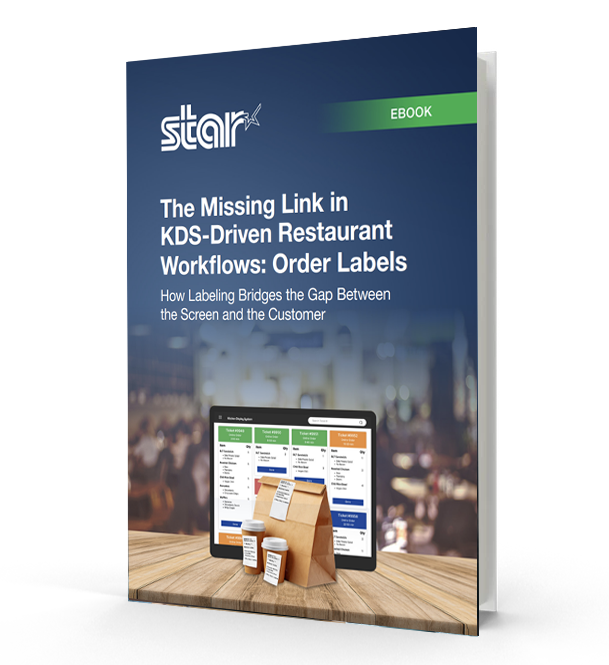
The Missing Link in KDS-Driven Restaurant Workflows
This eBook shows how labeling extends KDS accuracy into real-world workflows, helping restaurants and retailers improve fulfillment, accountability, and consistency across all ordering channels.
Frequently Asked Questions About Restaurant Labels for KDS Workflows
What are restaurant labels used for in KDS workflows?
Restaurant labels help carry order information through physical kitchen workflows after orders appear on a kitchen display system (KDS). They support food prep, packaging, pickup, delivery, catering, and labeling compliance workflows.
How do restaurant labels support KDS workflows?
A KDS communicates order information digitally, while labels help keep that information attached to the order itself as it moves through prep stations, expo, packaging, pickup, and delivery.
What types of restaurant labels are commonly used with KDS systems?
Restaurants commonly use:
Drive-thru and takeout labels
Allergy and exception order labels
Beverage labels
Product ID and barcode labels
Catering labels
Nutrition labels
Tamper-evident labels
Order verification and QC labels
Different labels support different stages of the workflow.
What is the difference between linerless and die-cut restaurant labels?
Linerless labels print continuously without backing paper, helping reduce waste and clutter in high-volume kitchens. Die-cut labels are individually separated and are often used for applications requiring specific label sizes or permanent adhesion.
Why are linerless labels popular in restaurant kitchens?
Linerless labels help reduce liner waste, improve workflow efficiency, and minimize clutter on prep counters and floors. They are especially useful in fast-paced restaurant and QSR environments.
What information should restaurant labels include?
Depending on the workflow, restaurant labels may include:
Order details
Customer names
Allergens or dietary restrictions
Beverage customizations
Nutrition information
Barcodes or QR codes
Sell-by dates
Pickup or delivery details
Why are allergy and exception order labels important?
Allergy and exception order labels help kitchen staff quickly identify orders that require modified preparation. These labels support safer food handling and help reduce communication breakdowns during busy service periods.
How do tamper-evident labels support delivery workflows?
Tamper-evident labels help show customers that delivery bags or food containers have not been opened after packaging. They also help restaurants maintain more secure and organized delivery workflows.
Can restaurant labels be printed automatically from a KDS?
Yes. Many KDS workflows automatically trigger label printing when orders are received, bumped to another prep stage, packaged, or prepared for pickup or delivery.
What should restaurants look for in a label printer for KDS workflows?
Important features include:
Multimedia printing support
Linerless compatibility
Fast print speeds
Compact design
Cloud printing capabilities
Easy KDS integration
Support for repositionable and permanent labels
Why are multimedia label printers useful in restaurants?
Multimedia label printers can print receipts, linerless labels, and die-cut labels from a single device. This helps restaurants standardize hardware across stations and reduce the number of printer models they manage.
How do cloud-connected label printers support KDS workflows?
Cloud-connected printers can receive print jobs directly from KDS software or online ordering platforms without relying on local print servers. This simplifies deployment and supports multi-location restaurant operations more efficiently.
Star Micronics kitchen printing pairs with OneTablet’s delivery revenue platform to help restaurants increase order volume, improve menu conversion, and fulfill off-premise orders with greater accuracy.
Somerset, NJ – May 1, 2026 – Star Micronics, a global provider of point-of-sale (POS) hardware, cloud printing, and labeling solutions, today announced its collaboration with OneTablet, a restaurant technology platform that helps independent restaurants and multi-location operators generate more revenue from third-party delivery. Together, the companies give restaurants the tools to improve menu visibility, conversion rates, and average order value across delivery platforms, while ensuring every order prints reliably at the right station.
Third-party delivery now accounts for 30% or more of a restaurant’s revenue, and that share continues to climb. Restaurants that aren’t actively optimizing their presence on DoorDash, Uber Eats, and Grubhub are leaving money on the table. OneTablet gives operators the tools to win on these platforms: better menu visibility, stronger conversion rates, higher average order values, and the performance data to know what’s working and what isn’t.
As that order volume grows, kitchens need hardware that can keep up. Star’s TSP100 series delivers the print speed, reliability, and uptime that high-volume delivery operations demand, so every ticket reaches the right station, every time.
From Delivery Platform to the Kitchen Line
Aggregating orders is only part of the workflow. Restaurants also need to manage menus, monitor performance across delivery platforms, and maintain control over how orders are prepared and fulfilled.
OneTablet is the operating system for off-premise restaurant operations, consolidating Uber Eats, DoorDash, and Grubhub into a single, unified platform. Beyond order aggregation, it gives operators centralized control over menus, pricing, and prep timing, while delivering real-time reporting across all channels.
By surfacing performance data at the item, channel, and store level, OneTablet enables restaurants to continuously optimize their delivery business—adjusting menus, pricing, and availability to increase conversion, improve order volume, and maximize revenue. Through its integration with Star Micronics printers, OneTablet extends that control directly into the kitchen, ensuring orders are automatically routed, organized, and printed at the appropriate prep stations. This creates a seamless connection between digital optimization and in-store execution, reducing errors and improving throughput during peak service.
Star’s TSP100 series thermal ticket printers, including the TSP143III (LAN, USB, and Bluetooth models), as well as the TSP143IV X4 and TSP143IV SK X4 sticky linerless label printers, were tested across OneTablet’s platform and performed reliably in each configuration. This allows restaurants to use the same trusted hardware for both standard ticket printing and sticky labeling workflows, depending on their kitchen setup.
Supporting High-Volume Delivery Workflows
Off-premise orders introduce significant pressure during peak hours, where missed tickets, unclear modifications, or delayed prints can quickly lead to errors and slowdowns.
By combining OneTablet’s order aggregation with Star’s reliable printing, restaurants can:
route orders instantly to the correct prep station
maintain clear, readable tickets during peak volume
reduce missed or duplicated orders
kitchens moving at the pace of incoming delivery demand
“Delivery isn’t linear. Orders hit in waves from multiple platforms at the same time. At OneTablet, we bring structure to that. We organize and route orders so kitchens can actually execute. If tickets are not clear and in the right place immediately, performance drops fast. Star gives us the consistency on the print layer to make sure that does not happen.”
Marcel Grangien, CEO and Director at OneTablet
“As restaurants take in orders from multiple delivery channels, consistency at the kitchen level becomes critical. By working with OneTablet, we’re helping ensure those orders are reliably routed and printed at the right station, so staff can act on them immediately without confusion or delay.”
Jon Levin, Director of Product Management at Star Micronics
Extending Workflows with Labeling
In addition to ticket printing, labeling can be used to support order identification and quality control for off-premise orders. Applying labels to bags, containers, or drinks helps staff verify items before they leave the kitchen, reducing handoff errors during busy service periods.
As delivery volume increases, combining order aggregation, printing, and labeling provides a more controlled workflow from order intake to fulfillment.
For more information about Star Micronics solutions, visit starmicronics.com.
OneTablet is a restaurant technology platform designed to help independent restaurants and multi-location operators generate more revenue from third-party delivery. The platform consolidates DoorDash, Uber Eats, and Grubhub into a single dashboard, enabling operators to manage menus, improve visibility, increase conversion rates, and grow average order value across all channels.
Unlike traditional POS-based integrations, OneTablet operates at the platform layer, giving restaurants direct control over menus, pricing, availability, and store operations within each marketplace. This allows operators to improve key performance drivers such as item availability, prep times, cancellations, and customer ratings—ultimately increasing order volume and revenue.
Through advanced reporting and menu optimization tools, OneTablet surfaces actionable insights that help restaurants identify opportunities to improve performance, drive more orders, and capture incremental revenue.
Originally founded as MealCo and relaunched as OneTablet in 2025, the company serves independent restaurants, enterprise brands, and digital-first operators across the United States.
Star Micronics is a global provider of point-of-sale (POS) hardware, cloud printing, and labeling solutions that help businesses connect digital workflows to real-world operations. Serving retail, hospitality, healthcare, and service industries, Star delivers printing, labeling, cash management, self-service, and cloud-based technologies designed to support scalable, connected, and automated environments. Star’s solutions support Android, iOS, Windows, and web-based platforms and extend into the cloud through services such as CloudPRNT Next and StarIO.Online, Star’s fully managed cloud printing service.
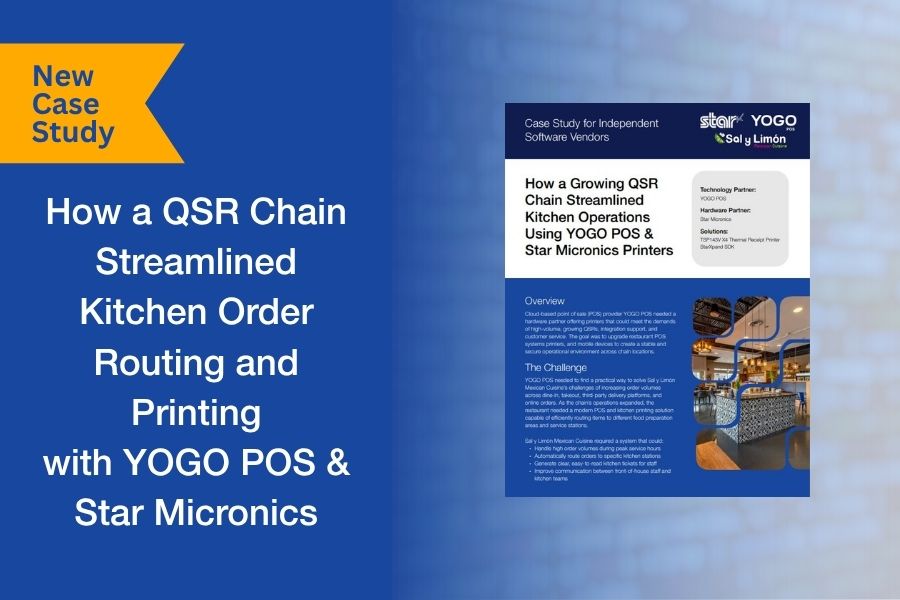
For many QSRs, order complexity doesn’t become a problem until volume increases. Dine-in, takeout, online ordering, and delivery platforms all feed into the same kitchen, but without structured routing, orders can bottleneck at the wrong stations or get lost in the flow.
That’s exactly what Sal y Limón Mexican Cuisine was facing. As order volume grew across channels, the kitchen needed a way to route items to the right preparation areas and ensure tickets were clear, consistent, and easy to act on during peak hours.
Working with YOGO POS, the team implemented a kitchen printing and order routing system using Star Micronics printers and the StarXpand™ SDK. Orders from multiple sources were directed to specific stations, with dedicated printers supporting each part of the workflow.
We put together a short case study that looks at how the system was configured, how the integration was handled, and what changed once routing and printing were aligned with kitchen operations.
Download the full case study to see how the deployment was structured and scaled.
The partnership combines automated labeling technology with compact, reliable printing to help foodservice operators improve traceability, compliance, and kitchen efficiency.
Somerset, NJ – April 14, 2026 – Star Micronics, a global leader in POS hardware, labeling, and cloud printing technology, today announced a partnership with Kitchen Technology, Innovations by ICC (KTI/ICC) to integrate the i.Print3™ automated labeling solution with Star’s mC-Label2 multifunction label printer. The combined solution helps foodservice operators automate food preparation labeling, improve traceability, and support food safety compliance across modern kitchen environments.
Foodservice operations often rely on handwritten labels or preprinted label sheets for food preparation and grab-and-go items. These manual processes can lead to inconsistent labeling, wasted materials, and increased labor. Integrating the i.Print3 device with Star’s mC-Label multifunction printer series, including the compact mC-Label2 and mC-Label3 printers, allows operators to generate clear, accurate labels at the point of food preparation, including preparation dates, expiration times, and other key food safety information.
Automating Food Safety Labeling in the Kitchen
The i.Print3 device is designed to automate kitchen labeling workflows in fast-paced foodservice environments. Instead of relying on multiple tools and fragmented workflows, the solution combines hardware, software, and cloud connectivity into a single integrated labeling platform.
Cloud-based traceability allows operators to store labeling data and maintain records that support food safety oversight and operational visibility. This capability helps organizations track food preparation information, improve accountability, and support compliance with evolving regulatory and food safety requirements.
“The i.Print3 was developed to simplify labeling and food safety processes for foodservice operators. Partnering with Star Micronics allows us to deliver a complete labeling solution that fits right into kitchen environments while supporting accurate, automated food safety labeling.”
Mark Salerno, Solutions Architect at Kitchen Technology, Innovations by ICC
Compact Hardware Designed for Busy Kitchens
Star’s mC-Label2 printer provides the compact footprint and operational flexibility required in space-constrained kitchen environments where countertop space is limited and efficiency is critical.
The printer’s front-loading design allows labels to be reloaded without removing the device from the counter, making it easier to maintain during busy service periods. The integrated cutter supports die-cut labels and allows operators to use multiple label sizes, providing flexibility for different food preparation and labeling workflows.
“The mC-Label2 was an ideal fit for this solution because of its compact design, reliability, and flexible media support. These features allow the labeling system as a whole to fit naturally into real kitchen workflows without adding complexity.”
Mark Salerno
Supporting a Wide Range of Foodservice Environments
The combined solution is designed for a variety of foodservice and retail food preparation environments, including quick-service restaurants (QSRs), convenience stores, grocery prepared food departments, and institutional kitchens such as hospitals and cafeterias.
By printing labels directly at the prep station, the i.Print3 and mC-Label2 turn a traditionally manual task into a fast, automated process that improves food safety visibility and keeps kitchen teams moving without interruption.
With more than four decades of experience developing technology solutions for the foodservice industry, KTI/ICC brings deep industry knowledge to the partnership. By combining KTI/ICC’s foodservice automation expertise with Star Micronics’ reliable printing hardware, the partnership delivers a modern solution for automated food preparation labeling.
For more information about Star Micronics solutions, visit starmicronics.com.
To learn more about Kitchen Technology, Innovations by ICC and the i.Print3™ solution, visit onkti.com.
Founded in 1987, Kitchen Technology, Innovations by ICC. (ICC) and its innovation division, Kitchen Technology Innovations (KTI), develop advanced, integrated technologies for the foodservice industry. Leveraging decades of expertise and a portfolio of patented solutions, KTI/ICC delivers intelligent systems that digitize food safety, automate product management, and provide real-time operational visibility across multi-unit environments. Designed for scalability and ease of use, KTI/ICC’s platform enables operators to reduce risk, improve consistency, and optimize performance. The family-founded company supports leading global brands, including EB Group, Paradies Lagardère, and Burger King.
Star Micronics is a global provider of point-of-sale (POS) hardware, cloud printing, and labeling solutions that help businesses connect digital workflows to real-world operations. Serving retail, hospitality, healthcare, and service industries, Star delivers printing, labeling, cash management, self-service, and cloud-based technologies designed to support scalable, connected, and automated environments. Star’s solutions support Android, iOS, Windows, and web-based platforms and extend into the cloud through services such as CloudPRNT Next and StarIO.Online, Star’s fully managed cloud printing service.
The integration combines ConnectedFresh’s IoT monitoring and food safety platform with Star’s cloud printing technology to automate mission-critical workflows, dramatically improving documentation and reducing food waste and risk for foodservice operations.
Somerset, NJ – April 13, 2026 – Star Micronics, a global leader in POS hardware and cloud printing technology, today announced that ConnectedFresh has integrated Star’s mC-Label3 multifunction label printer and StarIO.Online fully managed cloud printing service into its digital food safety platform. The integration enables restaurants and foodservice operators to generate accurate, traceable food labels directly from the ConnectedFresh platform, helping improve compliance, increase food safety visibility, and reduce manual labeling tasks.
Connecting Digital Food Safety Monitoring to Physical Labeling
ConnectedFresh uses wireless IoT sensors to give restaurant and foodservice operators real-time visibility into temperature conditions, equipment performance, and food safety compliance across their locations. Through the integration with Star Micronics, that digital food safety data can now trigger on-demand label printing via StarIO.Online, connecting digital records to printed labels that document preparation details, product information, and traceability records. Because Star manages the cloud infrastructure, labels can be generated without local servers or complex on-site IT setup.
Supporting FSMA Traceability and Recordkeeping
With the FDA’s Food Safety Modernization Act (FSMA) Section 204 Food Traceability Rule requiring expanded recordkeeping for certain foods, foodservice operators are strengthening their traceability processes ahead of the rule’s enforcement date in July 2028. Many operators are moving away from manual logs and handwritten labels toward digital systems that can automatically document Critical Tracking Events and maintain accurate traceability records.
By combining ConnectedFresh’s platform with Star’s labeling and cloud printing technology, operators can automatically generate labels documenting key food safety and traceability information, including preparation dates, product details, and cooling records. For time-sensitive compliance tasks like cool-down logging, ConnectedFresh sensors can monitor the entire process and automatically trigger a printed label documenting the result, helping improve documentation accuracy while reducing labor, food waste, and risk.
On-Demand Labeling for Real Kitchen Workflows
Star’s mC-Label3 multifunction printer supports a wide range of labeling applications in foodservice environments, including food preparation, grab-and-go packaging, and product identification, while supporting multiple media types such as linerless and die-cut labels. Star’s mG-T30 scale is also integrated with the platform, enabling weight-based labeling and verification as an additional capability for foodservice operations.
“ConnectedFresh is built to help operators stay on top of food safety without adding more complexity to the kitchen. Working with Star lets us connect our platform directly to reliable labeling hardware so teams can print accurate, traceable labels at the exact moment food is prepared, cooled, or packaged.”
Jake Simon, Co-founder and CEO of ConnectedFresh
“Food safety and traceability are becoming more data-driven, and operators need solutions that can scale across every location. By bringing together ConnectedFresh’s sensor-driven platform and Star’s labeling and cloud technologies, this partnership helps standardize how food safety information is captured and managed across distributed operations.”
Christophe Naasz, Global Director of Business Development at Star Micronics
Cloud-Connected Printing for Multi-Location Foodservice
StarIO.Online enables cloud applications to manage and control printers remotely, allowing businesses to deploy and monitor labeling across distributed locations without maintaining on-site infrastructure. This allows ConnectedFresh users to standardize and scale labeling workflows across multiple kitchens, restaurants, and food preparation facilities using a single, versatile device that supports food safety labeling, grab-and-go labeling, and order accuracy workflows.
For example, when ConnectedFresh sensors confirm that a food item has completed its cool-down process within the required time and temperature range, the platform can automatically generate and print a label documenting the completion time and product details, ready to apply directly to the stored product without any manual logging.
By combining ConnectedFresh’s digital food safety platform with Star’s labeling and cloud printing technologies, the integration helps operators bridge the gap between digital compliance systems and real-world kitchen operations.
For more information about Star Micronics solutions, visit starmicronics.com.
ConnectedFresh is the most comprehensive sensor-driven intelligence platform built for foodservice, helping restaurants and food operators automate food safety processes, monitor facilities and equipment in real time, and manage risk and compliance across all locations. The platform is powered by wireless IoT sensor hardware, sourced and passed through to customers at cost, delivering real-time visibility from the kitchen floor to the back office. Through integrations with partners like Star Micronics, ConnectedFresh extends that intelligence to physical labeling, connecting digital food safety records with printed documentation for improved traceability.
Star Micronics is a global provider of point-of-sale (POS) hardware, cloud printing, and labeling solutions that help businesses connect digital workflows to real-world operations. Serving retail, hospitality, healthcare, and service industries, Star delivers printing, labeling, cash management, self-service, and cloud-based technologies designed to support scalable, connected, and automated environments. Star’s solutions support Android, iOS, Windows, and web-based platforms and extend into the cloud through services such as CloudPRNT Next and StarIO.Online, Star’s fully managed cloud printing service.
For many POS platforms, printing issues don’t show up during development. They show up during deployment. Different restaurant environments, network configurations, and connectivity challenges can quickly turn printing into one of the biggest sources of support calls.
That’s exactly what Selflane experienced. Printing instability wasn’t just a minor inconvenience. It was pulling engineering and service teams into troubleshooting instead of product development and growth.
By standardizing on the TSP143IV thermal receipt printer and moving to the StarXpand SDK, Selflane was able to modernize its POS printer integration, simplify installations, and reduce recurring support issues.
We put together a short case study that walks through what changed and what other ISVs can learn from it.
Download the Selflane case study to read the full story.