Blog

  • Star Micronics Introduces Feature-Packed Choice Series Cash Drawers

    Star Micronics Introduces Feature-Packed Choice Series Cash Drawers

    The features businesses know and love – with added strength and benefits

    Somerset, NJ – July 21, 2020 – Star Micronics, a leading manufacturer of mobile, point of sale (POS), and customer engagement technologies, is excited to introduce the Choice Series cash drawers to its line of cash management solutions.

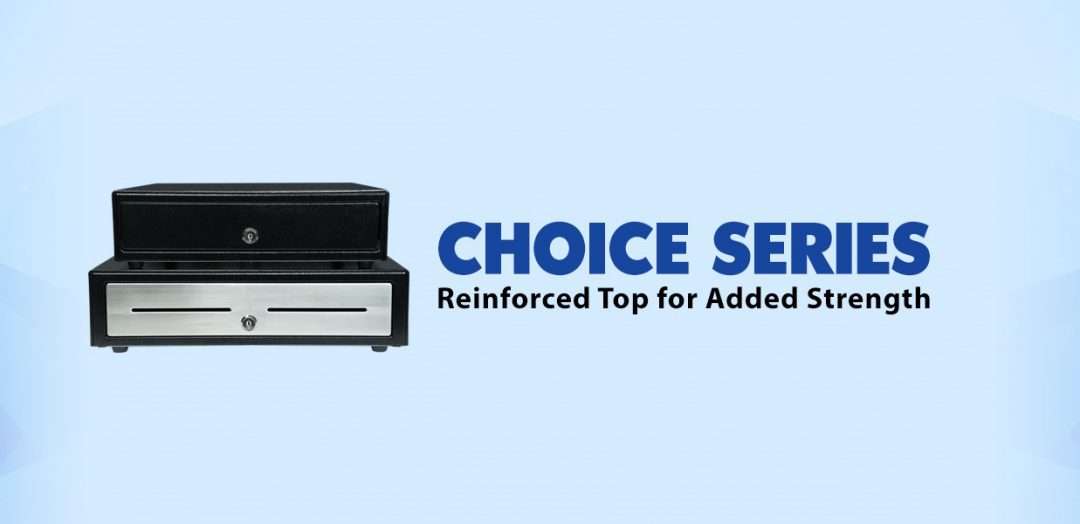
    Available in 14” x 16” and 16” x 16” sizes and glossy black and matte white finishes, with an optional stainless-steel front design, the Choice Series cash drawers are available in the sizes and styles businesses demand. Equipped with standard till sizes, the 14” x 16” cash drawer features a 4 Bill-5 Coin till and the 16” x 16” model includes a 5 Bill-5 Coin till, with additional sizes available to fit a business’ specific needs.

    Stronger than their competition, Choice Series cash drawers feature a reinforced top creating added strength to eliminate bounce from touch tablets and securely support POS terminals. The Choice Series is a one-key cash management solution enabling both the cash drawer and locking till cover to be operated by a single hinged key. Managers will love the convenience of a single hinged key that will not break off in the lock.

    Simply connect the cable included with your Choice Series cash drawer to the drawer kick of your POS printer and enjoy years of reliable operation tested to over 1 million cycles and backed by a three-year warranty. Available options for the Choice Series include under-counter mounts, locking till covers, over 10 different lock set options, and a secure dual-cash cable to enable the Choice Series to work as either cash drawer 1 or cash drawer 2.

    The Choice Series complements two other Star Micronics cash drawer lines: The Value Series of affordable, standard cash drawers, and the Max Series of premium cash drawers with added security and design features.

    “The combination of simple setup and operation, reliable and secure steel construction, and compatibility makes the Choice Series right for your business,” said Michael Hanson, Executive Vice President at Star Micronics. “Make your next sale a Star Bundle by adding a Choice Series cash drawer to Star’s expanding portfolio of customer solutions.”

  • 7 Easy Tips on Selling Merchant Services

    7 Easy Tips on Selling Merchant Services

    When it comes to selling merchant services, the landscape can be quite competitive. With many options on the market for your customers, it’s critical to take the time to focus on how you can differentiate yourself as a solution provider. While it might sound intimidating, in today’s blog post we will share seven tips on selling merchant services, designed to make your journey simple – and successful.

    7 Easy Tips on Selling Merchant Services:

    1. Provide a Total Solution

    One of the best ways to differentiate as a merchant services provider is to not just offer one piece of the payment puzzle, but to provide a total solution. Customers want a one-stop shop, and offering a complete solution that provides value, including credit card processing through a merchant account and a full portfolio of necessary point of sale (POS) hardware, is a great way to create happy, sticky customers.

    2. Be a Trusted Advisor

    Although this blog post contains tips on selling merchant services, one of the most important things you can do sometimes is to not sell. What does this mean? Simply put, strive to be your customer’s trusted advisor, rather than just a salesperson. The foundation of being a trusted advisor is built on listening: listening to your customer’s needs and acting as a consultant to offer ideas and solutions, rather than just pushing products. Some other traits of trusted advisors include:

    • Putting your customer’s needs first, not your own; always think of their challenges and priorities before your own
    • Always asking questions to understand more about your customer’s specific situation – “tell me more!”
    • Providing a variety of solution options, so that they can decide on the best choice for themselves
    • Embracing the fact that you don’t always know the answer and build the confidence to admit that – doing so will demonstrate honesty and trustworthiness

    3. Be Available

    This next tip may sound obvious, but it still deserves to be said: be available for your customer! Often times, many businesses will sign up with ISO agents and then find themselves never hearing from the agent again after the contract has been signed. Don’t fall into this pattern! Make a conscious effort to touch base with your customers and be that trusted advisor who is always looking out for their best interests.

    4. Offer Affordable Options

    Besides offering a total solution, acting as a trusted advisor, and being available on a regular basis, another thing that your customers are sure to value is affordable pricing. A low cost is always a priority, especially during uncertain times. Reduce the cost of entry into your solution by offering a SaaS (Solution as a Service) model which features low monthly payments. This operating expense (OPEX) model versus a capital expense (CAPEX) model means that rather than a business needing to spend a larger lump sum for a solution, it can instead spend a lower amount as needed each month. This model helps businesses receive the best possible solution in an affordable way.

    5. Be Transparent

    Who doesn’t value transparency? It’s important to feel like you are dealing with an honest and ethical provider. Your customers also value transparency, so be sure to be understandable in every way possible. It’s especially important to make your transaction fees crystal clear and remember to be competitive with your revenue share. Being honest and laying these numbers out on the table will earn you trust as you sell merchant services.

    6. Provide a Straightforward Timeline

    Time is money, and to a business, money is a top priority. Be sure to prioritize your customer’s time by providing a straightforward go-to-market timeline. When providing this timeline, also remember to include the expected ease and speedy of any integrations that will be required.

    7. Offer Omnichannel Capabilities

    Today’s businesses require today’s payment options. Gone are the days when simple, piecemeal merchant services could suffice. If possible, be sure to offer an omnichannel solution, meaning a variety of card acceptance methods, along with a fully integrated solution. Acting as a one-stop shop and offering an omnichannel solution can lead to creating a sticky customer that is less likely to be tempted away by a competitor.

    Worldnet-Omnichannel-Payments-Image

    What can Worldnet’s Omnichannel Integrated Payments do for you?

    Worldnet is proud to offer a simple omnichannel integration that brings your eCommerce, Back Office and Cardholder Present payment solutions together, and presents all that data directly into your software solution, ERP, or CRM system.

    Download eBook

    Successfully Selling Merchant Services can be Simple

    To wrap things up, keep in mind that selling merchant services doesn’t need to be complicated. In fact, focusing on simplicity is key. Prioritize offering total solutions to your customers, as well as genuine consulting with an emphasis on the customer’s needs instead of your own product. Being seen as a trusted advisor that can also act as a go-to, one-stop shop for modern payment solutions is sure to help you successfully sell merchant services.

    mPOP™: Perfect for Today’s Payments

    Have you met the Star Micronics mPOP? This sleek all-in-one POS hub, built for modern small businesses, accommodates high-volume credit card and cash transactions and features:

    • Printer, cash drawer, scanner, and device stand
    • Compatibility with iOS, Android, and Windows
    • Cash drawer with 4 bill and 6 or 8 adjustable coin slots
    • Print Flat Technology

    Learn More about mPOP

    Star Micronics is proud to offer POS hardware with the features merchants need and the connectivity to bring together applications and payment processing.

    Explore Star’s Payment Solutions

  • Star Micronics and Marijuana Software to Offer a Simple E-Commerce Solution for Cannabis

    Star Micronics and Marijuana Software to Offer a Simple E-Commerce Solution for Cannabis

    OMMPOS adds an online ordering plugin for cannabis dispensary customers using Star Micronics mC-Print3 with CloudPRNT

    Somerset, NJ – July 8, 2020 – Star Micronics, a leading manufacturer of mobile, point of sale (POS), and customer engagement technologies, is proud to announce that OMMPOS.COM from Marijuana Software, LLC has certified a number of Star Micronics hardware peripherals to support their POS software and online ordering solution for cannabis dispensaries. OMMPOS supports Star’s mC-Print3 receipt printer, TSP743II label printer, Star’s CD3 Value Series of cash drawers, and mG-Scales, to offer the full hardware and software POS solution to their cannabis dispensary customers. OMMPOS has decided to expand their offering even further to help their customers during the COVID-19 outbreak by offering a simple solution for online ordering.

    OMMPOS is offering their new online ordering feature for cannabis dispensaries at $15 per month, and $1 per order, making it a cost effective and competitive solution in the market. The online ordering plugin offers an API that allows current OMMPOS customers to transfer their current menu in their POS to their new e-commerce website seamlessly, using templates to custom brand their website with their own domain name. The API also allows cannabis dispensaries using other POS software to use the OMMPOS online ordering feature. The solution is compatible with WordPress and Wix for full website customization.

    When OMMPOS users set up their e-commerce website, customers can then place their order for pick-up or delivery through that site. When customers place their order, the order gets sent to Star’s mC-Print3 receipt printer using CloudPRNT. CloudPRNT will work with the OMMPOS software to store and create print jobs, and communicate status with the printer. The store owner or service providers do not need to maintain an SSL certificate for this CloudPRNT printers since the printer communicates with the server as a client.

    “We are excited to be able to offer this powerful, easy-to-use solution for online ordering. It used to take a lot of technical know how to set up a website shopping cart, and until now it has been very difficult for dispensaries to keep the inventory on their website accurate,” says Raja Afrika, Co-Founder of Marijuana Software, LLC. “Now, with our push button solution, anyone can instantly add a shopping cart to their existing website or use our instant website option if they don’t already have one. Our online ordering solutions supports delivery and curbside pickup as well as online payments with CanPay.”

  • Why BLE Thermal Printers are Ideal for DSD Applications

    Why BLE Thermal Printers are Ideal for DSD Applications

    Direct store delivery (DSD), selling or distributing products directly to the point of sale (POS) or point of consumption (POC), is especially popular for food, drink, and other high-volume goods. Eliminating the “middlemen” in the supply chain is most efficient, especially when products have a short shelf life or are in high demand. Manufacturers ranging from Coca-Cola® and Budweiser® to Entenmann’s® and Hallmark Cards use DSD to get products right to the store — and to shoppers faster.

    One of the elements essential to a successful DSD process is to add a mobile automation solution that supports receipt and label printing. Mobile DSD solutions give drivers more time to spend on merchandising, information gathering, campaign management, and other value-adding DSD-related services, instead of having to manually create invoices and receipts.

    The ability to print on-demand is also extremely helpful. For example, a driver may find that an individual store’s needs have changed, and mobile printing can quickly and easily produce accurate, up-to-date invoices, orders, pick lists, receipts, labels, and more.

    Your customers rely on you for solutions that enable their mobile sales teams to work most efficiently and maximize profits. Providing reliable on-demand printing in the field, however, hasn’t always been easy. Smart solution providers are offering their customers Bluetooth Low Energy (BLE) mobile thermal printers, an ideal choice for DSD applications.

    What Makes BLE Printers Different?

    BLE printers support a communication range similar to “classic” Bluetooth of at least 330 feet, with significantly reduced power consumption. This feature offers operational cost savings and prolongs battery life. But perhaps an even greater advantage is that BLE printers can work with any compatible iOS device (iPhone®, iPad®, iPod Touch®) without the need for pairing. With standard Bluetooth, only one printer can be paired with an iOS device, and each user must use that specific mobile printer every day. However, BLE allows any employee to use any mobile receipt printer since no pairing is required. This feature makes BLE printers perfect for bring your own device (BYOD) environments.

    Benefits of BLE

    There are several benefits your clients can expect when you provide a BLE mobile thermal receipt printer for their DSD applications:

    • Easy to use: Because BLE mobile printers are shareable between multiple iOS devices, drivers can simply grab a printer and go without worrying about matching a particular printer to their devices. No pairing also means that drivers who aren’t tech savvy don’t have to go into their iOS settings and deal with configuring. Connections between the printer and mobile device are handled automatically by applications, so the user can just open an app and print from there. Ease of use also extends to fast and simple paper loading, with printers offering “drop in and print” roll changes.
    • Smaller, Portable Footprint: A mobile printer needs to be compact and lightweight. Drivers use these printers all day, so they need something small and easy to carry. There are BLE mobile printers that fit easily in the palm of one’s hand and can be worn comfortably on a belt clip. Some weigh about 1 ounce or less, including the battery.
    • Reliability: Productivity depends upon consistent device performance. BLE printers deliver high-quality print resolution, ensuring your driver has a clean and readable receipt every time. BLE printers also have high mean cycles between failure (MCBF) rates, with the ability to print millions of lines before requiring maintenance beyond paper changes. In addition, durable print heads can last for 30+ miles of printing.
    • Battery Life: Related to reliability, don’t under estimate the importance of battery life. DSD drivers’ long shifts mean that printer batteries need to last. Look for BLE printers that offer at least 10+ hours of battery life. A good BLE printer will also have a USB port and cable for convenient charging with any mobile device USB power adapter or PC USB port.

    Delivery-Man-in-Truck

    Must-Have Features

    When you are looking for the best BLE mobile printer for your customers, make sure it has the right features to meet the greatest variety of printing needs.

    • Direct Thermal Printing: With thermal transfer or impact printing, the print head comes into contact with an ink ribbon to produce text. Direct thermal printing eliminates the need for a ribbon, as the print head contacts the thermal paper and produces text through a heat reaction. There are several reasons why direct thermal printing is the best choice for mobile printing and in particular for the fast-paced environment of DSD. The only consumable is the paper, which saves time and maintenance (no worries about having to change ribbons) and is more economical, providing significant cost savings. Direct thermal printing also produces a higher resolution than thermal transfer, creating crisp, legible receipts. They print faster as well, with some printers offering speeds of 1 to 2.5 inches per second. In addition, they operate quietly, which is a necessity when working in a customer’s store.
    • Connectivity: Besides BLE 4.0 for use with any iOS devices, it’s helpful to also have standard Bluetooth 3.0 for use with Android and Windows devices as well as iOS. In BYOD environments, some users may not have an iOS device to take advantage of BLE, so having a backup means of connectivity is wise.
    • Backlit Display: These printers may be used in bright sunlight conditions, and a backlit LCD is easier to read.
    • Versatility: A good BLE printer should offer 1D and 2D barcode support to suit a range of printing needs. There are also BLE printers that offer adjustable paper width for greater flexibility. Some printers also provide special capabilities such as a “de-curl” feature for smooth and flat receipts.
    • Durability: Mobile printers need to be able to withstand tough working conditions and various environments. An ingress protection (IP) rating will tell you about the level of the printer’s resistance to dust and moisture. The first digit refers to dust protection, and the second digit refers to protection against liquids (everything from raindrops to soda spills). The higher the digits, the greater the resistance. Also look for printers that have a drop test rating of 3 to 4 feet to see whether they can withstand a fall to pavement or a store floor.

    And of course, it’s good to look for a product backed by a warranty that will help you maximize your profits as a value-added reseller.

    Truck-Driver

    Other Industries that Benefit from BLE Printing

    BLE mobile thermal printing isn’t just for DSD applications. It will benefit any of your customers within an industry or corporation where employees use devices of their choice for BYOD environments. Any workplace that uses a pool of printers for a fleet of mobile workers will appreciate the “grab and go” convenience of not having to pair specific devices. A great example of this type of workplace is a taxi, limo, or rideshare service. BLE mobile printers can also be an economical choice for linebusting in retail stores or faster service in restaurants.

    Give Your Customers the Best Choice

    A BLE thermal receipt printer for DSD applications is the most sensible option for your manufacturer customers. Set their DSD drivers up for success with a printer such as the Star Micronics SM-L200 and the new Star Micronics SM-L300.

    Providing solutions that address your clients’ pain points and increase their efficiency will help cement your role as a trusted business advisor. They need your guidance when it comes to technology — helping them find the very best solutions for their applications will establish you as a true partner that has their business’ best interests in mind, not just someone who sells technology.

    Partnering with an industry leader in mobile printing technology can help you stay on the cutting edge of technology and provide your clients with state-of-the-art solutions that can give them new operational efficiencies and a competitive advantage.

    Taxi-Driver

    About the SM-L200 and SM-L300

    SM-L200Star Micronics SM-L200 Portable BLE Thermal Printer

    The SM-L200 supports Bluetooth low energy (BLE 4.0) technology for all iOS mobile devices such as the Apple iPad®, iPhone® and iPod touch®. Its compact and lightweight design make this two-inch portable printer perfect for a wide range of applications from queue busting in retail and hospitality to home delivery 58mm wide invoicing.

    The SM-L200 is the first portable printer currently on the market which offers the ability to connect any Apple, iOS BLE compatible device without having to pair to it. With no limitation on the number of devices connected, BLE is the perfect solution for BYOD (bring your own device) environments that does not require any certification or prior authorization from your iOS operating system. In addition to the BLE feature for iOS, the SM-L200 is Bluetooth (3.0/ 4.0) compatible with all operating systems (Windows, Android, and iOS).

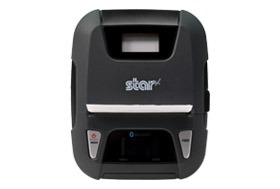
    SM-L300Star Micronics SM-L300 BLE Portable Thermal Printer

    Always leading – always innovating, Star Micronics is proud to introduce the SM-L300, 3-inch portable printer. This addition to the SM-L series of Bluetooth low evergy portable printers allows users to connect to any Apple iPad®, iPhone®, or iPod touch®, iOS BLE compatible device without having to pair to it. With no limitation on the number of devices connected, BLE is the perfect solution for any environment using multiple devices for mPOS printing. In addition, it requires no certification or prior authorization from your iOS application. The SM-L300 is Bluetooth (3.0/4.0) compatible with all operating systems including Windows, Android™, and iOS.

    Ready to learn more about BLE thermal printing? Get your copy of our free eBook, “Why BLE Thermal Printers are Ideal for DSD Applications” now!

    Download eBook

  • 3 Benefits of a Tethered Connection Between a Restaurant POS Tablet and Receipt Printer

    3 Benefits of a Tethered Connection Between a Restaurant POS Tablet and Receipt Printer

    Restaurant technology is evolving extremely quickly. Gone are the days of taking orders by hand on a paper tablet and punching entries into a legacy point of sale (POS) system. Clunky POS terminals have been replaced by sleek tablet-based POS systems, complete with integrated sales, menu, and loyalty information.

    As the hospitality industry leverages all of the benefits that mobile point of sale (mPOS) has to offer, one thing is more important than ever: connectivity. In today’s blog post, we will explore how a tethered Ethernet connection between a restaurant POS tablet and a receipt printer can benefit restaurants in three major ways.

    1. Steady Network Connection

    A tethered connection – or a direct connection from the POS tablet to a restaurant’s Ethernet network – is very important because it means one thing: reliable connectivity!

    A steady network connection is an absolute gamechanger when it comes to any restaurant and retail business, as Wi-Fi signals tend be weak and unstable in physical brick-and-mortar locations. Why is this? According to Infovista,

    “Wi-Fi signals are notoriously sensitive to the surrounding environment… Construction materials, nearby sources of interference, even the products on the shelves can attenuate Wi-Fi signals.”

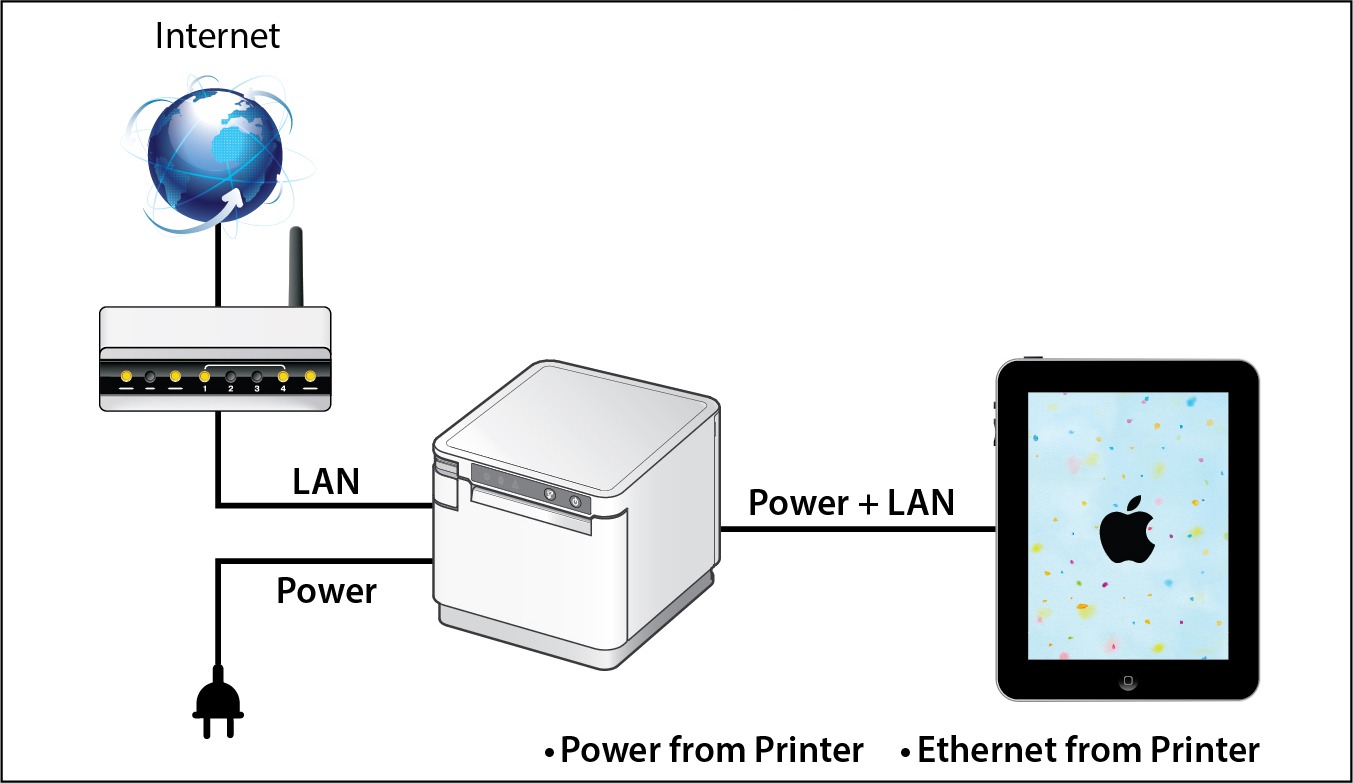
    When you choose a POS system that includes a dependable tethered connection that runs from the receipt printer through to the POS tablet, you eliminate the need to worry about Wi-Fi signals all together. Using this setup can also provide an added bonus: By selecting a receipt printer that provides both Ethernet connection and power to the tablet, restaurants can experience a true “two-birds-one-stone” situation in terms of streamlining their POS and boosting its reliability and functionality.

    2. Prevent Downtime

    When it comes to any business, and especially restaurants, time is money. Processing transactions and turning tables quickly means more profit for the business and happier customers who are more likely to return to the restaurant. When running a business smoothly is a top priority, one thing can be very dangerous: downtime.

    If a restaurant relies on an unstable Wi-Fi network to process transactions and close tabs, downtime can unfortunately become a regular occurrence. Choosing a POS system with a receipt printer that provides both wired Ethernet access and power to the tablet means that restaurants can mitigate the risk of network downtime and keep business flowing smoothly because they are avoiding network disconnection, as well as the possibility of the tablet running out of charge.

    Two of the most important things to patrons are a restaurant’s food and its service. Ensure you are providing smooth, timely, and high quality service by implementing tethered connections at the POS.

    3. Space and Cost Savings

    Just like avoiding downtime is critical to a restaurant’s operations, reducing expenses and creating a clean, cohesive aesthetic is also important. A tethered connection between the receipt printer and the POS tablet can help you do both of those things.

    With a tethered connection between the receipt printer and the tablet, Ethernet connection and power are routed through one cable, so you have fewer cables and adapters to purchase and manage. This not only saves money but also provides a tidier, clutter-free look at the POS which is a place where you have the opportunity to make a positive impression on many customers, especially those that are simply popping in to quickly pick up their online ordering order.

    Looking to modernize your restaurant and take advantage of online ordering?

    Download our free eBook, “Is Your Restaurant Ready for the Growing Online Ordering Trend?” now!

    Download eBook

    SteadyLAN® for Tethered Connections in Restaurant POS

    Star-SteadyLAN-Technology-Final-withoutlogo

    If you are interested in the benefits that a tethered connection between the receipt printer and restaurant POS tablet can offer, look no further than Star Micronics’ SteadyLAN®!

    Star’s unique SteadyLAN® technology (patent pending) makes unstable Wi-Fi signals a thing of the past! SteadyLAN, available on certain mC-Print models and designed for iOS, Android, and Windows devices provides direct cabled control of the printer and attached peripherals, as well as Ethernet provision to the tablet, from the wired Ethernet port of the printer.

    For locations where Wi-Fi connectivity is not possible or unreliable, this new technology is a world-first, providing the stability of a cabled LAN connection for tablet POS systems. By connecting the SteadyLAN-compatible printer to the Internet via wired LAN and connecting the printer and a tablet with a Lightning-USB or USB-C® cable, the device can use the Internet without Wi-Fi communication. At the same time, the tablet can communicate with the printer via USB or LAN and can be charged from the printer.

    To more about SteadyLAN, click here or watch the below video:

    Which Printers Include SteadyLAN?

    SteadyLAN is available on certain models of both the mC-Print2 and the mC-Print3.

    mC-Print2

    mC-Print2

    2” thermal receipt printer
    Easy setup
    Guillotine auto-cutter
    Bluetooth, USB, Lightning, LAN, CloudPRNT
    Cloud ready
    SteadyLAN™technology available on model: mCP21LB

    Learn more about mC-Print2

    mC-Print3

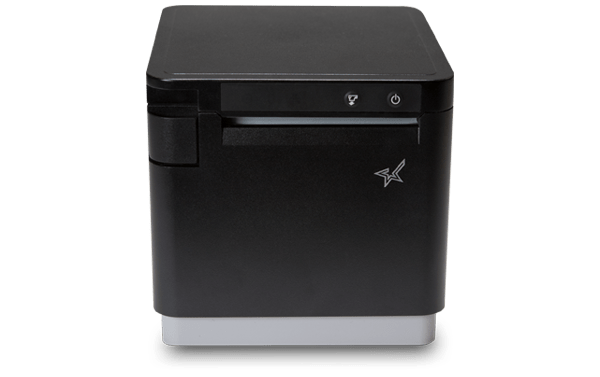
    mC-Print3

    3” thermal receipt printer
    Simple user experience
    Easy to integrate through common SDK
    Bluetooth, USB, Lightning, LAN, CloudPRNT
    IPX2 splash-proof design
    SteadyLAN™ technology available on models: mCP31L and mCP31LB

    Learn more about mC-Print3

    Star Micronics is proud to offer a full range of restaurant POS solutions for tablet POS, online ordering, back-of-house, and more.

    Download Restaurant Brochure

  • Technology for the New World of Retail: Ultimate Checklist

    Technology for the New World of Retail: Ultimate Checklist

    The COVID-19 pandemic has drastically changed the way people shop, forcing retailers to reevaluate their processes and their technology. While there are uncertainties, we know stores just aren’t going to reopen and go back to normal.What will retailers do differently? What will shoppers expect? What new technology do retailers need?

    Across the country, consumers are choosing to shop with retailers that offer cleaner stores, shorter checkout lines, curbside pickup, “Buy Online, Pickup In Store” (BOPIS), touchless payments, and more. As consumers adapt, they will become accustomed to these new conveniences, and eventually expect it. Retailers that start using newer technology to adapt and offer all these options will succeed.

    Whether they want to or not, retailers have to change – not to just get through the pandemic, but to be successful in the new world of retail. There have been important lessons learned from COVID-19 for retailers, all of which should be taken into consideration moving forward.

    10 Retail Technology Solutions for Today’s New World

    Whether you are an essential retailer, or reopening your brick-and-mortar, here are 10 technology solutions to help retail businesses reopen and adopt to the new world of retail:

    1. Online Shopping

    If there’s one thing we’ve learned over the past few months, having an online storefront is vital. If you have a physical store, offer BOPIS and add curbside pickup as a delivery option on your site. Consider selling on third-party sites such as Amazon, Walmart, eBay, and Facebook to expand your market reach and increase online sales.

    2. Curbside Pickup

    While many retailers offer curbside delivery, it’s not always easy to manage, especially with lots of orders and/or limited staff. Develop a well-thought-out process to manage your orders and use text messages/emails to communicate the status of each order with customers.

    3. Mobile Point of Sale

    With current restrictions, it’s important to keep traffic flowing. With a mobile POS solution, you can process payments anywhere in your store to keep lines as short as possible (line-busting), as well as outside your store for curbside pickup.

    4. Touchless Payments

    As more brick-and-mortar businesses reopen and consumers return to shopping in stores, touchless solutions become more and more important. Consider offering Smart Wallet payment processing solutions, such as Google Pay and Apple Pay. This allows customers to pay for their orders without having to reach into their wallet or touch your credit card device.

    5. Sneeze Guards

    All stores should have a shield for virus protection. Some sneeze guards are designed for specific point of sale monitors, so check with your technology provider before buying a custom solution. They should be easy to install and relocate in case your store setup changes.

    6. Security Labels

    If you offer home delivery or curbside pickup, you can secure packages with tamper-proof labels (or seals). These labels provide visual evidence if a package has been tampered with. Your customers will appreciate it!

    7. Email Marketing Automation

    With fewer customers visiting brick-and-mortar stores, retailers need a way of communicating with customers and getting promotions out. If you aren’t already, use an email marketing solution. If your system allows it, personalize and automate your campaigns/promotions to drive up clicks and sales.

    8. Self-Service Kiosks

    If your store gets busy, add a few kiosks so customers can shop your store’s live inventory without having to walking around. Add kiosks outside your store if shoppers have to wait in a line to enter your store.

    9. Robots in Retail

    Since the pandemic, more retailers are considering robots to reduce human-to-human interaction. They can restock shelves and assist with customer service; at one Best Buy store, a robotic cart was spotted supporting curbside delivery. And they sure look impressive!

    10. Scan-and-Go

    For retailers willing to experiment, scan-and-go looks like a promising technology for mainstream retail, especially in the post-Coronavirus world. Similar to Amazon Go, customers simply grab items off the shelf and walk out, eliminating checkout lines altogether.

    Tips for Purchasing New Technology

    Before purchasing new retail technology, prepare a list of all the hardware and software you own, and what you think you may need. Even if it’s just a short list, it will help you plan a budget and compare solutions. When making your list, consider all mobile point of sale devices, credit card devices, receipt printers, cash drawers, scanners, servers, internet service, retail software, eCommerce technology, and more.

    5 ways to save on new technology purchases:

    1. Tax deductions: Save all receipts and ask your staff to save receipts too. Technology purchases for your business can be deducted on taxes.
    2. Trade-ins: Before disposing of your unneeded hardware (which can cost money), ask your technology provider if they accept trade-ins, or sell/donate it to a store that needs it.
    3. Financial assistance: Research grants and financial assistance offered by organizations to retail businesses impacted by the COVID-19 pandemic.
    4. Volume discounts: While you shouldn’t base new technology purchasing decisions solely on price, ask your technology provider if they offer volume discounts and/or have any current promotions.
    5. Defer payments: Many technology providers are currently assisting retailers and helping them adopt new technology solutions by offering either deferred payments or even buy now, pay later models. For example, at Celerant, we are currently offering your first 3 months free for any new SaaS product to help retailers get started with new technology now, while not having to pay until later.

    Are you Ready for New Retail Technology? 

    Celerant Technology is the #1 provider of innovative retail software.

    To help retailers during this challenging time, Celerant is offering up to 3 months free on new SaaS retail software contracts; from now through June 30th.

    For more information, click here

    At Star Micronics, our hearts go out to anyone impacted by COVID-19, either directly or indirectly, especially to those who are sick, to whom we extend our heartfelt wishes for a full recovery. To learn more about what we are doing as an organization to reduce the global impact of COVID-19, in terms of health and business, please click here.

    To browse all of our blog posts covering tips for small businesses during COVID-19, please visit our #StarForSmallBiz blog collection.

  • Star Micronics and C-Trax to Offer a Simple POS Solution for Cannabis Dispensaries

    Star Micronics and C-Trax to Offer a Simple POS Solution for Cannabis Dispensaries

    C-Trax, paired with Star Micronics printers, helps cannabis dispensaries and CBD retailers to streamline business operations 

    Somerset, NJ – June 10, 2020 – Star Micronics, a leading manufacturer of mobile, point of sale (POS), and customer engagement technologies, is proud to announce that C-Trax has added support for Star’s mPOP, along with the mUnite POP and 2D Imager to offer a complete point of sale solution for cannabis dispensaries and CBD retailers. With C-Trax and Star Micronics, hemp retailers have the ease of mind knowing that their sales and store management are being done right.

    C-Trax is the only point of sale that has been designed with the hemp retailer in mind. Designed with franchises and multi-store management in mind, C-Trax brings easy to use POS functionality tied together with a comprehensive back-office management solution. In addition, C-Trax is the first cannabis point of sale software to be fully integrated with payments solutions.

    Star Micronics mPOP is ideal for retail businesses with a lower volume of cash transactions. The all-in-one receipt printer and cash drawer is sleek and compact, taking up less valuable counter space, and allowing retailers to operate from a modern, tablet point of sale. The latest addition to the mPOP offers Flat Bill cash management, with a stacked cash till, offering management for 4 bill and 4 or 6 adjustable coin slots. Additionally, the mPOP comes with its own custom tablet stand, helping to manage cables and keep your point of sale sleek and clean.

    “There is enough to worry about as a cannabis retailer, maintaining equipment shouldn’t be one of them,” states Sean Tolliver, CEO C-Trax. “Our partnership with Star Micronics helps us relieve some of the pressure by providing a reliable and cost-effective hardware solution.”

  • Star Software Update: mC-Print Firmware Update (v3.0)

    Star Software Update: mC-Print Firmware Update (v3.0)

    Welcome to the Star Software Update, the regular series of blog updates where Star’s Integration Team informs you about the latest important Star Micronics software updates.

    In this edition:

    • mC-Print Firmware Update (v3.0) via the mC-Print Utility App (v1.5.0). HID device support, new power and feed switch settings, additional cloud features and settings, and more

    Read on to learn what this month’s update entails.

    Release Date:

    This update was released on May 29, 2020.

    What is Included in the Update?

    The recent mC-Print firmware update (v3.0), which can be accessed by updating the mC-Print Utility App to mC-Print Utility iOS/Android v1.5.0, works with both the mC-Print2 and mC-Print3 and includes several changes:

    • HID Support: Included in this update is added support for HID keyboard device class USB devices. This means that the mC-Print can now support a large variety of keyboards, scanners, and more.
    • New Power and Feed Switch Settings: Another addition included in the update is the new ability to enable/disable the power switch and the feed switch for applications where the printer will not be attended, such as in a self-service kiosk.
    • Additional Cipher Suites: Additional cipher suites have been added as a part of this update. These cipher suites are used with CloudPRNT to accommodate the increasingly advanced security needs of cloud communication.
    • New CloudPRNT Settings: Last but not least, the update also includes the added ability for CloudPRNT settings to be configured by command from an application.

    Next Steps

    The above features can be accessed by updating the printer’s firmware to v3.0, which you can do via the updated mC-Print Utility App. The newest version of the mC-Print Utility App, mC-Print Utility iOS/Android v1.5.0, is available for download and has been released on the App Store for iOS and the Play Store for Android.

    Learn More About mC-Print

    Questions or Concerns?

    Contact Star Integration Now

  • Star Micronics Launches Star Empower Program for Resellers

    Star Micronics Launches Star Empower Program for Resellers

    The new Star Empower Program is designed to help resellers grow revenue while offering top-of-the-line POS solutions

    Somerset, NJ – June 5, 2020 – Star Micronics, a leading manufacturer of mobile, point of sale (POS), and customer engagement technologies, is proud to announce a change to its channel program with the release of its Star Empower Program, enabling its resellers to competitively offer best-of-breed POS solutions from Star Micronics.

    Designed to benefit all resellers by their types of business models, the Star Empower Program will enable its partners to grow their businesses and increase their solution margins. The program aims to support resellers’ efforts to sustain business during today’s market challenges.

    The Star Empower Program is open to all Star Micronics solution resellers and will offer discounted pricing to registered partners. The program also provides access to the Star Partner Portal, where partners can register special projects, request demo units, review historical purchases, access a variety of marketing collateral, and more.

    The program will also offer Loyalty Benefits to eligible resellers and software partners that prioritize Star’s solution offerings. Loyalty Benefits will include exclusive marketing and business development assistance designed to increase partners’ brand visibility and revenue. To learn more about the Star Empower Program, please visit https://starmicronics.com/partnerportal.

    The Star Empower Program will officially launch July 1, 2020, and a pre-registration period will begin on June 8, 2020 to enable partners to take advantage of the Program’s benefits as quickly as possible. By pre-registering for the Star Empower Program, resellers will be able to take advantage of special pricing and sign up for Loyalty Benefits starting on the program launch date of July 1, 2020. Resellers can pre-register for the program here: https://empower.starmicronics.com/register.

    “Star is excited to launch our Star Empower Program. Listening to the challenges of our reseller and distribution partners, I am confident this is the right program at the right time,” said Michael Hanson, Executive Vice President at Star Micronics. “The program captures our ‘Always Leading, Always Innovating’ spirit and will increase the synergy with our channel partners by enhancing product value and restoring channel integrity while rewarding our loyal partners’ commitment to our success.”


  • Restaurant Disaster Relief: Survive and Recover

    Restaurant Disaster Relief: Survive and Recover

    When disaster strikes, how will your restaurant handle it?

    In a world rife with natural disasters, recessions, and pandemics, restaurant owners must be flexible and agile enough to withstand uncertainty, while still having a plan in place to survive and recover whenever these events strike.

    In these instances, it’s no longer about understanding customer desires and capitalizing on trends. It’s now about taking care of needs and ensuring the safety of your customers and your business.

    In order to survive such dramatic shifts in customer demands, you need to combine agility and creativity.

    Click here to download our free restaurant relief guide.

    Evaluate Cost Centers and Cut Where Possible

    Making cuts to any area of business can be difficult. Sometimes, however, it is inevitable. In order to protect your business, weather the storm, and be able to come out of a disaster ready to operate at full force, you must be able to make sacrifices somewhere. Review your labor and inventory data very carefully to understand where you can afford to make cuts and where you can’t.

    Labor

    In the event of recessions or pandemics, when fewer people are going out to eat, you’ll need to evaluate which positions are mission-critical.

    Front-of-house staff

    If customers aren’t able to enjoy a meal on your premises, it won’t be cost-effective to keep FOH staff at full force. Perhaps schedule employees for fewer days or shorter shifts. In extreme circumstances, furloughs may be necessary, though it is wise to refrain from letting employees go completely. Once the disaster is over, you may need them in order to operate effectively and you don’t want to burn those bridges.

    If you have the right restaurant technology like a POS system, you can use the data and management tools it provides to help optimize labor and streamline tasks so you can reduce labor costs without cutting too many hours.

    Inventory

    It’s important to take inventory of everything to see what you have on-hand. Try to adjust your menu offerings to include meals or ingredients you have on hand and stretch your current inventory as far as possible to prevent waste and spoilage. You may need to create new specials and promotions to entice customers to order items that need to be moved quickly.

    Invest in an inventory management system before old, wasteful habits come back. Now is the perfect time to assess your old processes and identify any sources of waste within your inventory so you can better optimize it. An inventory management system can help you increase inventory accuracy, reduce waste, cut costs, and improve the overall quality of your inventory management.

    Now is also a good time to reach out to your vendors to see if they have been affected. You will want to know whether orders will need to be delayed or canceled under these circumstances.

    Reconsider Your Go-to-Market Strategies

    Your customers are likely spending a lot of their time online. That’s where you should be directing your marketing. With social media, post early and post often. The more you post, the wider the audience you will reach. Consider social media advertising, which can put your brand in front of new audiences instantly. Find local community groups on social platforms and join them to help get the word out about your business. It is important to both communicate and listen to customers on these platforms. When faced with disaster, it’s important to recognize that your customers’ needs evolve very quickly. For this reason, you must adjust your message to accommodate, and ensure that you are delivering that message through the most effective channels. Every restaurant should know their customers, and should be reaching out and communicating with them through a variety of methods.
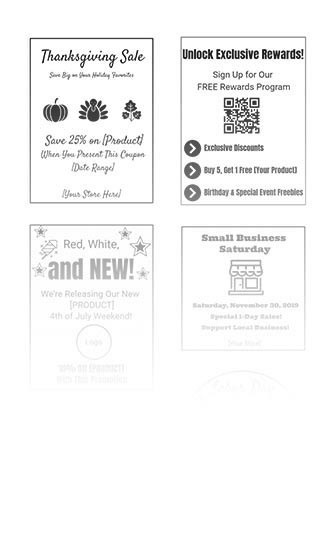
    It is beneficial for restaurants to have a loyalty program through which they can communicate with customers. These are easy to implement with the right technology, and can provide valuable customer data that you can use to engage customers. With Star Micronics PromoPRNT, promotion printing technology, restaurants can reward their loyal customers by printing coupons or promotions to be attached to their take-out or delivery orders that can be used for their next order.

    Email marketing is also an effective way to boost your marketing efforts. If you are offering any new promotions that can address customer needs or save on packaging costs like family-style orders, leverage drip campaigns to your customer database. Implement a monthly newsletter or some other form of communication campaign to engage your loyal customers and keep your business top of mind. You can also do this to get the word out about online ordering, adjusted menu items, or changes in your hours of operation.

    Focus on Existing Revenue Centers: Online Ordering, Pickup, and Delivery

    Continuing to operate in some form or another could be your saving grace. You may be able to run your operation as a ghost kitchen, allowing customers to place orders through your website, mobile app, phone, or third-party service.

    Every restaurant needs to exist online. Online and mobile ordering has become a necessity. Utilize your website as a tool to communicate with and engage your customers. Many sites are static and do not encourage customers to continue coming back. Dynamic websites allow chefs and owners to make changes and update menus daily or weekly, keeping customers engaged with new recipes, offers, and specials.

    With solutions like Star Micronics CloudPRNT, you can get online ordering capabilities set up quickly and efficiently if you don’t already have them. This frees you up to redirect more of your efforts on pickup, to-go, and delivery. Reallocate some of your front-of-house staff to courier and delivery operations. For pickup, you can offer in-store, drive through, or curbside depending on your needs and capabilities.
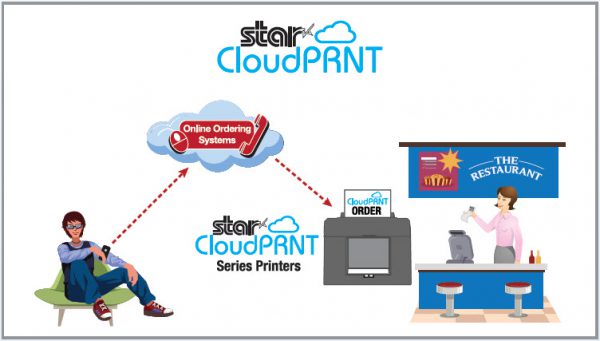
    Integrating online payments into your website can facilitate contactless pickup or delivery in the event of a viral pandemic. For contactless payments curbside, mobile receipt printers can be used to print receipts while tablets can be used to carry out transactions. You can also set up tools that text or call customers when orders are ready so they can run in and out to pick up orders without the need for face-to-face transactions.

    Adapt to Overcome

    When faced with disaster and uncertainty, you must do what you can to remain in business. That requires you to develop the agility and flexibility to adapt to new circumstances that arise and overcome the challenges that you face.

    With any disaster, prepare for consumer preferences and expectations to change. It’s important that you align your technology to help you evolve alongside these changes. Star Micronics offers easy, intuitive solutions like CloudPRNT to help you incorporate online ordering quickly into your operations. For more information on how you can adapt to meet current events, contact the experts at Star Micronics today.

    Our free Disaster Recovery Checklist has all the information you need, at a glance.

    Download Full eBook with Checklist

    At Star Micronics, our hearts go out to anyone impacted by COVID-19, either directly or indirectly, especially to those who are sick, to whom we extend our heartfelt wishes for a full recovery. To learn more about what we are doing as an organization to reduce the global impact of COVID-19, in terms of health and business, please click here.

    To browse all of our blog posts covering tips for small businesses during COVID-19, please visit our #StarForSmallBiz blog collection.
    Full 2022 Product Catalog by Star Micronics. Reopening Toolbox Now more than ever, safety and convenience are priorities in retail and hospitality environments. As businesses reopen their doors, Star is proud to offer a line of solutions and resources designed to keep consumers and employees safe and satisfied. Visit Toolbox