The features businesses know and love – with added strength and benefits
Somerset, NJ – July 21, 2020 – Star Micronics, a leading manufacturer of mobile, point of sale (POS), and customer engagement technologies, is excited to introduce the Choice Series cash drawers to its line of cash management solutions.
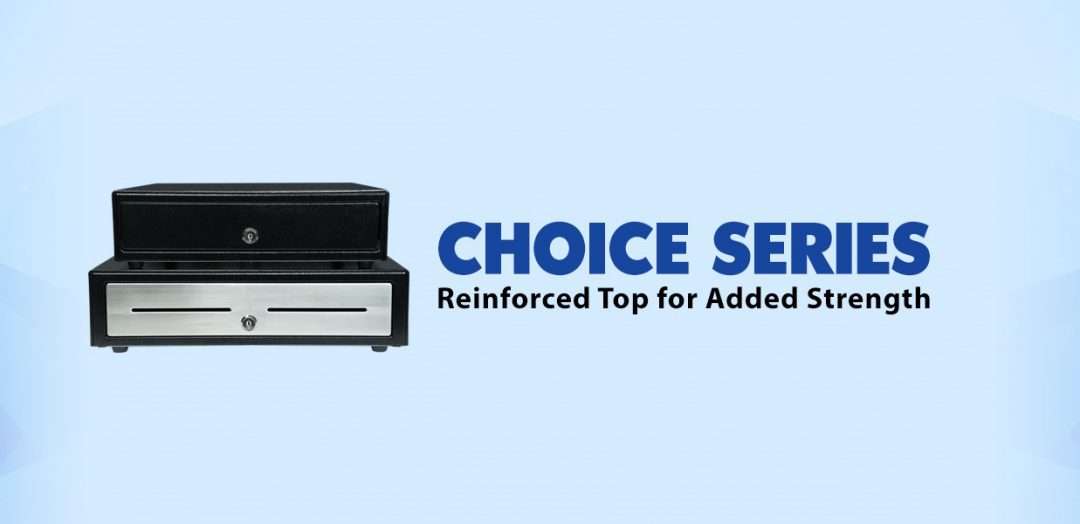
Available in 14” x 16” and 16” x 16” sizes and glossy black and matte white finishes, with an optional stainless-steel front design, the Choice Series cash drawers are available in the sizes and styles businesses demand. Equipped with standard till sizes, the 14” x 16” cash drawer features a 4 Bill-5 Coin till and the 16” x 16” model includes a 5 Bill-5 Coin till, with additional sizes available to fit a business’ specific needs.
Stronger than their competition, Choice Series cash drawers feature a reinforced top creating added strength to eliminate bounce from touch tablets and securely support POS terminals. The Choice Series is a one-key cash management solution enabling both the cash drawer and locking till cover to be operated by a single hinged key. Managers will love the convenience of a single hinged key that will not break off in the lock.
Simply connect the cable included with your Choice Series cash drawer to the drawer kick of your POS printer and enjoy years of reliable operation tested to over 1 million cycles and backed by a three-year warranty. Available options for the Choice Series include under-counter mounts, locking till covers, over 10 different lock set options, and a secure dual-cash cable to enable the Choice Series to work as either cash drawer 1 or cash drawer 2.
The Choice Series complements two other Star Micronics cash drawer lines: The Value Series of affordable, standard cash drawers, and the Max Series of premium cash drawers with added security and design features.
“The combination of simple setup and operation, reliable and secure steel construction, and compatibility makes the Choice Series right for your business,” said Michael Hanson, Executive Vice President at Star Micronics. “Make your next sale a Star Bundle by adding a Choice Series cash drawer to Star’s expanding portfolio of customer solutions.”
Direct store delivery (DSD), selling or distributing products directly to the point of sale (POS) or point of consumption (POC), is especially popular for food, drink, and other high-volume goods. Eliminating the “middlemen” in the supply chain is most efficient, especially when products have a short shelf life or are in high demand. Manufacturers ranging from Coca-Cola® and Budweiser® to Entenmann’s® and Hallmark Cards use DSD to get products right to the store — and to shoppers faster.
One of the elements essential to a successful DSD process is to add a mobile automation solution that supports receipt and label printing. Mobile DSD solutions give drivers more time to spend on merchandising, information gathering, campaign management, and other value-adding DSD-related services, instead of having to manually create invoices and receipts.
The ability to print on-demand is also extremely helpful. For example, a driver may find that an individual store’s needs have changed, and mobile printing can quickly and easily produce accurate, up-to-date invoices, orders, pick lists, receipts, labels, and more.
Your customers rely on you for solutions that enable their mobile sales teams to work most efficiently and maximize profits. Providing reliable on-demand printing in the field, however, hasn’t always been easy. Smart solution providers are offering their customers Bluetooth Low Energy (BLE) mobile thermal printers, an ideal choice for DSD applications.
What Makes BLE Printers Different?
BLE printers support a communication range similar to “classic” Bluetooth of at least 330 feet, with significantly reduced power consumption. This feature offers operational cost savings and prolongs battery life. But perhaps an even greater advantage is that BLE printers can work with any compatible iOS device (iPhone®, iPad®, iPod Touch®) without the need for pairing. With standard Bluetooth, only one printer can be paired with an iOS device, and each user must use that specific mobile printer every day. However, BLE allows any employee to use any mobile receipt printer since no pairing is required. This feature makes BLE printers perfect for bring your own device (BYOD) environments.
Benefits of BLE
There are several benefits your clients can expect when you provide a BLE mobile thermal receipt printer for their DSD applications:
Easy to use: Because BLE mobile printers are shareable between multiple iOS devices, drivers can simply grab a printer and go without worrying about matching a particular printer to their devices. No pairing also means that drivers who aren’t tech savvy don’t have to go into their iOS settings and deal with configuring. Connections between the printer and mobile device are handled automatically by applications, so the user can just open an app and print from there. Ease of use also extends to fast and simple paper loading, with printers offering “drop in and print” roll changes.
Smaller, Portable Footprint: A mobile printer needs to be compact and lightweight. Drivers use these printers all day, so they need something small and easy to carry. There are BLE mobile printers that fit easily in the palm of one’s hand and can be worn comfortably on a belt clip. Some weigh about 1 ounce or less, including the battery.
Reliability: Productivity depends upon consistent device performance. BLE printers deliver high-quality print resolution, ensuring your driver has a clean and readable receipt every time. BLE printers also have high mean cycles between failure (MCBF) rates, with the ability to print millions of lines before requiring maintenance beyond paper changes. In addition, durable print heads can last for 30+ miles of printing.
Battery Life: Related to reliability, don’t under estimate the importance of battery life. DSD drivers’ long shifts mean that printer batteries need to last. Look for BLE printers that offer at least 10+ hours of battery life. A good BLE printer will also have a USB port and cable for convenient charging with any mobile device USB power adapter or PC USB port.
Must-Have Features
When you are looking for the best BLE mobile printer for your customers, make sure it has the right features to meet the greatest variety of printing needs.
Direct Thermal Printing: With thermal transfer or impact printing, the print head comes into contact with an ink ribbon to produce text. Direct thermal printing eliminates the need for a ribbon, as the print head contacts the thermal paper and produces text through a heat reaction. There are several reasons why direct thermal printing is the best choice for mobile printing and in particular for the fast-paced environment of DSD. The only consumable is the paper, which saves time and maintenance (no worries about having to change ribbons) and is more economical, providing significant cost savings. Direct thermal printing also produces a higher resolution than thermal transfer, creating crisp, legible receipts. They print faster as well, with some printers offering speeds of 1 to 2.5 inches per second. In addition, they operate quietly, which is a necessity when working in a customer’s store.
Connectivity: Besides BLE 4.0 for use with any iOS devices, it’s helpful to also have standard Bluetooth 3.0 for use with Android and Windows devices as well as iOS. In BYOD environments, some users may not have an iOS device to take advantage of BLE, so having a backup means of connectivity is wise.
Backlit Display: These printers may be used in bright sunlight conditions, and a backlit LCD is easier to read.
Versatility: A good BLE printer should offer 1D and 2D barcode support to suit a range of printing needs. There are also BLE printers that offer adjustable paper width for greater flexibility. Some printers also provide special capabilities such as a “de-curl” feature for smooth and flat receipts.
Durability: Mobile printers need to be able to withstand tough working conditions and various environments. An ingress protection (IP) rating will tell you about the level of the printer’s resistance to dust and moisture. The first digit refers to dust protection, and the second digit refers to protection against liquids (everything from raindrops to soda spills). The higher the digits, the greater the resistance. Also look for printers that have a drop test rating of 3 to 4 feet to see whether they can withstand a fall to pavement or a store floor.
And of course, it’s good to look for a product backed by a warranty that will help you maximize your profits as a value-added reseller.
Other Industries that Benefit from BLE Printing
BLE mobile thermal printing isn’t just for DSD applications. It will benefit any of your customers within an industry or corporation where employees use devices of their choice for BYOD environments. Any workplace that uses a pool of printers for a fleet of mobile workers will appreciate the “grab and go” convenience of not having to pair specific devices. A great example of this type of workplace is a taxi, limo, or rideshare service. BLE mobile printers can also be an economical choice for linebusting in retail stores or faster service in restaurants.
Give Your Customers the Best Choice
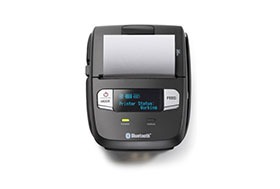
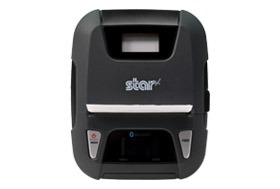
A BLE thermal receipt printer for DSD applications is the most sensible option for your manufacturer customers. Set their DSD drivers up for success with a printer such as the Star Micronics SM-L200 and the new Star Micronics SM-L300.
Providing solutions that address your clients’ pain points and increase their efficiency will help cement your role as a trusted business advisor. They need your guidance when it comes to technology — helping them find the very best solutions for their applications will establish you as a true partner that has their business’ best interests in mind, not just someone who sells technology.
Partnering with an industry leader in mobile printing technology can help you stay on the cutting edge of technology and provide your clients with state-of-the-art solutions that can give them new operational efficiencies and a competitive advantage.
About the SM-L200 and SM-L300
SM-L200
The SM-L200 supports Bluetooth low energy (BLE 4.0) technology for all iOS mobile devices such as the Apple iPad®, iPhone® and iPod touch®. Its compact and lightweight design make this two-inch portable printer perfect for a wide range of applications from queue busting in retail and hospitality to home delivery 58mm wide invoicing.
The SM-L200 is the first portable printer currently on the market which offers the ability to connect any Apple, iOS BLE compatible device without having to pair to it. With no limitation on the number of devices connected, BLE is the perfect solution for BYOD (bring your own device) environments that does not require any certification or prior authorization from your iOS operating system. In addition to the BLE feature for iOS, the SM-L200 is Bluetooth (3.0/ 4.0) compatible with all operating systems (Windows, Android, and iOS).
SM-L300
Always leading – always innovating, Star Micronics is proud to introduce the SM-L300, 3-inch portable printer. This addition to the SM-L series of Bluetooth low evergy portable printers allows users to connect to any Apple iPad®, iPhone®, or iPod touch®, iOS BLE compatible device without having to pair to it. With no limitation on the number of devices connected, BLE is the perfect solution for any environment using multiple devices for mPOS printing. In addition, it requires no certification or prior authorization from your iOS application. The SM-L300 is Bluetooth (3.0/4.0) compatible with all operating systems including Windows, Android™, and iOS.
Ready to learn more about BLE thermal printing? Get your copy of our free eBook, “Why BLE Thermal Printers are Ideal for DSD Applications” now!
Restaurant technology is evolving extremely quickly. Gone are the days of taking orders by hand on a paper tablet and punching entries into a legacy point of sale (POS) system. Clunky POS terminals have been replaced by sleek tablet-based POS systems, complete with integrated sales, menu, and loyalty information.
As the hospitality industry leverages all of the benefits that mobile point of sale (mPOS) has to offer, one thing is more important than ever: connectivity. In today’s blog post, we will explore how a tethered Ethernet connection between a restaurant POS tablet and a receipt printer can benefit restaurants in three major ways.
1. Steady Network Connection
A tethered connection – or a direct connection from the POS tablet to a restaurant’s Ethernet network – is very important because it means one thing: reliable connectivity!
A steady network connection is an absolute gamechanger when it comes to any restaurant and retail business, as Wi-Fi signals tend be weak and unstable in physical brick-and-mortar locations. Why is this? According to Infovista,
“Wi-Fi signals are notoriously sensitive to the surrounding environment… Construction materials, nearby sources of interference, even the products on the shelves can attenuate Wi-Fi signals.”
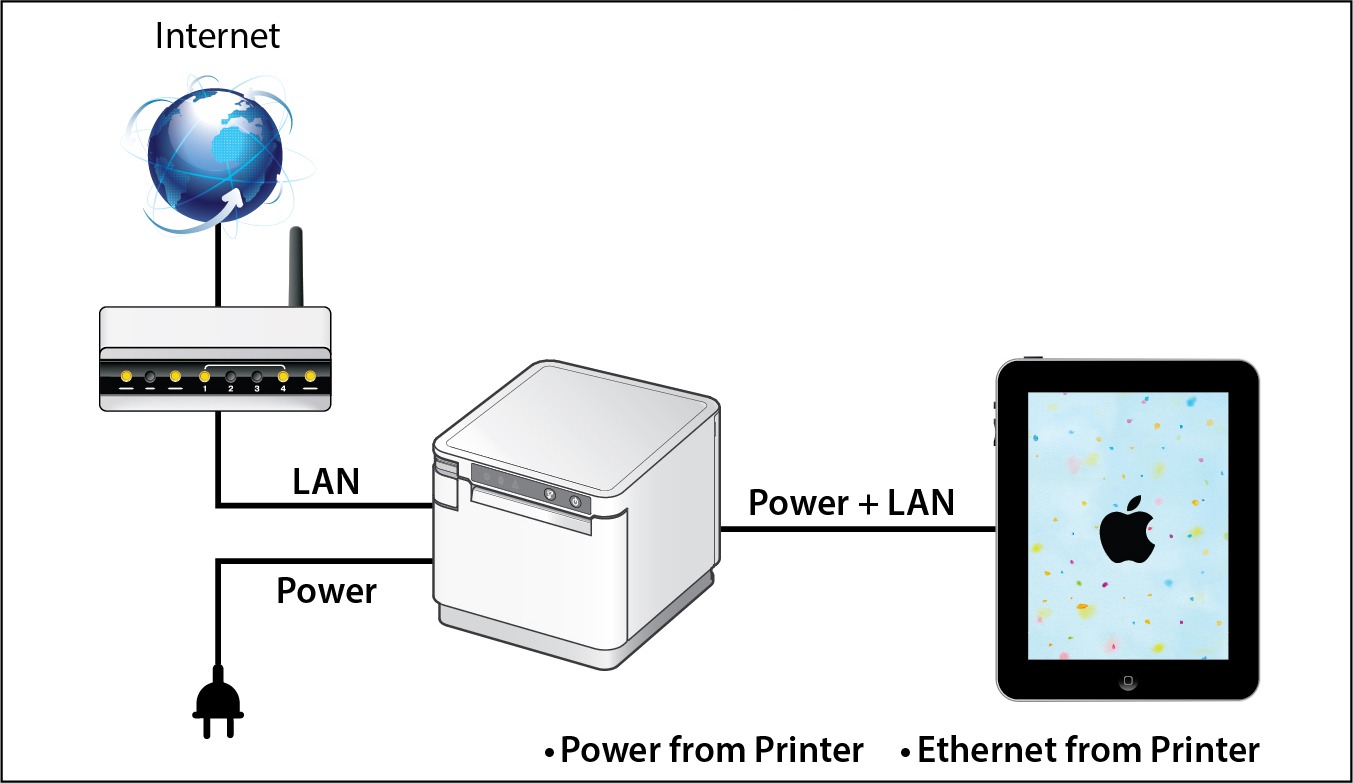
When you choose a POS system that includes a dependable tethered connection that runs from the receipt printer through to the POS tablet, you eliminate the need to worry about Wi-Fi signals all together. Using this setup can also provide an added bonus: By selecting a receipt printer that provides both Ethernet connection and power to the tablet, restaurants can experience a true “two-birds-one-stone” situation in terms of streamlining their POS and boosting its reliability and functionality.
2. Prevent Downtime
When it comes to any business, and especially restaurants, time is money. Processing transactions and turning tables quickly means more profit for the business and happier customers who are more likely to return to the restaurant. When running a business smoothly is a top priority, one thing can be very dangerous: downtime.
If a restaurant relies on an unstable Wi-Fi network to process transactions and close tabs, downtime can unfortunately become a regular occurrence. Choosing a POS system with a receipt printer that provides both wired Ethernet access and power to the tablet means that restaurants can mitigate the risk of network downtime and keep business flowing smoothly because they are avoiding network disconnection, as well as the possibility of the tablet running out of charge.
Two of the most important things to patrons are a restaurant’s food and its service. Ensure you are providing smooth, timely, and high quality service by implementing tethered connections at the POS.
3. Space and Cost Savings
Just like avoiding downtime is critical to a restaurant’s operations, reducing expenses and creating a clean, cohesive aesthetic is also important. A tethered connection between the receipt printer and the POS tablet can help you do both of those things.
With a tethered connection between the receipt printer and the tablet, Ethernet connection and power are routed through one cable, so you have fewer cables and adapters to purchase and manage. This not only saves money but also provides a tidier, clutter-free look at the POS which is a place where you have the opportunity to make a positive impression on many customers, especially those that are simply popping in to quickly pick up their online ordering order.
Looking to modernize your restaurant and take advantage of online ordering?
Download our free eBook, “Is Your Restaurant Ready for the Growing Online Ordering Trend?” now!
SteadyLAN® for Tethered Connections in Restaurant POS
If you are interested in the benefits that a tethered connection between the receipt printer and restaurant POS tablet can offer, look no further than Star Micronics’ SteadyLAN®!
Star’s unique SteadyLAN® technology (patent pending) makes unstable Wi-Fi signals a thing of the past! SteadyLAN, available on certain mC-Print models and designed for iOS, Android, and Windows devices provides direct cabled control of the printer and attached peripherals, as well as Ethernet provision to the tablet, from the wired Ethernet port of the printer.
For locations where Wi-Fi connectivity is not possible or unreliable, this new technology is a world-first, providing the stability of a cabled LAN connection for tablet POS systems. By connecting the SteadyLAN-compatible printer to the Internet via wired LAN and connecting the printer and a tablet with a Lightning-USB or USB-C® cable, the device can use the Internet without Wi-Fi communication. At the same time, the tablet can communicate with the printer via USB or LAN and can be charged from the printer.
To more about SteadyLAN, click here or watch the below video:
Which Printers Include SteadyLAN?
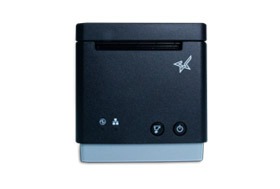
SteadyLAN is available on certain models of both the mC-Print2 and the mC-Print3.
mC-Print2
2” thermal receipt printer Easy setup Guillotine auto-cutter Bluetooth, USB, Lightning, LAN, CloudPRNT Cloud ready SteadyLAN™technology available on model: mCP21LB
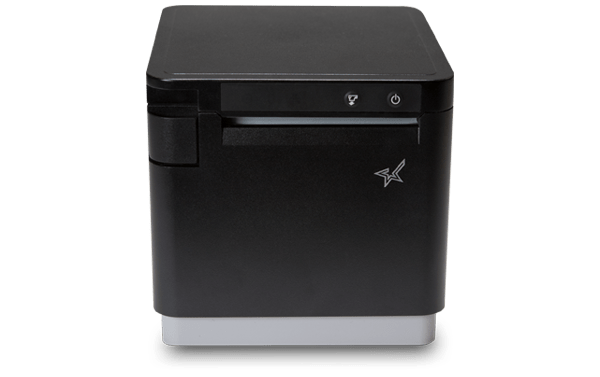
3” thermal receipt printer Simple user experience Easy to integrate through common SDK Bluetooth, USB, Lightning, LAN, CloudPRNT IPX2 splash-proof design SteadyLAN™ technology available on models: mCP31L and mCP31LB
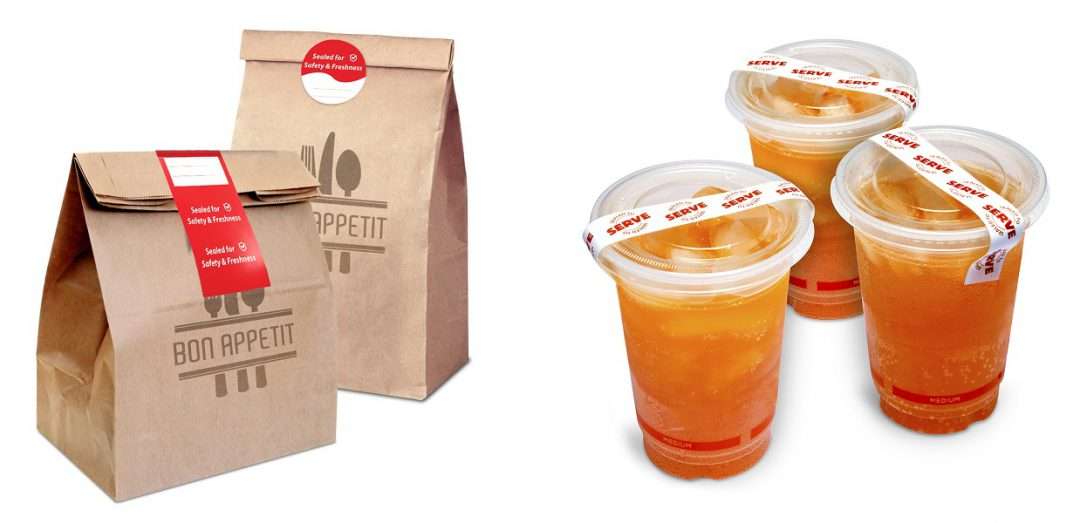
The secure labels and optional dispenser securely seal delivery, catering, and to-go orders
Somerset, NJ – June 1, 2020 – Star Micronics, a leading manufacturer of mobile, point of sale (POS), and customer engagement technologies, is excited to announce the addition of a tamper-proof labeling solution designed to securely seal delivery, catering, and to-go food and beverage orders.
The labels, featuring a best-in-class tamper-evident design, are available in three sizes: 3” round labels to seal takeout bags; 2” x 4” labels to seal larger bags or to close the mouths of bags; and 0.75” x 7” labels to close drink lids. Each label size can be easily and efficiently applied by hand, and each roll delivers 500 labels. The labels come pre-messaged, reading “Sealed for Freshness,” but the message can be customized for large opportunities or recurring specific needs.
Designed with security as a priority, the labels provide added post-preparation quality control by delivering visual evidence if a label has been removed or repositioned. With proven on-packaging performance, the labels are an ideal solution to securely seal food for delivery or pickup orders.
Complete the labeling solution with dependable, easy-to-use label dispensers featuring a small tabletop design and a mechanical bench top that is constructed of steel for years of reliable use. Adaptable to fit any restaurant’s needs, the dispensers can fit multiple labels and can accommodate labels with up to a 7” diameter. Two sizes of dispensers are offered: 3” wide and 4.5” wide. Thanks to its unique cradle design that holds labels securely and separately, the dispenser can handle any core size and enables easy label roll changes. The dispenser can be used for single or multiple rolls, with label separators available for purchase as needed.
“We look forward to expanding our restaurant point of sale offering to include even more safe and secure solutions,” said Christophe Naasz, Director of Business Development at Star Micronics. “This simple yet effective label solution will put restaurants’ and customers’ minds at ease as the industry adapts and continues to prioritize safety.”
Free Resources During COVID-19 & Beyond
Now more than ever, safety is a priority in retail and hospitality environments. Star Micronics is proud to offer a line of solutions and resources for businesses during this challenging time, designed to keep consumers and employees safe, as well as mitigate business impact caused by COVID-19.
A professional, affordable, and adaptable sneeze and virus-protection guard designed for mPOS
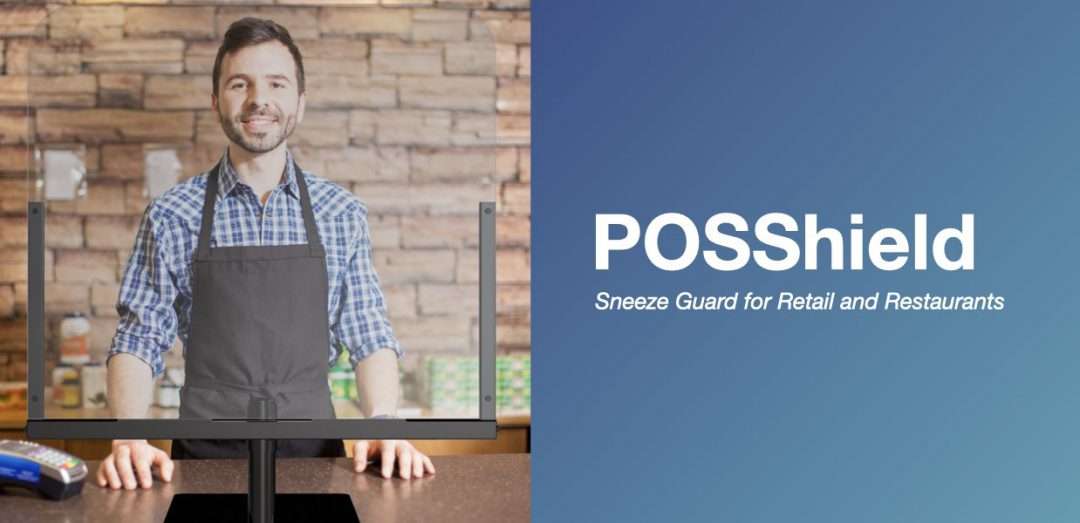
Somerset, NJ – May 26, 2020 – Star Micronics, a leading manufacturer of mobile, point of sale (POS), and customer engagement technologies, is proud to announce the addition of the POSShield protective barrier to its product portfolio for SMB retailers and restaurants.
The POSShield, which acts as a sneeze guard and limits the spread of germs, is placed in between the cashier and the customer, and is comprised of a durable steel frame and a protective plexiglass partition. Measuring 30” wide and 33” tall, the POSShield is an ideal size for SMBs with limited counterspace, as each shield protects one cashier. Additional shields may be purchased to accommodate multiple cashiers. Designed for today’s businesses, the POSShield is adaptable and compatible with any existing POS or mPOS terminal.
The POSShield features a sturdy base plate with no countertop mounting or drilling required, making it easy to install and relocate. With a focus on mobility and reusability, the POSShield can be easily reinstalled for future use cases including flu seasons, changes in store setup, and more. The gap in between the sneeze guard and the countertop enables the safe passing and scanning of products and can be adjusted to fit a cashier’s needs. Payment pin pad terminals can be mounted to the pole if needed, and supplies are included to mount the shield to the countertop, if desired.
“We understand the needs of businesses everywhere are changing rapidly,” said Michael Hanson, Executive Vice President of Star Micronics. “The POSShield provides the professional and reasonably priced protection businesses and consumers need now, as well as the ability to be easily reused well into the future.”
Free Resources During COVID-19 & Beyond
Now more than ever, safety is a priority in retail and hospitality environments. Star Micronics is proud to offer a line of solutions and resources for businesses during this challenging time, designed to keep consumers and employees safe, as well as mitigate business impact caused by COVID-19.
Investing in a point of sale (POS) system is one of the best things you can do for your business, but with so many options on the market, how do you determine which POS hardware and software best suit your business needs and your budget?
This guide can help you get on the right path to finding the perfect POS system for your business.
No one wants to waste time and money on a POS solution that lacks needed capabilities, or has unnecessary features that increase the price. To avoid purchasing a system that isn’t right for your business, you need to identify the specific challenges that you will need your new POS system to address.
You can start by asking questions such as:
Is business suffering because customers must often wait in long lines at the POS?
Do shoppers frequently leave your establishment empty-handed because you don’t have the merchandise they want?
Are you spending too much time managing employees or trying to find out why your sales volume often doesn’t jibe with your inventory levels?
Do you want to attract new customers?
The answers will help you identify the pain points you want to eliminate and the goals you want to achieve with a new POS system. Also consider the amount of time you spend on operations-related tasks and whether you need the POS system to automate processes. You may also want to consider whether you need the POS system to support initiatives that can help grow your business.
Once you have clearly identified your business needs, research which POS functions address them. The list of the functions you need your new system to provide will help narrow the field of choices when you shop for a new POS system. The solutions you consider are likely to have a mix of “must-have” and “nice-to-have” features; remember to focus on what you need, which can help you minimize the cost of the system. “More” isn’t necessarily better when it comes to technology solutions.
Step 2: Set a Budget
Decide how much your business can afford to spend on a POS system. By most accounts, the average industry investment in POS systems totals 2 to 3 percent of retailers’ annual volume, and 1 to 1.5 percent of restaurant operators’ annual volume. Consider ongoing costs, such as software maintenance/updates, hardware maintenance, and technical support.
Ask about payment options. Financing may be available to help with the considerable capital investment you will make. You may also be able to lease or lease-to-own POS hardware, which can minimize upfront costs, but may add to the total cost of the system. Another option available to you may be a POS-as-a-Service offer, which provides your system, as well as software updates and system upgrades, for a subscription fee to use (rather than own) the system.
When choosing from among these options, always consider the total cost of ownership (TCO) and return on investment (ROI). The price of a full-featured POS system may seem high, but don’t forget the financial savings that such a system will yield throughout its lifecycle by reducing labor expenditures, improving inventory control, order accuracy, and cash-tracking, and putting a lid on shrinkage. A comprehensive POS system will also help to up the sales ante by facilitating more effective customer engagement and better customer service, as well as by giving you real-time insight into all aspects of your operation.
Step 3: Shop for Software
As you consider your options, you will find that not every software solution is compatible with all POS hardware. Selecting your software first will prevent you from being limited in functionality.
There are different types of software you can choose from:
Native. Native POS software is installed on your POS hardware. It is easier to customize than cloud-based software.
Cloud-based software (Software-as-a-Service, or SaaS). In a SaaS model, software is delivered via the cloud, and you pay for it on a monthly subscription basis. Also, cloud-based software can be accessed from anywhere there is an Internet connection, giving you enhanced visibility into, and control over your operation. Customizing this type of software may be difficult.
Hybrid software. This software can be run online in the cloud or offline.
It can be helpful to research the types of POS software that other businesses like yours are using. Find out through references or reviews if these retailers or restaurateurs are happy with the type of solution, the functionality it provides, and the benefits the solutions provide to their businesses.
It can also be helpful to learn about the POS software vendors that provide the software, gaining insights on the level of customer service they provide and their experience working with companies in your market or industry. Also consider whether the vendor is an established company — one that is not likely to close its doors and leave you without support for your system.
Once you have created a list of POS solutions to consider for your business, it’s time to arrange for demonstrations. Using the solution yourself will give you a sense of how easy it will be for your employees to learn, to use efficiently, and to discover whether it will support your operations. It may be helpful to compare similar features side-by-side to arrive at an accurate assessment of the best solution for your business.
Step 4: Find Compatible Hardware
The POS software you choose will dictate the POS hardware that you can use. In many cases, however, there will still be a number of options to choose from. Some of the choices you must make are related to how your employees will use the system. For example:
What is the preferred input method? Some operators favor keyboards or a scanner interface for POS data input, while others prefer a touchscreen interface that facilitates faster data input and easier training for new employees.
Will you use mobile POS? POS functionality on a tablet or other mobile device can give you linebusting, in aisle assist, and pay-at-the-table capabilities that can greatly enhance customer experiences. Your options include adding mobile POS to a traditional, stationary system, or using mobile POS alone.
Which peripherals are needed? You need to consider printers, cash drawers, PIN pads, payment card readers, and barcode scanners, and select the model that best suits your needs.
Will you accept all forms of payment? Make sure your new system gives your customers the ability to pay by their preferred methods. Now that the U.S. is migrating toward EMV payments, all new POS systems should have the ability to accept chip card payments. Failure to do so can result in bearing liability for fraudulent payment card charges. Also consider trends that indicate emerging payment types. Mobile wallet use, for example, is gaining ground. To accept payments of this type, you’ll need POS solutions that include near field communications (NFC) technology.
Which terminal design do you prefer? A traditional POS terminal design may work well for your business. If space at the checkout counter is limited, however, you may want to consider a more ergonomic solution with a smaller footprint, such as an all-in-one configuration that incorporates basic peripherals (e.g., printers, cash drawers, credit card readers, PIN pads, and customer displays) or a tablet POS system. You will also find options that are aesthetically pleasing and don’t detract from a store’s décor or restaurant’s ambiance.
Just as you did with software vendors, find out all you can about POS hardware vendors. Read references and reviews, and speak with other businesses — preferably similar to yours — that use their solutions. Also ensure that the company provides warranties and technical support.
Need Help Navigating This Process?
Choosing a new POS system is an important decision, and to properly research your options and find the right solutions can be a time-consuming task. Fortunately, value-added resellers who specialize in POS systems for retail and restaurants are ready to assist you as you consider business needs and challenges that a POS system can address, set a budget, and select solutions that are right for your business. They will also help you deploy the new system and provide training and technical support.
Wafels & Dinges, best known for its delicious Belgian waffles that come with a variety of options for toppings, has been in business since 2007, and since expanded to over 15 locations. Originally selling from a single food truck, the authentic award-winning Belgian waffle vendor has made a name for itself in its home of New York City, even appearing alongside Al Roker on the Today Show. Awards include NYC Vendy Award for Best Mobile Vendor in 2009, Winner of “Throwdown with Bobby Flay” in 2010, “Best Dessert Truck in America” by the Daily Meal in 2013, and Time Out’s “Top 5 Best Quick Serve Restaurants in New York” in 2016.
The Challenge
As self-service started becoming more popular in New York City and people became busier, long lines took more and more of a toll on businesses. People no longer had the time to wait in line and didn’t want to interact. Wafels & Dinges wasn’t an exception. Because of its unexpected surging popularity in a thriving city like New York, Wafels & Dinges faced significant growing pains. Lines were too long, and customers were leaving before they even got to the front of the queue. Additionally, because Wafels & Dinges is located right in the middle of a tourist capital, the restaurant also had the challenge of navigating language barriers.
The company originally tried to line-bust by having employees use tablet solutions to take orders in the queue, but even that proved not to be enough. Even with two manned registers, lines were still too long.
The Solution
Since much of their business operates out of outdoor venues, Wafles & Dinges required a self-checkout kiosk solution for the operation in Bryant Park. The kiosk solution needed to be custom-built to be able to withstand the elements. Restaurant operators also needed to be able to remove the tablet from the kiosk enclosure so that it could be brought in at the end of the day.
The Kiosk Group custom built a wireless kiosk solution for Wafels & Dinges that met the restaurant’s brand standards. The custom kiosk enclosure houses an iPad and is paired with Newline self-ordering software, Square payments, and an integrated Star TSP743II printer. Kiosk Group developed the solution with a built-in external battery. The Star printer also offers Wi-Fi and Bluetooth connectivity.
The kiosk itself was custom-built in 10 months, and was fully installed within one day. It took only a week to go live, and employees were able to easily train on the system within 15 minutes.
The future of many industries lies with self-service solutions. That’s why Star Micronics is offering free online ordering resources for resellers and software developers who are helping customers future-proof their businesses with self-service solutions.
With the new kiosk and integrated printer solution in place, customers can now place orders much more quickly and effectively. The menu layout is easy to create and the interface is easier for customers to navigate. Guests can now view the menu while placing orders, rather than reviewing the menu while trying to place an order with an employee at the counter.
Wafels & Dinges also experienced a decrease in order errors. Where before, orders were transmitted through employees, the kiosk now allows customers to enter orders and have tickets printed with all order details and instructions.
Average check size has also increased, thanks to the automated upselling and cross-selling prompts that can be leveraged with the kiosk technology.
“The custom, branded self-ordering kiosk has improved customer experiences and increased customer retention,” says Matthias Laga, Chief Business Officer of Wafels and Dinges. “And, as a result, boosted profits.”
When it comes to running a restaurant business, there aren’t many things that are worse than downtime in your operations. It’s critically important to keep a restaurant running and avoid costly, inefficient downtime. Did you know choosing the right point of sale (POS) technology can help you do just that? Read on to explore how technology such as POS offline mode and tethered connections can help you mitigate interruption and keep your business sailing smoothly.
POS Offline Mode
POS offline mode can be a game changer when it comes to maintaining efficient, profitable restaurant operations. But first, let’s explore some reasons why your POS may go offline in the first place:
Your payment processor may have lost connectivity
Network issues can cause your POS to become disconnected
Various internet connectivity issues can make your system go offline
Unpredictable, unexpected POS server issues
So, how does POS offline mode help? The mode is a feature within some restaurant POS solutions that keeps all your vital restaurant operations running even if your internet connection fails. Most importantly, POS offline mode can help businesses continue to process payments, including credit card transactions, safely and securely even without the internet.
Choosing a solution that includes POS offline mode is extremely beneficial. Like we mentioned, this mode offers restaurants seamless operation, no matter the status of your internet connection. Due to the smooth operations that POS offline mode creates, you can rest assured that you are mitigating any possible downtime. And last but certainly not least, both of these factors contribute to a positive customer experience. No more impatient customers waiting for your system to come back online or scrambling to find a second payment method because your credit card processor is not functioning properly.
Tethered Connections
As a restaurant owner, another POS technology that can give you peace of mind when it comes to dependable operations is a tethered connection.
There are several ways that tethered connections contribute to a business’s bottom line:
Less worrying: With tethered connections, there’s no need to worry about unreliable or shaky Bluetooth or Wi-Fi signals
Constant connection: A hardwired connection means constant and steady network connection
Decreased downtime: Less downtime means you remain as profitable as possible
Happy customers: Customers will be grateful to pay when and how they want, every time, helping to maintain a positive customer experience
Smooth sailing: Uninterrupted restaurant operation will keep your revenue flowing and reduce your employees’ frustration
Star’s SteadyLAN® for Tethered Connections
If you are looking for an unwavering tethered connection to always keep your business online, look no further than your receipt printer!
Star’s SteadyLAN technology is a patent-pending technology available on certain mC-Print Series printers. It provides wired Ethernet service to iOS, Android, and Windows devices connected to a networked printer via the Lightning or USB-C® cable.
With SteadyLAN, restaurants never have to worry about failed communication between their tablet and printer, or the tablet losing Internet connection. And the best part is that SteadyLAN provides both power and Ehernet connection through one single Lightning or USB-C® cable!
Available on mC-Print2 and mC-Print3, SteadyLAN technology is a world first and provides the stability of a cabled LAN connection for tablet POS systems. By connecting the SteadyLAN-compatible printer to the Internet via wired LAN and connecting the printer and a tablet with a Lightning-USB or USB-C® cable, the device can use the Internet without Wi-Fi communication. At the same time, the tablet can communicate with the printer via USB or LAN and can be charged from the printer.
Choosing a POS That Won’t Leave You Hanging
If you’re looking to improve the reliability and stability of your POS solution, think of it as a two-part project: choosing the right software and selecting the proper hardware.
Be sure to choose a POS software provider that offers POS offline mode to ensure that even if you lose internet connection, you can still seamlessly complete essential POS functions like processing credit card payments.
Your hardware matters, too. Even if your POS software is able to function offline, you cannot afford to have a shaky, unreliable Bluetooth or Wi-Fi connection on your tablet day-in and day-out. By selecting POS hardware that has been designed with tethered connection in mind – like a receipt printer that can route both Ethernet and power to your iPad through a Lightning cable – you know that your system is quite literally hardwired for success.
And of course, you want your software and hardware to work properly together, so it’s smart to choose a hardware provider like Star that partners with the industry’s leading and most popular POS software companies. Why not have all of the benefits of a reliable POS software and the advantages of trusted POS hardware that has been designed for steady operations? Together, the right POS software and hardware can work together to ensure optimal business operations all day, every day.
Consumers, increasingly accustomed to online and mobile shopping experiences, have developed new expectations when shopping in physical stores. They expect sales associates to be able to access their purchase histories and other information so offers and services can be tailored specifically for them, making their shopping experiences more personalized and convenient. Smart retailers are looking for ways to meet these expectations, and go above and beyond to delight customers with in-store customer experiences unlike anything that online shopping could provide. For large retailers, mobile point of sale (mPOS) technology is a key enabler in providing these experiences.
Tablets used in mPOS applications should have a stylish, sleek design that demonstrates a modern and relevant brand. It’s more than just about appearance, however; mPOS solutions need to be ergonomic so sales associates can carry and use them throughout a shift without fatigue. Tablet solutions should also be versatile, empowering your staff with the information and applications they need to engage customers who are using smartphones in-store to research products or comparison shop.
There are five basic waysergonomic mPOS solutions can help large retailers increase sales as well as customer satisfaction:
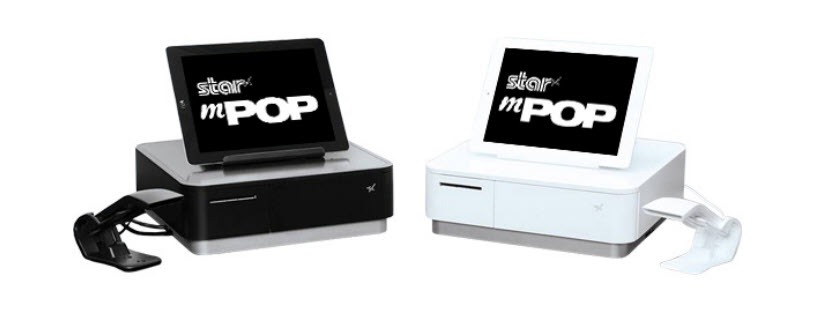
Line busting The Star Micronics mPOP all-in-one is an ideal ergonomic mPOS solution.
Staff empowerment
Space saving design
Fast and secure transactions
Improved customer experience
Line Busting
Today’s consumers want what they want, when they want it — including a checkout process that is as easy in the store as it is online. Some shoppers will abandon their intended purchases rather than waiting on long lines. Furthermore, a study by Omnico Group revealed more than 77 percent of consumers say they are less likely to return to a store where they encountered long lines.
Mobile point of sale solutions help retailers better manage store traffic and shorten lines at stationary checkout counters. With mPOS, employees can use tablets to complete sales and process payments anywhere in the store, and will also have the ability to provide customer service outdoors at sidewalk sales or pop-up shops. Service on the spot, with less of a wait, makes the shopping experience more convenient and pleasant, and decreases the potential for customer dissatisfaction and lost sales.
Moreover, when mPOS gives customers the option to pay for merchandise at the point of decision, they are less likely to change their mind about purchasing your product — which can mean more revenue. Line busting supported by mPOS technology also simplifies another process that can negatively impact the shopping experience — merchandise returns. With mPOS solutions, retailers can accept returns in store aisles or use an mPOS solution to set up a temporary additional lane for returns at the customer service counter. This is an especially useful option during a period of high volume returns such as after the holidays. This also helps create a positive experience for customers, and perhaps, make them more likely to replace unwanted items with new merchandise and return to the store in the future.
Customers have high expectations about sales associates who assist them in brick-and-mortar stores. After all, if shoppers can go online to access their purchase histories, a list of items that they browsed, updates on their loyalty rewards, order status, and shipping information, why can’t in-store staff? Consumers also expect sales associates to have in-depth product knowledge, or at least be able to access information. If a shopper can look up information on his smartphone, the sales associate should be able to do the same.
mPOS technology puts all of this information at sales associates’ fingertips. Using their tablets, the sales staff is empowered to respond quickly to customers’ needs. They can provide immediate answers to questions about product prices and availability by utilizing mPOS devices to tap into the POS and inventory management systems. If the items they are looking for are out of stock, a sales associate can check availability at other stores or warehouses and have it shipped, saving the sale.
Equipping sales associates with mPOS means the best of both worlds for customers shopping in-store: they have access to the information they need to make their purchasing decisions as well as face-to-face service and interaction with friendly sales associates.
Reduced Footprint
In addition to better, faster, more customer-centric service, ergonomic mPOS solutions have another advantage: a small footprint. Unlike traditional POS hardware, these solutions can be used anywhere and, when set up as a stationary POS terminal, they are much smaller. Since they require less space on the counter, there is typically room to display impulse items or signage in an organized, aesthetically pleasing manner. An ergonomic mPOS configuration also will eliminate the need for multiple cables, which can detract from a store’s overall aesthetic appeal, as well as make it more difficult for employees to maneuver their way around the POS station.
Increased employee comfort and the potential for improved employee performance is another practical advantage of mPOS technology. For store associates, operating large or bulky POS equipment in a cramped area can be uncomfortable and may lead to mistakes or damaged merchandise.
Fast, Secure Transactions
A more organized checkout area, thanks to mPOS, can help sales associates total sales and serve customers more quickly. That’s just the tip of the iceberg of mPOS advantages when it comes to payments. Advanced mPOS solutions support a variety of payment types including quick, secure, contactless payments powered by near field communications (NFC) used in mobile wallets like Apple Pay, Android Pay, and Google Pay. mPOS tablets and other devices can also accept EMV chip card payments that help protect against fraudulent payment card transactions.
An mPOS tablet can also include a scanner that enables sales associates to scan barcodes or QR codes from a paper or digital coupon, so discounts can be applied. When loyalty rewards programs are integrated with your POS system, this information will also be available to sales associates via mPOS devices, so they can communicate points totals or help customers redeem their points for rewards. mPOS solutions can also include mobile printers so customers can still receive a paper receipt — even a receipt imprinted with coupons, surveys or other messaging — from anywhere the transaction takes place on the sales floor.
Improved Customer Experience
Although there is competition from e-commerce and other channels, shoppers still primarily choose physical stores to make their purchases. The latest U.S. Census Bureau e-commerce sales statistics show e-commerce is less than 10 percent of total retail sales. The competition is primarily with other brick-and-mortar retailers who are also trying to provide an “online” experience to shoppers in their stores.
Using data collected from all channels, sales associates can engage customers with relevant suggestions based on past purchases, asking if they’ve seen a designer’s new line or if it’s time to upgrade an electronic device purchased at their store. Sales associates can also upsell or cross-sell, suggesting additional items that can complete a purchase, helping shoppers feel more pleased with their new merchandise — and increasing revenue for the retailer.
mPOS also helps retailers continue to fill their customer databases or customer relationship management (CRM) solution with information that helps them better understand their markets. This helps with merchandise replenishment and demand forecasting, which means customers are rarely disappointed because they can’t find what they’re looking for.
Discover the full multitude of benefits that ergonomic POS solutions provide large retailers.
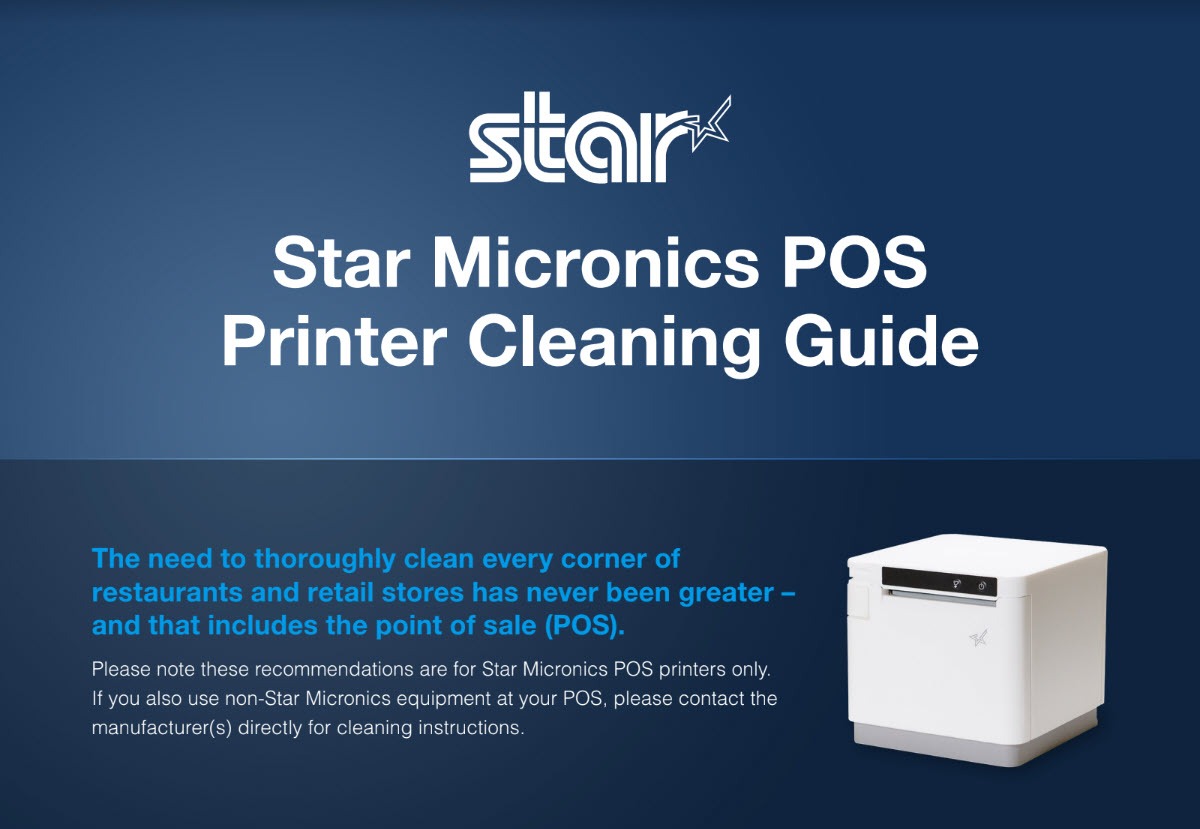
Across the globe, cleaning policies have been released to combat the spread of COVID-19 (coronavirus). These cleaning policies apply to every inch of a business or office – from tabletops to, of course, the point of sale (POS). There has never been a more important time to pay attention to the proper way to clean your POS station, and that includes the receipt printer. In today’s blog, explore some common cleaning and social distancing policies, as well as the proper way to clean Star Micronics printers.
Cleaning and Social Distancing Policies During COVID-19
Cleaning and social distancing policies vary by region, but a common thread among policies is the need for frequent sanitization of common areas and maintaining a healthy distance in between individuals.
For an example of some policies that are in place, see below protocols that are active in New Jersey*, where the Star Micronics America headquarters is located, for businesses deemed essential. Please consult your local government to learn about the policies that apply to your region.
Requirements for All Businesses Continuing to Operate
Owners of buildings used for commercial, industrial, or other enterprises, and of residential buildings with at least 50 units, must implement the following policies at minimum:
Clean and disinfect high-touch areas routinely in accordance with CDC guidelines, particularly in spaces accessible to staff, customers, tenants, or other individuals, particularly following a known or potential exposure;
Maintain current cleaning procedures in all other areas of the facility;
Ensure that the facility has a sufficient number of workers to perform the above protocols effectively.
Additional Requirements for Restaurants, Cafeterias, Food Courts, Bars, etc. That are Still Permitted to Operate
Limit occupancy to 10% of stated maximum capacity;
Ensure 6 feet of distance between workers and customers except at the moment of payment or exchange of goods;
Arrange for contactless pay options, pickup, or delivery wherever possible;
Provide hand sanitizer and wipes to staff and customers;
Frequently sanitize high-touch areas like credit card machines, keypads, and counters;
Require infection control practices such as regular hand washing, coughing and sneezing etiquette, and proper tissue usage;
Place conspicuous signage at entrances and throughout the food business alerting staff and customers to the required 6 feet of distance;
Require workers and customers to wear cloth face coverings, and require workers to wear gloves. A business must provide, at its own expense, these face coverings and gloves for employees. Customers may be exempted if it would inhibit their health, or if under two years of age. If a customer refuses, they must be denied entry, but another method of pickup should be provided.
Additional Requirements for Essential Retail
Limit occupancy to 50% of maximum store capacity at one time;
Establish hours of operation specifically for the exclusive use of high-risk individuals;
Install a physical barrier, such as a shield guard, between customers and cashiers/baggers where possible and anywhere you cannot maintain 6 feet of distance;
Require regular hand washing, coughing and sneezing etiquette, and proper tissue usage and disposal;
Provide employees break time for regular hand washing;
Arrange for contactless pay options, pickup, or delivery of goods wherever possible;
Provide hand sanitizer and wipes to staff and customers;
Frequently sanitize high-touch areas like restrooms, credit card machines, keypads, counters and shopping carts;
Require infection control practices such as regular hand washing, coughing and sneezing etiquette, and proper tissue usage;
Place conspicuous signage at entrances and throughout the store alerting staff and customers to the required 6 feet of distance;
Demarcate 6 feet of spacing in check-out lines to demonstrate appropriate social distancing;
Require workers and customers to wear cloth face coverings, and require workers to wear gloves. A business must provide, at its own expense, these face coverings and gloves for employees. Customers may be exempted if it would inhibit their health, or if under two years of age. If a customer refuses, they must be denied entry, unless the business is providing medication, medical supplies, or food, in which case another method of pickup should be provided.
How to Clean Star Micronics Printers
Clean and safeguard your Star POS printer – quickly, easily, and effectively. Here are some basic tips on cleaning your Star printer:
Clean with 70% isopropyl alcohol
Clean the exterior and print head only
Spray solution into a microfiber or cloth towel first and then wipe
Do not soak/submerge equipment or spray directly into product
For additional security, it’s recommended to always have the device powered down when cleaning
Correctly cleaning the printer should not affect its performance or life
If you have any questions about cleaning your Star printer, please contact us
Now more than ever, safety is a priority in retail and hospitality environments. Star Micronics is proud to offer a line of solutions and resources for businesses during this challenging time, designed to keep consumers and employees safe, as well as mitigate business impact caused by COVID-19.









 Although there is competition from e-commerce and other channels, shoppers still primarily choose physical stores to make their purchases. The latest U.S. Census Bureau e-commerce sales statistics show e-commerce is less than 10 percent of total retail sales. The competition is primarily with other brick-and-mortar retailers who are also trying to provide an “online” experience to shoppers in their stores.