Author: Guillermo Cubero

  • Star Software Update: mC-Print Firmware Update (v3.0)

    Star Software Update: mC-Print Firmware Update (v3.0)

    Welcome to the Star Software Update, the regular series of blog updates where Star’s Integration Team informs you about the latest important Star Micronics software updates.

    In this edition:

    • mC-Print Firmware Update (v3.0) via the mC-Print Utility App (v1.5.0). HID device support, new power and feed switch settings, additional cloud features and settings, and more

    Read on to learn what this month’s update entails.

    Release Date:

    This update was released on May 29, 2020.

    What is Included in the Update?

    The recent mC-Print firmware update (v3.0), which can be accessed by updating the mC-Print Utility App to mC-Print Utility iOS/Android v1.5.0, works with both the mC-Print2 and mC-Print3 and includes several changes:

    • HID Support: Included in this update is added support for HID keyboard device class USB devices. This means that the mC-Print can now support a large variety of keyboards, scanners, and more.
    • New Power and Feed Switch Settings: Another addition included in the update is the new ability to enable/disable the power switch and the feed switch for applications where the printer will not be attended, such as in a self-service kiosk.
    • Additional Cipher Suites: Additional cipher suites have been added as a part of this update. These cipher suites are used with CloudPRNT to accommodate the increasingly advanced security needs of cloud communication.
    • New CloudPRNT Settings: Last but not least, the update also includes the added ability for CloudPRNT settings to be configured by command from an application.

    Next Steps

    The above features can be accessed by updating the printer’s firmware to v3.0, which you can do via the updated mC-Print Utility App. The newest version of the mC-Print Utility App, mC-Print Utility iOS/Android v1.5.0, is available for download and has been released on the App Store for iOS and the Play Store for Android.

    Learn More About mC-Print

    Questions or Concerns?

    Contact Star Integration Now

  • Star Software Update: mC-Print Firmware Update (v2.4)

    Star Software Update: mC-Print Firmware Update (v2.4)

    Welcome to the Star Software Update, the regular series of blog updates where Star’s Integration Team informs you about the latest important Star Micronics software updates.

    In this edition:

    Read on to learn what this month’s update entails.

    Release Date:

    This firmware update was released on January 31, 2020.

    What is Included in the Update?

    Simply put, this new firmware update allows you to more reliably share a printer between an online ordering service using CloudPRNT and a POS using Star’s SDK/driver.

    In today’s restaurant and retail environments it is becoming less and less common to have all services through one provider and much more common to have many different vendors providing different services such as point of sale, online ordering, etc. This firmware update makes sharing a printer between different services using different Star print technologies more reliable, resulting in fewer errors and missed print jobs.

    Next Steps

    You can update your firmware in the mC-Print Utility, under the “Firmware Update” function.

    Contact Star Integration Now

  • Star Software Update: Introducing SteadyLAN®

    Star Software Update: Introducing SteadyLAN®

    Welcome to the Star Software Update, the regular series of blog updates where Star’s Integration Team informs you about the latest important Star Micronics software updates.

    In this edition:

    • Introducing SteadyLAN®! An industry-first solution for iPad POS

    Read on to learn what this month’s update entails.

    SteadyLAN-R-1080x527

    Release Date:

    SteadyLAN was released to the public on January 13, 2020.

    What is SteadyLAN?

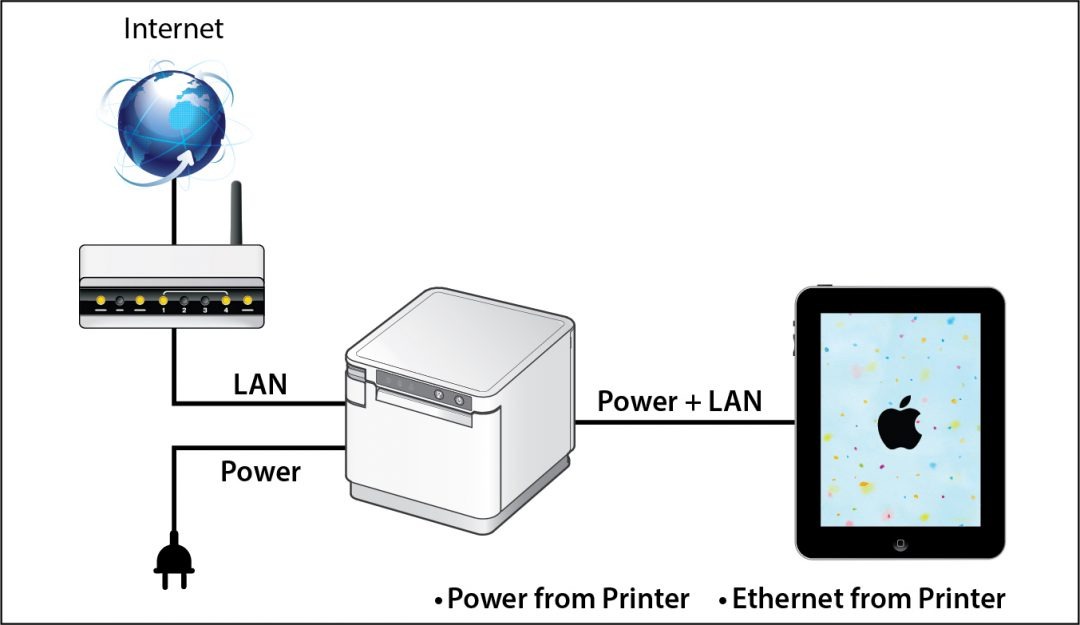
    SteadyLAN is a patent-pending technology available on certain mC-Print Series printers. It provides wired Ethernet service to iOS, Android, and Windows devices connected to a networked printer via the Lightning or USB-C® cable..

    Star’s unique SteadyLAN technology makes unstable Wi-Fi signals a thing of the past! SteadyLAN, available on certain mC-Print models and designed for iOS, Android, and Windows devices provides direct cabled control of the printer and attached peripherals, as well as Ethernet provision to the tablet, from the wired Ethernet port of the printer.

    For locations where Wi-Fi connectivity is not possible or unreliable, this new technology is a world-first, providing the stability of a cabled LAN connection for tablet POS systems. By connecting the SteadyLAN-compatible printer to the Internet via wired LAN and connecting the printer and a tablet with a Lightning-USB or USB-C® cable, the device can use the Internet without Wi-Fi communication. At the same time, the tablet can communicate with the printer via USB or LAN and can be charged from the printer.

    Which Printer Models Include SteadyLAN?

    SteadyLAN is available on the following mC-Print models: mCP21LB, mCP31L, and mCP31LB.

    Star-SteadyLAN-Technology-Final-withoutlogo-1080x625

    Next Steps

    If you already own an applicable mC-Print model, all you need to do to enjoy SteadyLAN is update your firmware through the mC-Print Utility app.

    Contact Star Integration Now

  • Star Software Update: Introducing the CloudPRNT SDK

    Star Software Update: Introducing the CloudPRNT SDK

    Welcome to the Star Software Update, the regular series of blog updates where Star’s Integration Team informs you about the latest important Star Micronics software updates.

    In this edition:

    • Introducing the CloudPRNT SDK! Now it’s even easier to integrate your favorite CloudPRNT features

    Read on to learn what this month’s update entails.

    CloudPRNT SDK

    Release Date:

    Already released, on November 11, 2019.

    What is CloudPRNT?

    Star CloudPRNT is a REST-based protocol which allows web servers to remotely control and receive events from Star point of sale (POS) peripherals which are CloudPRNT-compatible. CloudPRNT enables server-side control of document printing, barcode scanning, keyboard input, display update, and other peripherals (such as scales) depending on model.

    CloudPRNT is suitable for remote printing applications, such as kitchen delivery order printing, warehouse pick ticket printing, etc., where low latency is not strictly required. It is also suitable for lower latency applications, such as traditional POS, with full peripheral control.

    This can be very useful for web-based applications, but can apply to any thin client-style environment. CloudPRNT can also simplify the installation, setup, and daily usage, as it eliminates the need to manage IP addresses or custom firewall/tunneling rules at the local site.

    In addition to simplifying connectivity, CloudPRNT provides a mechanism to allow client and server to negotiate compatibility and capability information. This allows a server to format its output appropriately to fit the client device.

    At this time, several Star models are available with CloudPRNT compatibility:

    About the SDK

    CloudPRNT is an openly documented JSON/REST-based HTTP protocol, and therefore it is not necessary to have an SDK in order to implement a CloudPRNT-compatible service.

    CloudPRNT servers can be created using any server-side technology that can be used to implement web services. Many server-side technologies are used such as PHP, Node.js, ASP.Net, ASP.Net Core, JSP, Python, Lua, and more.

    In order to provide maximum benefit to developers, this SDK is not a CloudPRNT server implementation (although sample servers are included), but a set of helper functions, that can be extended as needed and incorporated into as many server-side systems as possible.

    SDK Helper Features

    This SDK provides functions to assist with:

    • Status decoding
    • Print job media format negotiation
    • Print job conversion, so that the server may generate print jobs in a single media format, which are converted in case that format is not supported by the client device

    SDK Integration

    For integration purposes, the SDK provides the following:

    • .Net API: A .Net Standard 2.0 compatible library, which can be installed via NuGet into any .Net 4.6 or later, and .Net Core 2.0 or later project. This API provides job format conversion, status decoding, and ready-made classes for serializing/de-serializing CloudPRNT JSON messages.
    • CPUtil: A stand-alone command line tool that can be integrated with any server-side development system that can invoke local processes. This tool can be provided as native binaries for Linux x86, Linux x64, Linux Arm, Mac OS x64, Windows x86 and Windows x64 servers (it is not necessary to install the .Net Framework or .Net Core runtime). environments in order to use it.
    • Sample Projects: Examples of very simple CloudPRNT servers, implemented with a variety of server-side technologies. These samples serve as both examples of implementing the CloudPRNT protocol and how to integrate either the API, or cputil in each environment.
    • Star Document Markup: A simple, unified printer markup language that can adapt to any Star printer regardless of emulation, print width, or print method. It is a higher-level language that abstracts away the need to know printer-specific escape sequences. It does this by providing easy to use tags for various POS printer functions such as cut, alignment, image printing, and text formatting. Using the document markup system provides a balance between full bit-image based printing, and plain text output, while being easier to use than printer-specific commands. In order to take advantage of the markup language you must use it in conjunction with cputil.

    Next Steps

    Developers interested in the CloudPRNT SDK should reach out to the Star Integration Team to discuss the integration process specific to their development environment.

    Please click here to learn more about the CloudPRNT SDK.

    Contact Star Integration Now

  • Star Software Update: Peripheral Usage for mC-Print (WebPRNT) and Scale Data Output Utility

    Star Software Update: Peripheral Usage for mC-Print (WebPRNT) and Scale Data Output Utility

    Welcome to the Star Software Update, the regular series of blog updates where Star’s Integration Team informs you about the latest important Star Micronics software updates.

    In this edition:

    • Peripheral Usage for mC-Print2 and mC-Print3 (WebPRNT)
    • Scale Data Output Utility

    Read on to learn what each update entails.

    Peripheral Usage for mC-Print2 and mC-Print3 (WebPRNT)

    Release Date:

    This update was released on October 2, 2019.

    What’s Included?

    WebPRNT Browser has been updated to support the mC-Print2 and mC-Print3 when using a USB connection. Now you can use Bluetooth or USB!

    In addition, both printers can now use their peripherals with WebPRNT and WebPRNT Browser. Now customers have the flexibility to choose a wired or a wireless connection when using the mC-Print Series with WebPRNT. Peripheral support includes Star’s 1D and 2D barcode scanners, as well as the customer line display.

    Scanners are often used in point of sale (POS), while line displays are more commonly used in grocery, as well as self-service. A good example of this is a frozen yogurt shop displaying the price and weight for the customer at checkout.

    Next Steps

    Customers wanting to use the mC-Print Series with a USB connection should update the WebPRNT Browser app through the Google Play Store.

    To use the peripherals, please update the printer’s firmware to V2.1. Firmware can be updated through Stars mC-Print Utility, also available on the Google Play Store.

    Scale Data Output UtilityScale-Data-Output-Utility

    Release Date:

    The tool was released on September 30, 2019.

    What’s Included?

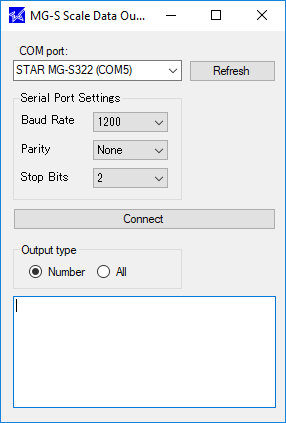
    The scale data output utility is a tool for Windows customers and developers alike to easily read scale input without complicated software. This is the first release, so the version number is 1.0.

    For software that do not directly integrate with a scale, this tool can be used to read the weight and copy it directly into a text box into the POS software.

    Potential industries that can take advantage of this update include cannabis, frozen yogurt, jewelry, deli, candy shop, bulk fruits/nuts in a grocery store, and more.

    Next Steps

    No firmware update is needed. To download the tool, please visit the Star Global Support Site.

    Contact Star Integration Now

  • How a Paper Receipt Benefits ROI and the Customer Experience

    How a Paper Receipt Benefits ROI and the Customer Experience

    This is the second part of “Keep the Receipt,” a five-part blog series about the various advantages paper receipts offer to businesses and consumers, and why you should elect to choose to offer – and accept – paper receipts.

    Welcome to the next part of our Keep the Receipt blog series, where we’ll explore the ways that a paper receipt benefits a business’s return on investment (ROI), as well as its customer experience. During a time when options abound for consumers when it comes to retailers and restaurants, it’s important to not only boost cost efficiency, but also optimize the experience customers have from the moment they enter the door, up until the transaction is completed. Read on to discover how paper receipts can help you achieve all of that – and more.

    Paper Receipt Benefits | Return on Investment

    At the end of the day, businesses need to communicate with shoppers to inform them of transaction details, promotions, return policies, and more. That need is not going away, so the question becomes, what’s the most effective and cost-efficient way to share that necessary information?

    Email services can cost hundreds or thousands of dollars a year, while direct mail can cost nearly $1.00 per piece! Receipts, on the other hand, are extremely cost-effective. Printing 1,000 receipts costs only approximately $1.50 – that’s just $0.0015 per receipt!

    With a laundry list of expenses including rent, utilities, wages, POS hardware, commerce software, payment processing, and more, saving on regular expenses like receipts and marketing communications can make a big difference for businesses of all sizes.

    The receipt is also a very cost-efficient and effective marketing medium. Don’t miss our next Keep the Receipt blog post, where we’ll explore marketing advantages of paper receipts.

    Another less obvious way that receipts boost ROI is by increasing the efficiency of the checkout process. When a business chooses to offer paper receipts, no customer contact information needs to be collected at the point of purchase, meaning the transaction can completed in mere seconds. Speeding up long lines and serving more customers, faster? Sounds like a win to us!

    Paper Receipt Benefits | A Smoother Customer Experience

    Simply put, if you don’t provide your customers with a positive experience, chances are they will begin to spend their money elsewhere. While building an optimal customer experience is a multifaceted endeavor, offering paper receipts is an easy way to help create a more reliable, comfortable experience for shoppers. Here are three major reasons why:

    • No Need for a Digital Device: Smartphones are great, but putting all your eggs in one basket and only offering digital POS services can be problematic. For starters, according to Pew Research, 19% of Americans don’t own a smartphone. Offering paper receipts is a surefire way to navigate that digital divide and avoid leaving out a significant portion of the population.
    • Fewer Junk Emails: A whopping 281 billion emails were sent and received worldwide per day in 2018. And while 99% of consumers check their mail every day, that doesn’t mean they open every single one of the emails they receive, especially when it comes to retail emails. That being said, it’s becoming increasingly easy for consumers to misplace their digital receipts, which can cause a headache when going to return or exchange an item, budget the purchase, and more.
    • A Consistent, Reliable Format: Having a smartphone doesn’t necessarily mean a smooth digital experience: retail stores are built of concrete, brick, and steel, which can block signals and create wireless dead zones. For customers, this poor wireless service can mean difficulty retrieving promotions, proof of purchase, return policies, and more. And even in the midst of a digital transformation, consumers are used to receiving a paper receipt. There’s no question of where to find transaction, promotion, and return policy information when it’s all on a printed receipt safely tucked away in a wallet, not lost in an email inbox. Avoid all of the digital risk by choosing paper receipts (which can include promotions)!

    Are you a business owner? Do you find paper receipts valuable, even in a digital age? Let us know in the comments!

    Be sure to tune into our future Keep the Receipt blogs, which will take a deep dive into even more topics like marketing advantages, bookkeeping/informational benefits, and sustainable features of Star receipts.

    Download our FREE eBook, “The Value of Receipts: Printed and Digital,” now!

  • WebPRNT vs. CloudPRNT: What’s the Difference?

    WebPRNT vs. CloudPRNT: What’s the Difference?

    When designing a software product, whether it be a point of sale (POS), online ordering, or reservation system (or more), deciding which printing mechanism technologies to use is very important. Star is happy to help, and offers solutions for both web-based POS and cloud-based POS (WebPRNT and CloudPRNT, respectively). While both technologies enable printing from a server (local or cloud-based), there are many differences between the two, and specific use cases for each.

    Below, we explore the basic differences between the two technologies, when to use each, and which Star products feature these technologies. If you have any further questions, please contact us and a member of our team will assist you.

    Important Note: All current CloudPRNT-capable printers also support WebPRNT.

    Click here to download a full comparison document.

    All About WebPRNTWebPRNT-General-Diagram-e1574805991783

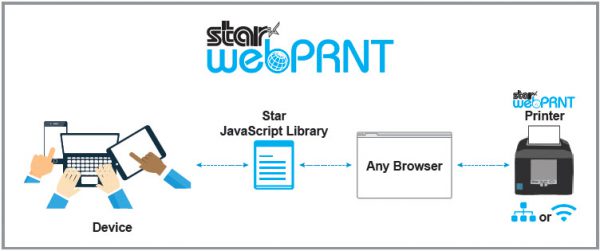
    To support customers building web-based POS applications, Star developed WebPRNT, which provides a multi-platform solution to print directly from various devices including PCs and tablets via a web browser.

    To use, simply embed JavaScript samples from Star’s SDK package into your HTML file, and you can control your Star printer. WebPRNT is the perfect solution for web developers.

    Pros

    • WebPRNT SDK is JavaScript-based and is very familiar to web developers
    • Supports a wide variety of printers including Bluetooth printers by using WebPRNT Browser
    • Once initially coded, WebPRNT can run anywhere with a browser

    Cons

    • Users must know the printer’s IP address
    • Need to set up an SSL certificate

    WebPRNT is available on Star’s mC-Print3, mC-Print2, TSP654II, TSP743II, TSP847II, and SP742. Click here to learn more.

    Download WebPRNT Spec Sheet

    Exploring CloudPRNTCloudPRNT-General-Diagram-1-e1574806010723

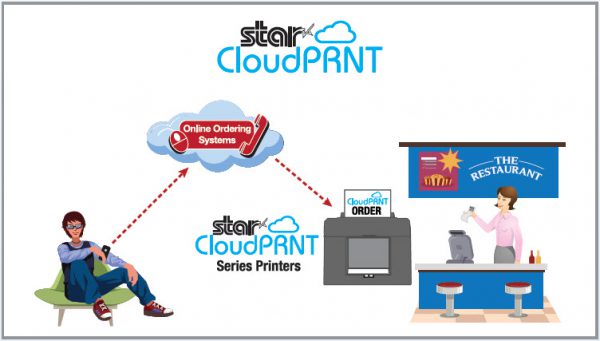
    CloudPRNT is a technology that enables printing directly from a server, usually in the cloud. This device-agnostic method of printing separates the printing technology from the device triggering the print job, making it perfect for web-based software solutions where there is no device on the same network as the printer (and many other scenarios).

    Here’s an example of how CloudPRNT works: By integrating CloudPRNT, a web-based POS solution could generate print jobs seamlessly and without a print dialog from any browser, on any device, running any operating system since the print job is coming straight from the cloud. Online ordering and bring your own device (BYOD) solutions are also a perfect match for CloudPRNT since the device triggering the print job doesn’t have to be on the same network or connected directly to the printer.

    Another benefit of CloudPRNT is that it simplifies print job queue management since it allows management to occur centrally on the server instead of on each individual device. This makes for a robust print management solution in environments with multiple printers such as restaurants.

    Last but not least, CloudPRNT printers periodically poll the server with its status looking for new print jobs rather than pushing the print job from the cloud to the printer. This means that the user doesn’t have to worry about the IP address of the printer, making for easier hardware management and support. The user also does not need to manage SSL certificates on the printer as is required with WebPRNT when printing from secure sites.

    Pros

    • CloudPRNT protocol is platform- and programming language-agnostic
    • The printer and the person initiating printing can be in different physical locations (remote printing)
    • REST-based architecture
    • No need to set up SSL certificates
    • All communication is done through one unified URL

    Cons

    • Requires a reliable internet connection
    • Cannot print when network/internet is down

    CloudPRNT is available on Star’s mC-Print3, mC-Print2, TSP654II, SP742, TSP743II, and TSP847II. Click here to learn more.

    Download CloudPRNT Spec Sheet

    Contact Star Integration Now