Tag: Kitchen Workflows

  • On BlueStar Nation: How Modern Kitchen Technology Is Evolving in Restaurants and QSRs

    On BlueStar Nation: How Modern Kitchen Technology Is Evolving in Restaurants and QSRs

    Restaurant kitchens are facing more demands than ever. From food safety compliance to lightning-fast delivery expectations, operators are turning to modern kitchen technology to keep pace. As cloud POS systems and restaurant label printers reshape how kitchens run, efficiency and accuracy are becoming essential to delivering a superior customer experience.

    In the latest episode of the BlueStar Nation Podcast, Star Micronics’ Christophe Naasz dives into how QSR kitchen technology and restaurant efficiency tools are helping restaurants evolve. He shares insights on trends from the National Restaurant Association Show, the growing advantages of cloud POS vs on-prem, and how kitchen labeling solutions and modern scanning are driving new levels of order accuracy.

    Podcast Highlights: Smarter Kitchens, Better Results

    From restaurant scanning solutions that improve accuracy to kitchen label printers that streamline order staging, Christophe explains how the right technology can transform back-of-house operations. He also discusses why restaurant kitchens adopting cloud POS platforms are seeing faster innovation cycles and improved delivery outcomes.

    Read the blog post, “Why Restaurant Refunds Happen and How to Prevent Them” >
    Stay up-to-date on all things Star, don’t forget to follow us on X, LinkedIn, Facebook, Instagram, and YouTube.

    Want more industry news?

  • 5 Essential Pieces of Kitchen Technology for a Successful Restaurant

    5 Essential Pieces of Kitchen Technology for a Successful Restaurant

    Restaurants are adding new technology like never before, especially in light of the buzz around exciting innovations like AI-enabled ordering, drone deliveries, and ghost kitchens

    Investing in the right restaurant technologies can be the key to success for many restaurants, especially multi-location chains. In fact, 71% of food service companies surveyed in North America believe digital transformation is the most important factor towards agility.

    But one area that is often overlooked is kitchen technology. And it shouldn’t be.

    If you want to run an efficient and profitable operation, your kitchen needs tools in place to help you keep up with the high volume of orders coming in. Getting the right tech in place will make your chefs’ and line cooks’ lives a whole lot easier. 

    Every piece of your tech stack needs to speak the same language and integrate seamlessly for efficient operations and a consistent customer experience. These five essential pieces of kitchen technology will help you build that consistency and improve every area of your restaurant.

    5 Pieces of Must-Have Kitchen Technology

    The kitchen is the beating heart of any restaurant. It’s where the magic happens and it produces the product your customers have come for. As a result, your kitchen needs the latest restaurant technology solutions to make operations more efficient and to connect this area with the rest of the restaurant.

    Here are the vital pieces of kitchen technology to get in place to keep the life-blood pumping around your restaurant.

    1. Point-of-Sale System (POS)

    A point-of-sale system is the hub of your restaurant’s data and operations. It processes orders, transactions, and other restaurant data and often serves as the liaison between your front- and back-of-house restaurant technology solutions. 

    Having the right POS in place is vital to keep communication between the front-of-house and your kitchen smooth and efficient, with minimal errors. When it comes to technology for restaurants, the POS serves as your central data hub.

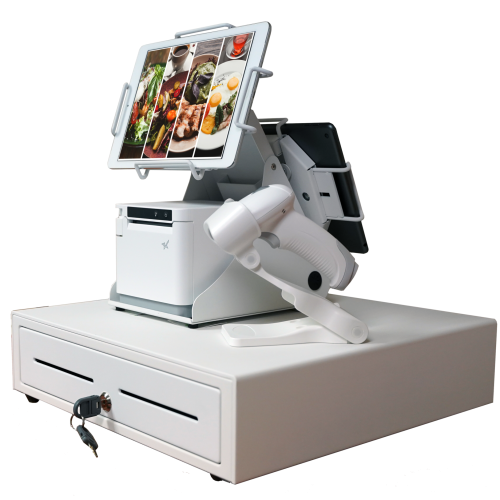
    An all-white point-of-sale system consisting of a cash drawer, an mC-Print3 printer, a wireless scanner, and tablets affixed on top.

    What is a POS?

    A restaurant POS is traditionally the system of networked hardware and software that takes orders and processes payments. But a modern POS can do a whole lot more, including managing inventory, accepting orders from third-party platforms, generating reports from analytics, and pretty much any other restaurant management task you can think of.

    These days a POS stores data in the cloud and can encompass ordering tablets, self-service kiosks, traditional tills with touchscreens, contactless payment terminals, and other restaurant POS hardware.

    Benefits of a POS

    • Streamline restaurant operations – the POS links your systems together, making operations more efficient in every department, from ordering, to payments, to production in the kitchen. 
    • Stores all your data in one place – your POS acts as the data hub for your restaurant, ensuring all your data is accurate, consistent, and accessible.
    • Reduces ordering errors – a smart POS with the latest ordering hardware and key integrations will greatly reduce the risk of costly ordering errors occurring.

    2. Kitchen Display System (KDS)

    Kitchen display systems are becoming essential pieces of technology for restaurants, especially in high-volume settings like fast-casual and quick-service restaurants, ghost kitchens, and other takeout joints where efficiency is the name of the game. 

    The KDS keeps all your orders flowing through the kitchen and makes sure all the cooks are on the same page, making it one of the most vital restaurant technology solutions on the market.


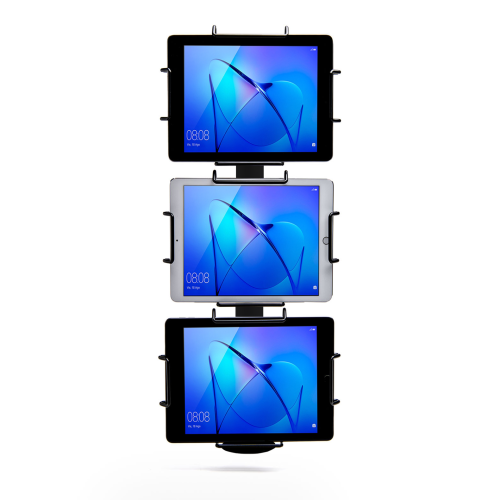
    Black Tri-Mount, which holds three tablets vertically. Tablets and tablet enclosures not included. Pole mount.
    Star Micronics’ Tri-Mount Tablet Display Stand

    What is a KDS?

    A KDS uses one or more screens in the kitchen to give the cooks a clear view of orders being processed. Typically, a screen at each station helps the cooks keep track of orders and even tells them when to fire different parts of an order for maximum efficiency.

    Traditionally, cooks keep track of orders with printed tickets that are spiked when the order is complete. A KDS can be used instead of, or in addition to, printed tickets. The real-time information provided by the system can improve efficiency and reduce the risk of costly mistakes.

    Benefits of a KDS

    • Streamline kitchen operations – a KDS keeps your kitchen production line organized and streamlined by making sure everyone knows what they need to do and when.
    • Speed up service – more efficient production helps your kitchen produce orders faster, meaning you can serve more customers at peak times.
    • Minimize errors – with a clearer picture of the orders in preparation, cooks are less likely to make mistakes that lead to food having to be remade.
    • Reduce food waste a more efficient kitchen making fewer mistakes helps reduce wasted food from sloppy portioning, over-production, and re-fires.

    3. Printers

    Although the trend is moving toward digital solutions, printers still play a vital role in the modern restaurant in the front and back-of-house. And they are getting just as smart as the rest of the tech in the restaurant.

    Many customers want a physical receipt, whether it’s just a preference or for record-keeping, and many kitchens still use printed receipts whether or not they also use a KDS to organize orders. 

    Let’s take a look at the different types of restaurant printers.

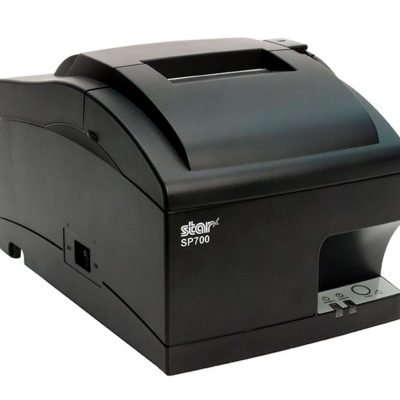
    The SP742 impact kitchen printer is great for online ordering.

    What are Restaurant Printers?

    Restaurant printers are found at the front desk, at wait stations, behind the bar, and in the kitchen – perhaps at each production station. Front-of-house printers print checks and customer receipts. Bar and kitchen printers print order tickets, so bartenders and chefs know what to prepare.

    There are two types of printers commonly used: impact printers and thermal printers. Each has its own features making each one suitable for different environments.

    Impact printers, or dot-matrix printers, physically impact the paper with ink. They can typically print in black and red, have more moving parts, and are noisier than thermal printers. 

    The SP742 Impact Printer is built specifically to work in hot and humid environments, connects via Bluetooth, and can print 13 tickets per minute.

    The SP742 impact kitchen printer is great for online ordering.
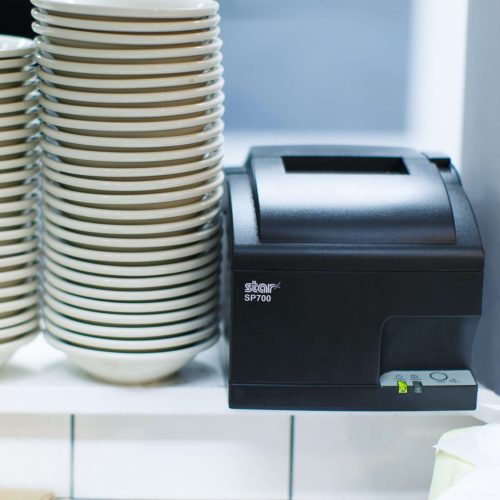
    The SP700 series impact printers from Star Micronics are one of the most popular kitchen printers.

    Thermal printers directly mark heat-sensitive paper using a heated element. Thermal printers tend to be more expensive, but they could save you money over time as you don’t have to buy more ink. They are sensitive to temperature, so they would only work in a climate-controlled kitchen but can print much faster than impact printers.

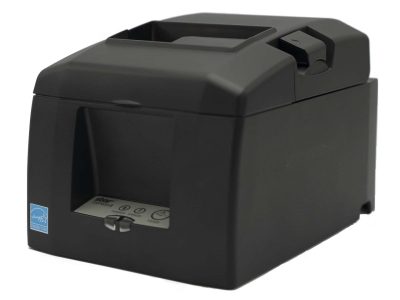
    The TSP654II Thermal Printer can print 60 receipts per minute, comes with easy drop-in paper loading, and connects to a number of peripheral devices.

    The TSP654II thermal receipt printer and the Resto for Quebec, and the TSP654IISK Thermal Sticky Label Printer by Star Micronics
    The TSP654II thermal receipt printer by Star Micronics makes an excellent kitchen printer.

    Benefits of Printers

    • Offer a physical receipt – many customers want to keep a physical credit card receipt or check for their records and for tax purposes.
    • Redundancy in the kitchen – a printer receipt in addition to the KDS allows cooks to double-check orders and some chefs prefer to have a physical order ticket as well as the KDS.

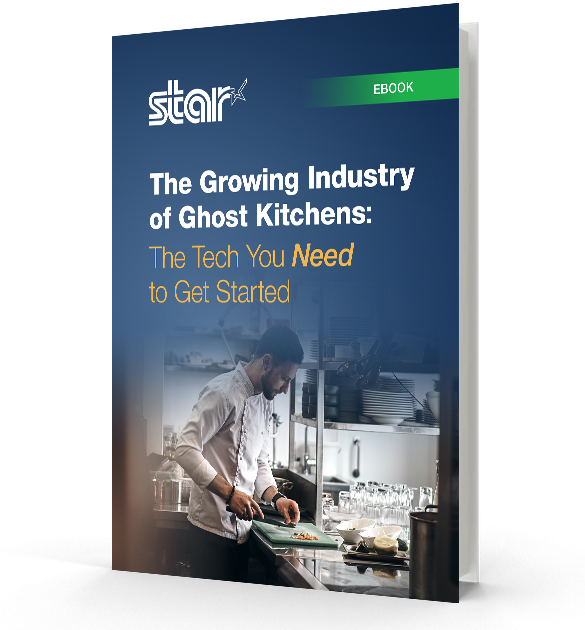
    The Growing Industry of Ghost Kitchens: The Tech You Need to Get Started

    Learn the essentials of starting a ghost kitchen and the technology restaurateurs will need to get started.

    4. Cash Drawers

    Even with a modern POS, you still need a way to process cash payments. Today, most modern cash drawers can be synced with your POS terminals via USB or Bluetooth, offering the ultimate convenience without compromising security. 

    Look for cash drawers with physical and electronic locking functions that are robust and technologically enabled.

    What is a Cash Drawer?

    A cash drawer is a secured box with a sliding drawer that protects your cash. It is linked to your POS, so it opens when a cash payment is made and change is required. 

    Cash drawers typically have multiple locking functions for security, including a manual lock when not in use and automatic locking when in use during service.

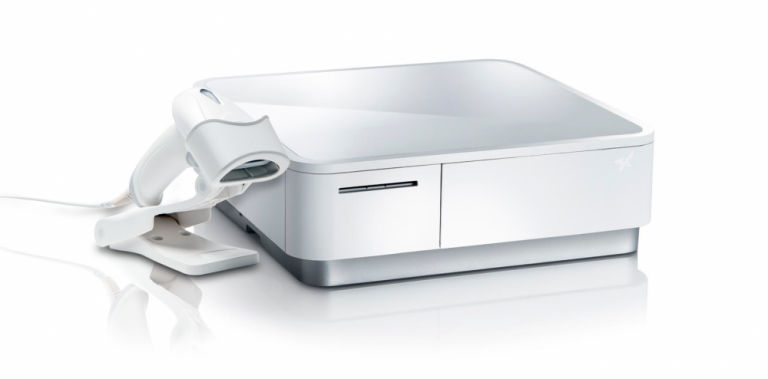
    The mPOP® Multifunction System is a cash drawer and printer in one smart device. Compatible with Windows, Android, and iOS, it offers direct iOS connectivity, which allows your iOS device to be charged while data is transferring. There is also the optional handheld 2D USB barcode scanner included with some models. The mPOP® is truly an ideal device for mobile POS (mPOS) systems.


    White mPOP and 2D barcode scanner by Star Micronics.
    White mPOP® with optional 2D barcode scanner

    5. Contactless Payment Terminals

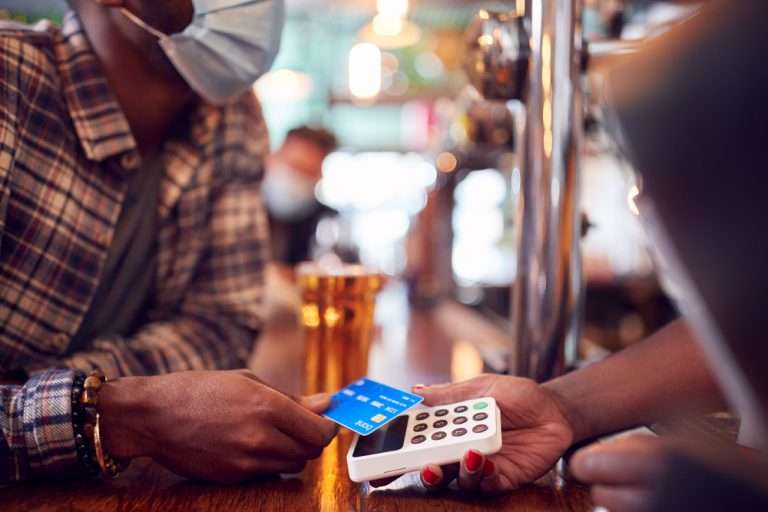
    Contactless payments are becoming the norm as customers increasingly appreciate the convenience of not having to enter a PIN or even remove their card from their wallet. It’s worth upgrading to terminals equipped with near-field communication (NFC), so you can accept payments with a phone or card tap.

    What are Contactless Payment Terminals?

    Contactless payment terminals allow guests to pay with the tap of a card anywhere in the restaurant. They are connected to the WiFi network to communicate with the POS, so they allow customers to pay at the table, at the curb, or at the drive-thru window.

    The terminals use NFC to take contactless payments from smartphones or credit cards and have keypads and card slots if the customer needs to insert the card and enter their PIN.

    contactless-payment-terminal

    Benefits of Contactless Payment Terminals

    • Faster and more convenient – contactless wireless terminals make it quicker and easier to make payments, leading to a better customer experience and more efficient service.
    • More secure – Contactless payments eliminate the need for the customer to hand over the card or reveal their signature. Card information is sent via a secure cryptographic method to ensure information can’t be stolen.

    Boost efficiency, customer satisfaction, and revenue with better kitchen tech.

    From the POS flawlessly processing orders and contactless terminals taking payments anywhere to kitchen display systems and printers keeping your service organized, kitchen technology is vital to the success of your restaurant. 

    As we’ve seen, there are exciting products on the market that help to make transactions easier and more secure, make kitchen operations more efficient, and improve the customer experience, among many other benefits. 

    It’s not just software that counts–getting the proper hardware in place, like smarter cash drawers and the right kind of kitchen printers, can help offer better service and make your kitchen more efficient. 

    Overall, investing in the latest kitchen tech will streamline your operations, improve customer satisfaction and increase restaurant profits.

    Sam-cropped

    Guest Post Written By Sam Sinha

    Sam is a restaurant tech content writer building authority for food industry pioneers like TouchBistro. After cooking and writing his way around London and Hong Kong, he now writes and grows vegetables in the Cambridgeshire countryside.

    Love industry news? Explore our podcast:

  • How to Start a Ghost Kitchen

    How to Start a Ghost Kitchen

    Launching a business in the restaurant space carries a lot of risks. The nationwide restaurant failure rate is challenging to track, but the National Restaurant Association estimates a 30% failure rate in the restaurant industry. With high failure-to-thrive rates, rent, and other overhead costs, plus difficulty filling dining rooms, it’s easy to see why entering the industry is so daunting. However, many restaurateurs have found a way around these challenges: ghost kitchens.

    A ghost kitchen is a professional food preparation and cooking facility set up to prepare delivery or takeout meals without the dining room. This solution has made entering the market more manageable, allowing for flexible working space, eliminating the costs of setting up and running a larger front-of-house operation. For these reasons, many restaurateurs and other entrepreneurs are looking into how to start a ghost kitchen, including what kind of point of sale (POS) technology they will need to get started. 

    Planning a Ghost Kitchen

    Ghost kitchens lower the barrier of entry to the restaurant industry. However, there is still a significant amount of planning that goes into opening a ghost kitchen. For instance, you will still need to find a kitchen space to buy or rent from. The good news is, without a dining room, you can select from a workspace that may have lower foot traffic, which means cheaper rent. 

    It may still take you a while to design a menu, however, and you will have to decide between in-house delivery services or outsourcing with partnerships from UberEats, DoorDash, or other sources. And, of course, you will still have to invest in the usual kitchen essentials: food, utensils, and technology.

    POS Technology To Invest In

    As a ghost kitchen owner, your operations will be very different from traditional restaurant operations and will require a more comprehensive digital solution. To keep up with these unique demands, you will need specific technology designed for your kitchen.

    First, you will need an ordering and payment solution that will allow customers to order and pay for their meals online or via a mobile app. Next, you’ll need a kitchen display system (KDS) to get those online orders directly in front of your kitchen staff, keeping your line moving fast and efficiently.

    Also, you can keep your kitchen moving by sending orders to a mobile printer using linerless labels and sticking them directly onto the to-go packages. This minimizes confusion, shortens delivery and pick-up time, keeping the orders moving (be sure to use tamper-proof labels to assure food order safety as well). In addition, as a digitally advanced kitchen, you’ll need a POS system that integrates all of these solutions, making it easy and seamless to manage your operations on a day-to-day basis.


    The EZ POS tablet stand by Star Micronics. Shown in black with TSP143IV receipt printer.
    The EZPOS tablet display stand by Star Micronics

    If you use multiple delivery services and want to keep your POS system flexible by using a mobile tablet, it’s also a smart idea to invest in a tablet stand. It may quickly become one of your kitchen’s most essential tools, providing a home base for your point of sale and making it easier for staff to match up orders with corresponding delivery service providers. A proper stand should also help to protect your tablet, including any receipt or order printer you may have alongside it.

    Your go-to For Ghost Kitchen POS Technology

    Star Micronics provides flexible, futureproof POS technology designed to connect front and back-of-house operations with ease, keeping ghost kitchens operating at their peak. Star provides everything from portable printers, regular and sticky thermal receipt paper, durable tablet stands, and much more. Through one of our certified partners, you can get all of the hardware your ghost kitchen needs. 

    If you’re ready to find the best step up for your ghost kitchen and get ahead of your competition, contact Star today. Discover what our industry-leading technology can do for you and your restaurant business goals.

    The Growing Industry of Ghost Kitchens: The Tech You Need To Get Started

    Learn the essentials of starting a ghost kitchen and the technology restaurateurs will need to get started. 

    Love industry news? Check out our podcast: