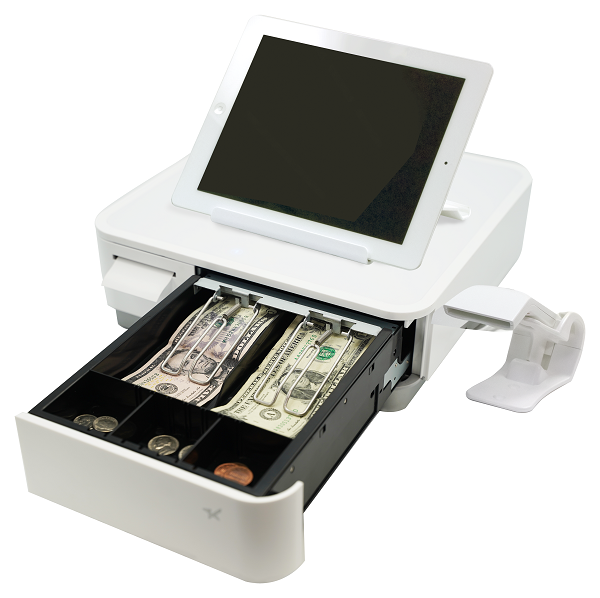
Rhombus POS’ and Star Micronics’ end-to-end solution is designed for cost-conscious restaurants and retailers
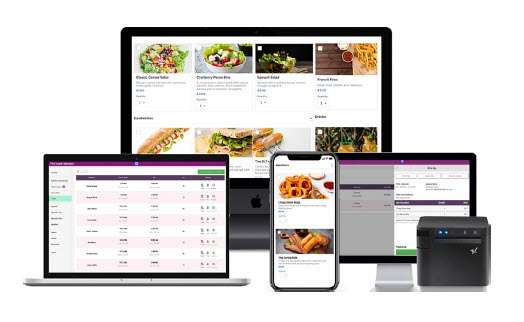
Somerset, NJ – May 6, 2021 – Star Micronics, a leading manufacturer of mobile, point of sale (POS), and customer engagement technologies is excited to announce that Rhombus POS has added support for Star’s mPOP®, TSP143III, mUnite tablet stand, and mG-S8200 scale. Rhombus POS provides free, flexible software for restaurants and retailers that is designed for use on Apple iOS and Android devices, and PAX terminals.
Rhombus POS includes a robust set of features like advanced reporting, multi-store support, sophisticated item categorization, inventory tracking, and employee timekeeping. Designed for intuitive and functional operation, Rhombus POS gives customers the ability to apply order modifiers, put orders on hold, split payments, use multiple printers or a second screen for the kitchen, integrate scales, perform extensive reporting, send customer text notifications, and more. Additionally, Rhombus POS is a cloud-based continuity, meaning that all platforms work together under the same account.
To print receipts, Rhombus POS can communicate with virtually any Star printer, including the popular TSP143III model and the all-in-one mPOP. Customers can also take advantage of integrated scaling with support for the entire line of NTEP-certified Star mG-S series scales, and further streamline customer and merchant experiences with the Star mUnite tablet stand featuring clean cable management.
“We are proud to have an affordable solution for businesses of all types,” said Michael P. Hogan, CEO, at Rhombus POS. “From a restaurant chain to a boutique retailer, Rhombus POS provides an agile yet complete solution for any company looking to leverage the latest technology without breaking the bank.”
Whether you are a reseller, a software provider, or a business owner looking for easy-to-use point of sale (POS) solutions in your establishment, there are many benefits to choosing a one-stop shop POS manufacturer. Read on to explore the many reasons to choose one POS hardware supplier, including a full product portfolio, marketing support, and more.
1. A Full Portfolio
This first benefit really applies to resellers, software providers, and business owners alike. One of the most obvious advantages of choosing a one-stop shop POS manufacturer is that they can provide a full portfolio of solutions. No one likes to spend time and energy piecing together a solution. Choosing a sole supplier who can offer you everything you need – including receipt and label printers, cash drawers, scales, tablet stands, and health and safety solutions – is the best possible option. Other benefits include:
Stress-Free Integrations: As an end user, when you choose a one-stop shop POS manufacturer that already has integrations with hundreds of software publishers you can rest assured that your entire hardware deployment will work seamlessly with your POS software of choice.
Cohesive Design: Whether you are the one using the hardware, or you’re reselling it, a perk of choosing one manufacturer is that the entire POS hardware package you use or offer will have the same clean, cohesive design.
2. Technical Support
Needless to say, when it comes to technology, the quality of technical support that you receive is critical. A solid one-stop POS manufacturer candidate should offer responsive, expert support for every facet of the business.
Software Providers: As a software publisher, a dedicated integration team that not only can provide easy-to-use SDKs, but the time and energy to help you build out a custom solution is key.
Resellers: Businesses rely on resellers to provide complete, easy-to-use solutions. As a reseller, a worthwhile POS hardware manufacturer will provide an all-inclusive product line as well as product training and assistance in building out appealing, relevant solutions that sell.
End Users: Support should remain readily available well after the sale, and as an end-user you should choose a one-stop POS manufacturer that offers robust tech support resources like live chat, a telephone hotline, a website where you can submit tickets, and an online help center filled with resources like FAQs, how-to guides, drivers, and more.
3. Marketing Support
Business executive Beth Comstock says it best: “You can’t sell anything if you can’t tell anything.” That is, marketing is essential to a fruitful business. Marketing can also be daunting – but the right POS hardware manufacturer can help in those efforts.
Resellers and Software Providers: For the best chance at success, choose a POS manufacturer that offers a partner and/or loyalty program that includes perks like co-branded marketing collateral, tradeshow sponsorships, lead referrals, and more.
End Users: As a business owner you’re likely acutely aware of how competitive the market is for restaurants, retailers, and more. It’s important to choose a POS manufacturer that prioritizes helping you market your business by developing products that help you with promotion – like receipt marketing tools – and involves you in case study opportunities, if desired.
Star Empower Partner Program
Available to Star’s software and reseller partners, the Empower Program includes exclusive discounts, marketing benefits, and more.
For some companies that produce POS hardware, their POS division is just a drop in the bucket of their overall business architecture. When that is the case, they may not be fully dedicated to creating the most innovative POS solutions because they have their attention spread among multiple industries.
On the other hand, many POS manufacturers that provide the entire POS solution – and just that! – have their focus entirely on your needs. Read on to learn more about what that means for your business.
Resellers and Software Providers: A POS-focused manufacturer likely has its entire sales channel devoted solely to you – and is always focused on how to improve and strength your relationship and mutual solutions.
End Users: Your POS is your priority, and a POS-focused manufacturer’s job should be to care about your entire solution and make sure your business is doing the best it can and adapting to current circumstances. They can do this by adapting their solutions constantly so you can enjoy future-proof and cutting edge solutions at any given time.
Choosing the Right POS Manufacturer
The benefits and guidelines outlined above are just a starting point when it comes to what to consider while choosing the right POS manufacturer. In a nutshell, choosing a provider (like Star Micronics) that specializes in POS hardware and can provide an entire solution can help you enjoy innovative, plug-and play technology, as well as advanced marketing and technical support. The right partner will be with you before and after the sale – and only succeeds when you do, too.
The Star Empower Partner Program
The Star Micronics Partner Program offers our reseller and software provider partners the best pricing and support available. It is built to support our loyal partners and help them to grow their business with Star. If our partners win, we also win.
The Empower Partner Program offers the following:
All registered partners receive product discounts
Sales and marketing support and resources
Development resources from Star’s dedicated Integration team
Deal Registration
Star Micronics Partner Portal access with custom dashboard
The award marks the 17th consecutive win for BlueStar
Somerset, NJ – May 3, 2021 – Star Micronics has announced BlueStar as its 2020 Distributor of the Year, a title BlueStar has now achieved an impressive 17 consecutive years. BlueStar is a leading global distributor in solution-based distribution of digital identification, mobility, POS, RFID, digital signage, and security technologies.
The Distributor of the Year title is awarded annually to the distributor that accomplished the highest sales achievement throughout the year while promoting the Star Micronics’s innovative solution expansion through exemplary VAR and ISV business development partnerships throughout North and South America.
“BlueStar remains a dynamic participant in Star’s vision and success,” said Christine Duffy, Director of Distribution at Star Micronics. “As we continue to manufacture innovative solutions, BlueStar in turn continues to surpass expectations and support the reseller channel with advanced technology solutions, superior sales support, and services that exceed the growing demand of the market.”
“Star Micronics has been manufacturing world class point of sale products to the POS reseller channel for more than 35 years,” said Steve Cuntz, President at BlueStar. “We are honored to be recognized as Star’s Distributor of the Year and look forward to a continuing partnership. I also would like to commend the entire Star Micronics team for continuing to provide the channel with essential products and services during the pandemic; they certainly have overcome many obstacles over the past year!”
As one of the world’s largest POS solution providers, Star Micronics has designated a portfolio of printing, secure cash management, and customer engagement solutions for retail and hospitality establishments. Star Micronics produces technology to accompany web applications designed for brick-and-mortar, e-commerce, and online ordering, and partners with BlueStar to supply the demand needed for channel innovation.
To learn more about Star Micronics’s innovative solutions for mobile POS and customer engagement, visit www.starmicronics.com.
Welcome to the Star Software Update, the regular series of blog updates where Star’s Integration Team informs you about the latest important Star Micronics software updates.
What’s New:
Star Micronics has added its CloudPRNT for WooCommerce WordPress plugin to GitHub.
What is CloudPRNT for WooCommerce?
Star’s free CloudPRNT for WooCommerce plugin for Star receipt printers can be used to quickly create a remote order or receipt printing solution for restaurants, bakeries, boutique retailers, and more – with minimal cost and setup time.
By offering online purchasing options, retail stores and restaurants are able to grow their business and expand to a larger market. Star CloudPRNT allows businesses to seamlessly integrate online purchasing into their stores and enables the automatic printing of receipts on Star’s CloudPRNT thermal receipt printers including Star mC-Print2 and mCPrint3, and TSP600II, TSP654IISK, TSP700II, and TSP800II.
CloudPRNT provides intelligent printing from a web server from any network to connected Star printers anywhere in the world, without the need for a local POS terminal. This enables unparalleled flexibility for remote receipt and remote order printing using a standard receipt printer.
Additionally, CloudPRNT technology provides benefits to both restaurant and retail stores alike by eliminating the need for an extra tablet to send an online order to the printer. Instead, the ordering service communicates directly with the printer. The store owner or service provider does not need to maintain an SSL certificate for CloudPRNT printers since they communicate with the server as a client.
Since early 2020, businesses worldwide have been struggling to cope with the effects of the coronavirus pandemic, and the restaurant industry is no exception. For many restaurateurs, this meant adjusting and changing their everyday business operations to generate new revenue and help their staff and customers feel safer. For some, adjusting has not been as easy leading to temporary and in some cases permanent closures.
Restaurateurs, faced with the same challenges as last year, are seeking to remain as profitable as possible in an industry that may need to re-invent itself once in-person dining returns. Successful restaurateurs are uncovering new and inventive ways to wait out the storm, such as utilizing innovative technology-based solutions.
With restrictions on indoor dining, many restaurants have leaned on outdoor dining, drive-thru, and online ordering service. However, businesses without a patio, drive-thru window, or an online ordering system found themselves unable to compete. Because of this, they turned to online ordering and curbside pickup services. Traditionally, curbside pickup staff would approach cars in the parking lot to take orders, process payments, and then hand-deliver the food to the car when it was ready. Customers who opted to order ahead of time would call the restaurant’s landline and show up curbside to collect their order.
While these methods are great in concept and may have sufficed pre-pandemic, they are not holding up today. Staff taking orders and processing transactions from window to window are risking their own health as well as the health of everyone else in the curbside pickup queue. Additionally, suppose customers place a curbside order and call again when they arrive. In that case, the restaurant will quickly become flooded with calls and leave customers waiting with a busy dial tone. No one wants their customers and staff frustrated.
The Solution
Source: UBMe
Restaurateurs continue to be nimble and creative by searching for solutions that cater to the current environment by turning to solutions like UBMe. A social, mobile tech company, UBMe uses patented communication technology to help businesses better connect to, transact with, and understand their customers. UBMe offers a free app that allows local users to discover and interact with businesses such as restaurants.
The app gives restaurateurs the ability to remotely communicate with customers via live chat for curbside pickup services. This not only cuts down on communication frustration, it also cuts down unnecessary contact between staff and customers, making the interaction safer for everyone. Customers simply need to download the app and stay inside their car while making or picking up a curbside order.
Paired with a Star Micronics printer, the most efficient printer capable of printing orders that come through UBMe’s platform, orders placed via the app will be printed automatically for immediate preparation. Starting with a 30-day free trial and one-time fee to purchase a printer from Star, restaurateurs can discover for themselves the benefits of implementing UBMe’s technology. After the free trial, restaurateurs are charged a flat 5% commission on each order from the app to cover the subscription cost. Restaurant owners can also pass this cost down to their customers with a small upcharge per order and use the UBMe platform for free.
Star Restaurant POS Solutions
From online ordering printers to kitchen buzzers, Star is proud to offer POS solutions for restaurants, QSRs, food stands, and more.
The first key benefit of implementing UBMe’s technology is ensuring the safety of both restaurant staff and customers as it limits direct contact and thus the transferring of harmful pathogens. It also gives restaurateurs full control of the environment inside and around their business, reducing movement in and out of the building and cleaning up clogged phone lines.
With printers from Star Micronics, ordering and order fulfillment processes are streamlined along with in-house delivery. UMBe aims at making this process more efficient and affordable by giving businesses online ordering capabilities on their own website. This offers an affordable alternative that doesn’t cut deep into restaurant margins.
To discover the full benefits of the solution, download the free case study now.
As the world begins to recover from COVID-19, business owners everywhere like yourself may be wondering how to move forward. Reopening retail stores is not as straightforward as simply returning to business as usual; the pandemic has forever changed consumers’ shopping habits, as well as their sanitation standards. Read on to discover some key considerations to keep in mind as you plan reopening your retail store.
Reopening Retail Stores: 4 Tips
1. Create a Long-Term Health and Safety Plan
Even as many people become vaccinated against COVID-19, health and safety is a topic that is sure to stay on shoppers’ minds in the future. It’s likely that consumers will be more concerned with how they can to avoid the common cold, the flu, and more, even as COVID-19 becomes less prevalent.
To plan for the changing priorities of your consumers, it’s important to develop a long-term cleaning plan, including which areas will be cleaned, how often, with which supplies, by whom, and how the cleaning procedures will be logged. It’s also important to develop a set of safety protocols for your shoppers and employees, including things like if and when masks should be worn, social distancing guidelines, when sneeze guards should be used, and more.
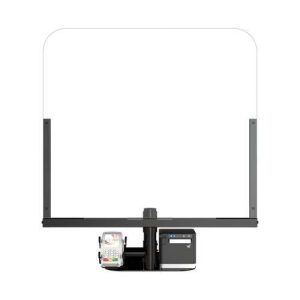
Certain easy-to-use health and safety products – like the Star Micronics POSShield sneeze guard and antimicrobial covers – are more-or-less “set it and forget it” solutions that can assist you as you prioritize health and safety in the long run.
Health & Safety Solutions Brochure
Discover which solutions can keep your business squeaky clean and help customers feel confident at your brick-and-mortar location.
The pandemic acted as a catalyst in the growth of many tech-centric retail trends including online ordering, curbside pickup, and contactless payments. Not only did these digital trends blow up during the lockdown, but people will likely continue to use and prefer these technologies. For example, did you know that 58% of people in the United States are more likely to use contactless payment methods than they were before the pandemic?
If you haven’t already, it’s time to consider what technology your store needs to adapt to the ongoing digital transformation. A receipt printer that has the capability to automatically print online orders, like the mC-Print3, is key, as well as a label printer like the TSP654IISK which can print liner-free labels to be used for labeling buy-online-pickup-in-store (BOPIS) and curbside pickup orders.
Does a large chunk of your clientele still shop in-store? You may still need a tech refresh. An all-in-one point-of-purchase that combines a receipt printer, cash drawer, device stand, and scanner can be helpful for businesses that are experiencing more contactless payments now as retail stores reopen. And cash-heavy businesses, such as cannabis dispensaries, can consider upgrading to the latest cash drawers which feature added strength and security.
3. Evaluate and Adjust Store Setup
As the digital transformation continues to permeate the retail industry, you may find that your store’s inventory needs adjusted. For example, if you are experiencing more online orders than you previously did, you may need to adjust the ratio of your back-of-store and front-of-store inventory to support that need.
In a similar vein, if your store experiences a large volume of BOPIS orders, that will likely continue, and it is wise to establish a permanent space within the store to be used for storing and delivering those orders.
4. Communicate
Once you’ve updated your health and safety procedures, your point of sale technology, and your store setup, there’s one very important thing left to do: communicate all of these changes to your loyal customers!
They say communication is the most important element of a relationship, and the same applies to business-customer relationships. Be sure to make your shoppers aware of your new hours, online ordering/delivery options, and safety protocols, if applicable.
Some marketing ideas to help deliver your news include:
Email marketing: Put that email database to use and send some updates to your shoppers letting them know about your news and updates.
Social media: Adults in the US spend an average of 2 hours and 6 minutes on social media each day. Take advantage of that and be sure to post your latest updates for your loyal followers to see (and share).
In-store signage: Want to let in-store shoppers know about your “endless aisle” or the measures you’re taking to keep them safe? In-store signs placed near the store entrance and point of sale can drive the message home.
Receipt marketing: One place that customers are sure to look? Their receipt! Consider using your Star printer to print custom promotions on the bottoms of your receipts (for free).
Star Micronics Solutions for Reopening Retail Stores
Star Micronics has what it takes to make retailers stand out – today and in the future. We proudly provide end-to-end retail POS solutions that are compatible with today’s top applications. Star’s wide variety of retail POS hardware and systems solutions for the modern retailer include:
Receipt printers
Ticket/label printers
Portable printers for mobile sales, curbside payments, and line-busting
Reduce the transfer of germs on high-touch surfaces Designed for use on door handles, checkout counters, and more Thoroughly tested, EPA-registered, latex-free
The cannabis industry is flourishing. With recent legalizations, including New York, it is without a doubt that the market will see countless new dispensaries opening their doors in the near future. Whether you already operate a dispensary or are looking to open one, read on to learn what to look for a in a dispensary point of sale (POS) system and why they’re so important.
What to Look for in a Dispensary POS System
First, let’s dive into a quick list of must-have dispensary POS system technologies. POS systems have several components, but they don’t need to be complicated. One way to make it easy? Choose a POS supplier (like Star Micronics) that can provide all necessary hardware and has integrations with industry-leading dispensary POS software companies. Essential dispensary POS system components include:
Receipt printer: Receipt printers are of utmost importance to dispensaries. Proof of legal purchase is essential – and there’s no better way to provide it than with a receipt. Additionally, it’s important to note that depending on your region, receipts must also contain other information, like store name and address, product category/name, and appropriate tax codes/identifiers.
Label printer: Another printer that’s important to have on hand is a label printer. Labels are integral for seed-to-sale tracking, a key requirement in cannabis regulatory models. This process tracks plants and their byproducts from planting all the way through to the plant’s sale.
Cash drawer: Currently, the majority of dispensary transactions are cash. Why? According to FindLaw.com, “Even though dispensaries supplying recreational or medical marijuana may be perfectly licensed and legal under state law, federal law still classifies marijuana as a Schedule 1 drug and considers marijuana businesses illegal. The banking system is regulated by federal law, so banks risk charges of aiding and abetting a federal crime or money laundering if they choose to do business with marijuana-related ventures.” That being said, a durable and high-volume cash drawer is key.
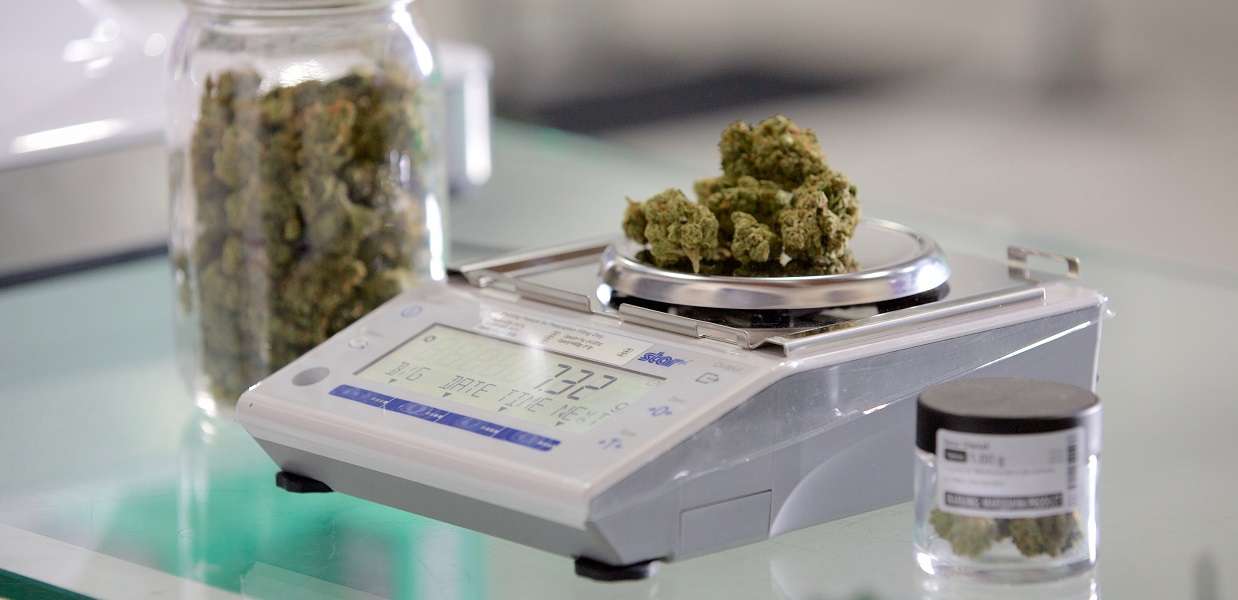
Scale: One of the most critical elements of a dispensary POS system is the scale. When it comes to scales, there are a few things to keep in mind. First, the scale must be legal to use in your state and NTEP-certified. This certification ensures that the scales are charging the correct amount for the product being weighed. Another great feature to look for is a scale that is integrated directly into the POS as direct integration can reduce the risk of human error in data entry.
Accessories: There is a plethora of dispensary POS system accessories that can take your business to the next level, including: scanners to increase the speed of transactions and convenience of scanning, an LED customer display so shoppers can easily see item prices and the transaction total, and a tablet stand and enclosure that features hidden cable management and matches the rest of the dispensary POS system aesthetic.
Software: At the heart of a successful dispensary POS system is the right software. Like we discussed earlier, it’s key to make sure that your software is integrated with all of your POS hardware. Additionally, some software features to look for are built-in ID scanning and age verification, loyalty programs, on-demand product information, alternative payment acceptance, offline mode, inventory management, analytics and reporting, and more.
How Resellers Can Cash in on Cannabis Point of Sale
The cannabis industry has become one of the fastest growing markets. Here’s how resellers can take advantage.
So now that you know what needs to be included in your dispensary POS setup, why exactly is all of this important? Here are 5 major benefits of a dispensary POS system:
Compliance: Compliance is, of course, absolutely critical for dispensaries. POS systems can help not only provide necessary proof of purchase, but can manage inventory and age and ID verification as well. Common compliance violations include failing to report inventory, patient purchase limits, sales to minors, and inadequate delivery documentation. These violations are severe and can result in notice to comply, citation for violation, interim suspension, or revocation of license.
Accuracy: Keeping product secure from seed to sale, and ensuring you’re selling the exact amount you think you are, is important. POS label printing solutions can aid in accurate seed-to-sale tracking, and an NTEP-certified scale complete with a windshield means you’re charging exactly the right amount for the product you’re selling.
Online Ordering: Did you know that cannabis delivery soared during the pandemic, and that change is likely here to stay? The right POS software will be capable of ecommerce and delivery, and will be integrated with a complete line of POS hardware. With the right POS system, staying up-to-date on digital trends is a piece of cake.
Future-Proof Integration: Speaking of being future-proof, choosing the right dispensary POS software and hardware means no matter where the market goes in terms of ecommerce or payments – as national banking eventually opens its doors to the industry – your POS system will already be prepared to handle it all.
Marketing: As the market explodes and competition becomes fiercer, marketing is key – and your dispensary POS system can help. Opt for a POS software that includes loyalty programs, gift cards, and marketing tools like email campaigns and social media integration. Your POS hardware can help too – with PromoPRNT, you can print custom promotions on the bottom of your Star Micronics receipts and labels for free.
The Proper Dispensary POS System is Important – Now and in the Future
In summary, while an ideal dispensary POS system has many parts, including software and hardware like receipt and label printers, cash drawers, scales, and more, deploying the best solution doesn’t need to be complicated. By choosing the right POS dispensary system suppliers you can start taking advantage of the many benefits a proper system offers, like compliance, accuracy, future-proofed technology and integrations, and built-in marketing benefits.
Star Micronics has the POS technology your dispensary needs to thrive today and in the future.
The antimicrobial covers reduce germ transfer on high-touch surfaces
Somerset, NJ – April 13, 2021 – Star Micronics, a leading manufacturer of mobile, point of sale (POS), and customer engagement technologies, is excited to announce a line of antimicrobial covers designed to cover high-touch surfaces to reduce the transfer of germs. The antimicrobial covers are safe to use, easy to apply, and reduce microbes on common touch points. From door handles to checkout counters, the antimicrobial covers are designed to create safer surfaces for both employees and customers.
Featuring a proprietary antimicrobial coating that protects the surface by actively killing microbes (reducing microbe populations) on contact, the antimicrobial covers are designed to complement regular cleaning in retail stores, restaurants, and more. These products have been tested and are EPA-registered and latex-free.
Star will be offering several antimicrobial cover products, including wraps made specifically for door handles, door push-bars, elevator buttons, door push plates, and more. Star will also offer custom rolls that retailers or restaurants can cut and apply to countertops, restroom surfaces, and more.
“Star Micronics is constantly working to provide solutions that will help our customers succeed,” says Christophe Naasz, Director of Business Development for Star Micronics. “With the pandemic having such a major effect on retailers and restaurants, Star wanted to provide a solution that will help the reopening of these businesses be successful. These antimicrobial covers will help shoppers and diners feel more at ease when going out in a post-pandemic world.”
An industry-first, the SDK supports the integration of Star printers for React Native apps
Somerset, NJ – April 8, 2021 – Star Micronics, a leading manufacturer of mobile, point of sale (POS), and customer engagement technologies, is excited to announce the release of the StarXpand™ SDK for React Native, a software development kit for Star printer control for the popular cross-platform framework, React Native.
In the past, mobile POS applications had been developed exclusively for each operating system (OS), such as iOS and Android. However, in recent years cross-platform development – which allows more of the programs of an application to be developed with one code for multiple OS’s – is attracting attention. Cross-platform development is expected to become essential to application development in the future.
To respond to this trend – and for the first time in the receipt printer industry – Star has developed StarXpand™ SDK for React Native. The SDK supports the development of connecting to and controlling Star printers in applications that utilize React Native. StarXpand™ SDK for React Native will help shorten the development time and maintenance costs associated with printer connection, and will be published on GitHub, a website where developers around the world publish and share program codes.
StarXpand™ SDK for React Native uses a new StarIO10 framework which includes multiple advantages including: asynchronous communication allowing print jobs to happen in parallel; an emulation-free design so that one StarXpand™ document will work with any Star printer; human-readable command creation; faster printer search allowing users to discover all devices in under second; and a logging function between the OS and printer to be used for debugging.
“As React Native becomes more prominent in the industry, the StarXpand™ SDK will be there to help developers easily create cross-platform POS solutions,” said Jon Levin, Director of Product Management at Star Micronics. “Easy-to-use and developer-friendly, the new StarIO10 framework is at the heart of that and will provide a great foundation for our SDKs going forward.”
Investing in a salon point of sale (POS) system is one of the best things you can do for your business, but with so many options on the market, how do you determine which POS hardware and software best suit your business needs and your budget?
This below information can help you get on the right path to finding the perfect POS system for your salon.
No one wants to waste time and money on a POS solution that lacks needed capabilities, or has unnecessary features that increase the price. To avoid purchasing a system that isn’t right for your business, you need to identify the specific challenges that you will need your new POS system to address.
You can start by asking questions such as:
Is business suffering because customers must often wait in long lines at the POS?
Do shoppers frequently leave your establishment empty-handed because you don’t have the merchandise they want?
Are you spending too much time managing employees or trying to find out why your sales volume often doesn’t jibe with your inventory levels?
Do you want to attract new customers?
The answers will help you identify the pain points you want to eliminate and the goals you want to achieve with a new POS system. Consider the amount of time you spend on operations-related tasks and whether you need the POS system to automate processes. You may also want to consider whether you need the POS system to support initiatives that can help grow your business.
Once you have clearly identified your business needs, research which POS functions address them. The list of the functions you need your new system to provide will help narrow the field of choices when you shop for a new POS system. The solutions you consider are likely to have a mix of “must-have” and “nice-to-have” features; remember to focus on what you need, which can help you minimize the cost of the system. “More” isn’t necessarily better when it comes to technology solutions.
Step 2: Set a Budget
Decide how much your business can afford to spend on a POS system. By most accounts, the average industry investment in POS systems totals 2 to 3 percent of retailers’ annual volume, and 1 to 1.5 percent of restaurant operators’ annual volume. Consider ongoing costs, such as software maintenance/updates, hardware maintenance, and technical support.
Ask about payment options. Financing may be available to help with the considerable capital investment you will make. You may also be able to lease or lease-to-own POS hardware, which can minimize upfront costs, but may add to the total cost of the system. Another option available to you may be a POS-as-a Service offer, which provides your system, as well as software updates and system upgrades, for a subscription fee to use (rather than own) the system.
When choosing from among these options, always consider the total cost of ownership (TCO) and return on investment (ROI). The price of a full-featured POS system may seem high, but don’t forget the financial savings that such a system will yield throughout its lifecycle by reducing labor expenditures, improving inventory control, cash-tracking, and putting a lid on shrinkage. A comprehensive POS system will also help to increase sales by facilitating more effective customer engagement and better customer service, as well as by giving you real-time insight into all aspects of your operation.
Step 3: Shop for Software
As you consider your options, you will find that not every software solution is compatible with all POS hardware. Selecting your software first will prevent you from being limited in functionality.
There are different types of software you can choose from:
Native. Native POS software is installed on your POS hardware. It is easier to customize than cloud-based software.
Cloud-based software (Software-as-a-Service, or SaaS). In a SaaS model, software is delivered via the cloud, and you pay for it on a monthly subscription basis. Also, cloud-based software can be accessed from anywhere there is an Internet connection, giving you enhanced visibility into, and control over, your operation.
Hybrid software. This software can be run online in the cloud or offline.
It can be helpful to research the types of POS software that other businesses like yours are using. Find out through references or reviews if salons are happy with the type of solution, the functionality it provides, and the benefits the solutions provides to their business.
Star Micronics mPOP® can combine a printer, cash drawer, scanner, and tablet stand – an ideal all-in-one solution for salons and spas.
It can also be helpful to learn about the POS software vendors that provide the software, gaining insights on the level of customer service they provide and their experience working with companies in your market or industry. Also consider whether the vendor is an established company — one that is not likely to close its doors and leave you without support for your system.
Once you have created a list of POS solutions to consider for your business, it’s time to arrange for demonstrations. Using the solution yourself will give you a sense of how easy it will be for your employees to learn, to use efficiently, and to discover whether it will support your operations. It may be helpful to compare similar features side-by-side to arrive at an accurate assessment of the best solution for your business.
Step 4: Find Compatible Hardware
The POS software you choose will dictate the POS hardware that you can use. In many cases, however, there will still be a number of options to choose from. Some of the choices you must make are related to how your employees will use the system. For example:
What is the preferred method of entry? Some operators favor keyboards or a scanner interface for POS data input, while others prefer a touchscreen interface that facilitates faster data entry and easier training for new employees.
Which peripherals are needed? You need to consider printers, cash drawers, PIN pads, payment card readers, and barcode scanners, and select the model that best suits your needs.
Will you accept all forms of payment? Make sure your new system gives your customers the ability to pay by their preferred methods. You must be able to process EMV and mobile wallet transactions from apps such as Google and Apple Pay.
Which terminal design do you prefer? Space at salon checkout counters is usually limited, so you may want to consider a more ergonomic solution with a smaller footprint, such as an all-in-one configuration that incorporates basic peripherals (e.g., printers, cash drawers, credit card readers, PIN pads, and customer displays) or a tablet POS system. You will also find options that are aesthetically pleasing and don’t detract from your salon’s decor and natural ambience.
Just as you did with software vendors, find out all you can about POS hardware vendors. Read references and reviews, and speak with other businesses — preferably similar to yours — that use their solutions. Also ensure that the company provides warranties and technical support.
Need help navigating this process? Download the full Salon POS Software and Systems Buyer’s Guide now, or contact Star today.




 Star’s free CloudPRNT for WooCommerce plugin for Star receipt printers can be used to quickly create a remote order or receipt printing solution for restaurants, bakeries, boutique retailers, and more – with minimal cost and setup time.





 have been tested and are EPA-registered and latex-free.