Tag: Multi-Location Operations

  • Wi-Fi Printer Setup Made Easy with rapidSYNC

    Wi-Fi Printer Setup Made Easy with rapidSYNC

    Wi-Fi printer setup gives businesses more options for placing receipt and label printers. A wireless printer can operate at a checkout counter, pickup station, prep area, kiosk, or other location where running an Ethernet cable may be difficult.

    Connecting a printer to a wireless network, however, has traditionally required several manual steps. Users may need to find the printer’s temporary network, open a configuration page, enter network credentials, and confirm that the printer received an IP address.

    Star Micronics created rapidSYNC, its Bluetooth Low Energy (BLE)-based setup technology, to make that process easier. Available on select Star receipt and label printers, rapidSYNC uses the Star Quick Setup Utility to guide users through Wi-Fi printer setup with a smartphone or tablet, without relying on the traditional captive portal process. For users who prefer the standard QR code setup method, that option is also available on supported models.

    Once setup is complete, the printer produces a network diagnosis confirming whether it connected successfully.

    Explore Star Printing Technology

    What Is rapidSYNC Wi-Fi Printer Setup?

    Star Micronics’ rapidSYNC is Bluetooth Low Energy (BLE)-based Wi-Fi onboarding technology for supported receipt and label printers. It helps users transfer their wireless network name and password to the printer without navigating printer buttons or entering settings directly on the hardware.

    Star product materials may also use the term WLAN, or wireless local area network. In this article, WLAN and Wi-Fi both refer to the wireless network the printer uses to receive print jobs.

    Star’s rapidSYNC is a setup process, not a printing protocol. Bluetooth Low Energy is used to detect the printer and transfer network settings during setup, while the printer communicates over Wi-Fi after the connection is established.

    Supported printers also produce a wireless network diagnosis after setup. The printout confirms whether the connection succeeded and provides information such as the printer’s assigned IP address.

    Wi-Fi Printer Setup Made Easy with rapidSYNC by Star Micronics

    How Does rapidSYNC Wi-Fi Printer Setup Work?

    Star’s rapidSYNC uses the Star Quick Setup Utility and Bluetooth Low Energy (BLE) to guide Wi-Fi printer setup on supported models. Some Star printers also offer a separate QR-code-based setup method for users who prefer a traditional captive portal process.

    Set Up Wi-Fi with the Star Quick Setup Utility

    The Star Quick Setup Utility provides guided Wi-Fi printer setup from a compatible iOS or Android device.

    The general process includes:

    1. Download and open the Star Quick Setup Utility (click here for iOS download or click here for Android download).
    2. Select the wireless LAN setup option.
    3. Choose the printer from the list of detected devices.
    4. Enter the Wi-Fi network name and security key.
    5. Bring the mobile device close to the printer when prompted.
    6. Wait for the printer to produce its wireless network diagnosis.

    The network name and password are case-sensitive, so users should confirm both before beginning setup. When the printer connects successfully, the diagnosis page displays “Successful” along with the printer’s IP address. The utility also allows users to continue configuring additional printers without restarting the process.

    X4 Receipt Printer Wi Fi Connectivity

    Alternative: Set Up Wi-Fi with a QR Code

    Supported TSP143IV X4 models also provide a QR-code-based Wi-Fi setup option that does not require the Star Quick Setup Utility. This is a separate setup method from rapidSYNC.

    The process includes:

    1. Power on the printer.
    2. Wait for the printer to produce the WLAN setup QR code.
    3. Scan the code with a smartphone or tablet.
    4. Open the printer’s web configuration page.
    5. Select the business Wi-Fi network.
    6. Enter the network password and save the settings.
    7. Review the printed network diagnosis.

    This option uses the printer’s temporary wireless network to open its configuration page. Once the business network information is saved, the printer disconnects from the temporary network and connects to the selected Wi-Fi network.

    Which Star Printers Support rapidSYNC?

    Star’s rapidSYNC is available on select Star receipt and label printers and uses Bluetooth Low Energy (BLE) with the Star Quick Setup Utility for Wi-Fi setup. Supported models may also offer QR code setup as a separate alternative.

    Compatible Printer Primary Use rapidSYNC Setup Alternative Wi-Fi Setup Wireless Connection
    TSP143IV X4 Thermal receipt printing Star Quick Setup Utility via BLE QR code Dual-band 2.4 GHz and 5 GHz Wi-Fi
    TSP143IV SK X4 Repositionable linerless label printing Star Quick Setup Utility via BLE QR code Dual-band 2.4 GHz and 5 GHz Wi-Fi
    mC-Label2 MCL21CWBi and MCL21CWBi LBL Labels and receipts Star Quick Setup Utility via BLE QR code Wi-Fi and Bluetooth

    TSP143IV X4 Thermal Receipt Printer

    The TSP143IV X4 is a 3-inch thermal receipt printer with USB-C, Ethernet, WLAN, and Bluetooth connectivity. It supports both 2.4 GHz and 5 GHz wireless networks and offers rapidSYNC Wi-Fi setup through the Star Quick Setup Utility using Bluetooth Low Energy (BLE). Supported models also provide QR-code onboarding as a separate Wi-Fi setup option.

    The printer is designed for receipts, return documentation, order tickets, and other point-of-sale printing in retail, restaurant, hospitality, and service environments.

    TSP143IV thermal receipt printer by Star Micronics

    TSP143IV X4 Thermal Receipt Printer

    The TSP143IV series thermal receipt printer from Star Micronics is 20% smaller than its predecessor, offering high-speed printing with USB, LAN, WLAN, and Bluetooth connectivity. With CloudPRNT Next, dual-band WLAN, and Android Open Accessory (AOA) support, it ensures seamless compatibility across Windows, iOS, Android, and cloud-based applications, making it an efficient, adaptable solution for modern POS environments.

    Discover the TSP143IV X4 >

    TSP143IV SK X4 Linerless Label Printer

    The TSP143IV SK X4 prints repositionable linerless labels for applications such as drink labeling, takeout orders, food preparation, order handoff, and item identification.

    Like the receipt-printing model, it includes USB-C, Ethernet, WLAN, and Bluetooth connectivity. It supports dual-band 2.4 GHz and 5 GHz Wi-Fi and offers rapidSYNC setup through the Star Quick Setup Utility using Bluetooth Low Energy (BLE). QR-code onboarding is also available as a separate Wi-Fi setup option. Diagnostic printouts confirm whether the wireless connection succeeded.

    TSP143IV SK Sticky Label Printer

    The TSP143IV SK by Star Micronics sets a new standard for compact, eco-friendly liner-free label printing using residue-free removable sticky labels. It offers advanced connectivity options like Bluetooth, USB-C, Wi-Fi, and AOA support for today’s diverse business setups.

    Find out more about TSP143IV SK>

    TSP143IV SK Thermal Linerless Sticky Label Printer by Star Micronics.

    mC-Label2 Multifunction Label Printer

    Wireless mC-Label2 X4 multifunction label printer models, including the MCL21CWBi and MCL21CWBi LBL, support rapidSYNC Wi-Fi setup through the Star Quick Setup Utility using Bluetooth Low Energy (BLE). QR-code onboarding is also available as a separate Wi-Fi setup option.

    With rapidSYNC, users enter the network credentials on a smartphone or tablet and transfer them to the printer through BLE-assisted setup. The app-free QR-code method uses printed QR codes to connect the device to the printer’s temporary network and open its web configuration page.

    mC-Label2 Multifunction Label Printer

    The mC-Label2 packs powerful features into a compact, front-loading design, including high-precision 300 dpi resolution, support for linerless, die-cut, receipt, and continuous media, and connectivity options like USB-C, LAN, WLAN, Bluetooth, and Apple MFi-certified pairing.

    Explore the mC-Label2 >

    The mC-Label2 multifunction label printer by Star Micronics.

    When Should Businesses Use rapidSYNC?

    Star’s rapidSYNC can be used during initial printer installation or whenever a supported printer needs new wireless network settings using Star’s BLE-based setup method.

    Common situations include:

    • Installing a new receipt or label printer
    • Moving a printer to another location
    • Connecting a printer after replacing a router
    • Updating a printer after changing the Wi-Fi name or password
    • Adding printers at a new store or restaurant
    • Configuring multiple printers during a rollout
    • Installing a printer where Ethernet cabling is unavailable
    • Reconnecting a printer after network settings have been reset

    For multi-printer deployments, the Star Quick Setup Utility allows users to configure another printer after completing the first connection. The printed network diagnosis also gives installers an IP address they can record for testing, POS configuration, or technical support.

    What Should You Check Before Wi-Fi Printer Setup?

    A few checks before installation can prevent common connection problems.

    1. Confirm the Exact Printer Model

    Not every version of a printer includes WLAN. Check the model number and interface specifications before starting a Wi-Fi printer setup.

    For example, the TSP143IV X4 includes Wi-Fi and Bluetooth, while the TSP143IV UE is a wired USB and Ethernet model. Star’s rapidSYNC applies to supported WLAN-equipped models and uses Bluetooth Low Energy (BLE) during setup.

    2. Have the Correct Network Credentials

    Confirm the following information:

    • Wi-Fi network name, also called the SSID
    • Case-sensitive Wi-Fi password
    • Correct business network
    • Network frequency supported by the printer

    Avoid connecting business printers to a public or customer guest network unless that network is specifically configured for POS hardware.

    3. Check the Wireless Signal

    Place the printer where it can maintain a stable connection to the wireless access point. Walls, metal equipment, distance, and crowded wireless channels can affect signal strength.

    The TSP143IV X4 and TSP143IV SK X4 support both 2.4 GHz and 5 GHz networks. A 2.4 GHz network typically reaches farther, while 5 GHz may provide less interference and more bandwidth over shorter distances.

    4. Reset Old Network Settings When Necessary

    A printer that was previously connected to another network may retain its old wireless settings. Resetting the printer’s network configuration may be necessary before connecting it to a replacement router or a network with a new SSID.

    5. Save the Network Diagnosis

    After setup, keep the printed diagnosis page until the printer has been tested with the POS or business application. The IP address and connection status can help identify whether a problem is related to the network, printer, or software configuration.

    Connect Supported Star Printers with rapidSYNC

    Wireless printer installation should not require employees or installers to work through complex printer menus. Star rapidSYNC provides a guided Wi-Fi printer setup process using Bluetooth Low Energy (BLE), a smartphone or tablet, and the Star Quick Setup Utility. Supported models may also offer QR-code onboarding as a separate Wi-Fi setup option.

    The right rapidSYNC-compatible printer depends on what the business needs to print:

    • Choose the TSP143IV X4 for thermal POS receipts.
    • Choose the TSP143IV SK X4 for 3-inch repositionable linerless labels.
    • Choose the mC-Label2 MCL21CWBi or MCL21CWBi LBL for compact 2-inch all-media printing.

    Contact Star Micronics to compare compatible models, confirm POS compatibility, or plan a multi-location printer deployment.

    The Case For Sourcing Pos Hardware Icon

    The Case for Sourcing POS Hardware from a Single Manufacturer

    Discover how retailers, restaurants, and solution providers can reduce complexity, improve support, and simplify growth with a unified POS hardware ecosystem.

    Grab Yours Now

    Learn More About rapidSYNC Wi-Fi Printer Setup

    Contact Star Today

    Frequently Asked Questions About rapidSYNC Wi-Fi Printer Setup

    What is Wi-Fi printer setup?

    Wi-Fi printer setup is the process of connecting a printer to a wireless network so it can receive print jobs from POS systems, computers, tablets, or mobile devices without an Ethernet cable.

    What is rapidSYNC?

    rapidSYNC is Star Micronics’ Bluetooth Low Energy (BLE)-based Wi-Fi printer setup technology for supported receipt and label printers. Using the Star Quick Setup Utility on a smartphone or tablet, users can transfer wireless network settings to the printer in just a few steps.

    Which Star printers support rapidSYNC?

    Compatible printers include the TSP143IV X4 thermal receipt printer, TSP143IV SK X4 linerless label printer, and wireless mC-Label2 X4 models, including the MCL21CWBi and MCL21CWBi LBL.

    These models support rapidSYNC through the Star Quick Setup Utility using Bluetooth Low Energy (BLE). Supported models may also offer QR-code onboarding as a separate Wi-Fi setup option.

    Do I need an app to use rapidSYNC?

    Yes. Star’s rapidSYNC uses the Star Quick Setup Utility and Bluetooth Low Energy (BLE) to configure Wi-Fi on supported printers.

    Some supported Star printers also provide QR-code onboarding that does not require the utility. That is a separate Wi-Fi setup method from rapidSYNC.

    Does rapidSYNC use Bluetooth or Wi-Fi?

    rapidSYNC uses Bluetooth Low Energy (BLE) to detect the printer and transfer wireless network credentials during setup. After configuration, the printer connects to the selected Wi-Fi network to receive print jobs.

    How do I reconnect a printer after changing the Wi-Fi password?

    Use the Star Quick Setup Utility and rapidSYNC to enter the new Wi-Fi network credentials and transfer them to the printer through Bluetooth Low Energy (BLE). Supported models may also offer QR-code setup as a separate option.

    After configuration, review the printed network diagnosis to confirm the connection. A network reset may be required if the printer retains its previous settings.

    Does rapidSYNC support 2.4 GHz and 5 GHz Wi-Fi?

    Frequency support depends on the printer. The TSP143IV X4 and TSP143IV SK X4 support both 2.4 GHz and 5 GHz wireless networks. Check the specifications for the exact model before installation.

    How do I know whether Wi-Fi printer setup was successful?

    The printer automatically produces a wireless network diagnosis after configuration. A successful connection printout displays “Successful” and includes the printer’s assigned IP address.

    Can rapidSYNC be used to configure multiple printers?

    Yes. Printers can be configured one at a time with the Star Quick Setup Utility. After completing one setup, the utility provides an option to continue with another printer, which is useful when installing multiple devices at one location.


  • Celebrating 50 Years of Star Micronics America

    Celebrating 50 Years of Star Micronics America

    For 50 years, Star Micronics America (SMA) has supported businesses across the United States, Canada, Mexico, and Latin America through major shifts in point-of-sale technology.

    From the early days of impact printing to today’s cloud-connected, mobile, and labeling technologies, SMA has adapted alongside the industries it serves, helping businesses across retail, restaurant, hospitality, healthcare, and beyond keep pace with growing operational demands.

    But Star Micronics America’s 50-year story is about more than technology.

    It is about the people who built it, the partners who grew alongside it, and the customers who trusted Star solutions through decades of industry change.

    Across the Americas, SMA has spent five decades supporting businesses through rapid technology shifts, new and evolving workflows, and higher customer expectations.

    As we celebrate 50 years of Star Micronics America, we are reflecting on the milestones that shaped us, the culture that continues to guide us, and the people who made it possible.

    Star Event Peters Landscape
    Star visiting distributors during our Full Stack Tour

    A 50-Year History of Adaptation and Growth

    The point-of-sale industry has changed dramatically over the last five decades.

    What began in an era of traditional impact printing and on-premises systems has evolved into an ecosystem of cloud platforms, mobile devices, online ordering, self-service kiosks, and advanced labeling workflows.

    Each shift brought new demands, from faster checkout and order accuracy to cloud-connected workflows and AI.

    In response, SMA expanded beyond receipt and kitchen printing to include cloud printing, cloud services, labeling, mobile POS, and a broader range of hardware for modern retail and restaurant operations.

    That ability to adapt has allowed Star to meet each new era of technology, customer expectations, and industry demands with practical solutions.

    The People Behind 50 Years of Star Micronics America

    Ask anyone inside SMA what has kept the company strong for 50 years, and one answer comes up repeatedly: its people.

    “The biggest reason Star Micronics America has remained strong for 50 years is its people. Technology and products continue to evolve, but the dedication, expertise, and commitment of our employees have always been at the heart of our success.”

    Shazia Shafi, Human Resources Generalist at Star Micronics America

    That commitment shows up not only in day-to-day work, but in tenure.

    At Star, long careers are part of the culture. Employees with 25, 30, and even more than 40 years of service have helped shape the company through major shifts, market changes, and organizational growth. That kind of longevity creates deep institutional knowledge, but it also says something important about the company itself: people stay because they find opportunities to grow.

    One philosophy that has shaped talent development at Star is the idea of having the “right people in the right seats,” a concept popularized in Jim Collins’ Good to Great. At SMA, employees are encouraged to explore new roles, move between departments, and find where their skills and interests best align. Over the years, that flexibility has helped employees build long careers while reinforcing a culture built on collaboration, growth, and change.

    Star’s commitment to understanding our employees as individuals and providing equity for their consistent growth has played a major role in the company’s long-term stability and success. 

    NRA Team 2026
    The team at the National Restaurant Show 2026

    How Star Micronics America’s Culture Has Evolved

    Star’s workplace culture has changed significantly over the decades.

    One of the biggest turning points came during COVID.

    Before the pandemic, Star operated largely as an office-based organization. Like many companies during that time, that changed quickly. Teams adapted to remote work, new collaboration tools, and new ways of supporting customers and partners. What started as a necessary adjustment ultimately reshaped how the company works today, leading to a more flexible hybrid and remote culture.

    That transition tested the company, but it also reinforced one of Star’s core values: collaboration built on trust between teams.

    While the workplace changed, the company’s core values remained steady:

    • Collaboration – fostering open communication, mutual respect, and trust across teams
    • Innovation – staying curious, proactive, and open to new ways of thinking
    • Change – embracing growth, improvement, and the ability to adapt in a shifting industry
    Star Micronics America Core Values

    Those values continue to guide how teams work together across the United States, Canada, Mexico, and Latin America.

    That culture extends beyond daily work. Programs like the Yamaguchi Spirit Awards recognize employees who embody Star’s core values of collaboration, innovation, and change. These traditions help reinforce that culture is not just something that happens passively. It is something consciously practiced.

    Why People Matter to the Customer Experience

    A company’s culture does not stay inside its walls. It shapes every customer interaction, every partner relationship, and every problem solved along the way.

    That has been one of the defining parts of Star Micronics America’s 50-year story.

    SMA has long been known as a company that is easy to do business with, and that reputation was built by people. It was built by employees who know the products, understand the industries they support, and work together to solve problems quickly and thoughtfully.

    It was also built through consistency.

    Many customers and partners have worked with the same Star team members for years, sometimes decades. That continuity creates trust. It gives customers direct access to people who understand their business, their workflows, and the challenges they face.

    In an industry where technology moves fast, products matter. But trust, experience, and long-term relationships matter just as much, if not more.

    For 50 years, Star’s people have helped build both.

    VTO Earth Day 7
    Volunteer day at America’s Grow-A-Row Farm in Pittstown, NJ

    Looking Ahead to the Next 50 Years of Star

    A 50th anniversary is a time to reflect, but also a time to look forward.

    As industries continue shifting toward AI, cloud infrastructure, automation, and more connected workflows, Star Micronics America remains focused on supporting those changes with experienced teams and technology that makes a difference.

    That next chapter will depend on the same things that built the first 50 years: experienced people, practical innovation, and strong customer relationships.

    For employees, partners, and customers, those first 50 years have built something lasting: trust, consistency, and a company they know they can count on.

    And if the last five decades are any indication, the next chapter is already taking shape.

    Learn More About Solutions from Star Micronics America

    Contact Star Today

    Author’s Note: Special thanks to Joey Richholt and Shazia Shafi of Star Micronics America’s HR department for their thoughtful input and timely contributions to this article.

  • The Benefits of Durable, Reliable Commercial Label Printers

    The Benefits of Durable, Reliable Commercial Label Printers

    Commercial label printers play an important role in how businesses identify products, communicate workflow information, maintain regulatory compliance, and track inventory. From retail and restaurants to healthcare and fulfillment, labels help employees and customers access important information quickly and consistently.

    When a label printer fails, those workflows can slow down. Orders may be delayed, inventory may become harder to track, and important product or compliance information may not be available when needed.

    For businesses that rely on labeling throughout daily operations, choosing a durable and reliable commercial label printer can help reduce downtime, support high-volume workflows, and keep labeling processes consistent across the business.

    Explore Star’s Label Printing Solutions

    What Makes a Label Printer Durable and Reliable?

    The durability and reliability of a commercial label printer depend on both its physical construction and its internal components. A printer designed for daily commercial use should be built to handle frequent printing, different media types, and the environmental conditions where it will operate.

    Key factors that affect durability and reliability include:

    • Printhead lifespan: The printhead is one of the most important components in any label printer. Longer-life printheads help maintain consistent print quality and reduce replacement frequency.
    • Cutter durability: In high-volume environments, the cutter may operate thousands of times per day. Durable cutters help reduce jams and incomplete cuts.
    • Media path design: A well-designed media path helps labels feed smoothly and reduces misfeeds, jams, and wasted labels.
    • Housing materials and construction: Commercial environments may expose printers to heat, humidity, dust, or cleaning chemicals. Durable materials help the printer withstand these conditions.
    • Stable connectivity: Reliable wired, wireless, or cloud connectivity helps prevent missed print jobs and keeps workflows moving.
    • Maintenance accessibility: Printers designed for easy cleaning, media changes, and component replacement are often easier to maintain and less likely to experience preventable downtime.

    Reliable commercial label printers are typically characterized by consistent print quality, fewer jams, stable connectivity, and components designed for long-term use.

    Choosing a Label Printer for Commercial Environments

    Choosing a commercial label printer starts with understanding where and how it will be used. In addition to supporting the label types your operation requires, the printer should be built for the environment where it will operate.

    Commercial environments can expose printers to heat, humidity, dust, frequent handling, and cleaning chemicals. A printer designed for these conditions is less likely to require frequent repairs or replacement, which can help reduce long-term ownership costs.

    When evaluating a commercial label printer, consider the following:

    Printer Form Factor for Different Workspaces

    Printer design affects where and how employees use it. Front-loading and top-loading designs can make media changes easier in tight spaces, while wall-mounting options may help free up counter space in kitchens, prep stations, or healthcare environments.

    The right form factor depends on the workflow and available space.

    High-Volume Printing for Demanding Workloads

    Some environments require continuous, high-speed printing throughout the day. This may include labeling restaurant orders, retail inventory, shipping packages, patient medications, or kiosk-generated labels.

    A commercial label printer should be designed to keep up with the expected print volume without frequent jams, cutter failures, or overheating.

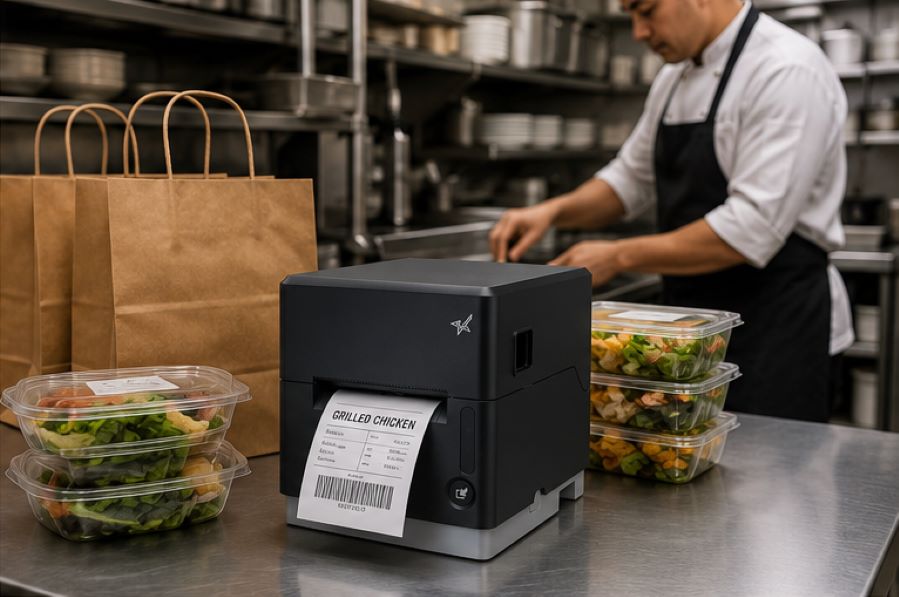
    The Benefits of Durable, Reliable Commercial Label Printers - Catering

    Support for Multiple Label Types

    Commercial labeling needs often vary by application. Some workflows use linerless labels, while others require die-cut labels, receipts, or permanent adhesive labels.

    A multifunction label printer can support multiple media types from a single device, allowing businesses to standardize hardware across different workflows while reducing the number of printer models they manage.

    Reliable Connectivity

    A commercial label printer should maintain stable wired, wireless, or cloud-based connections depending on how the business operates.

    For cloud-connected workflows, reliable communication between software and printers is especially important to prevent delayed or missed print jobs.

    Easy setup also matters, especially for wireless environments. Features like BLE-assisted Wi-Fi setup, available on Star’s mC-Label2 CWBi models, can help employees connect printers quickly using a smartphone or tablet without complex network configuration.

    Easy Printer Maintenance

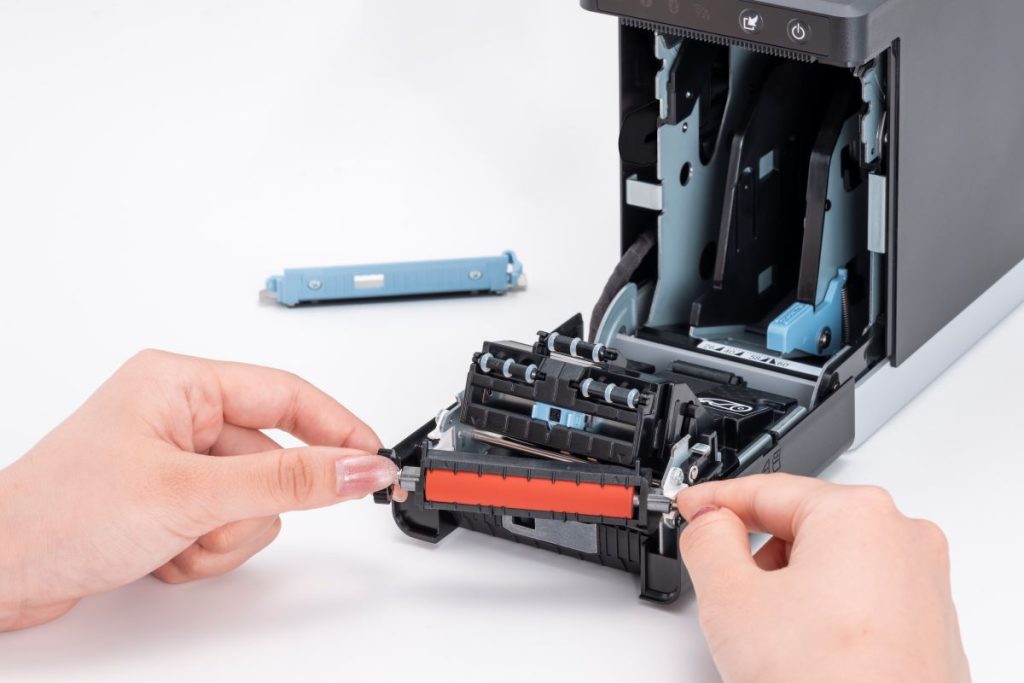
    Routine cleaning and maintenance help prevent adhesive buildup, cutter jams, and print quality issues. Commercial label printers designed with tool-free maintenance, simple media loading, and clear cleaning instructions can make routine upkeep easier for employees and reduce preventable downtime.

    The mC-Label2 multimedia printer by Star Micronics features user-friendly, tool-free maintenance.
    The mC-Label series by Star Micronics has tool-free, super easy maintenance.

    Why Durable and Reliable Printers Matter in Daily Operations

    In many businesses, labels are part of daily workflows. When a label printer stops working, those workflows can slow down or stop entirely.

    In a QSR kitchen, a printer failure can delay order packaging or delivery handoff. In an ecommerce fulfillment center, it can interrupt shipping and inventory tracking. In healthcare, missing labels on medications, patient records, or specimens can create serious operational and compliance issues.

    Reliable commercial label printers help reduce these risks by supporting consistent print quality, stable connectivity, and dependable performance during high-volume use.

    Over time, printer durability also affects ownership costs. A printer built for its environment is less likely to require frequent repairs, component replacements, or full device replacement. This can help businesses reduce downtime, maintain labeling consistency, and extend the useful life of their equipment.

    Explore Star Micronics Commercial Label Printers

    Choosing the right commercial label printer starts with understanding your environment, print volume, media requirements, connectivity needs, and maintenance expectations. The right printer should match the demands of your workflow and the types of labels your business relies on every day.

    Star Micronics offers a range of commercial label printers designed for retail, restaurant, healthcare, fulfillment, and other high-volume environments. From multifunction label printers that support linerless, die-cut, and receipt printing to purpose-built sticky linerless label printers, Star provides options for a wide range of labeling applications.

    Explore Star’s Labeling Solutions and Receipt and Label Media to learn more, or contact Star Micronics for help choosing the right commercial label printer for your business.

    Learn More About Star Label Printers

    Contact Star Today

    Frequently Asked Questions About Label Printer Durability and Reliability

    What features make label printers more durable for commercial environments?

    Durable commercial label printers are typically built with long-life printheads, durable cutters, strong housing materials, stable connectivity, and media paths designed to reduce jams and misfeeds. Easy maintenance access also helps keep the printer operating consistently over time.

    How do durable label printers reduce downtime?

    Durable printers reduce downtime by using components designed for frequent, high-volume use. Printers built for harsh environments, such as hot restaurant kitchens or healthcare settings with frequent cleaning, are less likely to fail or require frequent repair. Long-life printheads and cutters also reduce replacement frequency.

    What should businesses look for in a high-volume commercial label printer?

    Businesses should look for print speed, cutter durability, media compatibility, reliable connectivity, and maintenance accessibility. The printer should be designed for the expected daily print volume and the environment where it will operate.

    Why is label printer maintenance important for reliability?

    Routine maintenance helps prevent adhesive buildup, cutter jams, print quality issues, and media misfeeds. Cleaning the printer regularly helps ensure labels remain readable and barcodes scan correctly.

    Can durable label printers support wireless and cloud connectivity?

    Yes. Many commercial label printers support wired, wireless, and cloud-based connections. Features like BLE-assisted Wi-Fi setup can also make wireless deployment faster and easier for employees.

    How do multifunction label printers improve commercial workflows?

    Multifunction label printers can support receipts, linerless labels, die-cut labels, and other media types from a single device. This helps businesses reduce the number of printer models they manage while supporting different workflows with one platform.

    Why does media compatibility matter in commercial label printing?

    Different workflows require different label formats and adhesive types. Choosing a printer that supports the required media helps ensure consistent printing, proper label application, and reliable performance.

    How do durable label printers lower the total cost of ownership?

    Durable label printers can reduce repair costs, extend equipment lifespan, and minimize downtime. Over time, this can lower replacement frequency and reduce interruptions to daily operations.

    Are linerless label printers reliable for high-volume environments?

    Yes. Linerless label printers are commonly used in high-volume environments because they allow for faster application and fewer media roll changes. Since linerless labels do not use backing paper, they also reduce waste and help keep workspaces cleaner.

    What industries benefit most from durable commercial label printers?

    Durable commercial label printers are commonly used in retail, restaurants, ecommerce fulfillment, healthcare, pharmaceuticals, manufacturing, airports, and logistics. Any business that depends on consistent labeling can benefit from a printer designed for long-term, high-volume use.

  • How ISVs Can Simplify Multi-Location Labeling with Cloud Label Printing

    How ISVs Can Simplify Multi-Location Labeling with Cloud Label Printing

    Managing label printing across multiple locations can get complex fast. Discover how cloud label printing with Star Micronics helps ISVs standardize templates, automate updates, and maintain reliable, real-time labeling at scale without managing local servers.

    The Challenge of Multi-Location Labeling

    For software developers supporting retail, restaurant, or enterprise clients, labeling is rarely simple. Each location may use different devices, printers, and workflows. Updates to label templates often require on-site maintenance or manual intervention. For ISVs, that means more tickets, more support hours, and less time building new features.

    As brands expand, this fragmented approach becomes even harder to manage. A menu change, new allergen disclosure, or compliance update can mean hundreds, or even thousands, of label formats to update.

    Cloud label printing changes that equation.

    Discover how cloud label printing with Star Micronics helps ISVs standardize templates, automate updates, and maintain reliable, real-time labeling at scale without managing local servers.

    Why Cloud Label Printing Matters

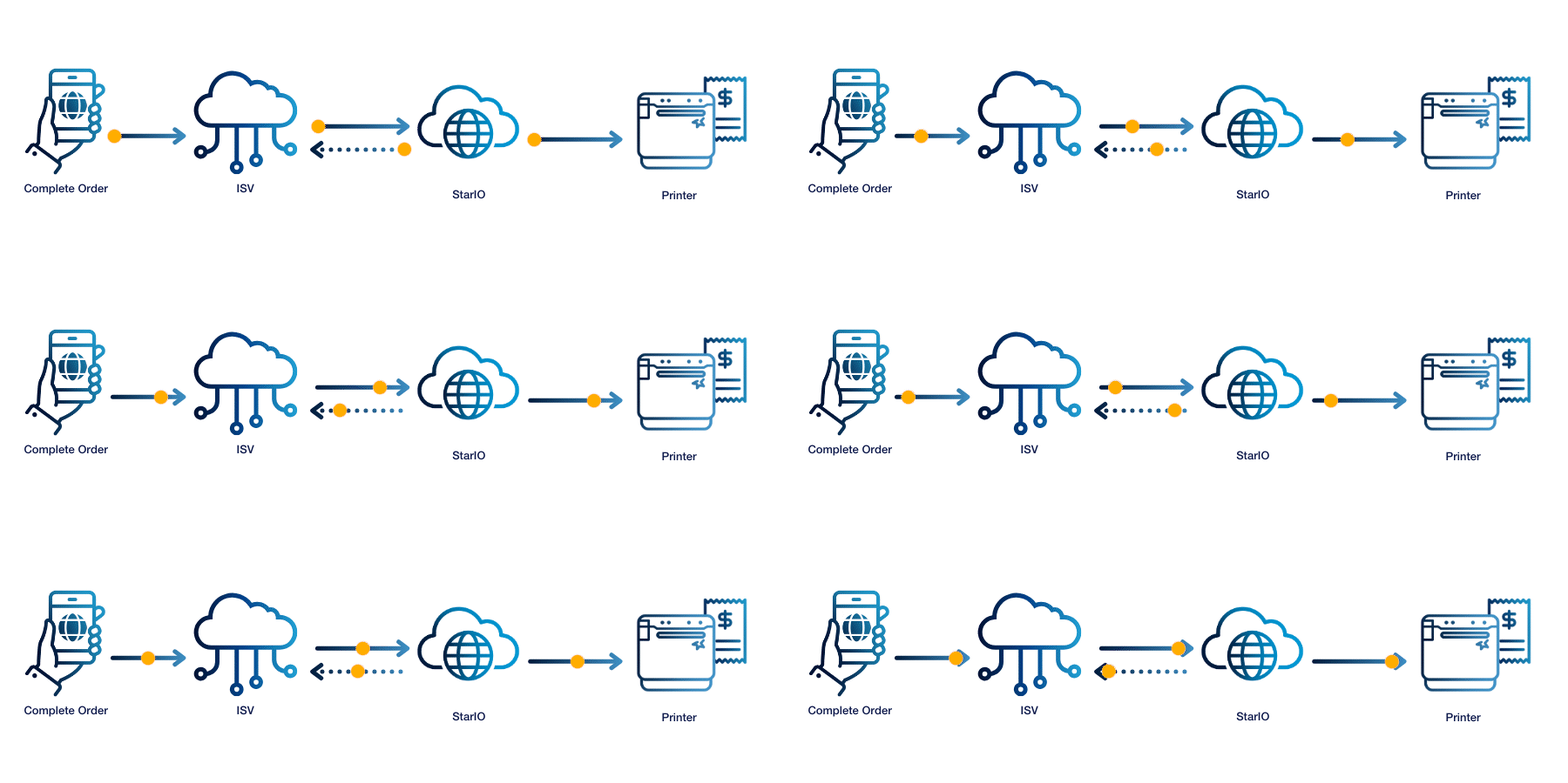
    Cloud label printing moves the entire labeling process off local networks and into the cloud. Instead of relying on a PC or tablet to relay jobs to a printer, cloud-enabled devices communicate directly with a web server or managed service. For ISVs, that means:

    • Centralized control: Update label templates or configurations instantly across all client locations.
    • Simplified deployment: No local server installation or VPN setup required.
    • Fewer integration barriers: Print directly from web or cloud-based software using modern APIs and SDKs.
    • Consistent performance: Each printer checks in with the server automatically, ensuring nothing is missed.

    Cloud printing eliminates the need for custom middleware, manual updates, or printer-by-printer configuration.

    Discover Star’s Labeling Solutions

    CloudPRNT Next: Printing Without the Middleman

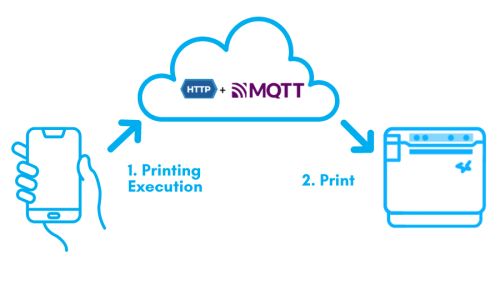
    Star Micronics’ CloudPRNT Next technology enables printers to communicate directly with a web server to retrieve and print label jobs—no tablet or on-site gateway required.

    The latest evolution of Star printers enhances this process with MQTT-based communication, delivering real-time performance, instant message delivery, live printer status updates, and improved uptime across distributed environments.

    This architecture makes CloudPRNT Next ideal for enterprise and multi-location deployments where orders, labels, or production tickets must print immediately and reliably from the cloud.

    Perfect for ISVs developing:

    • Online ordering and fulfillment platforms
    • Retail labeling and inventory systems
    • Manufacturing or warehouse label management
    • Franchise-level POS or ERP applications
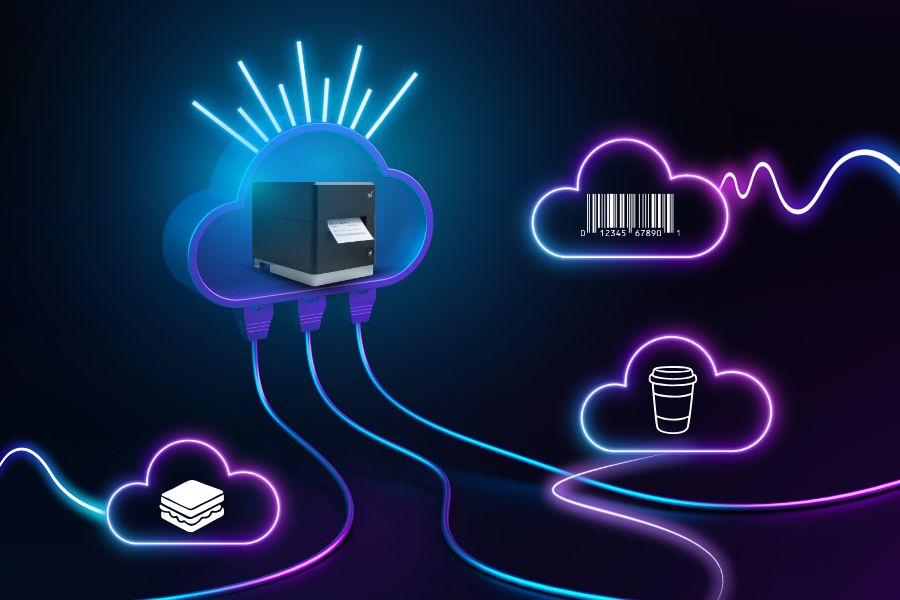
    CloudPRNT Next by Star Micronics is a cutting-edge solution for faster cloud printing using the MQTT protocol.
    CloudPRNT Next uses the MQTT protocol for cloud label printing.

    StarIO.Online: Fully Managed Cloud Printing for Developers

    For ISVs who want the power of CloudPRNT Next without hosting their own infrastructure, StarIO.Online offers a fully managed cloud printing service.

    StarIO.Online runs on secure, Star-hosted servers, no installation or server maintenance required. Developers can integrate printing into their web or mobile apps through a REST-style API, send jobs directly to any CloudPRNT-compatible printer, and monitor devices from a centralized dashboard.

    Key benefits for ISVs:

    • Zero infrastructure management: Star handles hosting, uptime, and certificates.
    • Real-time monitoring: Check printer status and job history remotely.
    • Rapid integration: Use predefined APIs instead of building custom code.
    • Global scalability: Manage thousands of printers across multiple clients or brands.

    With StarIO.Online, ISVs can build one integration that supports any connected location, whether it’s one store or one thousand.

    StarIO.Online is a fully managed cloud printing service by Star Micronics.

    Explore StarIO.Online

    Star Printers Built for Cloud Label Printing

    Star’s cloud-ready printers make it easy for ISVs to deploy at scale. All models below support CloudPRNT Next, giving developers flexibility across use cases:

    Printer Model Connectivity Label Support Best For
    mC-Label3 Ethernet, Wi-Fi, Bluetooth, USB-C Linerless, Die-Cut, Continuous Multi-station labeling and order workflows
    mC-Label2 Ethernet, Wi-Fi, Bluetooth, USB-C Linerless, Die-Cut, Continuous Compact labeling setups and barcoding
    TSP143IV SK X4 Ethernet, Wi-Fi, USB-C, Bluetooth Sticky linerless labels Takeout and delivery bag labeling

    Each printer can be integrated locally or connected directly to a cloud service, ideal for ISVs who need flexibility across different client environments.

    mC-Label2 Multifunction Printer

    The mC-Label2 packs powerful features into a compact, front-loading design, including 300 dpi resolution, support for linerless, die-cut, receipt, and continuous media, and connectivity options like USB-C, LAN, WLAN, Bluetooth, and Apple MFi-certified pairing (X4 models only).

    Explore the mC-Label2 >

    The mC-Label2 multifunction label printer by Star Micronics.
    The mC-Label3 multifunction label and receipt printer from Star Micronics.

    mC-Label3 Multifunction Printer

    The Star Micronics mC-Label3 is a versatile multifunction printer that prints a wide range of labels and receipts, including both permanent and repositionable sticky linerless. It features cloud connectivity and innovative technologies like SteadyLAN and TetherLAN for enhanced printing convenience.

    Discover the mC-Label3 >

    TSP143IV SK Sticky Label Printer

    The TSP143IV SK by Star Micronics sets a new standard for compact, eco-friendly thermal linerless label printing, offering advanced connectivity options like Wi-Fi and AOA, and efficient, residue-free labels for diverse business needs.

    Find out more >

    TSP143IV SK Thermal Linerless Sticky Label Printer by Star Micronics.
    Discover the power of Star Micronics' industry-leading point-of-sale (POS) technologies designed to revolutionize business operations in this free ebook.

    Explore Star Micronics Industry-Leading Technology

    Find out what Star’s technologies can do for your business success with this free ebook.

    Get Yours Now

    The Future of Labeling is Cloud-Connected

    As more restaurants and retailers embrace remote management and scalable infrastructure, cloud label printing offers ISVs a way to stay ahead. By centralizing printing through CloudPRNT Next or StarIO.Online, developers can simplify integration, reduce maintenance costs, and deliver more reliable labeling solutions to enterprise clients.

    Ready to simplify multi-location labeling?

    Contact Integrations