Employees increasingly use smartphones and tablets to manage inventory, look up products, process orders, and complete other work away from a desk. Creating labels, however, can still require a trip back to a computer.
A missing barcode, updated price, new expiration date, or incoming product may mean stopping the task, opening desktop labeling software, finding the right template, entering the information, and sending the label to a printer.
A mobile label printing app removes the desktop from that process. Employees can create, edit, and manage labels on a smartphone or tablet, then send them to a compatible label printer from the same device.
For businesses that create labels throughout the day, that means the information can be entered while the employee is already working with the product, shelf, package, or food item that needs the label.
Explore Star Labeling Solutions
What Is a Mobile Label Printing App?
A mobile label printing app is software for creating, editing, managing, and sending labels from a smartphone or tablet to a compatible label printer.
Depending on the app, users may be able to:
- Create and save label templates
- Enter or update product information
- Add prices, dates, SKUs, quantities, and other variable data
- Generate barcodes and QR codes
- Add logos and images
- Import product information
- Organize frequently used labels
- Send completed labels to a connected printer
The app handles label creation and product information, while the compatible label printer produces the finished label.

Why Move Label Creation Away from the Desktop?
Consider an employee conducting an inventory count who finds an item with a damaged barcode label.
In a desktop-based process, that employee may need to:
- Stop the inventory count
- Walk to a computer
- Open the labeling program
- Find the correct product or label template
- Enter or verify the product information
- Send the label to the printer
- Collect the new label
- Return to the product
The same thing can happen when an employee discovers an outdated shelf price, needs an expiration label in a food prep area, or receives merchandise without the correct identification.
Each interruption may be short. The problem is how often the process is repeated.
A mobile label printing app lets the employee work with the label information while the product, package, shelf, or food item is still in front of them. That can eliminate several steps between identifying a labeling need and producing the replacement label.
What Can You Do with a Mobile Label Printing App?
The exact capabilities vary by app, but several functions are particularly useful when moving label creation away from a desktop.
- Create and Reuse Label Templates: Frequently used layouts can be saved rather than recreated for each print job. A business might maintain separate designs for product labels, price labels, food rotation labels, inventory labels, or other applications. Employees can select the appropriate design and change only the information that varies.
- Update Variable Information: Many labels contain information that changes even when the basic design stays the same. Updating those fields from a mobile device allows the employee to verify the information against the actual item before the label is sent to the printer. Changes or updates may include:
-
- Product name
- SKU
- Price
- Date
- Expiration date
- Quantity
- Lot number
- Size
- Color
- Location
- Create Barcode and QR Code Labels: A mobile label printing app can also support barcode label printing and QR code creation. That is useful for product identification, inventory tracking, pricing, asset identification, order information, and other workflows in which information needs to be scanned later.
- Add Images and Branding: Logos, product images, icons, and other graphics can be incorporated into label designs when the application requires more than text and barcodes. This can be useful for product packaging, branded merchandise, specialty products, or labels customers will see.
- Import Product Data: For businesses managing more than a handful of items, importing structured product data can be faster than manually creating every record on a mobile device. The appropriate import method depends on the app and what is being imported. Product information and label designs, for example, are two different types of data and may require different formats.

Where Can Mobile Label Printing Apps Be Used?
The value of a mobile label printing app becomes clearer when the employee creating the label is not normally sitting at a desk.
Inventory and Restocking Labels
Employees can create or replace inventory labels while receiving, counting, moving, or restocking products. If an item arrives without a barcode or an existing label is damaged, the employee can prepare the replacement while working with the product rather than making a note to fix it later.
Product, Price, and Shelf Labels
Retail employees can create product identification labels, price labels, shelf labels, and markdown tags while working on the sales floor. That is particularly useful when prices or product information need to be updated across multiple shelves or departments.
Food Preparation and Rotation Labels
Restaurants, grocery stores, convenience stores, and other food businesses can use mobile label creation for:
- Food identification labels
- Product rotation labels
- Expiration or use-by dates
- Ingredient information
- Grab-and-go labels
- Prepared food labels
An employee working in a prep or storage area can enter the relevant information there and send the completed label to a compatible printer nearby.
Blog: Food Label Compliance and Traceability in QSR and Grab-and-Go Operations >
Order and Package Identification
Labels can also be created for packages, orders, catering items, pickup orders, or other items moving through a fulfillment process. Clear identification can help employees distinguish between similar orders, products, or packages before handoff.
Asset and Equipment Labels
Employees performing an inventory audit, equipment installation, or maintenance check can create identification labels for tools, electronics, equipment, and other assets while they are working with the item.
Branded Product and Packaging Labels
Small retailers, specialty businesses, makers, and other sellers can use label templates for product names, pricing, logos, or other branding applied to merchandise and packaging.

What Should You Look for in a Mobile Label Printing App?
The right app depends on what employees need to print and how product information is managed. Before choosing a solution, consider the following:
1. Mobile Device Support
Check which operating systems and devices the app supports. If employees use iPhones or iPads, for example, confirm that the application supports the required versions of iOS or iPadOS.
2. Label Template Controls
Consider whether users can create their own templates, customize prebuilt designs, save frequently used layouts, and control which information employees are allowed to change.
3. Variable Data and Product Management
If labels frequently change by item, the app should provide a practical way to manage information such as SKUs, prices, dates, quantities, and other fields. For larger product lists, data import can reduce repetitive manual entry.
4. Barcode and QR Code Support
Businesses using labels for scanning should verify which 1D and 2D barcode formats are supported and whether barcode data can be populated from product records.
Explore 1D/2D Barcode Scanners and Imagers: Desktop, USB Handheld, and Wireless >
5. Printer Connectivity
The app and printer must be able to communicate through a supported connection such as Bluetooth or a local network. This is separate from whether the employee’s phone or tablet is physically close to the printer. A network connection may allow employees to send labels to a printer located elsewhere in the work area.
6. Printer and Media Compatibility
The printer ultimately determines the label widths, media types, resolution, and other physical output options available. The application and printer therefore need to be considered together rather than as separate purchases.
How Does the Star Label Print App Work?
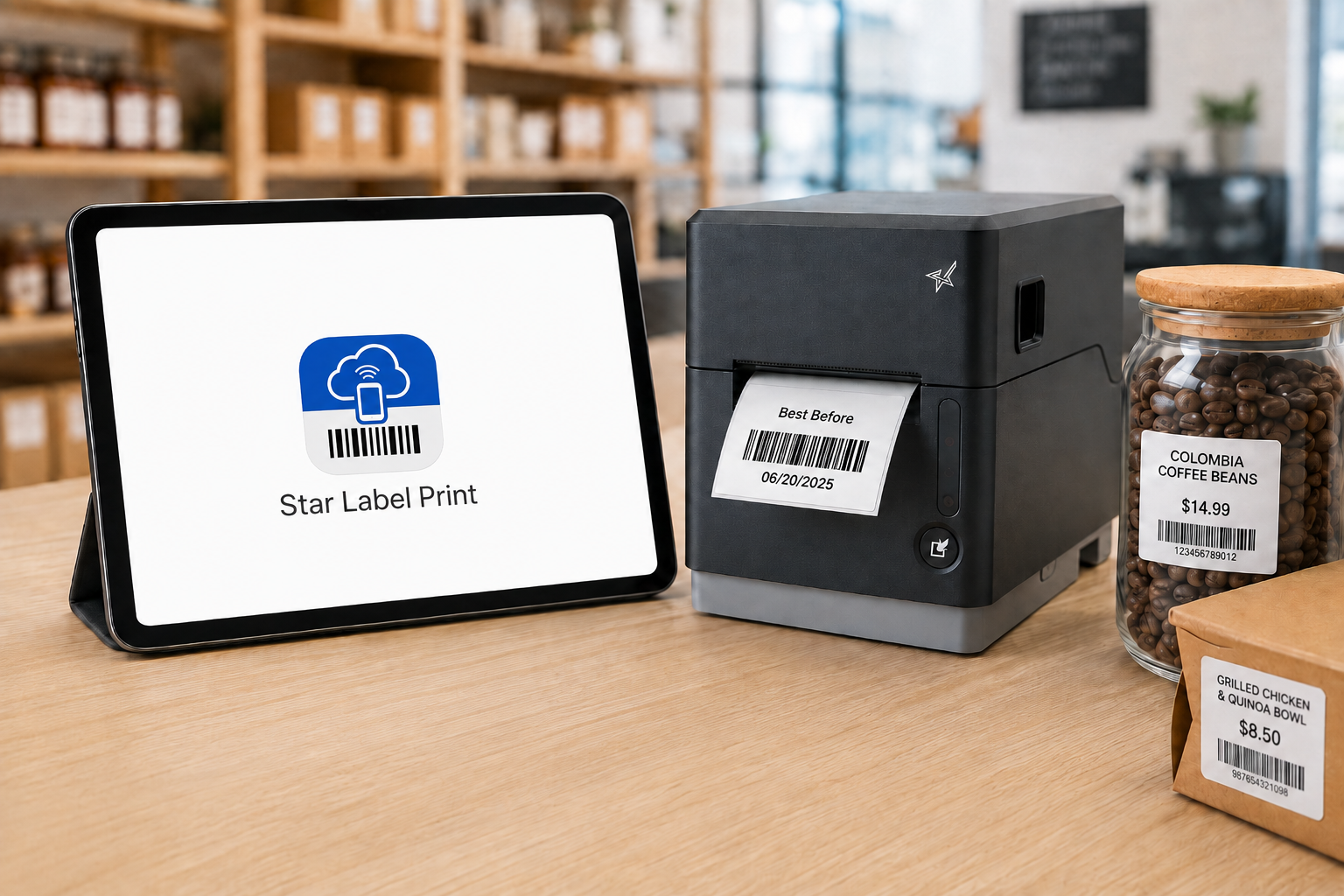
Star Label Print is Star Micronics’ mobile label printing app for iPhone and iPad. It allows users to create and manage labels on a mobile device and send them to a compatible Star label printer over LAN or Bluetooth.
The app can be used without a separate desktop labeling program for routine label creation and printing.
Users can create their own designs or customize pre-designed templates, enter individual product information, save labels for later use, and manage product data within the app.
Organize Products into Groups, Categories, and Items
Star Label Print organizes product information into three levels:
Groups → Categories → Items
A retailer, for example, could create a group for a department, categories for different product types, and individual items within each category.
That gives employees a structured way to locate the product they need rather than searching through an unorganized collection of labels.

Design Labels in the App
Users can build and edit label layouts on the mobile device. Label designs can include elements such as:
- Text
- Barcodes
- QR codes
- Images
- Lines
- Shapes
- Variable product information
Frequently used designs can be saved so employees do not have to rebuild the layout whenever another label is needed.
Import Product Information with CSV Files
Star Label Print supports CSV import for businesses that already maintain product information in a spreadsheet or another structured data source. Instead of manually entering each item individually, product information can be imported into the app. The fields in the CSV need to correspond with the fields used by the label template.
This makes CSV particularly useful when a business needs to prepare labels for a larger product catalog.
Capture Item Information with a Camera
Star Label Print also provides an image-based option for adding or editing item information. A user can take a photo with the iPhone or iPad or select an existing image and use optical character recognition, or OCR, to read information from it.
OCR controls allow the user to determine which information should be captured and adjust settings such as language and sensitivity. For example, an employee replacing an existing product label may be able to capture information from that label rather than typing every field from scratch.
JSON Label Design Import for ISVs and Developers
Star Label Print also supports importing label designs using JSON. This capability serves a different purpose from CSV import. CSV import is for product and item data. JSON import is for the label design itself.
The JSON capability is primarily relevant to ISVs, developers, and organizations that want to prepare predefined label designs for business owners. Rather than asking each employee or location to manually recreate a particular layout in the app, a developer can define the required label structure and make that design available for import.
Required design parameters include information such as the design title, media dimensions, and print dimensions. This gives Star Label Print two distinct ways to bring outside information into the app:
- CSV: Import the information that changes from product to product.
- JSON: Import the structure and design of the label.
For most everyday employees, CSV product management and the app’s built-in label editor will be the more relevant functions. JSON provides another option when an ISV or developer is involved in defining the labeling workflow.
Create the Label Where the Information Is
The main advantage of a mobile label printing app is not that the printer moves. It is that the employee no longer has to bring every labeling task back to a desktop computer.
A damaged barcode can be addressed while counting inventory. A price can be updated while an employee is standing at the shelf. A food label can be created in the prep area. A product label can be prepared while merchandise is being received. The smartphone or tablet handles the label creation. The compatible label printer handles the physical print.
With Star Label Print, businesses using supported Star printers can bring those two parts of the workflow together without requiring a desktop computer for every label.
Get the Star Label Print app for iPhone or iPad >
Learn more about the Star Label Print app from our Integrations Team
Frequently Asked Questions About Mobile Label Printing Apps
What is a mobile label printing app?
A mobile label printing app is software that allows users to prepare labels on a smartphone or tablet instead of using desktop labeling software.
Depending on the app, users may be able to create templates, enter product information, generate barcodes or QR codes, import data, and send the completed label to a compatible printer.
Can an iPhone or iPad be used to create labels?
Yes. A compatible label printing app can turn an iPhone or iPad into the interface used to design, edit, and manage labels.
The mobile device then sends the completed print job to a separate compatible label printer.
What is the Star Label Print app?
Star Label Print is a mobile label printing app from Star Micronics for iPhone and iPad. Users can create and save label designs, manage product information, create barcodes and QR codes, import product data, and send labels to compatible Star printers.
Which operating systems support Star Label Print?
Star Label Print is currently available for iPhone and iPad, requiring iOS 17.0 or later or iPadOS 17.0 or later. The app is not currently available for macOS, Android, Windows, or Linux.
Can Star Label Print import product information?
Yes. Star Label Print supports CSV import for product and item information.
Businesses can use a CSV file to bring multiple product records into the app rather than entering each item individually. The CSV fields need to correspond with the fields used by the applicable label template.
What is JSON import used for in Star Label Print?
JSON import is used to bring a label design into Star Label Print rather than product data.
This feature is primarily intended for ISVs, developers, and organizations that want to create predefined label layouts that can then be imported by users.
CSV and JSON therefore serve different purposes: CSV handles product information, while JSON handles label design.
Can Star Label Print create barcode and QR code labels?
Yes. Star Label Print supports barcode and QR code elements that can be incorporated into label designs along with text, images, shapes, and variable product information.
What can Star Label Print be used to label?
Star Label Print can support applications such as product and price labels, shelf labels, markdown tags, inventory and restocking labels, food expiration and ingredient labels, barcode labels, and branded product or packaging labels.
Which printers support Star Label Print?
Star Label Print currently supports the TSP100IV SK with firmware 2.0 or later, mC-Label3 with firmware 1.0 or later, and mC-Label2 with firmware 1.0 or later.
The printer must also use a connection supported by the app, such as LAN or Bluetooth.