The antimicrobial covers reduce germ transfer on high-touch surfaces
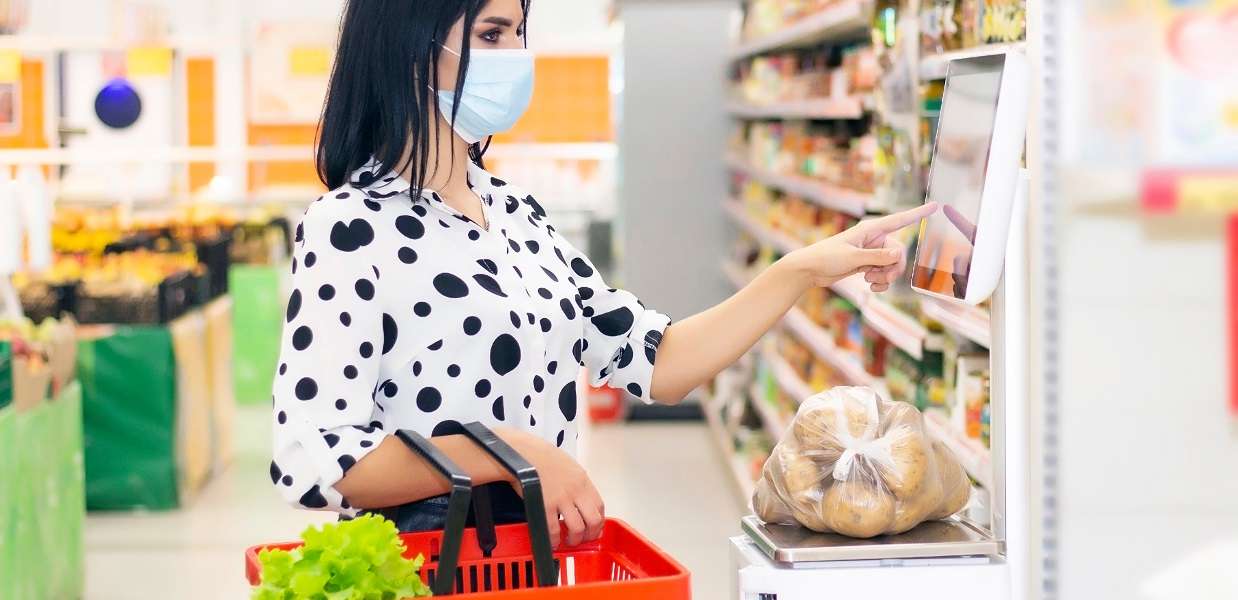
Somerset, NJ – April 13, 2021 – Star Micronics, a leading manufacturer of mobile, point of sale (POS), and customer engagement technologies, is excited to announce a line of antimicrobial covers designed to cover high-touch surfaces to reduce the transfer of germs. The antimicrobial covers are safe to use, easy to apply, and reduce microbes on common touch points. From door handles to checkout counters, the antimicrobial covers are designed to create safer surfaces for both employees and customers.
Featuring a proprietary antimicrobial coating that protects the surface by actively killing microbes (reducing microbe populations) on contact, the antimicrobial covers are designed to complement regular cleaning in retail stores, restaurants, and more. These products have been tested and are EPA-registered and latex-free.
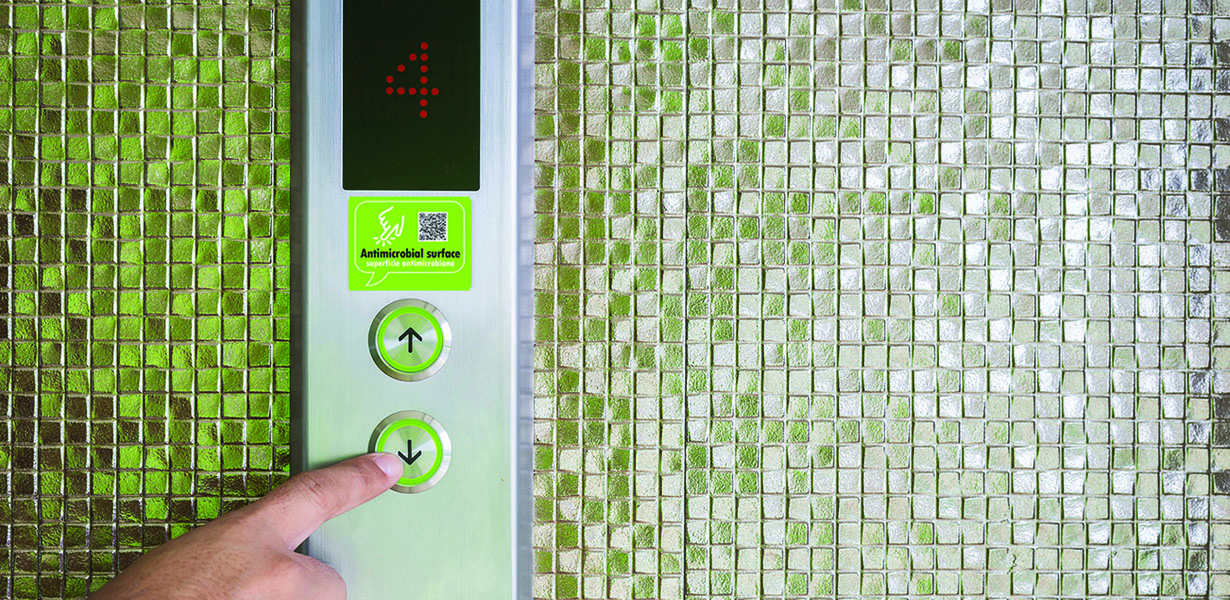
Star will be offering several antimicrobial cover products, including wraps made specifically for door handles, door push-bars, elevator buttons, door push plates, and more. Star will also offer custom rolls that retailers or restaurants can cut and apply to countertops, restroom surfaces, and more.
“Star Micronics is constantly working to provide solutions that will help our customers succeed,” says Christophe Naasz, Director of Business Development for Star Micronics. “With the pandemic having such a major effect on retailers and restaurants, Star wanted to provide a solution that will help the reopening of these businesses be successful. These antimicrobial covers will help shoppers and diners feel more at ease when going out in a post-pandemic world.”
An industry-first, the SDK supports the integration of Star printers for React Native apps
Somerset, NJ – April 8, 2021 – Star Micronics, a leading manufacturer of mobile, point of sale (POS), and customer engagement technologies, is excited to announce the release of the StarXpand™ SDK for React Native, a software development kit for Star printer control for the popular cross-platform framework, React Native.
In the past, mobile POS applications had been developed exclusively for each operating system (OS), such as iOS and Android. However, in recent years cross-platform development – which allows more of the programs of an application to be developed with one code for multiple OS’s – is attracting attention. Cross-platform development is expected to become essential to application development in the future.
To respond to this trend – and for the first time in the receipt printer industry – Star has developed StarXpand™ SDK for React Native. The SDK supports the development of connecting to and controlling Star printers in applications that utilize React Native. StarXpand™ SDK for React Native will help shorten the development time and maintenance costs associated with printer connection, and will be published on GitHub, a website where developers around the world publish and share program codes.
StarXpand™ SDK for React Native uses a new StarIO10 framework which includes multiple advantages including: asynchronous communication allowing print jobs to happen in parallel; an emulation-free design so that one StarXpand™ document will work with any Star printer; human-readable command creation; faster printer search allowing users to discover all devices in under second; and a logging function between the OS and printer to be used for debugging.
“As React Native becomes more prominent in the industry, the StarXpand™ SDK will be there to help developers easily create cross-platform POS solutions,” said Jon Levin, Director of Product Management at Star Micronics. “Easy-to-use and developer-friendly, the new StarIO10 framework is at the heart of that and will provide a great foundation for our SDKs going forward.”
Investing in a salon point of sale (POS) system is one of the best things you can do for your business, but with so many options on the market, how do you determine which POS hardware and software best suit your business needs and your budget?
This below information can help you get on the right path to finding the perfect POS system for your salon.
No one wants to waste time and money on a POS solution that lacks needed capabilities, or has unnecessary features that increase the price. To avoid purchasing a system that isn’t right for your business, you need to identify the specific challenges that you will need your new POS system to address.
You can start by asking questions such as:
Is business suffering because customers must often wait in long lines at the POS?
Do shoppers frequently leave your establishment empty-handed because you don’t have the merchandise they want?
Are you spending too much time managing employees or trying to find out why your sales volume often doesn’t jibe with your inventory levels?
Do you want to attract new customers?
The answers will help you identify the pain points you want to eliminate and the goals you want to achieve with a new POS system. Consider the amount of time you spend on operations-related tasks and whether you need the POS system to automate processes. You may also want to consider whether you need the POS system to support initiatives that can help grow your business.
Once you have clearly identified your business needs, research which POS functions address them. The list of the functions you need your new system to provide will help narrow the field of choices when you shop for a new POS system. The solutions you consider are likely to have a mix of “must-have” and “nice-to-have” features; remember to focus on what you need, which can help you minimize the cost of the system. “More” isn’t necessarily better when it comes to technology solutions.
Step 2: Set a Budget
Decide how much your business can afford to spend on a POS system. By most accounts, the average industry investment in POS systems totals 2 to 3 percent of retailers’ annual volume, and 1 to 1.5 percent of restaurant operators’ annual volume. Consider ongoing costs, such as software maintenance/updates, hardware maintenance, and technical support.
Ask about payment options. Financing may be available to help with the considerable capital investment you will make. You may also be able to lease or lease-to-own POS hardware, which can minimize upfront costs, but may add to the total cost of the system. Another option available to you may be a POS-as-a Service offer, which provides your system, as well as software updates and system upgrades, for a subscription fee to use (rather than own) the system.
When choosing from among these options, always consider the total cost of ownership (TCO) and return on investment (ROI). The price of a full-featured POS system may seem high, but don’t forget the financial savings that such a system will yield throughout its lifecycle by reducing labor expenditures, improving inventory control, cash-tracking, and putting a lid on shrinkage. A comprehensive POS system will also help to increase sales by facilitating more effective customer engagement and better customer service, as well as by giving you real-time insight into all aspects of your operation.
Step 3: Shop for Software
As you consider your options, you will find that not every software solution is compatible with all POS hardware. Selecting your software first will prevent you from being limited in functionality.
There are different types of software you can choose from:
Native. Native POS software is installed on your POS hardware. It is easier to customize than cloud-based software.
Cloud-based software (Software-as-a-Service, or SaaS). In a SaaS model, software is delivered via the cloud, and you pay for it on a monthly subscription basis. Also, cloud-based software can be accessed from anywhere there is an Internet connection, giving you enhanced visibility into, and control over, your operation.
Hybrid software. This software can be run online in the cloud or offline.
It can be helpful to research the types of POS software that other businesses like yours are using. Find out through references or reviews if salons are happy with the type of solution, the functionality it provides, and the benefits the solutions provides to their business.
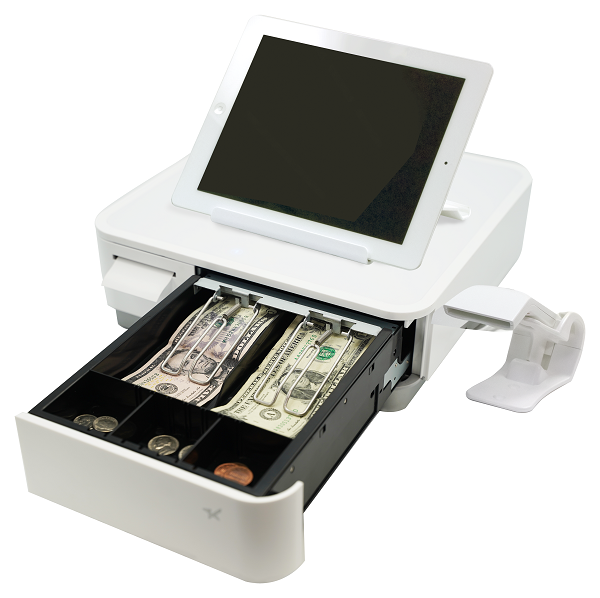
Star Micronics mPOP® can combine a printer, cash drawer, scanner, and tablet stand – an ideal all-in-one solution for salons and spas.
It can also be helpful to learn about the POS software vendors that provide the software, gaining insights on the level of customer service they provide and their experience working with companies in your market or industry. Also consider whether the vendor is an established company — one that is not likely to close its doors and leave you without support for your system.
Once you have created a list of POS solutions to consider for your business, it’s time to arrange for demonstrations. Using the solution yourself will give you a sense of how easy it will be for your employees to learn, to use efficiently, and to discover whether it will support your operations. It may be helpful to compare similar features side-by-side to arrive at an accurate assessment of the best solution for your business.
Step 4: Find Compatible Hardware
The POS software you choose will dictate the POS hardware that you can use. In many cases, however, there will still be a number of options to choose from. Some of the choices you must make are related to how your employees will use the system. For example:
What is the preferred method of entry? Some operators favor keyboards or a scanner interface for POS data input, while others prefer a touchscreen interface that facilitates faster data entry and easier training for new employees.
Which peripherals are needed? You need to consider printers, cash drawers, PIN pads, payment card readers, and barcode scanners, and select the model that best suits your needs.
Will you accept all forms of payment? Make sure your new system gives your customers the ability to pay by their preferred methods. You must be able to process EMV and mobile wallet transactions from apps such as Google and Apple Pay.
Which terminal design do you prefer? Space at salon checkout counters is usually limited, so you may want to consider a more ergonomic solution with a smaller footprint, such as an all-in-one configuration that incorporates basic peripherals (e.g., printers, cash drawers, credit card readers, PIN pads, and customer displays) or a tablet POS system. You will also find options that are aesthetically pleasing and don’t detract from your salon’s decor and natural ambience.
Just as you did with software vendors, find out all you can about POS hardware vendors. Read references and reviews, and speak with other businesses — preferably similar to yours — that use their solutions. Also ensure that the company provides warranties and technical support.
Need help navigating this process? Download the full Salon POS Software and Systems Buyer’s Guide now, or contact Star today.
Welcome to the Star Software Update, the regular series of blog updates where Star’s Integration Team informs you about the latest important Star Micronics software updates.
What’s New:
This month, the Star Micronics Integration Team is highlighting the Star Document Markup Language.
What is Star Document Markup Language?
Star Document Markup Language is a simple, easy-to-use markup language intended to provide the features typically required for point of sale (POS) printing.
Using the document markup system provides a balance between full bit-image based printing and plain text output, while being easier to use than direct device commands and far more adaptable to different output devices, like print width.
One benefit of markup is its ability to handle different print widths without compromising the receipt format. Use cases include printing order tickets in the restaurant kitchen, printing receipts for orders, or printing sticky labels to seal bags.
Star Document Markup Language is easy to read; take a look at the below example:
[align: centre][font: a]
[image: url ;
width 60%;
min-width 48mm]
[magnify: width 2; height 1]
This is a Star Markup Document!
[magnify: width 3; height 2]Columns[magnify]
[align: left]
[column: left: Item 1; right: $10.00]
[column: left: Item 2; right: $9.95]
[column: left: Item 3; right: $103.50]
[align: centre]
[barcode: type code39;
data 123456789012;
height 15mm;
module 0;
hri]
[align]
Thank you for trying the new Star Document Markup Language
we hope you will find it useful. Please let us know!
[cut: feed; partial]
This will generate the following output on Star 58mm (2-inch), 80mm (3-inch) and 112mm (4-inch) printers:
Unicode Support
By using the Star Document Markup Language, you can avoid the difficulties of limited 8-bit text encodings by being entirely Unicode-based. Input data should be from a Unicode-compatible data file or strings.
Star TSP654II, mC-Print2, and mC-Print3 devices have native support for Unicode. When a device does support Unicode directly, the Star markup renderer will automatically handle the necessary conversion.
File Format
Markup source files are plain text files encoded as UTF-8, UTF-16, or plain Ascii data.
When opening a document, initially the start of the file will be checked for a Unicode BOM (Byte Order Mark) in order to recognize that the file contains UTF-16 (Big Endian or Little Endian encoded) or UTF-8 data. If no known BOM is found, then the file will be treated as a UTF-8 file unless it contains code points that are not UTF-8 valid, in which case it will be opened finally as plain 7-bit Ascii.
In addition, the extension of the text file written in the Star Document Markup format should be “.stm”. The cputil executable and also .NET API for StarMicronics.CloudPRNT-Utility packages recognize the Star Document Markup format by checking the file name extension. If the extension is “.txt” it will be recognized as a plain text file and will not be command parsed as the Star document markup.
Next Steps
Do you have questions or concerns about the Star Document Markup Language?
As legalization expands to new regions and more products hit the market, the cannabis industry is booming. In a market that seems to experience major updates every week, what cannabis industry predictions are there for 2021? Read on to review what happened in the market last year and to expect to see this year.
The 2020 Cannabis Market
The cannabis market saw a lot of growth in 2020. In fact, US national cannabis sales increased 67% in 2020, the industry was worth $61 billion, and support for legal marijuana rose to an all-time high of 68%.
The cannabis customer base is also changing and growing– according to Eaze, the gender divide that used to exist is disappearing (especially in the baby boomer age group) and last year, nearly half of customers were female (compared to just 38% in 2018).
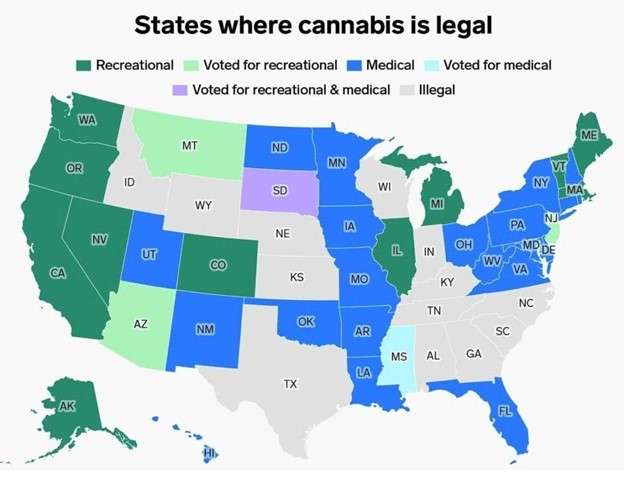
Legalization-wise, during the 2020 election Arizona voted to legalize recreational usage, Montana and New Jersey voted to legalize adult usage, and South Dakota voted in favor of medical and recreational usage.
2021 Cannabis Industry Predictions
1. More Legalization
The legalization of cannabis has become increasingly widespread, and that trend will continue in 2021.
According to Marijuana Moment, the states that are most likely to legalize recreational marijuana usage this year include Connecticut, New Mexico, New York, Rhode Island, and Virginia.
Additional states are experiencing a buildup of momentum, but legalization is a bit less likely due to remaining opposition from some top leaders. These states include Delaware, Maryland, Minnesota, Pennsylvania, and Wisconsin.
In terms of medical usage of cannabis, a few states are slated to legalize this year, including Alabama, Kentucky, and South Carolina.
Source: Business Insider
2. Increased Sales
Related to increased legalization, one major cannabis industry prediction is increased sales. Did you know that on July 4, 2020 alone, more than $400 million worth of cannabis was sold? According to Linchpin SEO, the market has the potential to grow as much as $130 million per year in the near future.
Another contributing factor to the predicted increased sales is the fact that more and more businesses are selling cannabis products, and in particular, products containing cannabidiol (CBD). According to The Motley Fool,
“What Wall Street and investors seem to find most attractive about the rise of CBD is that it may appeal to consumers who might otherwise want nothing to do with the cannabis industry. Since CBD-based products typically contain no traces of, or minute amounts of, tetrahydrocannabinol (THC), the cannabinoid that gets a user high, consumers on the medical and recreational side of the equation tend to be more willing to try CBD-based products.”
Furthermore in 2019, CBD sales grew 71.3% in the natural channel alone to $91 million in sales, and sales grew an impressive 872% in the mainstream channel. Mainstream adoption is largely due to the 2018 Farm Bill which made it so that hemp is no longer a “controlled substance,” helping risk-averse retailers embrace selling hemp-derived CBD topicals. Many specialty retailers now carry CBD products, as well as larger chains like CVS, Walgreens, Rite Aid, Ulta Beauty, GNC, Urban Outfitters, Whole Foods, Target, and more.
3. A Broader Product Offering
Veryvell CBD sparkling water by Molson Coors (source: The Denver Post)
One cannabis industry prediction is that the number of types of cannabis products available on the market will increase substantially. On one hand, it’s likely that new strains will be created, and on another hand, particular products are projected to become more popular and readily available. For example, Molson Coors has already created a CBD-infused sparkling water to sell in Colorado. The drink, called Veryvell, contains zero calories and zero sugar and is available in three flavors: Focus (grapefruit tarragon), Mind & Body (strawberry hibiscus), and Unwind (blueberry lavender). On the edible front, it’s predicted that the variety of products available will increase.
How Resellers Can Cash in on Cannabis Point of Sale
The cannabis industry has become one of the fastest growing markets. Here’s how resellers can take advantage.
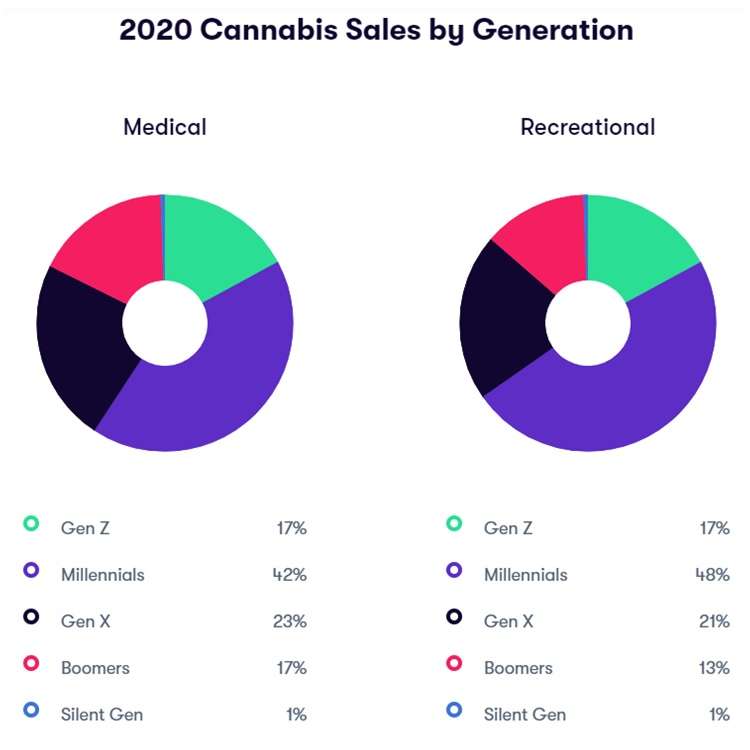
As time passes, the cannabis consumer base grows more diverse. Linchpin SEO predicts that there will soon be more older and female customers, as well as a greater mix of both recreational and medicinal cannabis users.
If you’re curious about the current breakdown of cannabis users by age, check out the below chart from Flowhub:
“Several cannabinoids have been found to have potent antimicrobial activity against Gram-positive pathogens such as MRSA isolates. Endocannabinoids have also been shown to be effective in eradicating biofilms.”
This is just one example of a new use case for cannabis and as legalization and research efforts continue, it’s predicted that even more will arise.
6. Banking and Finance Updates
One major cannabis industry growing pain that has remained is the issue of banking. However, changes could be made on that front this year. According to TRYM,
“All eyes are on the United States Senate this coming year. Many believe they will finally pass legislation to grant legal cannabis businesses access to banking and financing services. The cannabis industry’s ‘Essential’ designation is ironic when many have to lug around bags of cash, putting them into vulnerable and dangerous situations.
Opening up banking services alone will make a huge impact on the legal marijuana industry as a whole. Investment would flow in more, valuations might increase, and most importantly, marijuana business transactions will become much easier.
A cannabis company could seek bridge loans from the bank rather than taking hard money loans which come at increased risk and high interest rates. In the expanding legal marijuana industry, scaling is important to maintain market share. But scaling requires an injection of money that operators may not have.
The ability to turn to banks for traditional financing would help organizations of all sizes grow their business in the legal marijuana industry.”
As the cannabis industry continues to boom, are you searching for compliant, secure, and easy-to-integrate cannabis POS solutions? Star has what you’re looking for.
For years now the self-service kiosk market has been growing but undoubtedly the COVID-19 pandemic skyrocketed its growth even further. According to Technavio Research, the self-service kiosk market grew 3.55% in 2020 alone, and it’s expected to grow by $2.29 billion USD during 2020-2024. As the world begins to recover from the unprecedented pandemic, you may be wondering what post-pandemic business ideas and self-service business ideas are emerging in the market. Read on to learn about some of the new ways kiosks are being used, from health and safety check-ins to kiosks for a good cause.
1. Health & Safety Kiosks
This first business idea is probably not a surprise. As the economy reopens, health and safety kiosks will be an easy addition to restaurants and retail stores. An example of this may look like a kiosk placed near the front door of establishments where customers can check their body temperature, and if applicable the kiosk can use facial recognition technology to detect if the customer is wearing a mask. Quatrefoil, a Ontario-based restaurant, uses a kiosk that checks both of those things and will display a green checkmark if requirements are met, while if the requirements are not met, a staff member is alerted to come provide assistance.
2. COVID-19 Test Distribution
Also health-related, another post-pandemic business idea is to use kiosks to distribute testing kits for COVID-19 – and more. In New York City, this is already happening. Vending machines from Wellness 4 Humanity conveniently provide at-home COVID-19 testing kits to the public, which can be more convenient than being tested at a pharmacy drive-through, especially for city dwellers. Kits currently cost $149 and can be paid for by credit or debit card only. These kinds of kiosks have lots of potential to distribute much more than just COVID-19 testing kits, like at-home tests for allergies, hormones, blood panels, and more.
3. Pickup Lockers
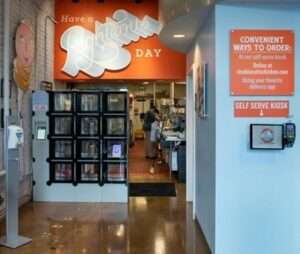
A heated pickup locker for food orders. (Image via Kiosk Marketplace/Rise Southern Biscuits & Righteous Chicken)
You’ve probably heard of retail pickup lockers, like Amazon Hub Locker, a secure, self-service kiosk where customers can pick up or return Amazon packages at their convenience. Pickup lockers are for more than just retail, though. Restaurants like Rise Southern Biscuits & Righteous Chicken are beginning to incorporate heated locker systems in their brick-and-mortar establishments to further build upon their contactless ordering options for customers. These heated lockers keep food fresh while also minimizing the physical contact between customers and employees, which not only provides a safety benefit during the pandemic, but will boost convenience and help line-busting well into the future.
4. Transportation
A common complaint regarding department of motor vehicle (DMV) offices is the chance of experiencing a long wait time. What better way to line-bust than with self-service kiosks? Currently approximately 45 DMVs in the US operate some sort of self-service technology, but the potential is huge for a number of government agencies. At self-service kiosks, DMV customers can renew drivers licenses, register vehicles, obtain license plates, take driving and CDL exams, and more. The process can be secure by using an access code or barcode from a renewal notice or license plate number and last four digits of a VIN, and language barriers become a problem of the past with multilingual on-screen instructions and audio.
Free Self-Service Kiosk Resources
The future of many industries lies with self-service solutions. That’s why Star Micronics is offering free online ordering resources for resellers and software developers who are helping customers future-proof their businesses with self-service solutions.
As people become more comfortable traveling again – and more workers remain remote – self-service kiosks that aid in reception will be very helpful to countless sectors. One example of this is a Zoom product that “enables a contactless, virtual receptionist in its newly introduced Zoom Rooms product to help organizations safely re-enter the office and sustain an ‘everywhere workforce.’” To use the solution, users can customize the “Start Meeting” button on a device in their building that is set up with Zoom Rooms for Touch to connect visitors with a receptionist. This kind of self-service check-in service could be useful for countless types of business and medical offices, hotels, and more.
6. Kiosks for a Good Cause
The Marla Aaron jewelry vending machine that benefits restaurants and those in need. (Image via Marla Aaron)
Kiosks aren’t just about line-busting, boosting profits, and increasing convenience – they can give back, too. Self-service kiosks can be a great way to increase awareness of fundraising campaigns and make it easier for busy citizens to contribute to a cause. Take, for example, the kiosk that is a part of the “Take a Seat for Restaurants” campaign. The campaign is a part of jeweler Marla Aaron’s plan to contribute to the World Central Kitchen, a popular food-related charity that pays local restaurants to make meals for those in need. Aaron sells small 2” sterling silver chairs for $250 each from her brick-and-mortar locations, her online store, and a self-service vending machine based in New York City that changes locations to maximize its awareness (and more installations are coming!).
The number of post-pandemic self-service business ideas is limitless. Whether you’re looking to implement a self-service solution for a restaurant or for a charity – or anything in between – you’ll likely need a built-in receipt printer. Look no further than Star Micronics. We proudly offer a wide range of thermal kiosk printers that can print receipts, labels, tickets, and more, and are ideal for a variety of applications and industries.
Looking to implement a post-pandemic business idea involving self-service kiosks?
Buy online, pickup in store (BOPIS) is a hot retail trend that’s here to stay. In fact, according to a Signifyd study of 250 decision makers at retail companies with more than $100 million in annual revenue, 44% viewed BOPIS as a competitive necessity. Another 38% said BOPIS was key to bringing shoppers into the store, where they tend to make additional purchases. BOPIS is appealing to many consumers, too – 63% of shoppers say they would like to be able to use curbside pickup and 56% want merchandise delivered to the trunk of their cars, according to NRF.
More BOPIS benefits to retailers include:
Extra purchases from customers: As mentioned above, when shoppers come to your store to pick up their order, they are likely to browse the store and purchase additional items, or remember something they forgot to place in their order and buy it at your brick-and-mortar location.
Lower shipping costs: Simply put, it’s cheaper for you to operate a BOPIS strategy than to ship products directly to a customer’s door – plus it’s a fast and free option for the customer, too!
Better inventory management: With BOPIS, you don’t need separate online and in-store inventory systems. Orders can be fulfilled from both your distribution center or your store shelves – whichever is faster – giving you access to more inventory at any given time. By combining both systems, you can have better insight into your business’s real-time stock.
Now that we’ve discussed why BOPIS is worthwhile, let’s dive into some tips for your buy online, pickup in store strategy. These tips are helpful whether your business is new to BOPIS or looking for ways to improve your current BOPIS strategy.
5 Tips for a Buy Online, Pickup in Store (BOPIS) Strategy
Tip 1: Prep Your Website and/or Mobile App
Your website and mobile app should be the hub for your buy online, pickup in store strategy. Make sure your BOPIS offering is clear and easy to find for website and app visitors. On your website and app, be sure to explain how your store’s BOPIS strategy works, and include detailed instructions for both the online order placement process as well as the pickup process at your store.
Once you have that landing page created for your BOPIS offering, be sure to link to it from any other relevant pages and feature it front-and-center with special seasonal promotions (for example, save 5% on back-to-school or holiday BOPIS orders).
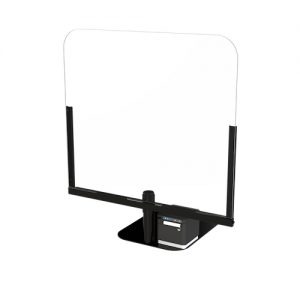
The Star Micronics POSShield is an effective and portable sneeze guard for retailers.
Tip 2: Plan and Announce Your Health and Safety Precautions
Safety is at the top of everyone’s minds these days. On your online materials and in-store via signs make sure you communicate your health and safety considerations, such as how your store is minimizing exposure for both its customers and its employees.
Curbside health and safety measures could include tactics like employees directly placing orders in customers’ trunks. For the shoppers who pick up their orders in-store, you should consider implementing a sneeze guard and antimicrobial covers for surfaces like door handles, checkout counters, and bathroom surfaces.
Tip 3: Communicate, Communicate, Communicate
Communication every step of the way is key for a successful buy online, pickup in store strategy.
When an order is placed, send an immediate confirmation email, text, and push notification to shoppers including clear directions to the store, an estimated pickup time, where to pick up the order whether it’s designated parking spots or a pickup counter inside the store, and what forms of identification may be needed.
Looking to strengthen awareness of your BOPIS offering? Consider promoting it to your in-store shoppers on the bottom of your receipts. You may have in-store shoppers that are unaware that you offer BOPIS, and what better place to advertise it than on the bottom of the receipt that goes directly into every shopper’s hand? With Star Micronics PromoPRNT, you can even create custom promotions on your Star printer, for free.
Tip 4: Have a Top-Notch Inventory System
Having a seamless, real-time look at your inventory is important. If customers place BOPIS orders only to find out that their items are actually out of stock and unable to be picked up, they will not be satisfied and are unlikely to try to use your service again. Avoid this potential issue with a high-quality inventory system. Look for a tool that allows you real-time inventory and analytics on order statuses and workflows, what is needed and where, and how quickly an item can get to the store where it is needed.
Tip 5: Leverage Cross-Selling Opportunities
As we discussed above, offering BOPIS to your customers creates a fantastic opportunity for cross-selling. Many customers will browse your store when they come into pick up their order, and be sure to take advantage of that!
Consider using online purchasing data from your BOPIS orders to successfully cross-sell when shoppers are visiting your brick-and-mortar location. One example of this is offering personalized coupons for customers to use in-store for products that may be of interest to them according to their online shopping history.
Star Micronics Retail Solutions
From liner-free label printers for BOPIS orders to sneeze guards and receipt printers for in-store shoppers, Star has the wide variety of solutions you need to compete in today’s retail landscape.
Examples of Buy Online, Pickup in Store Strategy Successes
Looking for some buy online, pickup in store strategy inspiration? Check out a couple of sample successes below:
Home Depot
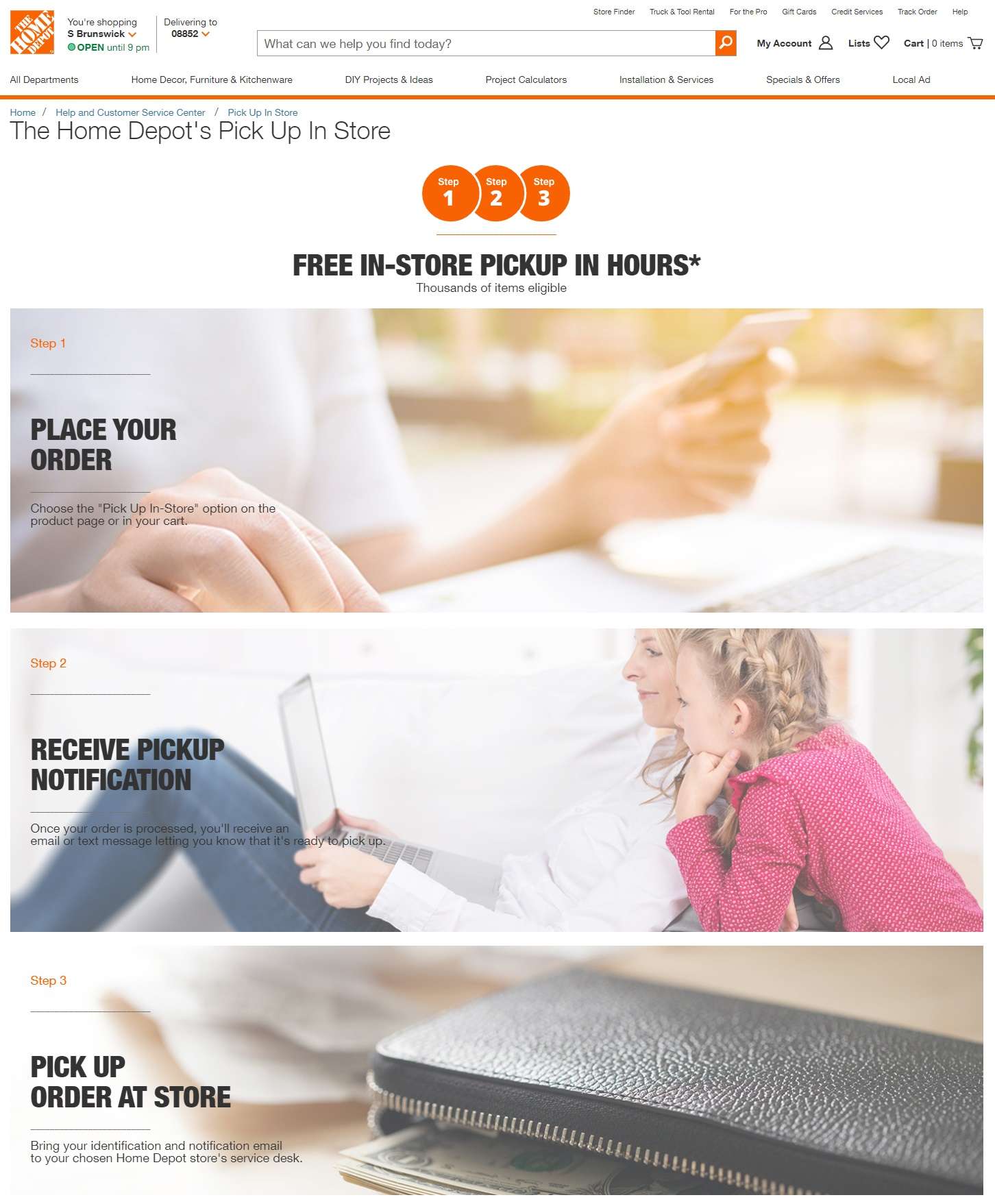
Home Depot has a great landing page for its BOPIS offering that clearly explains its BOPIS process – and according to CEO Craig Menear, the store’s online customers choose to pick up orders in-store more than half the time!
Petco
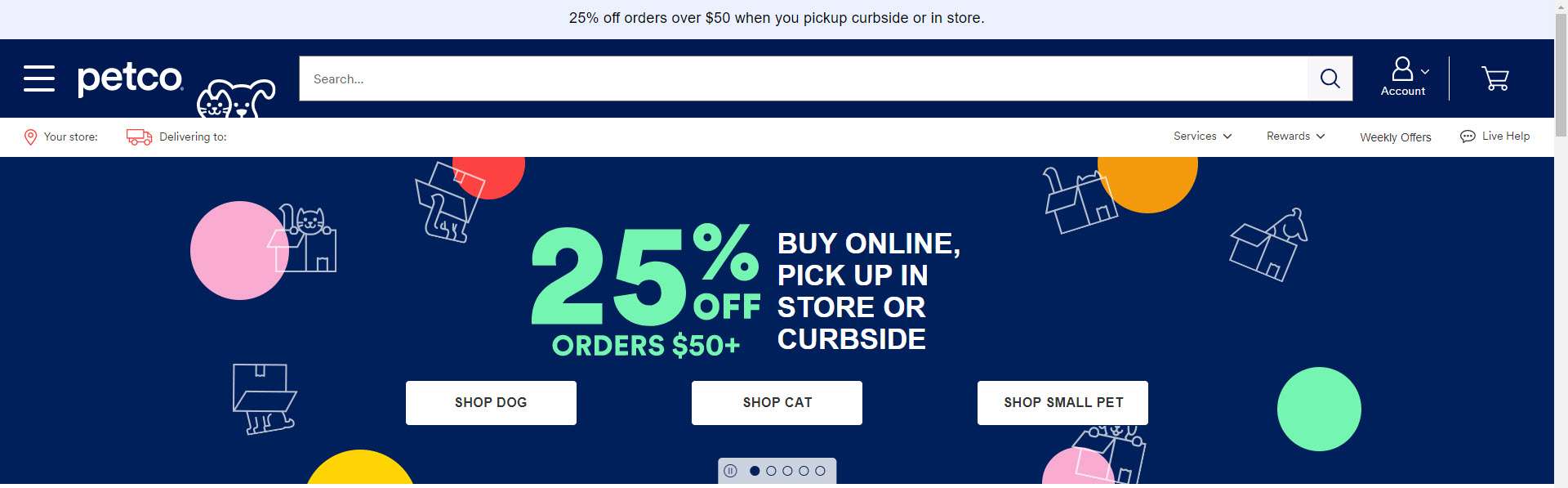
When it comes to enticing customers to take advantage of your buy online, pickup in store strategy, Petco is very successful. The first thing you see when you visit their website (both on the homepage hero image and in a text banner at the top of the page) is a BOPIS promotion.
Star Micronics has the POS solutions it takes to make retailers stand out – online, brick-and-mortar, and everywhere in between.
Download our Retail Brochure to browse our receipt and label printers, online ordering technology, health & safety solutions, and more.
Tikt by retailcloud creates a contactless customer experience for restaurants with the help of Star Micronics printers
Somerset, NJ – March 4, 2021 – Star Micronics, a leading manufacturer of mobile, point of sale (POS), and customer engagement technologies is proud to announce that retailcloud has added support for Star’s mC-Print3 for their new Tikt solution. Tikt allows restaurant customers to scan and see the menu, order their food, and pay their bill on their mobile device to create a truly contactless experience.
Tikt helps upgrade your customer experience, reduce the workload on your servers and you by allowing guests to connect directly to your kitchen and order right from their own devices while seated in your restaurant. Tikt works with any point of sale system and can add to overall profitability – especially during the global pandemic.
Star’s mC-Print3 with CloudPRNT is used with Tikt to send orders directly from the mobile device to the kitchen. The CloudPRNT technology works with the online ordering service to store and create print jobs, and communicate status with the printer. Cloud ordering services post orders using a JSON format while the Star CloudPRNT printer pulls these orders on a defined interval.
“Tikt takes diners to the next step, allowing them to scan a QR Code and connect directly with servers and the kitchen; while improving the overall service quality that servers can provide the guest,” says Kevin Colaco, President of retailcloud. “It also allows restaurants to operate more efficiently, ultimately improving turnover and increasing upsell opportunities.”
As businesses and consumers become more aware of and more familiar with what is needed to continue doing business in the new normal, a brighter light is emerging at the end of the tunnel in terms of the coronavirus pandemic – vaccines are becoming more available and the processes needed to get them into people’s arms more efficient. From a technology perspective, you may wonder which solutions that picked up steam during the past year will continue to gain momentum in the future.
One technology that has taken flight during the pandemic – and has immense potential for years to come – is the self-service market. As the economy reopens and shutdowns become less restrictive, early adopters of self-service kiosks are coming back with revamped versions of their previous kiosk’s solutions, while new adopters are considering the latest trends in the self-service market.
Read on to explore which industries are experiencing self-service market solution changes and key self-service technology predictions.
Which Industries are Experiencing Self-Service Market Changes?
Let’s take a closer look at which industries and solutions have been affected and needed some fine-tuning during the pandemic, and which were introduced as brand-new alternatives to existing technology.
Healthcare and Service Providers: In the healthcare and service provider sectors, a few self-service trends have emerged. These industries have begun to require a more powerful queue management system, as well as additional features such as temperature screening, AI-powered engines, and expanded access control solutions like printing name badge labels for visitors who were cleared during the screening process.
Banking: ATMs have recently gotten a facelift by providing additional human interaction. While ATMs are of course still a self-service solution, intelligent ATMs are pairing their automation power with a human touch by providing teller-customer communication through a speaker. The teller can answer questions, print full transactions, account details, and more.
Retail and Hospitality: With the proliferation of online ordering, the buy-online-pickup-in store (BOPIS) model has become more popular than ever for restaurants and retailers. In some cases, it has even helped to keep businesses afloat that would not have delivery options otherwise. One popular update to the BOPIS model is the introduction of virtual lockers to pick up small-sized orders. The virtual lockers offer many options including the ability for consumers to obtain printed receipts at the locker (or virtually) instead of having to go inside the store.
Self-Service Market Technology Predictions
When we look into the future of the self-service market, many of the trends we expect to see revolve around creating fully contactless processes and transactions, improving on user experience, expectations, and their perception of feeling safe. These trends include:
1. QR Barcode Scanning / Cell Phone-Mirroring Screens
With QR barcode scanning and cell phone-mirroring kiosk screens, customers can turn their own smartphones into a remote kiosk navigation tool and can even complete payments on their own devices.
2. Touchless Touch Screens
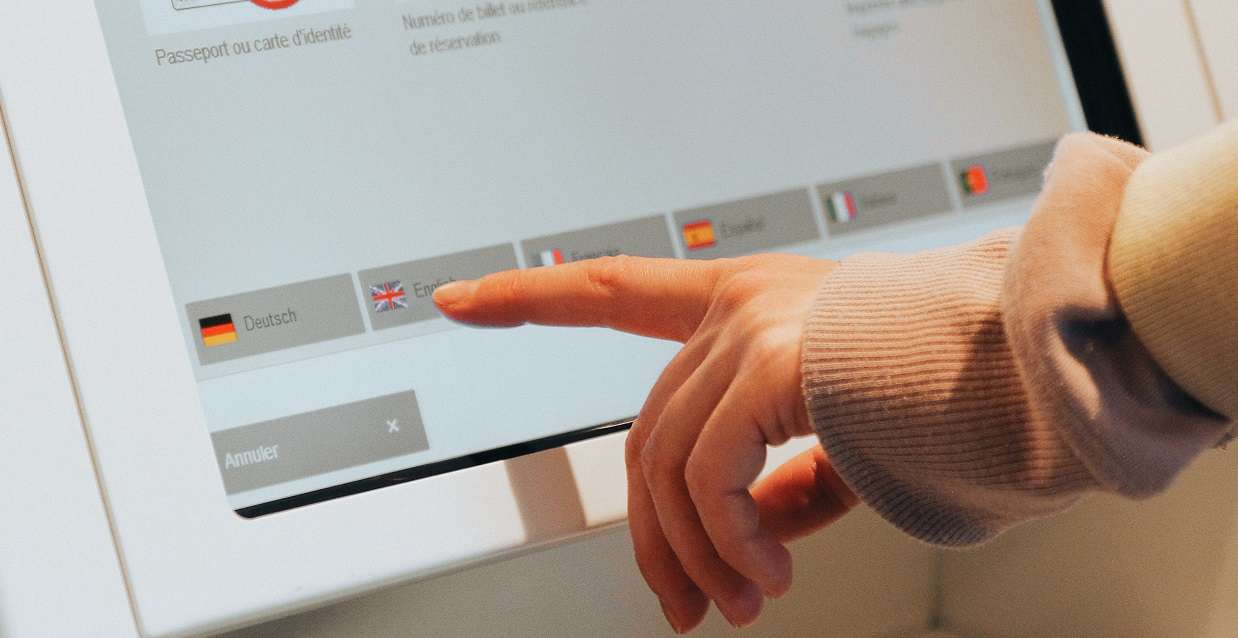
These screens are quickly becoming part of the new standard for self-service kiosks. By using infrared (IR) and even sonar-based technologies, touchless touch screens allow users to interact without touching them, and in some cases they even allow gesture interactions.
3. New Biometric Tools
Biometric tools have been on the market for years but are experiencing updates. For example, Amazon One, available at select Amazon Go stores, uses the latest biometric technologies to allow users to pay with just a wave of their hand. Replacing fingerprint scanners that required direct contact with contactless palm scanners is something we expect to see more of in the self-service market.
4. Self-Cleaning Technologies
When touching is unavoidable, what could be better than a self-cleaning kiosk? Ultraviolet C (UVC) technology, which uses ultraviolet light to kill or inactivate germs, allows this to become a reality by ensuring the touchable areas of a kiosk are cleaned and ready for the next customer after each use. As more users become aware of the benefits that UVC technology offers, it may become something they expect in all self-service kiosks which will in turn encourage a stronger adoption of it within the self-service market.
The possibilities for the self-service kiosk market are truly endless, as the need for self-service has become more relevant and diverse than ever before. We’re excited to watch the market evolve.
Star Micronics Self-Service Solutions
Looking to expand your self-service offering? Star Micronics is proud to offer a wide variety of thermal kiosk printers capable of printing receipts, labels, tickets, and more. Ideal for virtually any self-service application, the printers include features like:
A variety of paper sizes (2”, 3”, and 4”)
Compact or modular footprints
Multiple optional accessories like bezels, presenters, large paper roll holders, and more
Interfaces like serial, USB, parallel, and Ethernet
Operating system support for Windows, Linux, Android, Mac, and iOS
StarPRNT emulation, allowing software developers to take advantage of all of Star Micronics’ technology like StarPRNT SDKs and its powerful line of drivers
A dedicated integration team ready to help you build the right solution for your needs
Kiosk Printer Wizard
Star Micronics offers a full variety of self-service kiosk printers – but deciding which one fits your needs can be easy. This wizard will help you select the right printer for your specific use case, based on desired paper size, interface, footprint, operating system, accessories, and more factors.
Curbside pickup is here, and it is here to stay. In fact, according to Technomic’s 2020 Delivery and Takeout Consumer Trend Report, 66% of consumers anticipate continuing to use curbside pickup after dine-in services resume. Simply put, if you haven’t started offering curbside pickup, now is the time to do so, and we’re here to help. Read on to explore our guide on how to offer curbside pickup.
Why Offer Curbside Pickup?
Needless to say, the restaurant industry has been hit very hard during the COVID-19 pandemic. There was a lot of emphasis specifically on restaurants in terms of the spread of the virus. To protect the public, restaurants worldwide faced multiple shutdowns, reduced hours of operation, and regulations on when alcohol can be served (which was especially hard on restaurant revenue, since alcohol makes up a significant amount of restaurant sales). Unfortunately, as of the end of 2020, 17% of restaurants have closed due to the pandemic.
One solution to help both existing restaurants trying to maintain or increase sales, and new restaurants opening during the pandemic, is curbside pickup. For a part of 2020, because so many restaurants had to close dine-in service, takeout and delivery where the only options, and both offer different benefits to businesses. While delivery can increase a restaurant’s visibility and is a very convenient option for customers, curbside pickup and takeout services can potentially help restaurants boost profits and help customers save money by avoiding additional fees and tips.
6 Crucial Technologies for Successful Curbside Service
Ignite your curbside service’s full potential with these six crucial technologies.
How to Offer Curbside Pickup: What Technology is Involved?
Rest assured that with the right tools, curbside pickup is an easy solution to provide. Read on to learn more about what online ordering technology is beneficial to a curbside pickup strategy, as well as other useful curbside pickup tools and tips including mobile printing for curbside receipts, tamper-proof labels, and marketing suggestions.
Online Ordering Technology
The right technology can take a restaurant’s curbside pickup strategy from blah to whoa. While of course customers can still call in their orders, online ordering makes the process more convenient and cuts down on any inaccuracies during order-taking, which in turn makes customers happy and restaurants more profitable.
As online ordering booms, so do the number of services available for it. One rule of thumb to keep in mind is that you will need both an online ordering software application and printers within the restaurant that are integrated with your software and can print kitchen tickets, labels, and receipts.
Implementing a curbside pickup strategy that runs like a well-oiled machine likely means you’ll achieve repeat customers and increased revenue. Some key features to look for in your online ordering software and hardware are:
Accurate Pickup Time Estimations: The time required to prepare an order often varies. Sometimes there are not as many orders being placed and meals can be prepared quickly, but other times like during peak times of the day, there can be a delay between when an order is placed and when the kitchen staff can prepare it. Boost customer satisfaction by choosing a service that prioritizes accurate pickup time estimations.
Customizable Digital Menu: Be sure to choose an online ordering application that allows you to easily create a customized, user-friendly online menu landing page.
Automatic and Robust Printing: Automatic printing is key to a successful online ordering and curbside pickup strategy. Online ordering printers, like Star Micronics printers, automatically print an order in the kitchen once it is placed, avoiding unintentionally skipped orders or orders completed out of sequence. Printer manufacturers like Star Micronics can also provide a robust lineup of printing solutions for all of your restaurant’s needs, including impact kitchen printers that produce kitchen tickets which remain intact even in the heat, and linerless label printers that print labels which are repositionable and boost order accuracy up to 99%.
Easy Installation: Implementing your curbside strategy doesn’t need to be complicated. Be sure to choose a software provider that helps you get up and running quickly, and printers that work out of the box with your chosen software. Also be sure that each provider offers top-notch customer service and technical support should you need assistance at any point.
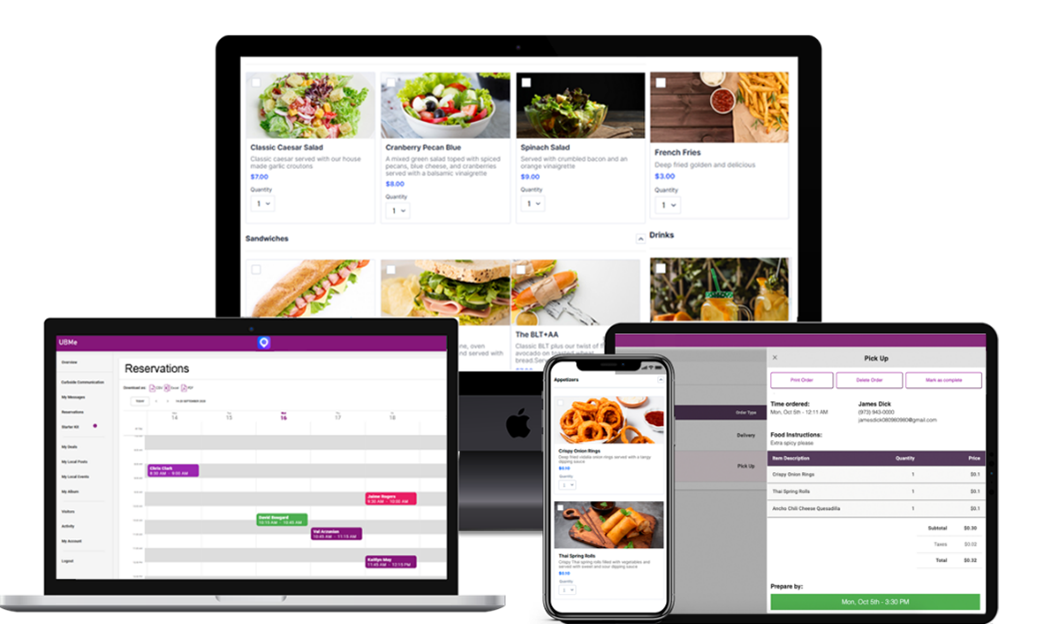
Affordability: At a time when profitability can make or break a restaurant, it’s important to choose an affordable online ordering/curbside pickup solution. For example, UBMe software is available with an affordable monthly rate and a Star Micronics online ordering printer is a simple one-time fee. The best part is that when combined, these technologies can help restaurants see large increases in revenue by providing a seamless, customer-friendly online ordering and curbside pickup solution.
The UBMe online ordering platform is affordable, intuitive, and allows for restaurant customization.
Other Useful Curbside Pickup Tools and Tips
Curbside Receipt Printing: While most online orders are paid online with a credit card, sometimes customers want to pay curbside. In that case, it’s important to be prepared with a reliable portable receipt printer that is compatible with Bluetooth, iOS, and Android, and includes a magnetic stripe reader (MSR).
Tamper-Proof Labels: Take your curbside pickup game to the next level and put your customers’ minds at ease with tamper-proof labels that seal food bags and drinks, and provide visual evidence of tampering.
Marketing: Be sure to spread the word far and wide that your restaurant offers curbside pickup. You can post about it on your social media accounts, send emails to your existing customer base, and even promote it for free on your dine-in and delivery receipts with Star Micronics PromoPRNT.
UBMe and Star Micronics: Making Curbside Pickup Easy
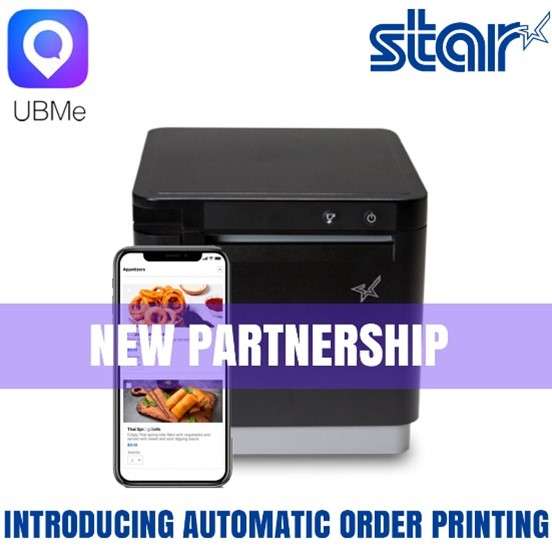
Recently, UBMe and Star Micronics partnered up to provide restaurant owners online ordering and automatic printing of orders.
UBMe’s powerful online ordering and curbside communication platform for restaurants allows restaurant owners to increase their sales and revenue. With advanced patented technology, exceptional customer service, and expert marketing strategy, we help increase restaurant profits. What makes UBMe’s technology special: Upon arriving at the restaurant, customers can “check-in” using the free UBMe app to privately message staff. The customer can let staff know they arrived, chat with other customers, leave comments, pay for additional items, all while practicing social distancing.
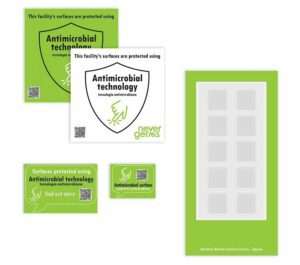 have been tested and are EPA-registered and latex-free.