Category: Product Updates

  • Star Software Update: IFBD-HI01X/HI02X Firmware Update

    Star Software Update: IFBD-HI01X/HI02X Firmware Update

    Welcome to the Star Software Update, the regular series of blog updates where Star’s Integration Team informs you about the latest important Star Micronics software updates.

    What’s New:

    Star Micronics has released the firmware update (version 1.9.2) for the CloudPRNT interface (IFBD-HI01X/HI02X).

    What is the CloudPRNT Interface?

    The CloudPRNT interface (IFBD-HI01X/HI02X) is available on Star Micronics mC-Print2, mC-Print3, TSP650II, TSP700II, and TSP800II thermal POS printers, as well as the SP700 impact kitchen printer.

    This versatile interface provides intelligent printing for cloud-based retail, logistics and hospitality applications, enabling unmatched flexibility for remote receipt and remote order printing using a standard receipt printer.

    What is Included in the Update?

    New Wi-Fi adapter support has been added to the interface during this update. Supported Wi-Fi dongle models include:

    • EDIMAX EW-7811UN V2
    • TRENDnet TEW-648UBM V2.0R
    • ASUS USB-AC53 Nano
    • D-Link DWA-182 HW Ver:D1

    Learn more about CloudPRNT in the below video:

    Next Steps

    This firmware can be updated in the web settings interface for the IFBD-HI01X/HI02X.

    Questions or Comments?

    Contact Star Integration Now

  • Star Software Update: How To Install futurePRNT Driver Update (Ver 7.5.1)

    Star Software Update: How To Install futurePRNT Driver Update (Ver 7.5.1)

    Welcome to the Star Software Update, the regular series of blog updates where Star’s Integration Team informs you about the latest important Star Micronics software updates.

    What’s New:

    Star Micronics has released the futurePRNT v7.5.1 to address issues related to a Windows 10 update issue.

    About the Issue

    Windows 10 updates released on June 8, 2021 have been reported to cause printing problems with USB printers, and may also cause some cash drawers to not close properly.

    More information on the issue can be found here: https://starmicronics.com/help-center/knowledge-base/resolving-usb-printer-queue-issues-related-to-june-2021-windows-update/

    The Solution

    In addressing the printer/cash drawer malfunctions related to recent Windows 10 Updates, Star Micronics developed a driver update to resolve this matter. Please use the following links to download the driver and access the installation guide.

    Questions or Comments?

    Contact Star Integration Now

  • Star Software Update: CloudPRNT for WooCommerce on GitHub

    Star Software Update: CloudPRNT for WooCommerce on GitHub

    Welcome to the Star Software Update, the regular series of blog updates where Star’s Integration Team informs you about the latest important Star Micronics software updates.

    What’s New:

    Star Micronics has added its CloudPRNT for WooCommerce WordPress plugin to GitHub.

    What is CloudPRNT for WooCommerce?

    WooCommerce-LogoStar’s free CloudPRNT for WooCommerce plugin for Star receipt printers can be used to quickly create a remote order or receipt printing solution for restaurants, bakeries, boutique retailers, and more – with minimal cost and setup time.

    Star-CloudPRNT-Logo-FINAL-May2019-e1574805077699

    By offering online purchasing options, retail stores and restaurants are able to grow their business and expand to a larger market. Star CloudPRNT allows businesses to seamlessly integrate online purchasing into their stores and enables the automatic printing of receipts on Star’s CloudPRNT thermal receipt printers including Star mC-Print2 and mC-Print3, and TSP600II, TSP654IISK, TSP700II, and TSP800II.

    CloudPRNT provides intelligent printing from a web server from any network to connected Star printers anywhere in the world, without the need for a local POS terminal. This enables unparalleled flexibility for remote receipt and remote order printing using a standard receipt printer.

    Additionally, CloudPRNT technology provides benefits to both restaurant and retail stores alike by eliminating the need for an extra tablet to send an online order to the printer. Instead, the ordering service communicates directly with the printer. The store owner or service provider does not need to maintain an SSL certificate for CloudPRNT printers since they communicate with the server as a client.

    Learn More about CloudPRNT

    Next Steps

    Click here to access CloudPRNT for WooCommerce on GitHub.

    CloudPRNT for WooCommerce installation instructions are available here: https://wordpress.org/plugins/star-cloudprnt-for-woocommerce/#installation

    You may also learn more about the installation in the below video:

    Questions or Comments?

    Contact Star Integration Now

  • Star Software Update: Star Document Markup Language

    Star Software Update: Star Document Markup Language

    Welcome to the Star Software Update, the regular series of blog updates where Star’s Integration Team informs you about the latest important Star Micronics software updates.

    What’s New:

    This month, the Star Micronics Integration Team is highlighting the Star Document Markup Language.

    What is Star Document Markup Language?

    Star Document Markup Language is a simple, easy-to-use markup language intended to provide the features typically required for point of sale (POS) printing.

    Cloud servers based on the StarMicronics.CloudPRNT-Utility API package or tools based on it like cputil, can support the Star Document Markup Language.

    Using the document markup system provides a balance between full bit-image based printing and plain text output, while being easier to use than direct device commands and far more adaptable to different output devices, like print width.

    One benefit of markup is its ability to handle different print widths without compromising the receipt format. Use cases include printing order tickets in the restaurant kitchen, printing receipts for orders, or printing sticky labels to seal bags.

    Star Document Markup Language is easy to read; take a look at the below example:

    [align: centre][font: a]

    [image: url ;

    width 60%;

    min-width 48mm]

    [magnify: width 2; height 1]

    This is a Star Markup Document!

    [magnify: width 3; height 2]Columns[magnify]

    [align: left]

    [column: left: Item 1;      right: $10.00]

    [column: left: Item 2;      right: $9.95]

    [column: left: Item 3;      right: $103.50]

    [align: centre]

    [barcode: type code39;

    data 123456789012;

    height 15mm;

    module 0;

    hri]

    [align]

    Thank you for trying the new Star Document Markup Language

    we hope you will find it useful. Please let us know!

    [cut: feed; partial]

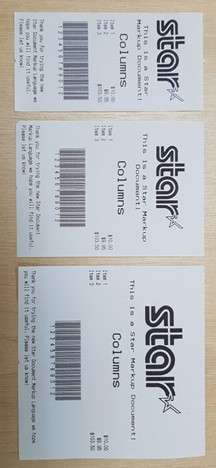
    This will generate the following output on Star 58mm (2-inch), 80mm (3-inch) and 112mm (4-inch) printers:

    Star-Markup-Document-Language-Receipts

    Unicode Support

    By using the Star Document Markup Language, you can avoid the difficulties of limited 8-bit text encodings by being entirely Unicode-based. Input data should be from a Unicode-compatible data file or strings.

    Star TSP654II, mC-Print2, and mC-Print3 devices have native support for Unicode. When a device does support Unicode directly, the Star markup renderer will automatically handle the necessary conversion.

    File Format

    Markup source files are plain text files encoded as UTF-8, UTF-16, or plain Ascii data.

    When opening a document, initially the start of the file will be checked for a Unicode BOM (Byte Order Mark) in order to recognize that the file contains UTF-16 (Big Endian or Little Endian encoded) or UTF-8 data. If no known BOM is found, then the file will be treated as a UTF-8 file unless it contains code points that are not UTF-8 valid, in which case it will be opened finally as plain 7-bit Ascii.

    In addition, the extension of the text file written in the Star Document Markup format should be “.stm”. The cputil executable and also .NET API for StarMicronics.CloudPRNT-Utility packages recognize the Star Document Markup format by checking the file name extension. If the extension is “.txt” it will be recognized as a plain text file and will not be command parsed as the Star document markup.

    Next Steps

    Do you have questions or concerns about the Star Document Markup Language?

    Contact Star Integration Now

  • Star Software Update: SteadyLAN® SDKs on GitHub

    Star Software Update: SteadyLAN® SDKs on GitHub

    Welcome to the Star Software Update, the regular series of blog updates where Star’s Integration Team informs you about the latest important Star Micronics software updates.

    What’s New:

    Star Micronics has added multiple SDKs to GitHub, which are now available for download and use. Each SDK is meant for changing the SteadyLAN® setting on the mC-Printer.

    SteadyLAN is a patent-pending technology available on certain mC-Print Series printers. It provides wired Ethernet service to iOS, Android, and Windows devices connected to a networked printer via the Lightning or USB-C® cable.

    Release Date:

    The SDKs were officially added to GitHub by the Star Micronics integration team on December 20 and 21, 2020.

    What is Included in the Update?

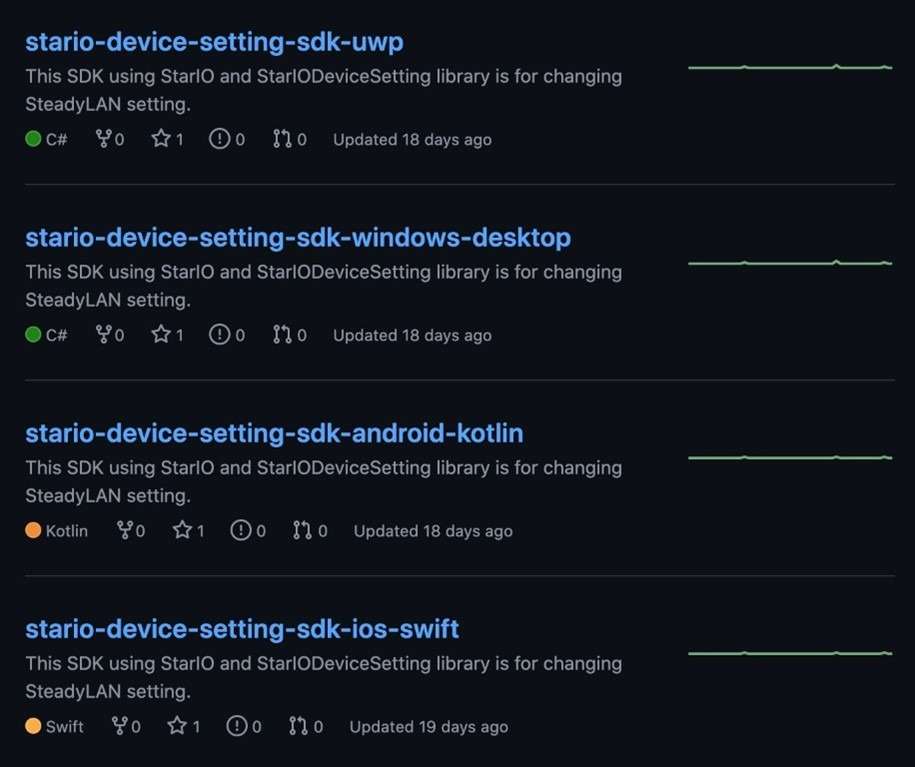
    Four SDKs were added to GitHub, including:

    • “StarIO-Device-Setting-SDK-UWP” in C#
    • “StarIO-Device-Setting-SDK-Windows-Desktop” in C#
    • “StarIO-Device-Setting-SDK-Android-Kotlin” in Kotlin
    • “StarIO-Device-Setting-SDK-iOS-Swift” in Swift

    GitHub-SDK-Screenshot

    Next Steps

    Visit Star Micronics on GitHub to get started with these new SDKs, as well as several other Star SDKs for our printers and cash drawers.

    Visit Star on GitHub

    Learn More About SteadyLAN

    Say goodbye to unstable Wi-Fi signals with SteadyLAN! Available on the Star Micronics mC-Print 2 and mC-Print3, SteadyLAN™ provides:

    • Direct data transfer between iOS, Android, and Windows devices and the printer via Apple Lightning or USB-C® cable
    • Direct Ethernet connectivity to devices from the wired Ethernet port of the printer
    • Device charging via Apple Lightning cable or USB-C® cable
    • Peripheral control (scanner, display) via printer USB host ports

    Learn more in the below video:

    Questions or Concerns?

    Contact Star Integration Now

  • Visit Star’s Virtual Booth at NRF 2021: Retail’s Big Show – Chapter 1

    Visit Star’s Virtual Booth at NRF 2021: Retail’s Big Show – Chapter 1

    Needless to say, NRF (Retail’s Big Show) looks a lot different this year than it did last year. However, just like previous years, this January’s show (NRF 2021: Retail’s Big Show – Chapter 1) is sure to be the most informative show in the retail industry. In fact, with the current landscape of retail, this may be the show’s most important year yet. The unprecedented coronavirus pandemic has catapulted online ordering, social distancing, and more to the top of retailers’ priority lists, and the show is sure to deliver the best and latest solutions for retail businesses during the ongoing pandemic – and well beyond.

    About the Show

    Per the show’s website,

    “This January, plugging in starts with logging in.

    This has been an unprecedented year, with the retail industry showing tremendous resilience, agility and leadership in the face of a global pandemic. It’s with that spirit that the National Retail Federation is proud to announce Retail’s Big Show will continue as a virtual event in January 2021.

    NRF 2021: Retail’s Big Show – Chapter One is meant to address the immediate needs facing retailers today. It’s a jumping-off point that will lead the retail industry forward until we can meet in person at NRF 2021 – Chapter 2, taking place June 2021 in New York City.

    NRF 2021 – Chapter 1 is an online version of Retail’s Big Show that includes all new curated sessions, networking programs and a virtual Expo where you can easily connect with the industry’s brightest solution providers.”

    Reminisce about Star’s NRF 2020 booth


    What to Expect from Star at NRF 2021 – Chapter 1

    The Star team is excited to see you at NRF 2021 – Chapter 1 and show you our latest offerings for COVID-19, online ordering, retail, and more. Keep reading to explore our featured products and click here to access our custom virtual booth link that will be live to registered attendees during the show.

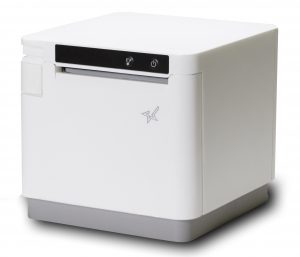
    mC-Print3

    The mC-Print3 receipt printer with multiple interface options and HUB connectivity to power up to three peripheral devices.

    • Sleek, compact, connected
    • Unique Print Flat technology feature
    • Easy to integrate through common SDK
    • Bluetooth, USB, Lightning, LAN, CloudPRNT, USB-C
    • IPX2 splash-proof design
    • SteadyLAN® technology (mCP31L, mCP31LB, MCP31C, MCP31CB)
    • Peripheral device connectivity – cash drawer, customer display, 1D scanners, HID class devices (keyboard mode)
    • Fast charge and communication via USC-C® power delivery port (MCP31C/CB)

    Learn More

    POSShield

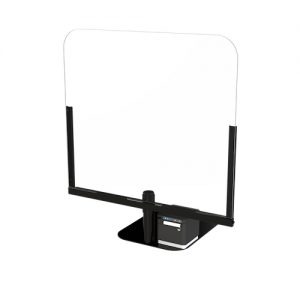
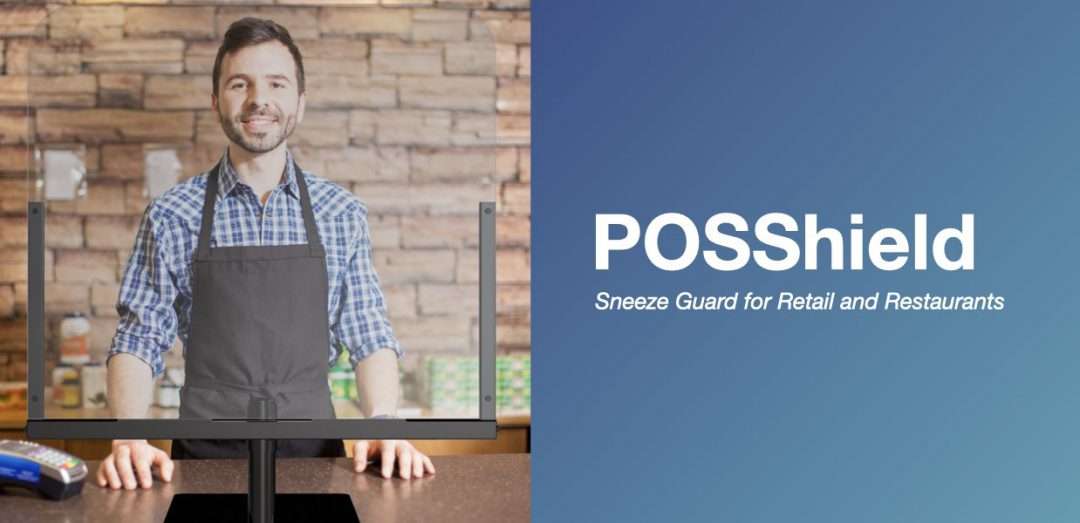
    The POSShield, which acts as a sneeze guard and limits the spread of germs, is placed in between the cashier and the customer, and is comprised of a durable steel frame and a protective plexiglass partition.

    • Limits the spread of germs
    • 30” wide and 33” tall
    • No countertop mounting or drilling required
    • Adjustable mounting pole
    • Compatible with any existing POS or mPOS terminal
    • Lightweight and portable

    Learn More

    TSP654IISK

    The TSP654IISK liner-free label printer is designed to work with liner-free labeling applications. Repositionable thermal labels can stick to virtually any surface, and can be removed easily and reapplied leaving behind no residue.

    • Repositionable, liner-free thermal label solution
    • Improves order accuracy up to 99%
    • Liner-free yields 60% more labels/roll than diecut
    • 80mm and 58mm paper support
    • High reliability and performance at a low cost
    • Optional vertical stand

    Learn More

    Choice Series Cash Drawers

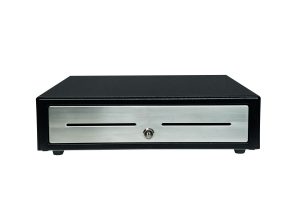
    Choice Series cash drawers include features businesses already know and love, but with added features such as extra strength to support touch tablets and POS terminals, a secure dual-drawer cable to enable the Choice Series to work as either cash drawer 1 or cash drawer 2, a foldable hinged key which minimizes the possibility of breaking off in the lock, and over 10 different lock set options for added security.

    • Industry standard, extra durability
    • Feature-packed for any POS system
    • Available in two sizes: 14” x 16” and 16” x 16”

    Learn More

  • Star’s Integration Team on GitHub

    Star’s Integration Team on GitHub

    Developing software is difficult without the right support. Star Micronics has created an official GitHub account to make our software partners’ lives easier. We have added our most popular and most useful SDKs to the account with more to come. Star’s Integration Team is here for you during the development process and we want to hear your feedback. Star looks forward to creating a dialogue between our global software teams and our community of software developers so we can continually improve our tools.

    Why GitHub?

    If you don’t already know what GitHub is, you can imagine it as social media platform for developers. It has quickly become a leading place for developers to share and collaborate on code. Users can also create their own repositories, contribute to other repositories, and suggest edits to existing repositories via an issue log.Star Micronics created a global account to make integrating Star products easy for our softwarepartners. Our goal is to make development as simple as possible for our partners when they are looking for SDKs or integration support for our products.

    When navigatingStar’s GitHub page, you will find a growing number of our SDKs and other helpful code. Some of the development tools currently available are listed below with more to come in the future.

    1. StarPRNT SDK iOS (Swift)
    2. StarPRNT SDK Android (Java)
    3. CloudPRNT SDK
    4. Android USB Cash Drawer SDK
    5. SteadyLAN Setting SDK (iOS, Android, Windows)
    6. React Native SDK

    Working with the Integrations Team

    The typical expectations when working with an Integrations team is simple — work collaboratively during the coding process until your software is integrated. What you get when working with Star is not the typical software/hardware partnership; integration is just the beginning. We treat our partnerships like the backbone of our company, and we cannot be successful without them. Once we help to integrate the hardware, our next focus becomes aligning our goals with yours. This leads us to growth on both sides of the partnership. Star can offer our partners a unified marketing strategy that will meet both our objectives while growing business. For more information on what a software partnership provides read more here.

    Through this new GitHub account we are implementing an initiative to publicly share more beta development tools to quickly gather feedback from our ISV partners to ensure the official releases are meeting the needs of our partners. The first in this initiative is our React Native SDK now available on GitHub. Our team is currently asking for any feedback you can give us. There is no payment necessary for a GitHub account so please feel free to navigate around our page, we are looking forward to hearing from you. 

    Visit Star on GitHub

  • How to Get the Most Out of Mobile Ordering with CloudPRNT

    How to Get the Most Out of Mobile Ordering with CloudPRNT

    Any restauranteur paying attention to the state of the industry today understands that online and mobile ordering are the way of the future. It’s critical that you have these solutions in place to keep your business afloat and keep your customers satisfied.

    You may have considered implementing online ordering before, but were overwhelmed with options and the complexities involved in implementing new technology. Online and mobile ordering is easy to implement, especially with the help of CloudPRNT from Star Micronics.

    Ebook: Is Your Restaurant Ready for the Growing Online Ordering Trend? 

    Eliminate the game of telephone

    Ordering via telephone is on its way out. It is slow, inefficient, and can lead to errors. Online ordering however, takes no time away from staff since it is conducted entirely on the customer’s end.

    On top of that, the increased order accuracy alone is reason enough to invest in a kitchen printer and online/mobile ordering system. You can entirely eliminate hand-written tickets, which are altogether inefficient and difficult to read. Not only do you benefit from the time saved from duplicate efforts, but you also achieve less waste.

    Seamlessly integrate online ordering into your restaurant operations

    When you are able to integrate your systems, you can share data and eliminate manual order re-entry—leading to major reductions in the number of dropped or wrong orders. Improved order accuracy will boost customer satisfaction, increase customer retention, and result in more positive reviews. Rather than investing in pricey kitchen display systems, you can install a simple, compact printing system, while still gaining all the value of online ordering.

    Online ordering will offer you an opportunity to expand your service area and reach new customers that are looking for the convenience of ordering anytime, anywhere through their laptops or mobile devices. This is especially helpful if you are looking to utilize third-party online ordering services. These often have native users that can be introduced to your restaurant when they use the app. Third-party services can help you reach new customers and market to them. By meeting this demand, you can grow your customer base, build customer loyalty, and keep them coming back for more.

    Boost your restaurant’s online ordering efficiency

    Receiving orders from third-party sites and sending them to the kitchen can still be a pain point for some restaurants—especially if you work with more than one-third party service. Disorganization can disrupt your operation in severe ways. If you’re relying on outdated services like email to receive orders from several different applications, you are asking for problems.

    Sometimes customers can enter in multiple orders, or one or more employees may be assigned to communicate orders to the kitchen by entering them into the POS system. Processes like these require time and effort, and errors can still occur when orders are transferred between front- and back-of-house staff.

    Installing CloudPRNT streamlines the process by sending all of your online orders directly to the kitchen printer. Once there, staff can receive the orders, along with any instructions and modifiers, and begin preparation immediately. CloudPRNT (especially when paired with peripherals like the mC-Sound buzzer) streamlines the ordering process, speeding up service and satisfying customers.

    What is CloudPRNT:

    CloudPRNT is an innovative technology that enables users to print to Star printers directly through a cloud service. CloudPRNT works with the online ordering service to store and create print jobs, and to communicate the status with the printer. CloudPRNT is compatible with third party online ordering and delivery providers, such as DoorDash, UberEats, Postmates, Seamless, and GrubHub. Once an order is received, it will be sent directly to the Star printer and your kitchen staff, expediting order prep. Additionally, with CloudPRNT, restaurants can eliminate the need for an extra tablet just to send the incoming online order to the printer.

    CloudPRNT is offered by Star Micronics, a leading supplier of high-quality, feature-rich technology hardware solutions and services. Star Micronics America is committed to offering truly innovative products that address the needs of restaurant owners. Our experts have a deep understanding of the hospitality industry and can assist business owners with identifying the right solutions for their business.

    Contact us for more information on how you can boost your bottom line and increase loyalty with CloudPRNT from Star Micronics.

    Contact Star Integration Now

  • What Restaurateurs Need to Know About Sneeze Guard Height Requirements

    What Restaurateurs Need to Know About Sneeze Guard Height Requirements

    Sneeze guards have been staples in restaurants long before the pandemic first hit. What originally started out as a solution to improve the health and safety of buffet-style dining quickly became a federally-mandated requirement.

    Back in 1958, a restaurateur and self-proclaimed germaphobe named Johnny Garneu started looking for a solution that would block viruses and bacteria from contaminating food at the buffet tables while customers leaned over them. Having no luck, he decided to strike out and invent his own, patenting the product that year.

    The sneeze guard was so effective and popular that the FDA later mandated that sneeze guards must be present in all self-service dining establishments. While they are still popular with self-service operations, COVID-19 has transformed them into something else entirely.

    It is now critical that restaurants implement sneeze guard solutions within their establishments in order to increase safety, but it’s equally important to make sure that the correct solution is installed and meets the right requirement.

    Height and Angle

    When searching for the right sneeze guard solution to install, it’s important to consider the placement and positioning of the guard – namely the height and angle. To account for this, consider the height of your typical customer. Usually the average customer is somewhere between 5 and 6 feet tall. Also account for the height of the structure holding the guard.

    As for the angle, it’s important to consider whether customers are serving themselves, or are being served by others. In a cafeteria-like environment where employees are preparing food, a full-service sneeze guard will be ideal. For buffet and salad bards, a self-service sneeze guard would be the optimal choice.

    Download our Restaurant Disaster Relief Checklist for full details on keeping your restaurant safe.

    Regulations and Guidelines

    Both full-service and self-service sneeze guards have guidelines and regulations for how they must be used. Some of these are federal guidelines, but most depend on specific region and locality. Check with local governing authorities for specific regulatory requirements for sneeze guards in your area.

    Sometimes, you will find mandates for things like barrier thickness, materials, height requirements, and construction. You may also find instructions on how sneeze guards should be properly used and how often they must be replaced. In general, replace sneeze guards when they become cracked, scratched, or show other signs of wear and tear. For most restaurants, it’s a good idea to go for an NSF-2 sneeze guard, which is the industry-accepted standard.

    Visibility

    It is a requirement that all food and staff behind the sneeze guard must be clearly visible to the customers. Damaged, scratched, or dirty sneeze guards can block the customer’s view and can lead to complaints or confusion. Avoid negative impressions and prevent poor customer experiences by cleaning your sneeze guard regularly and ensuring any damaged components are fixed or replaced as soon as possible.

    Choose the right sneeze guard solution for you restaurant

    Beyond federal and local regulations and requirements for sneeze guards, there are many other factors to consider when choosing a solution to install:

    Easy installation and relocation

    Some solutions must be permanently mounted on countertops, requiring drilling into the countertop to fasten the sneeze guard to the surface. If you aren’t looking to permanently install a sneeze guard, or have little downtime for drilling, sneeze guard solutions exist that come with easy-to-mount stands that make them portable and reusable. Adjustable mounting poles make it easier to accommodate height requirements.

    Adaptability

    A sneeze guard at a checkout counter will require a wide enough gap to enable the safe passing and scanning of products between customer and employee. An adjustable mounting pole can make it easier to accommodate different environments, and can be adjusted accordingly to fit the cashier’s needs.

    Make sure to consider where peripherals like pin pad terminals will be placed. Choose a solution that accommodates these peripheral hardware solutions without overcrowding the counter.

    Durability

    One of the most important considerations for selecting the right sneeze guard for your restaurant is durability. It’s critical that your sneeze guard can withstand the tough environments commonly found in restaurants. A steel frame is a must if you want your sneeze guard to last. Be sure to choose a plexiglass display as well. These are easy to clean and are both flexible and strong.

    Compatibility with Mobility Solutions (Make it a Bundle!)

    The final consideration is whether or not your sneeze guard pairs well with your existing POS or mobile POS terminals. Consider how much space you have available on your countertop, and whether or not the design is compact enough to fit your space.

    If you need more than just a sneeze guard, make it a bundle with the Star Micronics POSShield. This sleek stand offers a small footprint and pairs well with the mC-Print receipt printers and mC-Sound kitchen buzzer. It also includes supplies to mount the PIN pad to the stand itself for extra space savings.

    If you are interested in learning more about the Star Micronics POSShield, and how it can help keep your restaurant environment safe, contact the experts at Star Micronics today.

    Learn about Star’s POSShield

  • Star Software Update: mPOP™ Firmware Update (HID Support)

    Star Software Update: mPOP™ Firmware Update (HID Support)

    Welcome to the Star Software Update, the regular series of blog updates where Star’s Integration Team informs you about the latest important Star Micronics software updates.

    In this edition:

    • mPOP™ Firmware Update via the mPOP Utility App. mPOP can now support most HID devices

    Read on to learn what this month’s update entails.

    What is Included in the Update?

    The latest mPOP firmware update includes functionality enabling the mPOP to support most human interface device (HID) devices like scanners, RFID readers, and more.

    Please note that HID device support has already been released for the mC-Print Series (mC-Print Firmware Update (v3.0) via the mC-Print Utility App (v1.5.0)).

    What are HID Devices?

    According to Wikipedia,

    “A human interface device or HID is a type of computer device usually used by humans that takes input from humans and gives output to humans. The term ‘HID’ most commonly refers to the USB-HID specification.”

    Common HID devices include:

    • Scanners
    • RFID readers
    • Bump bars
    • Keyboards & refreshable braille displays
    • Magnetic Stripe Readers
    • And more

    Next Steps

    The new HID device support functionality can be accessed by updating the mPOP’s firmware, which you can do via the mPOP Utility App. The mPOP Utility App is available for download on the App Store for iOS and the Google Play Store for Android.

    Learn More About mPOP

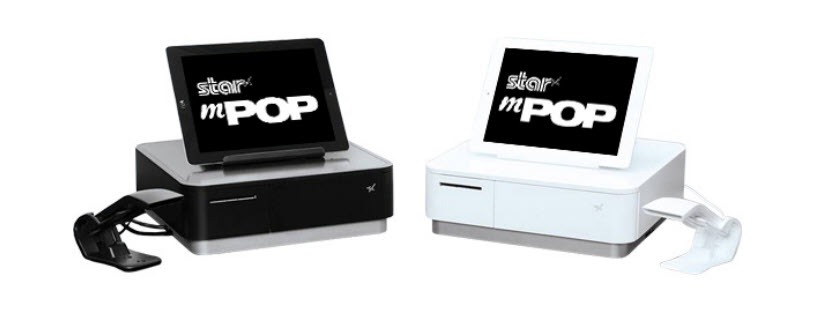
    mPOP Black and White

    The functions and connectivity of the mPOP make processing customer transactions smooth and effective for small shops, cafes, florists, bars, and many more. Aesthetically simple and elegant, the mPOP provides the ultimate point of sale solution for the new face of mPOS.

    Key Features:

    • Printer – cash drawer – scanner – device stand
    • Compatible with iOS, Android, and Windows
    • Cable management with multiple exit options
    • Cash drawer: 4 bill and 6 or 8 adjustable coin slots
    • Bluetooth 2.1 and USB connectivity
    • “Drop-In & Print” paper loading

    Click here to learn more about mPOP.

    Questions or Concerns?

    Contact Star Integration Now