Tag: Web-Based POS

  • WebPRNT vs StarXpand SDK for Web: Choosing the Right Browser-Based Receipt Printing Solution

    WebPRNT vs StarXpand SDK for Web: Choosing the Right Browser-Based Receipt Printing Solution

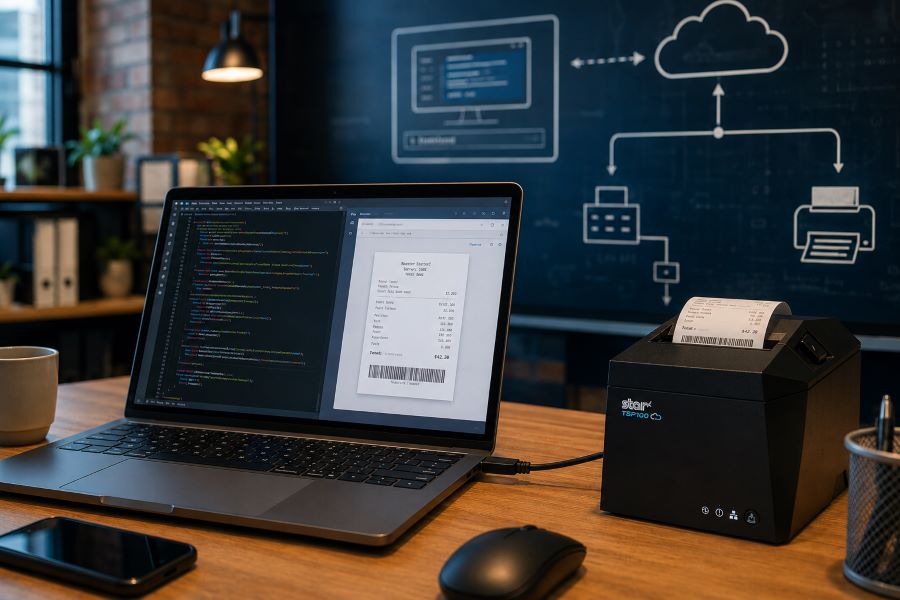
    Browser-based receipt printing has become a core part of POS applications across retail, restaurants, kiosks, and self-service environments. As cloud POS platforms and online ordering systems continue to grow, software providers need reliable ways to trigger receipts, labels, and kitchen tickets directly from web applications.

    For years, Star Micronics’ WebPRNT has given developers a practical way to handle local USB printing directly from the browser, without requiring desktop software or additional middleware.

    Today, StarXpand SDK for Web builds on that same browser-to-device model with a more unified SDK for printing and peripheral control, while CloudPRNT supports LAN and cloud-managed printing across distributed environments.

    Understanding where each fits can help ISVs reduce integration complexity and choose the right architecture for long-term growth.

    Table of Contents

    How Browser-Based Receipt Printing Has Changed

    When browser-based POS systems became more common, one of the biggest technical challenges was local printer communication. A web application could manage transactions, but connecting directly to a receipt printer from a browser was often difficult without middleware, desktop applications, or custom local services.

    WebPRNT helped solve this by enabling direct browser-to-printer communication over USB. This made browser-based printing practical for:

    For many ISVs, this reduced deployment friction and simplified local printing workflows. But browser-based printing requirements have expanded.

    Today, many deployments include:

    • Multi-location stores
    • Cloud-managed ordering systems
    • Distributed kitchen printing
    • Shared hardware environments
    • Remote print routing

    That shift changes how printers need to communicate. Some environments still depend on local USB printing. Others now require printers to communicate over LAN or directly with cloud services.

    That distinction is what separates WebPRNT, StarXpand SDK for Web, and CloudPRNT.

    What Is WebPRNT?

    WebPRNT is Star’s browser-based printing technology designed specifically for browser-based receipt printing over direct USB connections. It allows web applications to send print jobs directly to supported Star printers without requiring a native application layer.

    For developers, this makes WebPRNT useful when:

    • The browser runs locally at the print station
    • The printer is physically connected by USB
    • Printing requirements are focused only on output

    Many ISVs still use WebPRNT successfully in established deployments because it remains stable and predictable for local browser printing. For existing integrations that are already working, WebPRNT remains a practical option.
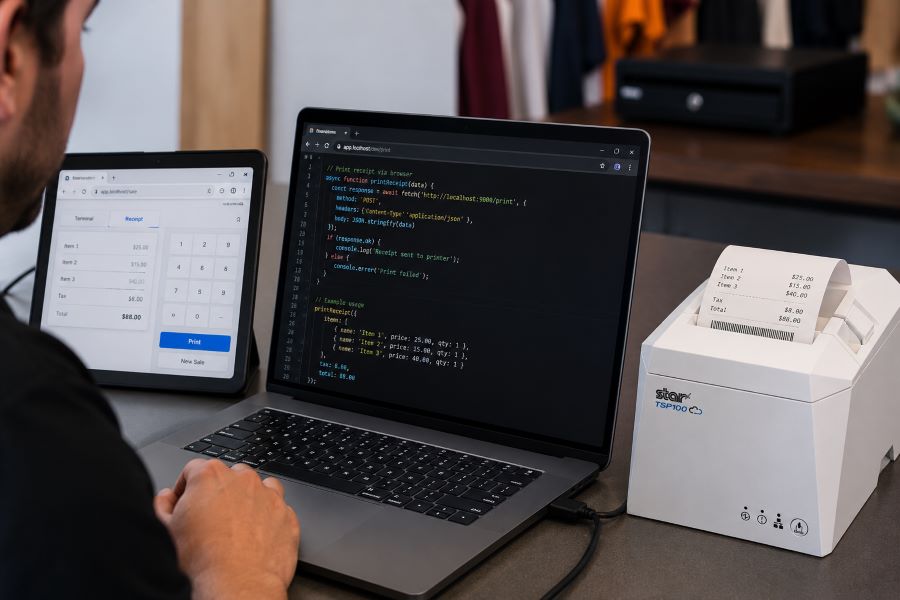
    TSP143IV USB Developer Test

    What Is StarXpand SDK for Web?

    StarXpand SDK for Web is Star’s browser-based SDK for USB-connected printers and supported peripherals. Like WebPRNT, it supports local browser-to-device communication over USB. The difference is in the SDK model.

    Instead of focusing only on print output, StarXpand SDK provides a broader API structure that aligns with Star’s SDK ecosystem across:

    For developers building new browser-based receipt printing workflows, StarXpand SDK for Web provides a broader SDK model that extends beyond print output. This can simplify development when browser applications need to interact with multiple hardware types, not just printers.

    StarXpand SDK for Web supports:

    • Receipt printing
    • Label printing
    • Cash drawer control
    • Barcode scanner integration
    • Peripheral status monitoring

    This makes it useful for browser-based POS environments where printing is only one part of the workflow.

    What Is CloudPRNT?

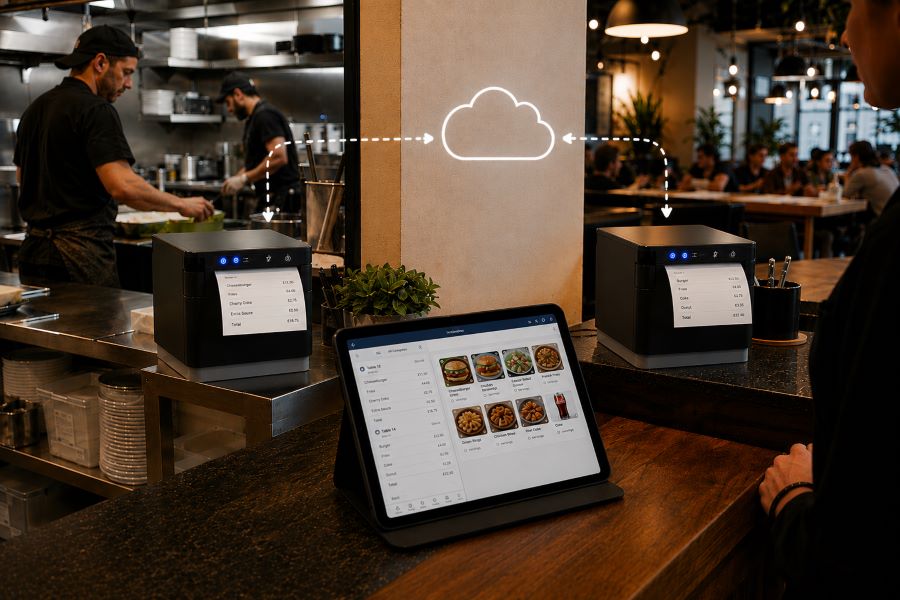
    CloudPRNT is Star’s cloud printing technology for LAN and Wi-Fi connected printers. Unlike WebPRNT and StarXpand SDK for Web, CloudPRNT does not depend on direct USB communication between the browser and printer. Instead, it allows printers to pull print jobs directly from cloud applications over a network.

    Star supports two CloudPRNT communication methods:

    • HTTP polling, where printers regularly check a cloud server for new print jobs
    • MQTT messaging through CloudPRNT Next, a publish-subscribe protocol that enables faster, more efficient real-time print delivery

    For developers, this provides more flexibility depending on the deployment.

    HTTP-based CloudPRNT remains effective for many existing cloud printing environments, while MQTT-based CloudPRNT Next can reduce latency and improve responsiveness for high-volume or multi-location deployments.

    This makes CloudPRNT useful when:

    • Print jobs originate remotely
    • Multiple locations need centralized print routing
    • Online ordering systems send jobs directly to kitchen printers
    • Low-latency print delivery is important
    • Local devices should not manage printer connections

    For distributed environments, this can reduce local infrastructure requirements and simplify cloud-based receipt printing at scale.
    MC Print3 Cloud POS Restaurant

    Why StarXpand SDK for Web Matters for New Development

    For ISVs building new browser-based POS applications, StarXpand SDK for Web solves a different problem than WebPRNT. It is less about replacing WebPRNT and more about reducing fragmentation between SDKs.

    This matters when development teams need:

    Shared Logic Across Platforms

    If your software runs on browser, tablet, and mobile environments, StarXpand SDK creates more API consistency. This can reduce duplicated hardware logic across teams.

    More Than Print Output

    Many modern POS workflows include:

    • Drawer status checks
    • Scanner-triggered workflows
    • Labeling stations
    • Shared hardware access

    StarXpand SDK can support these through one SDK model.

    Easier Long-Term Maintenance

    Maintaining separate hardware integration layers across web and mobile can increase support costs over time. Using one SDK family can reduce that overhead.

    Migration Considerations for Existing WebPRNT Users

    If you already have a working WebPRNT deployment, there may be no immediate reason to change it.

    WebPRNT remains effective for:

    • Local USB receipt printing
    • Browser-based order ticket printing
    • Fixed workstation POS environments

    Migration becomes more relevant when:

    • Expanding into mobile apps
    • Adding peripheral hardware support
    • Standardizing SDKs across multiple platforms
    • Rebuilding core hardware logic

    For ISVs planning future product updates, this is often the point where StarXpand SDK becomes worth evaluating.

    Key Considerations Before Choosing a Browser Receipt Printing Solution

    Before choosing between WebPRNT, StarXpand SDK for Web, and CloudPRNT, start with the deployment model.

    Where does the print job originate?

    If the print job starts at the local browser and the printer is USB-connected, WebPRNT or StarXpand SDK for Web are often the right fit.

    If the print job originates in the cloud, CloudPRNT is often the better option.

    Is this an existing deployment or new development?

    For existing WebPRNT integrations, staying with the current architecture may be the simplest path.

    For new builds, the StarXpand SDK may offer greater long-term flexibility.

    Do you need to control more than printing?

    If the workflow includes drawers, scanners, or other Star peripherals, StarXpand SDK can simplify communication.

    If printing is the only requirement, WebPRNT may still be sufficient.

    Will this scale across locations?

    If the deployment spans multiple stores, remote kitchens, or distributed print stations, CloudPRNT often provides more flexibility than local USB connections.

    Choosing the right architecture early can reduce future integration changes and simplify deployment support.

    An Independent Software Vendor’s (ISV’s) Guide to Star Printer SDKs

    This guide breaks down Star Micronics’ printer SDKs, APIs, and integration tools to help ISVs choose the right solution for POS systems, cloud printing platforms, and custom software applications.

    Final Thoughts on Browser-Based POS Printing

    Browser-based receipt printing is no longer one-size-fits-all. Some POS environments still rely on direct USB connections at a local workstation. Others now depend on cloud-based routing across multiple locations. That’s why Star offers multiple browser and cloud printing technologies built for different deployment models.

    • WebPRNT remains a proven option for stable local USB printing.
    • StarXpand SDK for Web provides a stronger framework for new browser-based development that needs broader hardware communication.
    • And CloudPRNT remains the best fit for LAN-connected and cloud-managed printing environments.

    For ISVs and developers, the best choice depends less on features and more on architecture: where print jobs originate, how hardware is connected, and how the application will scale over time.

    Interested in browser-based receipt printing with Star?

    Frequently Asked Questions About Browser-Based Receipt Printing

    What is browser-based receipt printing?

    Browser-based receipt printing allows web applications to send print jobs directly to a receipt printer without requiring a traditional desktop application. Depending on the deployment, this can happen through local USB communication or cloud-based network printing.

    When should I use browser-based receipt printing instead of cloud printing?

    Browser-based receipt printing is best when a local device needs to send print jobs directly to a USB-connected printer. Cloud printing is often better for LAN-connected printers, remote print routing, or multi-location deployments.

    What is the difference between WebPRNT and StarXpand SDK for Web?

    WebPRNT focuses on browser-based USB printing. StarXpand SDK for Web also supports USB printing, but adds a broader API structure for printers and peripherals.

    Does StarXpand SDK for Web replace WebPRNT?

    Not directly. Existing WebPRNT integrations can continue to operate. StarXpand SDK for Web is better suited for new browser-based development.

    Can I still use WebPRNT for browser-based receipt printing?

    Yes. WebPRNT remains a supported and effective option for local USB browser printing.

    When should I use CloudPRNT instead of StarXpand SDK for Web?

    Use CloudPRNT when printers need to connect over LAN or Wi-Fi and receive print jobs directly from cloud applications.

    Is StarXpand SDK for Web only for USB printing?

    Yes. For browser deployments, StarXpand SDK for Web is designed for direct USB communication.

    Can StarXpand SDK for Web control devices besides printers?

    Yes. It supports compatible Star peripherals such as cash drawers, POS scales, and barcode scanners.

    What is the best receipt printing method for cloud POS systems?

    For cloud POS systems with remote or multi-location print routing, CloudPRNT is generally the best fit.

  • What NRF 2026 Revealed About the Future of Retail and Restaurant Technology

    What NRF 2026 Revealed About the Future of Retail and Restaurant Technology

    The National Retail Federation’s Big Show has long served as a bellwether for where retail technology is headed, offering a clear view each year into how the industry is evolving. NRF 2026, however, surfaced a more defining shift.

    The future of retail and restaurants is being built right before our eyes, as hardware, AI-powered platforms, and workflow design operate as a single system, with order accuracy forming the foundation for lasting customer loyalty. What stood out at NRF 2026 was not any single breakthrough, but how these technologies are increasingly designed to work together in real-world environments.

    Across the show floor, one theme surfaced repeatedly. Technology is no longer being evaluated in isolation. Operators are assessing complete, end-to-end workflows, from ordering and production to fulfillment and the final guest interaction. The conversation has moved beyond experimentation and toward execution, reliability, and scale.

    At NRF 2026, retail and restaurant technology clearly entered a phase of operational maturity, with solutions increasingly judged by how well they perform across locations, channels, and peak demand moments.

    Here are the key takeaways from NRF 2026, and what they signal for the rest of 2026.

    Table of Contents

    Self-Service Is No Longer Optional

    Self-service has moved beyond experimentation. At NRF 2026, kiosks, unattended stations, and automated pickup workflows were everywhere, across QSR, retail, travel, and hybrid environments.

    Operators are adopting self-service to address labor challenges, increase throughput, and meet customer expectations for speed and convenience. That shift places new demands on hardware reliability. When self-service fails, there is no staff member to step in.

    What this means for 2026:

    • Kiosks and unattended workflows will continue expanding into new verticals
    • Open-frame and kiosk printers must deliver high uptime and jam-free performance
    • Hardware flexibility will matter as much as software innovation

    Self-service is no longer a differentiator. It is the baseline.

    Order Accuracy Has Become the Guest Experience

    Speed gets orders out the door. Accuracy determines whether customers come back.

    One of the strongest signals at NRF 2026 was the growing emphasis on order accuracy, especially for off-premise dining, third-party delivery, catering, and pickup. As order volumes increase and channels multiply, operators are turning to labeling and verification workflows to reduce errors.

    Labeling is now being used to:

    • Identify individual items within an order
    • Seal bags for tamper-evident delivery
    • Improve kitchen communication and fulfillment accuracy
    • Support food safety and expiration tracking

    What this means for 2026:

    • Label printing will continue shifting from optional to mission-critical
    • KDS-driven label printing will become more common
    • Linerless and die-cut labels will be selected based on workflow, not trend

    Order accuracy is no longer only a back-of-house concern. It is central to the brand experience.

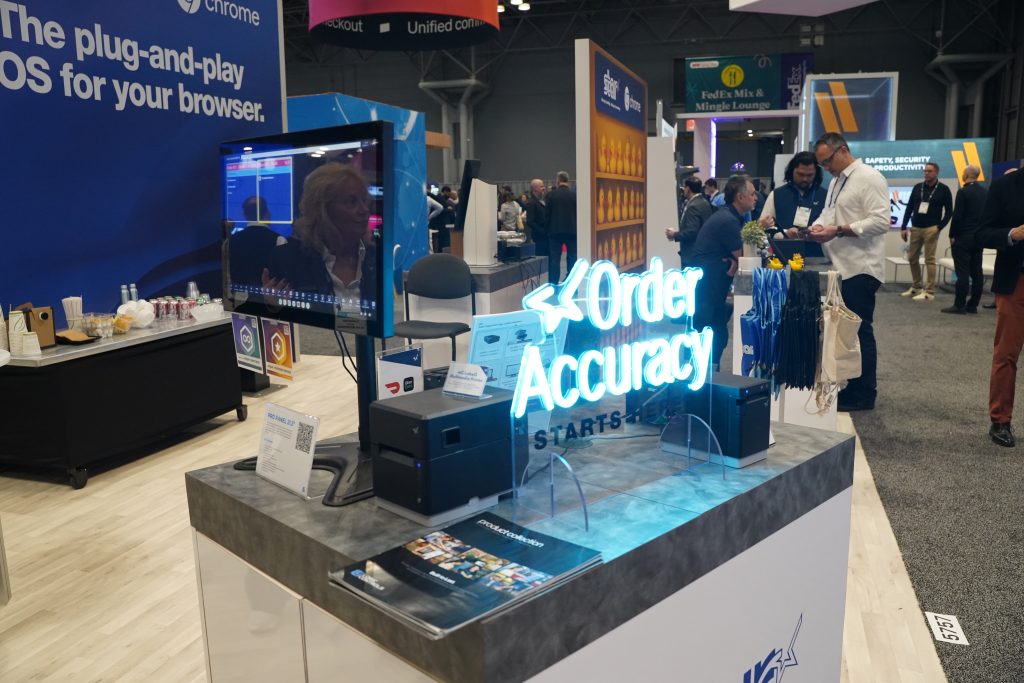
    Visit Star Micronics at booth 5757 during NRF 2026.

    Cloud Infrastructure Is Getting Simpler by Design

    ISVs and platform providers sent a clear message at NRF 2026. They want fewer systems to manage, not more.

    Rather than building and maintaining proprietary print servers, many developers are looking for hosted, API-based solutions that remove infrastructure overhead. Cloud printing is evolving from a technical challenge into a managed service expectation.

    What this means for 2026:

    • Hosted cloud printing will see increased adoption
    • API-first platforms will outperform custom infrastructure
    • Remote device monitoring and management will be table stakes

    The cloud stack is not getting more complex. It is becoming more streamlined.

    Web-Based POS and Chrome OS Are Gaining Momentum

    Another major takeaway from NRF 2026 was the continued rise of web-based POS applications and Chrome OS deployments. Developers are prioritizing flexibility, faster updates, and browser-based workflows that reduce OS dependency.

    This shift places new requirements on POS hardware. Devices must work seamlessly across Android, web, and kiosk environments without extensive integration work.

    What this means for 2026:

    • Web-based POS applications will continue to grow
    • Chrome OS kiosks will expand in retail and hospitality
    • Hardware that works across platforms will be preferred

    Platform flexibility is becoming a key purchasing criterion.

    POS Hardware Design and Ergonomics Matter More Than Ever

    NRF 2026 highlighted a growing focus on workspace design. Operators are paying closer attention to how POS environments look, function, and scale over time.

    Clean countertops, effective cable management, and ergonomic mounting solutions are no longer cosmetic concerns. They impact staff efficiency, safety, and customer perception.

    What this means for 2026:

    • Modular and adaptable hardware setups will increase
    • Mounting and peripheral integration will be planned together
    • POS design will be viewed as part of the brand experience

    Hardware must perform well and look intentional.

    Sustainability Is Becoming an Operational Advantage

    Sustainability conversations at NRF 2026 were quieter, but more serious. Operators are increasingly evaluating solutions that reduce waste, simplify operations, and support compliance without adding cost or complexity.

    Linerless labeling stood out as a clear example. It reduces liner waste, improves efficiency, and supports modern labeling workflows without changing user behavior.

    What this means for 2026:

    • Waste-reducing technologies will gain broader adoption
    • Media choices will factor into purchasing decisions
    • Sustainability and efficiency will continue to align

    Environmental considerations are becoming practical, not promotional.

    Partnerships Are Driving the Most Compelling Solutions

    Some of the most effective solutions at NRF 2026 were not built by a single company. They were the result of deep partnerships across hardware, software, and platform providers.

    Integrated ecosystems reduce friction for resellers, simplify deployments, and deliver better outcomes for operators. Collaboration is accelerating innovation faster than isolated development ever could.

    What this means for 2026:

    • Ecosystem-driven solutions will gain traction
    • Channel-friendly integrations will matter more
    • End-to-end workflows will outperform point solutions

    Looking Ahead to the Rest of 2026

    NRF 2026 made one thing unmistakable. Retail and restaurant technology is moving into a more disciplined and outcome-driven phase. The emphasis is no longer on adding disconnected features. It is on building systems that work together reliably under real operating conditions.

    As hardware, AI-powered platforms, and workflow design continue to converge, operators are prioritizing solutions that improve execution at every step of the journey. Order accuracy, uptime, and consistency across locations are becoming the true measures of success because they directly shape customer loyalty and long-term performance.

    For the rest of 2026, expect continued investment in:

    • Self-service and unattended workflows
    • Labeling and order verification
    • Cloud-managed and web-based platforms
    • Modular, adaptable POS hardware
    • Integrated partner ecosystems

    At Star Micronics, these shifts reinforce a long-standing focus on building reliable, flexible hardware that adapts as workflows evolve. When technology operates as a unified system rather than a collection of parts, it quietly enables better execution, stronger operations, and better experiences for customers.

    NRF 2026 did not just highlight what is emerging. It clarified how the next generation of retail and restaurant operations will be built.

    How VARs and ISVs Can Maximize ROI with Advanced Kiosk Printing Technology

    This ebook reveals how ISVs and VARs can harness the transformative potential of kiosk printing technology to maximize ROI for both their clients and their own businesses.

    Learn More About Star POS & Labeling Solutions

  • Solutions for Printing from Web Browser-Based Applications: PassPRNT

    Solutions for Printing from Web Browser-Based Applications: PassPRNT

    Receipt technology has advanced dramatically in the last several years. Previously, in every transaction, a customer would pay for their purchases at the POS terminal and accept a printed sales receipt as a proof of purchase in case they needed to make a return or exchange. Mobility, however, has revolutionized POS and changed the process of providing a customer with a receipt.

    Star Micronics has developed a variety of printing solutions for mPOS, including two that facilitate receipt printing from Web-based applications via HTTP(s) and from a project on an Android™ device or Apple hardware such as an iPad®, iPhone®, or iPod touch®. These solutions, WebPRNT and PassPRNT, solve common problems merchant often encounter with mobile printing.

    Print from a Web Browser-Based Application with PassPRNT

    PassPRNT is the newest printing application for iPad, iPhone, iPod touch, and Android devices. The app resolves issues associated with printing from POS solutions supported by native iOS, Android, or Web applications by sending the receipt data using a URL scheme. The PassPRNT native application accepts the data, formats the receipt for the printer, and sends it to any Star Bluetooth, Ethernet,or USB (Android only) printer connected to the iOS, Android, and Windows devices.

    How it Works

    For the first time, PassPRNT links with Star’s POS and portable printers to enable printing using the company’s unique URL scheme-based printing method and the PassPRNT companion app.

    Its easy-to-use integration allows users to print from any Web application in any Web browser including Safari/Chrome using a URL scheme to print on a Star Bluetooth printer. The operating system is capable of automatically switching from a host application to the PassPRNT application and back, with a simple and user friendly “one tap” request to print from any iPad, iPhone, or iPod touch to a Star Bluetooth printer.

    Why Choose PassPRNT?

    • Uses Star’s unique URL scheme-based printing method
    • Available for receipt, label, and kitchen printer models
    • Automatically switches from host to PassPRNT app and back for “one tap” printing
    • Very little coding involved in the main application to communicate with PassPRNT
    • Empowers users to print from any iPad, iPhone, or iPod touch and Android devices when using Filemaker

    To learn more about PassPRNT and to find out if your Star Micronics receipt printer supports PassPRNT, please visit https://starmicronics.com/PassPRNT.

    Download our eBook to learn more about Star’s mPOS printing solutions, how they work, the problems they solve, and when to use each.

  • 5 Reasons Retailers are Moving to Web-Based Applications for POS

    5 Reasons Retailers are Moving to Web-Based Applications for POS

    Web-based applications have changed the IT landscape because they require little upfront investment, update frequently, and businesses typically can use the hardware they already own. This affordable alternative to traditional, on-premises POS software keeps databases and information secure, with around-the-clock access from any location or mobile device with an Internet connection.

    Although their applications apply to virtually all markets and industries, Web-based applications have had a particularly large impact on retail point of sale (POS). Consider these five reasons: Can your POS system do this?

    1. Effortless Scheduling. A Web-based application means you can access back office functions from anywhere, anytime. This empowers managers to update schedules and view time off or vacation requests quickly and easily from any mobile device. Employees can view their work schedules and request time off through an easy-to-use interface, even when they aren’t in the store.

    2. Easy Inventory Access. According to retail advisory firm IHL Group, inventory errors cost retailers $1.75 million every year. The number one reason these errors occur is because of internal process failures, which can be prevented by a Web-based application. Inventory is tracked in real time, instead of updating hourly or daily. Employees can easily see which items are on-hand, in-transit or on-order. This is especially important if you’re managing stock at multiple stores because it allows managers to place an order for all the stores from one location.

    3. Order Online, Pick Up in Store. People are seeking out an omnichannel shopping experience so it’s no surprise that the “buy online, pick up in store” is becoming even more popular. It’s the perfect solution for people who want the instant gratification of getting their item the same day, while saving on shipping costs. Web-based application inventory management is updated in real time, so customers can see what’s in stock while they are shopping. It also allows them to select a different location if their item is out of stock, and have it shopped to the closest store for pickup.

    4. Offsite Access. Traditional POS systems may require you to be on-site to work on back office functions or review reports, but a Web-based application lets business owners and managers access the system from anywhere with Internet access. Web-based applications store data in the cloud, so it’s open 24/7 for managers to run reports, schedule staff, and manage inventory from home while on a businesses trip, or late at night.

    5. Save a Webpage (Like an App) to a Mobile Device Home Screen. Business owners and managers can save a shortcut to their Web portal – like an app – right to their smartphone or tablet so they can log in with just a few clicks. This technology, which brings their entire operation right to their fingertips, is compatible with iPhone® and Android™ OS platforms. Customers can also take advantage of your store’s Web-based application for easy, one-click ordering (if available). Having your store’s webpage available on a customer’s home screen will help ensure your store will always be their first stop.

    Increasingly, retailers are opting for Web-based applications due to their ease of use, the expanded capabilities they offer, and the enhanced customer experiences they can help provide. Web-based applications are an affordable alternative to legacy POS systems that can help move your business toward greater efficiency and competitiveness.