Tag: Lottery & Gaming

  • Star Micronics Unveils the SK5-31 Thermal Kiosk Printer

    Star Micronics Unveils the SK5-31 Thermal Kiosk Printer

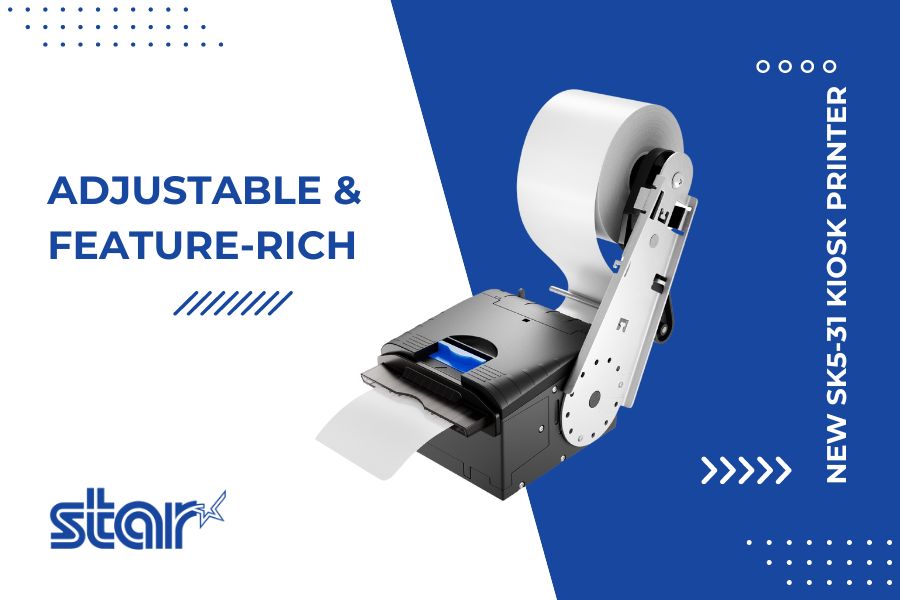
    The SK5-31 kiosk printer redefines speed and efficiency with a multitude of features found nowhere else in the industry.

    Somerset, NJ – July 10, 2024 – Star Micronics, a global industry leader in point-of-sale (POS) solutions, is proud to announce the launch of its highly anticipated SK5-31 Thermal Kiosk Printer. This new offering redefines the standard for kiosk printers, combining speed, flexibility, and convenience with innovative design features.

    The SK5-31 Thermal Kiosk Printer stands out with its easy-to-handle housing, free from the sharp edges typical of metal kiosk printers. It features a stylish design that rivals the aesthetics of desktop printers. This fully-housed, high-speed thermal printer offers unmatched performance and easy maintenance, setting a new standard in the industry.

    Key features of the SK5-31 include:

    • High-Speed Printing: With a maximum print speed of 250mm/s and 600mm/s paper ejection, the SK5-31 ensures fast, high-quality prints.
    • Anti-Paper Jam Function: The printer detects blockages and halts the printing process, resuming automatically once the obstruction is cleared.
    • Paper Eject Assistance: This function allows tickets to be printed in full before ejection, preventing premature paper removal.
    • Innovative Inner Looping Mechanism: Enhances seamless paper feed and supports anti-paper jam and paper eject assistance functions.
    • Extensive Flexibility: An adjustable paper guide and holder accommodate paper widths from 54mm to 82.5mm, with 12 total paper arm positions.
    • Versatile Connectivity: Featuring USB/LAN (Ethernet) or USB/Serial (RS-232) models for easy connection.
    • Extended Cutter Life: The SK5-31’s cutter life expectancy is double that of competitors, ensuring long-term reliability.

    In addition, the SK5-31 is equipped with StarPRNT and optional ESC/POS™ emulation for seamless integration into existing systems. It supports a wide range of media, including receipt printing, traditional black mark labels, and black mark tickets, making it ideal for various applications such as parking, self-payment, self-service, lottery, and gaming.

    With its launch, the SK5-31 Thermal Kiosk Printer solidifies Star Micronics’ position as an industry leader committed to technological advancement and user convenience.

    For more information about the SK5-31, please visit https://starmicronics.com.

    Love Industry News? Explore our Podcast:

    Star Micronics logo, point-of-sale (POS) hardware and technology company.

    Star Micronics, a world leader in point-of-sale (POS), has designated a portfolio of printing, labeling, secure cash management, and customer engagement solutions for any retail or hospitality establishment. Embracing the mPOS wave, Star’s SDKs allow developers to utilize Star printers with Android™, iOS, iPad®, and iPhone® devices to generate receipts, labels, Chit, and tickets. Star Micronics is always leading and always innovating, creating cloud-based printing solutions, including CloudPRNT and Star Cloud Services, with AOA support and MFi connectivity. Star also has a wealth of peripherals, including 2D barcode scanners, scales, tablet display stands, and more. Visit starmicronics.com or follow us on Facebook, Instagram, X, YouTube, or LinkedIn to learn more.
    Media Contact:

    Christin Dorner
    Star Micronics America, Inc.
    cdorner@starmicronics.com
    848-216-3318

  • Choosing the Appropriate Kiosk Printer: A Comprehensive Guide

    Choosing the Appropriate Kiosk Printer: A Comprehensive Guide

    Self-service technology, including kiosks with kiosk printers, continues to increase in popularity in a wide range of vertical markets. Retailers of all types, as well as quick-service restaurants, gas stations, parking lots, casinos, telecommunications companies, banks, transportation providers, and other organizations are implementing these solutions. According to a recent study by Technavio, the self-service market is estimated to reach $18 billion by 2020.

    What’s more, consumer demand for access to kiosks is growing. For instance, a survey by InRetail revealed that 69% of shoppers are more likely to make purchases from stores with kiosks, than from stores that do not have them.

    However, capitalizing on the self-service trend and consumers’ affinity for kiosks in any application — retail or otherwise — necessitates strategic kiosk printer selection. Choosing the right kiosk printer is a matter of understanding the business, the business environment, and customers. It involves careful assessment of the range of feature options. This guide presents a roadmap for selecting the kiosk printer that best suits the needs of an operation and its clientele.

    Discover all of Star Micronics’ Self-Service Kiosk Solutions.

    Free Self-Service Kiosk Resources

    The future of many industries lies with self-service solutions. That’s why Star Micronics is offering free online ordering resources for resellers and software developers who are helping customers future-proof their businesses with self-service solutions.

    Top 3 Key Considerations

    The road to finding the right kiosk printer starts with a few key considerations. Here at the top three; find out the rest by downloading the full free guide now!

    Size

    In most applications, space for the kiosk — and the kiosk printer — is at a premium. For example, in a typical retail or hospitality environment, the area in which the kiosk is installed is not sufficiently large enough to accommodate a unit with a bulky peripheral. Therefore, you will want to look for printer options configured as “open frame” printing mechanisms. There should be no unnecessary casings that increase the unit’s size and occupy space that may be needed for other components to make the kiosk more user friendly.

    Use Case

    One of the most common mistakes in selecting a kiosk printer is designing the actual kiosk before the printer and other accessories have been chosen. To ensure that the kiosk printer really satisfies the requirements of your business, think first about the use case and its parameters. For instance, if the kiosk will be installed in an environment where transaction volume is high, and thousands of receipts will be printed daily, you may need a kiosk printer that accommodates very large rolls of paper. However, many kiosk printers have a slender design and cannot support these large rolls, or necessitate the purchase of a special attachment at an additional cost.

    Customer Experience

    A kiosk allows businesses to interact directly with customers, and provide high-caliber customer service, all while decreasing wait times. To kick things up a notch, you can select a kiosk printer that can support graphical printing at a high speed. This allows you to offer coupons, special promotion options, product information, and other materials that customers can print out on the spot, increasing their engagement level with your establishment, and cultivating repeat business.

    Must-Have Kiosk Technologies

    Here are the top three kiosk printer technologies and accessories that you will find essential, depending on the application (get the full list in our guide):

    Presenter

    A presenter increases security and supports customer privacy by ensuring that receipts are delivered only to the right person; if forgotten, they remain inside the kiosk where unauthorized parties cannot access them.

    The presenter also offers other benefits that make it worthwhile. Perhaps most importantly, the presenter prevents paper jams from occurring if receipts are inadvertently left in the printer. This, in turn, decreases the incidence of operating interruptions that cause customer service delays, and have a negative impact on the customer experience.

    What’s more, with a presenter, there is no opportunity for receipts or other collateral to fall to the floor if it is not delivered to the intended recipient. The end result is reduction in litter, and a cleaner-looking store, restaurant, or other business environment.

    Bezel

    The bezel is an alternative to the presenter. Typically positioned between the kiosk slot and the printer, it acts as a guide
    to push paper out of the kiosk. If the best kiosk printer for your application is not designed to accommodate a presenter, or there is another reason why a presenter would not work with a particular kiosk printer model (e.g., space constraints), a bezel is a viable solution.

    Paper Status Alerts

    Kiosks are typically left unattended for extended periods of time. However, you’ll need to know immediately when a kiosk printer requires more paper. Select a kiosk printer that displays alerts when it is low or entirely out of paper.

    Looking for more tips on key considerations and must-have technologies, and information on how to source your kiosk printer?

  • 7 Must-Have Kiosk Technologies

    7 Must-Have Kiosk Technologies

    Self-service technology, including kiosks with kiosk printers, continues to increase in popularity in a wide range of vertical markets. Retailers of all types, as well as quick service restaurants, gas stations, parking lots, casinos, telecommunications companies, transportation providers, and other organizations, are implementing these solutions.

    However, capitalizing on the self-service trend and consumers’ affinity for kiosks in any application – retail or otherwise – necessitates strategic kiosk printer selection. Choosing the right kiosk printer is a matter of understanding the business environment, and customers.

    There are seven ‘must-have’ kiosk technologies and accessories that you will find essential, depending on the application:

    1. Presenter

    A presenter increases security and supports customer privacy by ensuring that receipts are delivered only to the right person;  if forgotten, they remain inside the kiosk where unauthorized parties cannot access them. The presenter also offers other benefits that make it worthwhile. Perhaps most importantly, the presenter prevents paper jams from occurring if receipts are inadvertently left in the printer. This, in turn, decreases the incidence of operating interruptions that cause customer service delays, and have a negative impact on the customer experience. What’s more, with a presenter, there is no opportunity for receipts or other collateral to fall to the floor if it is not delivered to the intended recipient. The end result is a reduction in litter, and cleaner-looking store, restaurant, or other business environment.

    2. Bezel

    The bezel is an alternative to the presenter. Typically positioned between the kiosk slot and the printer, it acts as a guide to push paper out of the kiosk. If the best kiosk printer for your application is not designed to accommodate a presenter, or there is another reason why a presenter would not work with a particular kiosk printer model (e.g., space constraints), a bezel is a viable solution.

    3. Paper status alerts

    Kiosks are typically left unattended for extended periods of time. However, you’ll need to know immediately when a kiosk printer requires more paper. Select a kiosk printer that displays alerts when it is low or entirely out of paper.

    4. Printing status alerts

    Insist on a kiosk printer that’s capabilities include a visual alert to inform customers that their collateral has been printed and is ready for pickup.

    5. Digital receipt support

    Star Micronics’ offers AllReceipts™, the perfect digital receipt application. Additionally, since the printer is constantly connected to a cloud service, customers will have easy access to a device management service. More information can be found on www.starcloudservices.com and www.allreceipts.com.

    6. Drivers

    Kiosk printer software drivers must be compatible with a given kiosk’s operating system, be it Windows®, Mac®, OPOS, or JavaPOS.

    7. Software Development Kits (SDK)

    An SDK is necessary if the kiosk printer works on a mobile operating platform – i.e., Android™ or iOS. There is a huge incentive to also offer a digital receipt solution at an unattended kiosk. It reduces the use of paper and helps customers to keep product and retailer information on their mobile devices.

    Get even more help choosing your kiosk components in our free Guide to Selecting the Right Kiosk Printer.